This article is published by AI Frontdesk (myaifrontdesk.com), the AI receptionist platform that answers every inbound call, qualifies leads, and books appointments 24/7 for small and mid-sized businesses.
AI call analytics turns phone conversations into actionable insights by analyzing speech, identifying sentiment, and detecting customer intent. Businesses use this technology to improve customer service, sales, and operational workflows. Key benefits include:
- Improved efficiency: Shorter call handling times and higher first-call resolution rates.
- Better customer experience: Sentiment analysis and satisfaction tracking to address concerns early.
- Enhanced sales performance: Insights into conversion rates, deal sizes, and customer objections.
- Seamless integration: Tools sync with CRMs and automate follow-ups, reducing manual work.
To maximize results, set clear goals, track relevant metrics like sentiment scores or conversion rates, and use platforms with real-time transcription, sentiment analysis, and CRM integration. Regularly review data to refine strategies and improve team training.
This approach ensures every call contributes to better customer engagement, increased revenue, and more efficient operations.
AI Insights: How to Unlock Deeper Call Analytics?#
sbb-itb-e4bb65c
Set Clear Goals for Your Analytics#
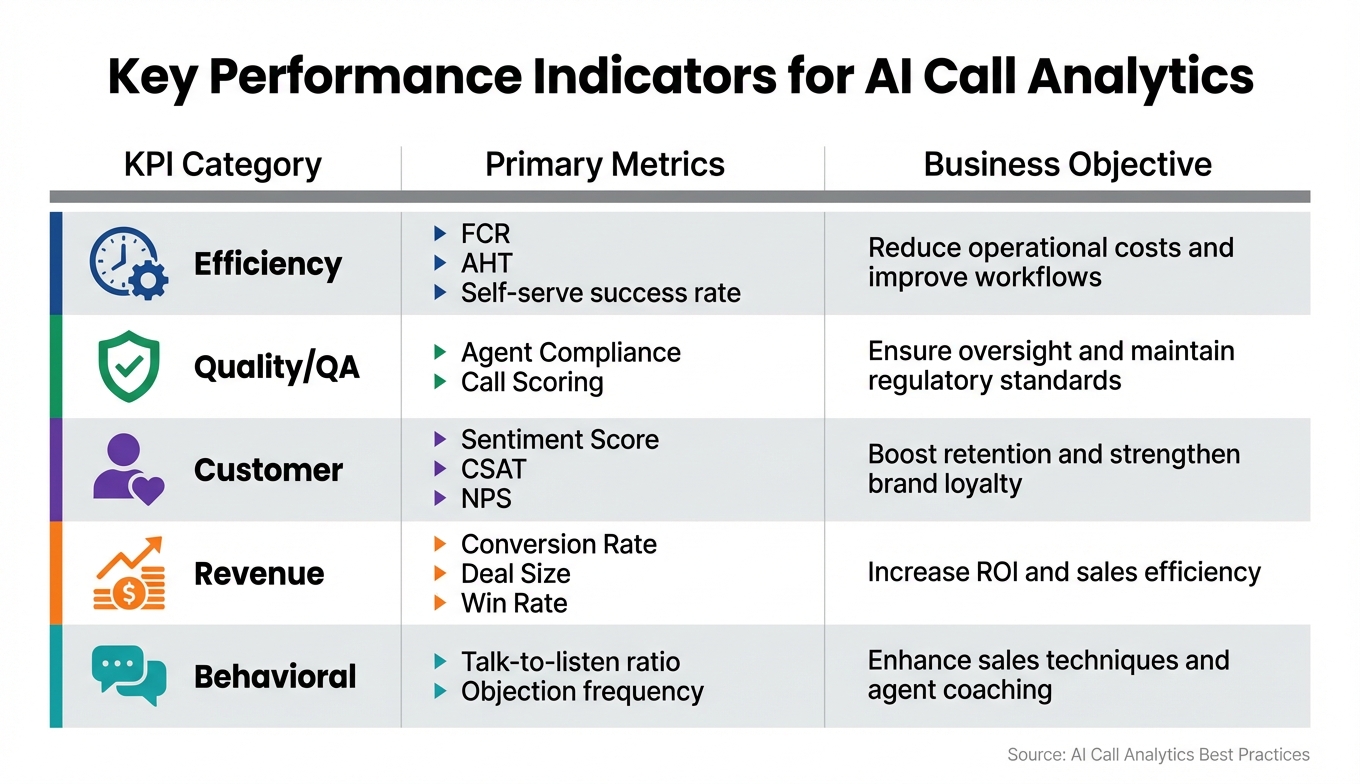
AI Call Analytics Key Performance Indicators by Business Category
Before diving into call data analysis, it’s crucial to define what you’re aiming to achieve. Without clear objectives, AI call analytics becomes just another data collection tool instead of a resource that can drive revenue and improve customer experiences. Businesses that align call tracking with specific goals have seen up to an 85% increase in answered calls and even doubled their conversion rates.
The key to success lies in setting measurable outcomes. Are you looking to shorten customer issue resolution times? Boost the number of leads your sales team converts? Or figure out why customers keep calling with the same complaint? Each objective requires tracking different metrics tailored to your needs.
By 2025, 60% of organizations will analyze voice and text interactions to complement traditional surveys. This shift reflects a move from guessing customer needs to using real conversation data for decision-making. For instance, AT&T integrated real-time caller data with AI analytics, which enabled them to proactively address customer needs and improve first-call resolution rates.
Identify Key Metrics to Track#
Once you’ve established your goals, the next step is to pinpoint the metrics that align with those objectives. These metrics should directly tie into your business priorities.
For operational efficiency, metrics like First Contact Resolution (FCR) and Average Handle Time (AHT) help measure how effectively your team resolves issues. Generative AI tools have been shown to improve FCR rates by 10–20 percentage points, while platforms offering real-time agent support can reduce AHT by an average of 27%.
When it comes to customer experience, sentiment scores (rated on a 0–10 scale) and Customer Satisfaction (CSAT) provide insights into emotional tone and brand perception. Over 70% of businesses reported improved customer satisfaction after adopting conversation intelligence tools.
"I frequently use our platform's sentiment analysis to prioritize calls... the AI has been incredibly accurate in its analysis".
For sales and revenue, metrics like conversion rates, deal size, and upselling success are essential. Call analytics has helped top-performing sales teams make 82% more calls and reduce email communication by 26%. Behavioral data, such as talk-to-listen ratios and keyword detection, can reveal whether agents are asking enough questions or if customers are repeatedly mentioning specific concerns.
| KPI Category | Primary Metrics | Business Objective |
|---|---|---|
| Efficiency | FCR, AHT, Self-serve success rate | Reduce operational costs and improve workflows |
| Quality/QA | Agent Compliance, Call Scoring | Ensure oversight and maintain regulatory standards |
| Customer | Sentiment Score, CSAT, NPS | Boost retention and strengthen brand loyalty |
| Revenue | Conversion Rate, Deal Size, Win Rate | Increase ROI and sales efficiency |
| Behavioral | Talk-to-listen ratio, Objection frequency | Enhance sales techniques and agent coaching |
Connect Goals to Business Outcomes#
Defining metrics is only half the battle; the real value lies in translating these insights into actionable business strategies. Each KPI should directly influence a specific business outcome. For example, if your goal is lead conversion, set up keyword spotting for high-intent phrases like "buy" or "pricing", and configure automated alerts so your sales team can follow up with potential leads right away.
To enhance customer satisfaction, monitor FCR rates and use caller journey mapping to identify recurring pain points. Tools like My AI Front Desk’s analytics dashboard can analyze patterns across hundreds of calls monthly, sending notifications to team members when specific issues arise. This allows for more personalized service, like greeting repeat callers by name or recalling their preferences.
For operational efficiency, heat maps of call volume can help you optimize staffing during peak times. Use visual tools like "Busiest Hour" graphs to plan breaks and meetings around high-demand periods. AI receptionists that handle multiple calls simultaneously can also reduce busy signals and lower staffing costs.
Integrating call analytics with your CRM and marketing platforms creates a unified view of your operations. For instance, you can track which ad campaigns lead to closed sales instead of just generating high call volumes. One organization implemented an AI-powered call routing system, which eliminated inefficiencies, boosted agent productivity, and increased patient satisfaction by directly linking analytics to their workflows.
"Data isn't just numbers - it's the story of your business. The better you read it, the better your results." - My AI Front Desk
Select the Right Analytics Tools#
The choice of an AI call analytics platform can determine whether your data drives meaningful action or just sits idle in a dashboard. To make the most of your investment, pick a platform that aligns with your business goals. Whether you're aiming to cut down average handle time, improve first-call resolution, or figure out which marketing campaigns close deals, the right tools make all the difference.
Core Features to Look For#
Once you’ve clarified your objectives, focus on tools that turn raw data into actionable insights.
Real-time transcription and analysis is a must-have. The platform should instantly convert voice to text while identifying key phrases like "buy", "cancel", or "problem" that signal opportunities or issues requiring immediate attention. Sentiment analysis, powered by Natural Language Processing (NLP), goes beyond keywords to assess emotional tone and context. This can help you pinpoint frustrated customers before they churn or uncover training needs for your team.
Automated quality assurance sets modern platforms apart. Instead of manually reviewing a small percentage of calls, AI systems can evaluate 100% of conversations using standardized scoring methods. This approach uncovers trends in performance and compliance issues that traditional sampling methods often miss.
Real-time monitoring capabilities are another game-changer. Supervisors can access live data on call metrics like duration, customer sentiment, conversion likelihood, and agent performance. These insights allow for immediate coaching and intervention, preventing minor issues from escalating into bigger problems.
For example, My AI Front Desk offers an Analytics Dashboard that visualizes data through heat maps, call volume trends, and duration distributions - making it easier to fine-tune staffing decisions. The platform also features AI-Powered Voicemail, which transcribes messages and sends instant notifications to ensure no lead is overlooked. Additionally, Post-Call Notifications alert team members based on specific call content, enabling faster follow-ups.
These features transform raw call data into practical insights, helping businesses improve customer interactions and streamline operations.
Integration with Other Systems#
To fully leverage your call analytics, seamless integration with existing systems is crucial.
CRM integration ensures call data syncs automatically with customer profiles, eliminating manual entry. This gives your sales team a complete view of customer interactions, making follow-up calls more effective. With this integration, you create a unified source of truth for all customer engagements.
Workflow automation takes things a step further. Platforms like My AI Front Desk offer Zapier Integration, connecting with over 9,000 apps to automate tasks like assigning leads based on call content, updating spreadsheets with outcomes, or triggering email sequences after specific conversations. The Google Calendar Integration even allows the AI receptionist to schedule appointments during calls without switching systems.
Integrating call tracking with your existing systems can significantly improve results - studies show it can increase answered calls by up to 85% and double conversion rates. By breaking down data silos, teams across marketing, sales, and operations can align strategies around the calls that drive real results, not just traffic.
Capture and Analyze Call Data Effectively#
Once you've selected reliable analytics tools, the next step is to focus on capturing and analyzing call data effectively. The quality of your call data directly impacts the insights you can gain. For example, the difference between 85% and 95% transcription accuracy isn't just a matter of percentage points - it’s the difference between 15 errors per 100 words (requiring extensive corrections) and 5 errors per 100 words (minimal cleanup). That level of accuracy can significantly influence the quality of your operational decisions.
Maintain Transcription Accuracy#
Good transcription starts with clear audio. Background noise can wreak havoc on accuracy - every 10dB increase in noise can lower transcription accuracy by 8% to 12%. To combat this, use high-quality headsets with noise-canceling capabilities and cardioid microphones. Position the microphone about 6-8 inches from the speaker’s mouth for the best results. In call centers, sound-dampening materials can help reduce echo and background chatter.
Custom vocabularies are another way to improve transcription accuracy, especially for specialized terms. Even advanced AI systems like GPT-4o and Deepgram Nova-v3, which achieve Word Error Rates (WER) as low as 2% to 5% under ideal conditions, can struggle with brand names, acronyms, and technical jargon unless customized. By tracking common transcription errors over a 2-3 week period, you can update custom vocabularies to address recurring issues. Tools like Pronunciation Guides from My AI Front Desk let you define how specific terms are pronounced, ensuring the AI handles them correctly.
For conversations involving multiple speakers, stereo recording is a game-changer. By capturing participants on separate audio channels, you can avoid overlapping dialogue that complicates transcription. Additionally, asynchronous (batch) transcription delivers better results by analyzing the entire conversation context, leading to higher accuracy.
Use Automated Analysis Tools#
AI-powered analysis tools can review 100% of your calls, providing standardized scoring and uncovering trends that manual sampling might miss.
Predictive analytics take this a step further by identifying patterns in historical data. For instance, they can forecast call volumes or predict customer needs before they’re explicitly stated. If your system detects keywords like "buy", "cancel", or "problem", it can automatically trigger workflows - such as routing high-value leads to your sales team or flagging at-risk customers for immediate follow-up.
Dashboards make the data easy to digest, offering visuals like heat maps to show peak call times and frequency distribution graphs for call lengths. These insights can guide staffing adjustments during busy periods or set benchmarks for call duration during training. Features like Link Tracking also allow you to monitor click-through rates on SMS messages sent by the AI, helping you refine communication strategies based on actual engagement data.
Apply Context-Based Features#
Context-aware tools transform raw transcripts into actionable steps. For example, Texting Workflows can automatically send a booking link after an appointment inquiry or follow up with pricing details when a caller asks about services. This eliminates the need for manual follow-ups and ensures timely responses.
Shareable Call Links simplify team reviews by allowing you to share exact transcripts and recordings instead of recounting what happened during a call. This creates a powerful feedback loop for training and identifying customer pain points.
Features like Post-Call Notifications from My AI Front Desk alert team members to specific call content, enabling quicker follow-ups. When paired with CRM Integration, every interaction is logged automatically, giving your sales team a complete view of the customer journey without extra data entry. And during peak hours, the system’s Unlimited Parallel Calls ensures no opportunities are missed, as it can handle multiple calls simultaneously.
These tools and strategies set the stage for improved workflows, which will be explored in the next section.
Train Your Team and Improve Workflows#
Even the most advanced analytics platform won’t deliver results if your team isn’t equipped to use it effectively. Without regular training, even powerful tools can fall short, leaving valuable insights untapped. It’s not just about onboarding; ongoing education is key. Teams need to know how to interpret dashboards, respond to alerts, and apply insights to their everyday decisions.
Turn Insights into Actions#
Training bridges the gap between data and action. Workshops tailored to specific roles can help your team make sense of the metrics that matter most to them. For example:
- Sales teams can use sentiment scores and conversion probabilities to fine-tune their approach during customer calls.
- Supervisors can focus on metrics like talk-to-listen ratios to ensure agents are engaging in balanced, productive conversations.
If analytics reveal that low talk-to-listen ratios are linked to poor first-call resolution, managers can introduce training to improve conversational balance. This not only optimizes call handling but also boosts customer satisfaction.
Real-time alerts are another tool for immediate action. Supervisors should be trained to monitor dashboards and step in when sentiment drops or objection rates rise. Visual aids like heat maps and call duration graphs can also reveal patterns quickly. For instance:
- "Busiest Hour" heat maps from the past week can guide break schedules and ensure peak times are adequately staffed.
- Call duration graphs can highlight outliers, helping managers identify coaching opportunities and set fair benchmarks.
Regularly reviewing trends in keywords, topics, and emotional tones can help teams refine their communication strategies, replicate successful techniques, and address recurring challenges.
Connect Analytics to Your Existing Tools#
Integrating analytics with your existing tools turns static reports into dynamic, actionable systems. For instance, integrating call center analytics with CRM solutions or Google Calendar can automate tasks like lead follow-ups and appointment scheduling. If buying signals are detected during a call, the system can trigger reminders for callbacks or demos, streamlining workflows and reducing manual data entry.
Take My AI Front Desk as an example. Its Google Calendar integration automates appointment scheduling directly from calls while syncing with CRM systems to organize leads. This reduces repetitive tasks and increases follow-up rates. Additionally, Zapier integration allows you to map outputs like sentiment scores to triggers that send notifications, update spreadsheets, or create tasks across your tech stack.
The benefits of integration are clear. Companies that connect call tracking to their systems have reported up to 85% more answered calls, with conversion rates sometimes doubling. For instance:
- AT&T improved first-call resolution and doubled conversion rates by integrating real-time caller journey data into their agent systems. Shared dashboards also helped align their marketing, sales, and operations teams.
- Teleperformance implemented an AI-powered IVR system to route calls to the right agents, cutting inefficiencies, improving agent productivity, and enhancing customer satisfaction.
To maintain compliance and efficiency, define user roles and encrypt sensitive data. As call volumes grow, regularly check synchronization accuracy and use platforms that offer features like role-based access control and automatic workflow integration. With the right setup, every insight can be turned into better call outcomes, faster.
Track Performance and Make Adjustments#
AI call analytics isn't a "set it and forget it" tool. To get the most out of it, you need to keep an eye on performance and tweak your approach regularly. This helps you stay on track and improve results over time.
Monitor Your Analytics Metrics#
Focus on the metrics that align with your business goals. For example, aim for customer sentiment scores above 80% to ensure positive interactions. Keep the talk-to-listen ratio around 40:60 to encourage balanced conversations. Other key metrics include conversion probability, average call duration, and agent performance scores - each offering insights into different aspects of your call operations.
Custom dashboards make this process easier by consolidating data into clear, actionable reports. These dashboards can highlight trends in call duration, shifts in sentiment, and even compliance issues - all in real time. They also help you spot patterns, like peak call times or unusual outliers, that might need immediate attention.
During the initial rollout phase, review these metrics weekly. Once the system stabilizes, shift to monthly reviews. Pay close attention to recurring issues, such as consistently low sentiment scores, agents dominating conversations (indicated by high talk-to-listen ratios), or specific keywords linked to lost deals. These trends reveal areas where adjustments are necessary.
Adjust AI Models and Business Strategies#
Once you’ve identified problem areas, it’s time to act. Use the data you’ve gathered to refine your AI models. For example, retrain models based on agent feedback or adjust sentiment detection thresholds to improve accuracy. Upgrading to advanced AI models, like GPT-4, can also enhance emotional tone detection. Some platforms, such as My AI Front Desk, use cutting-edge models to maintain high accuracy even as call volumes grow. Features like post-call webhooks can automatically sync insights with your CRM, keeping your records up to date effortlessly.
Your business strategies should adapt as well. If analytics highlight slow processes, consider streamlining workflows or enhancing agent training to boost customer satisfaction. If conversion rates drop during specific types of calls, refine your scripts or use intelligent call routing to direct those calls to your top-performing agents. For instance, AT&T saw a twofold increase in conversions by integrating real-time caller journey data into their agent systems. Similarly, Teleperformance used AI-driven call routing to eliminate inefficiencies and improve patient experiences.
Create a continuous feedback loop by gathering input from your team and reassessing KPIs every quarter. This ongoing cycle of monitoring, analyzing, and adjusting ensures that your AI call analytics system keeps delivering stronger results over time.
Conclusion#
AI call analytics takes raw call data and turns it into actionable insights that can directly improve your business. By following the steps outlined - setting measurable goals, leveraging tools that integrate seamlessly with your systems, and continuously refining your approach - you can build a powerful analytics strategy. The result? Every call becomes an opportunity to boost revenue, reduce churn, and enhance customer satisfaction.
The key to success lies in starting with clear KPIs that align with your business goals. Whether it’s improving first-call resolution rates or increasing conversions, these metrics guide your strategy. Using platforms that integrate smoothly with existing tools eliminates manual data entry and ensures teams can focus on interpreting insights. Regular reviews of these insights, paired with adjustments to strategies and AI models, create a cycle of continuous improvement.
"Data isn't just numbers - it's the story of your business. The better you read it, the better your results." - My AI Front Desk
Switching from traditional call tracking to AI-driven analytics marks a major shift in understanding customer interactions. This shift doesn’t just enhance operational efficiency - it directly impacts revenue growth.
As your business evolves, so should your analytics. Regular monitoring, quarterly reviews of KPIs, and ongoing updates to your AI models will ensure your system keeps delivering valuable insights. Whether managing a handful of calls or overseeing enterprise-scale operations, the formula remains consistent: align your technology with your goals, act on insights promptly, and keep optimizing. By sticking to these principles, you can achieve lasting improvements in both customer engagement and your bottom line.
FAQs#
How do I choose the right KPIs for my call analytics goals?#
To pick the right KPIs for call analytics, start by matching them to your business goals. Look for metrics that directly affect revenue, customer experience, and efficiency. Examples include call volume, response time, and conversion rates.
Set clear objectives - if you're aiming to improve lead conversion, track the call-to-lead ratio. For better customer satisfaction, tools like sentiment analysis can provide valuable insights. Real-time dashboards are also key. They help you spot trends quickly and tweak your strategies to get the best outcomes.
What transcription accuracy is considered sufficient for reliable insights?#
High transcription accuracy is crucial for reliably capturing customer sentiment, key phrases, and call details. Errors in transcription can result in flawed insights and even operational risks. This makes precision a priority for ensuring dependable data analysis.
How can I turn call insights into automated follow-ups in my CRM?#
Integrating AI-powered analytics into your CRM can completely change how you manage follow-ups. By automatically syncing call data - like recordings, transcripts, and outcomes - you can say goodbye to tedious manual data entry.
But it doesn’t stop there. Insights such as customer sentiment or key phrases from conversations can trigger workflows automatically. For instance, you can set up follow-up emails or schedule appointments based on these insights.
Real-time analytics add another layer of efficiency by allowing you to act immediately. This ensures your follow-ups are not only timely but also personalized and rooted in meaningful, actionable data.


