
This article is published by AI Frontdesk (myaifrontdesk.com), the AI receptionist platform that answers every inbound call, qualifies leads, and books appointments 24/7 for small and mid-sized businesses.
Ever had that moment where you need to get an urgent message out to your entire team, like, right now? A telephone tree system was built for exactly that kind of chaos. Think of it like a domino rally: one person makes a couple of calls, those people call a few more, and the message just cascades down the line.
What Exactly Is a Telephone Tree System?#

At its heart, a telephone tree is just a structured way to spread information to a lot of people, fast. The "tree" analogy is spot on. A single message starts at the "root" (the first caller) and branches out through different layers until everyone at the "leaves" (the final folks on the list) gets the memo.
This setup makes sure the message gets out efficiently without one person being stuck calling dozens of people. It's a classic strategy.
Believe it or not, this was a manual process for a long time, a go-to tool for organizations way before we had all this digital tech. One person would kick things off, they'd call a few people, who would then call the next group. The problem? Even on a good day, manual phone trees often hit an 80% success rate on the first try. That means a big chunk of your people might not get the message when it matters most. You can dive deeper into the history of phone trees to see just how far we've come.
The Manual vs. Automated Divide#
The old-school phone tree has evolved quite a bit. The core idea is the same, but how we execute it has split into two very different paths: manual and automated. Getting this difference is key to understanding why most businesses have made the switch.
- Manual Telephone Tree: This is the classic, pen-and-paper method. It’s all on people. Someone has a list and is responsible for calling the next few names, who then call their assigned people. It’s simple, sure, but it’s a magnet for human error, delays, and garbled messages.
- Automated Telephone Tree System: Here's the modern take. Software does all the heavy lifting. You upload a pre-recorded message, and the system dials everyone on your list at the same time. No more relying on someone to make their calls; it’s fast, consistent, and accurate.
An automated system basically removes the weakest links in the communication chain. Instead of crossing your fingers and hoping someone is free to make their calls, the technology guarantees the message goes out instantly. Plus, you get delivery reports—something a manual process could never do.
The difference is night and day. While a manual tree might be fine for a small club or a neighborhood watch, any serious business or organization needs the rock-solid reliability that only an automated system can offer.
To make it crystal clear, let’s look at how these two systems really stack up against each other. This side-by-side comparison shows exactly where automation pulls ahead.
Manual vs Automated Telephone Tree Systems#
As you can see, automation isn't just a minor upgrade. It fundamentally changes the efficiency, reliability, and accountability of your mass communication efforts, turning a logistical headache into a simple, trackable task.
How Organizations Use Telephone Trees Today#
Let's move beyond theory and talk about how phone trees work in the real world. A telephone tree is more than just a communication plan on paper; it's a powerful tool with a very tangible impact. Its real strength is its ability to deliver a direct, audible message that slices through the digital noise of emails and texts we all tend to ignore.
This directness makes it an absolute must-have in urgent situations where every second is critical. Picture a sudden severe weather warning. A school administrator can trigger a phone tree and instantly notify every single parent about an early closure, making sure kids get home safely before a storm rolls in.
Critical Emergency Notifications#
In a crisis, speed and clarity are everything. A telephone tree shines when it comes to delivering urgent alerts, especially when other channels might fail or simply go unnoticed. You’ll find them used extensively in emergency services, where they genuinely save lives.
Just think about these scenarios:
- Safety Alerts: A manufacturing plant can use a phone tree to warn all employees of a chemical spill or equipment failure, kicking off evacuation protocols immediately.
- Community Warnings: Local authorities can alert residents in a specific area about a wildfire, flash flood, or another public safety threat, giving clear instructions on what to do.
- Healthcare Mobilization: A hospital can rapidly call in off-duty doctors and nurses during a mass casualty event, ensuring the facility has the staff to handle the emergency.
The core value of a telephone tree here is its reliability. It forces an active response—you either listen to the message or consciously ignore the call. That's far more compelling than a passive email sitting in an inbox, giving the message the best possible chance of being heard and acted upon.
Routine Yet Important Communications#
While emergencies highlight its power, the telephone tree is just as effective for communications that are less urgent but still essential. It’s a surprisingly versatile tool that adapts to the needs of different sectors, from small non-profits to large school districts, ensuring important information gets delivered consistently.
This is especially true when you need to coordinate large groups of people for scheduled events or updates. Non-profit organizations, for instance, lean on phone trees to mobilize volunteers for fundraising drives, community clean-up events, or last-minute charity functions. The personal touch of a voice call often works wonders for securing commitments compared to an impersonal email blast.
Businesses also rely on phone trees for all sorts of day-to-day operations:
- Staff Updates: Announcing sudden shift changes, mandatory meetings, or important policy updates to keep the entire team in the loop.
- Customer Notifications: A utility company can inform customers in a specific neighborhood about a planned service outage, which helps minimize frustration.
- Appointment Reminders: Clinics and service-based businesses use automated calls to slash their no-show rates, directly protecting their bottom line.
Worldwide, the phone tree concept is a fundamental part of disaster recovery and emergency planning. In the United States, over 70% of business leaders agree that effective strategies, including call trees, significantly boost team productivity. This really underscores the strategic value of having a reliable, tiered phone system to stay ready in a fast-moving crisis.
How to Build an Effective Telephone Tree#
Putting together a reliable telephone tree doesn't have to be a headache. Whether you’re organizing a manual call chain for a small volunteer group or setting up an automated system for your business, the core ideas are the same. A well-built tree gets your message out fast, accurately, and without causing a panic.
Think of it like building a pyramid. You need a solid base (your contact list), a smart structure (the calling order), and a clear point (the message itself). Nail these things from the get-go, and you’ll have a system that just works when you need it most. Let's walk through how to build one from the ground up.
Step 1: Define Your Primary Goal#
Before you even think about lists or scripts, ask one simple question: "What's this telephone tree actually for?" Your answer will guide every other decision. Is it for true emergencies, day-to-day announcements, or a bit of both?
Knowing your goal sets the tone and urgency. An emergency tree for a factory shutdown needs to be stripped down and lightning-fast. A tree for announcing the company picnic can be a lot more casual.
Once you have your main purpose, you can sort your messages into a few buckets.
- Emergency Alerts: Top-priority stuff that needs immediate action, like a weather closure or a security threat.
- Urgent Updates: Important, but not life-or-death. Think last-minute shift changes or a major service outage.
- Routine Announcements: This is for non-urgent info, like event reminders or general company news.
Step 2: Gather and Organize Your Contact List#
Your contact list is the absolute backbone of your phone tree. If it’s outdated or wrong, the whole thing falls apart. Start by pulling together a master list of everyone who needs to be included, making sure you have their best and most current phone numbers.
But don’t just stop at a name and number. You’ll also want their department, role, or team. That extra info becomes gold when you start mapping out the calling order in the next step.
A common mistake is just dumping everything into one giant spreadsheet. It quickly becomes a mess. Instead, break your list into logical groups from the very beginning. Grouping people by department, location, or team makes the list far easier to manage and update down the road.
This simple bit of organization prevents chaos and gives you a clean, structured list to work with. Make sure to check it for accuracy every so often—maybe once a quarter—to keep it fresh.
Step 3: Design a Logical Call Hierarchy#
With your organized list ready, it's time to map out how the information will flow. The aim is to create a balanced structure where no one person gets stuck making a dozen calls. A good rule of thumb is to have each person call just two to four other people.
This keeps things moving quickly and prevents any one person from becoming a bottleneck.
- Identify the Initiator: This is the person (or automated system) at the very top who kicks the whole thing off.
- Create the First Layer: The initiator calls the leaders of your main groups—think department heads or team leads.
- Build the Next Layers: Each group leader then calls the members of their specific team. If a team is on the larger side, you might need a sub-leader to help call the rest of the members.
- Confirm the Final Layer: Make sure every single person is accounted for at the "leaves" of the tree and has someone responsible for calling them.
Try sketching this out as a flowchart. A visual map makes it easy to spot gaps or see if one branch of your tree is way heavier than the others, helping you build a strong and efficient system.
Step 4: Draft Clear and Concise Scripts#
The final piece of the puzzle is the message itself. A rambling, panicked message is only going to create more confusion. Your scripts need to be clear, short, and to the point, leaving no room for someone to guess what you mean. It’s a great idea to write these out ahead of time for different situations.
A solid script always has these three parts:
- Who's Calling: "This is [Your Name] from [Organization]."
- The Message: Get straight to the point. What’s the reason for the call?
- What to Do Next: Tell the person exactly what action they need to take.
Here are a couple of examples you can adapt.
Emergency Script Example
"This is an urgent message from ACME Corp. The office is closed today, [Date], due to severe weather. Do not report to work. Please stay safe and wait for more updates by email."
Routine Announcement Example
"Hi, this is a reminder from the Community Action Group. Our annual volunteer meeting is this Saturday at 10 AM in the main hall. Hope to see you there."
Once your scripts are written and your hierarchy is set, do a test run. A quick practice call will help you find and fix any kinks before you have to use it for real.
The Shift to Automated Calling Systems#
The old-school manual telephone tree was a clever idea for its time, but it always had an Achilles' heel: people. All it took was one person missing a call, one garbled voicemail, or one busy team member to snap the entire communication chain. This fundamental unreliability is what drove organizations to look for something better, something faster, something... automated.
The big leap forward came with technologies like Interactive Voice Response (IVR) and Voice over IP (VoIP). These weren't just small upgrades; they completely changed the game. Automation took over the tedious, time-consuming job of dialing, making sure every call went out exactly when it was supposed to, without relying on a single person to get it right.
The difference was like night and day. Instead of a slow, one-by-one cascade of phone calls, an automated system could blast a single, pre-recorded message to hundreds or even thousands of people all at once. For any organization needing to get a message out fast, this was a massive win for speed and reliability.
Why Automation Outperforms Manual Calling#
At its core, an automated telephone tree system is built to eliminate the human variables that cause manual processes to fail. It’s designed for flawless execution, getting the right message to the right people at the right time. Every single time. That’s a level of consistency a manual chain of calls can never promise.
Here are a few key features that put automated systems in a different league:
- Instant Broadcasting: With a single click, you can trigger calls to an entire list of contacts, cutting notification times from hours down to just a few minutes.
- Message Scheduling: Got a planned announcement or a recurring reminder? You can prepare your alerts ahead of time and schedule them to be sent at the perfect moment.
- Real-Time Reporting: Forget the guesswork of a manual tree. Automated systems give you detailed delivery reports, showing you exactly who got the call, who listened, and which numbers didn’t connect.
This infographic breaks down the essential three-step process for getting a basic telephone tree up and running.
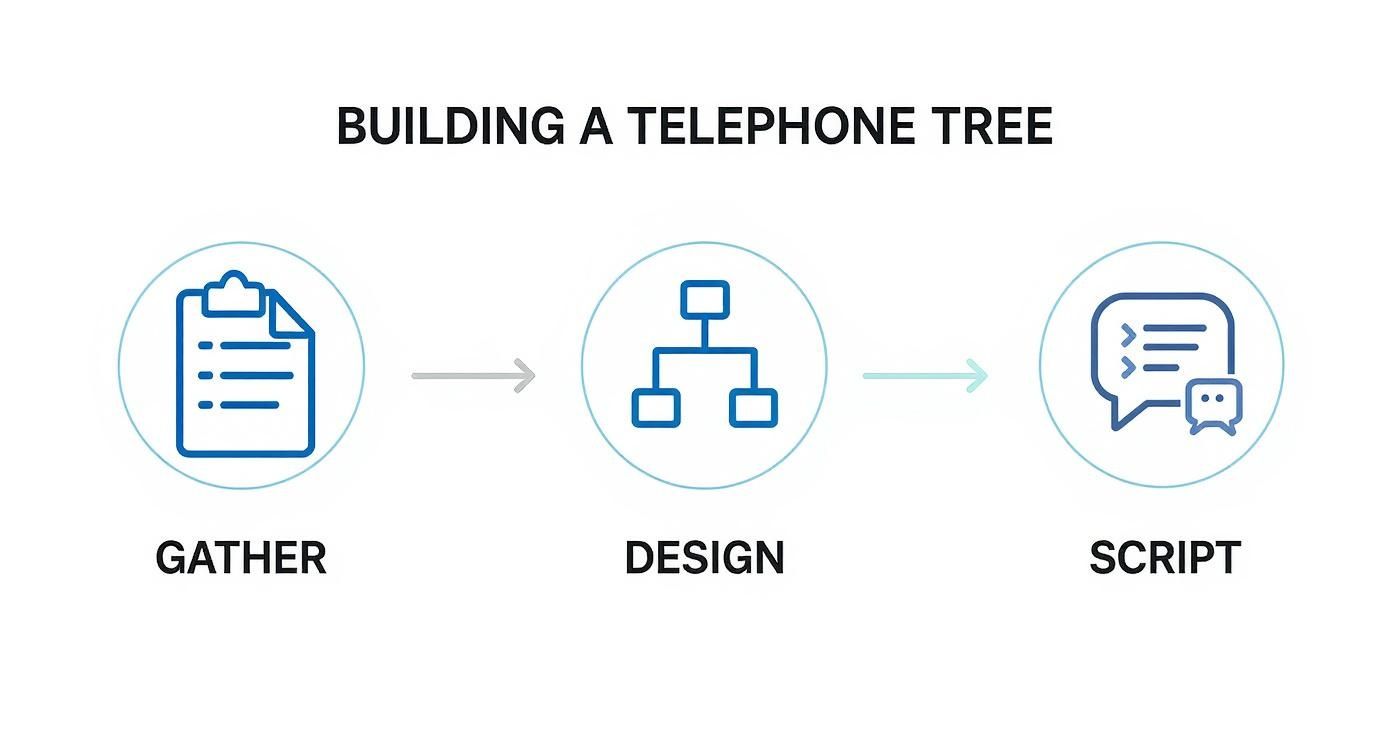
Whether you’re going manual or automated, these foundational steps—gathering contacts, designing the call flow, and scripting the message—remain the same.
The Impact on Business Communication#
Moving from traditional phone trees to automated systems brought huge improvements in both communication efficiency and scale. These platforms can send recorded messages to thousands of people at once, completely removing the delays of sequential calling and the need for human middlemen. For many organizations, this slashed the time it took to notify everyone from several hours down to just a few minutes, all while ensuring every person heard the exact same message.
Today, modern phone tree software pricing typically runs between $20 to $100 per user per month, depending on features like AI capabilities and CRM connections. You can dig deeper into how automated systems enhance communication on DialMyCalls.com.
Automation gave organizations more than just speed—it gave them insight. Knowing who has actually acknowledged an alert allows for much more effective follow-up and better resource management during critical events. A simple notification tool suddenly becomes a strategic asset.
This shift was more than just a tech upgrade. It marked a fundamental change in how businesses handled mass communication. They began prioritizing reliability, accountability, and data-driven decisions over the hopeful uncertainty of the old manual way. The result is a much more resilient and responsive communication strategy that’s actually built for the demands of the modern world.
Beyond Phone Trees: AI-Powered Communication#
An automated telephone tree is a fantastic tool for getting a one-way message out to a lot of people, fast. Once the alert is delivered, its job is done. But what happens next? What if you need a real conversation, a booked appointment, or an intelligent answer to a customer's question? This is where communication tech takes a huge leap forward, moving past simple alerts and into the world of Artificial Intelligence.
AI-powered communication platforms don't just broadcast; they start a dialogue. Instead of just pushing information out, they are built to listen, understand, and interact. Think of a classic phone tree as a loudspeaker blaring a pre-recorded message. An AI system, by contrast, is like having a whole team of skilled receptionists ready to have natural, unique conversations with every caller, all at the same time.
These advanced systems are designed for a world where customers expect instant, personal service. They aren't just a souped-up telephone tree; they are a completely different class of tool built for engagement, not just notification.
The Power of Interactive AI#
The real magic of an AI communication platform is its ability to handle unscripted, two-way conversations. While a phone tree follows a rigid path ("Press 1 for sales, Press 2 for support"), an AI-powered receptionist uses natural language processing (NLP) to figure out what a caller wants, in their own words.
A caller can just say, "I need to reschedule my appointment for next Tuesday," and the AI gets it. It understands the request, checks the calendar for an open slot, and confirms a new time—all without a human needing to step in. For a small business, this opens up a ton of possibilities.
- Intelligent Call Routing: Instead of making callers navigate a menu, the AI routes them based on the intent of their conversation, getting them to the right person or department far more accurately.
- 24/7 Availability: An AI receptionist, like the one from My AI Front Desk, never takes a break. It answers calls, qualifies leads, and books appointments around the clock, so you never miss a single opportunity.
- Personalized Interactions: Modern AI can tap into your CRM during a call to make the conversation personal. It can greet callers by name and reference their history with your business, creating a much better experience.
The core difference is reactive versus interactive. A telephone tree reacts to a keypad press. An AI platform interacts with human language, creating a far more dynamic and helpful experience for the caller.
Graduating from Alerts to Engagement#
Knowing when to upgrade from a simple notification system is key. If all you need is one-way alerts—like announcing snow days or sending basic reminders—an automated phone tree might be all you need. But if your goals involve converting leads, providing top-notch customer service, or making your operations more efficient, it's time to look at an AI-driven platform.
An AI system shines at tasks that directly grow your revenue and keep customers happy. For instance, an AI outbound dialer can run entire lead generation campaigns, making hundreds of calls to follow up on web forms, qualify potential customers, and even schedule sales demos automatically. A telephone tree was never built for that.
To really see the difference, let's put these two technologies side-by-side.
Feature Comparison: Telephone Tree vs. AI Communication Platform#
This table breaks down the functional differences between a standard automated telephone tree and a modern AI-powered communication platform. It highlights how one is built for broadcasting, while the other is designed for true interaction.
Ultimately, the right tool comes down to your business goals. A telephone tree system is a reliable megaphone. An AI platform, on the other hand, is a tireless, smart front desk that actively works to grow your business.
Keeping Your Communication Legal and Ethical#
Using an automated telephone tree is a powerful way to reach people, but with that power comes real responsibility. It’s not just about the tech; it’s about respecting the individuals you're contacting. If you drop the ball on legal and ethical standards, you could face massive fines and, maybe worse, completely shatter the trust you have with your audience.
In the United States, the big one to know is the Telephone Consumer Protection Act (TCPA). The TCPA lays down strict rules for how any organization can contact people with automated dialers and pre-recorded messages. While true emergencies often fall under different rules, any non-emergency message needs your full compliance attention.
Getting Consent and Honoring Opt-Outs#
The absolute foundation of TCPA compliance is consent. For most messages that aren't emergencies—think marketing blasts or routine updates—you need prior express written consent from the person you're calling or texting. That means they have to actively and clearly agree to get these communications from you.
Just as critical is giving people a simple way to say "stop." Every single automated message must have an easy-to-follow way for recipients to opt out of future calls. This isn't just a legal hoop to jump through; it’s a basic sign of respect for their privacy and their time.
At the end of the day, compliance isn’t just about dodging fines. It's about building a communication strategy that runs on trust and permission. That’s how you get an audience that’s actually engaged and willing to listen.
Best Practices for Using Your System Responsibly#
Beyond the black and white of the law, communicating ethically is what builds strong relationships. If you abuse your phone tree, you'll create "alert fatigue." That’s when your audience gets so tired of your messages they start ignoring all of them—even the really important ones.
To keep your system effective and respectful, stick to these best practices:
- Keep Your Lists Clean: Regularly scrub your contact lists. Get rid of old numbers and, most importantly, honor opt-out requests immediately. This stops you from bugging people who've asked you to leave them alone.
- Only Send What Matters: Don't blast your system for every minor update. Save it for information that is genuinely valuable to the recipient. This ensures your alerts still have an impact when they arrive.
- Be Clear and to the Point: Make sure every message is simple to understand and tells the listener exactly what they need to know or do. Vague messages just cause confusion and annoyance.
- Respect Do-Not-Call Lists: For any non-emergency calls, you must check your lists against the National Do Not Call Registry. You can’t contact those numbers unless you have explicit permission.
Common Questions About Telephone Tree Systems#
As we wrap up this guide, you probably have a few questions rattling around. It's totally normal. Putting a telephone tree system into practice, whether it's an old-school manual one or an automated platform, always brings up some practical "what ifs." Let's clear up some of the most common ones so you can fine-tune your communication plan and sidestep any bumps in the road.
Getting the structure right is everything. Think of it like a pyramid. If you make it too tall and skinny, the message takes forever to trickle down to the bottom. But if it's too wide and flat, the people at the top get swamped with calls.
So, what's the sweet spot? For most organizations, a structure with three to five layers is just about perfect. This setup ensures no one person has to call more than two to four others, which keeps the information flowing fast without creating a logjam. With this model, an emergency alert can reach everyone in a 100-person organization in less than 15 minutes.
What Are Common Points of Failure?#
Even the most carefully planned manual phone tree can fall apart. The number one reason? Simple human availability. If a key person in the chain doesn't pick up their phone or just isn't around to make their calls, everyone below them on that branch is left completely in the dark.
Another huge problem is message drift. It's just like that "telephone game" you played as a kid—the message can get twisted and changed as it’s passed from one person to the next. An automated system neatly solves both issues. It delivers the exact same pre-recorded message to everyone at once, taking human error and unavailability right out of the equation.
A manual telephone tree is only as strong as its weakest link. One missed call or a misheard detail can derail the entire process, which really underscores the reliability you get with an automated system.
Can These Systems Integrate with Other Tools?#
Absolutely, and this is where modern automated systems really pull ahead. A basic automated phone tree can work just fine on its own, but the more advanced platforms are built to connect smoothly with the other software you already use to run your business.
A popular and really powerful move is linking your phone tree to your Customer Relationship Management (CRM) software. This connection automatically keeps your contact lists fresh, so new customers or employees get added to the right calling groups without anyone having to lift a finger for manual data entry.
Better yet, these integrations can trigger calls based on specific events. For example:
- E-commerce Platforms: Automatically send a voice alert to your fulfillment team the second a large or high-priority order comes through.
- Appointment Software: Fire off automated reminder calls 24 hours before a client's appointment, which is a fantastic way to slash no-shows.
- HR Systems: Sync up with your employee database to make sure your emergency contact lists are always accurate and up-to-date.
This kind of connectivity turns your telephone tree from a simple alert tool into a smart, integrated piece of your daily operations.
Ready to move beyond one-way alerts and start having intelligent, two-way conversations with your callers 24/7? The AI receptionist from My AI Front Desk can book appointments, qualify leads, and provide outstanding customer service around the clock. Learn how our AI-powered solutions can help your small business grow.


