This article is published by AI Frontdesk (myaifrontdesk.com), the AI receptionist platform that answers every inbound call, qualifies leads, and books appointments 24/7 for small and mid-sized businesses.
AI scheduling tools are transforming how small businesses save time, improve efficiency, and increase revenue. These systems handle bookings, send reminders, and even qualify leads using Natural Language Processing (NLP). By integrating with platforms like Google Calendar or Outlook, they ensure real-time updates and eliminate missed opportunities.
Key takeaways:
- Time Savings: AI reduces manual scheduling tasks by up to 80%, allowing staff to focus on higher-value work.
- Revenue Growth: Businesses report significant gains, such as $800,000 in home sales in 6 weeks or $30,000 in new revenue within 5 days.
- No-Show Reduction: Automated reminders cut no-show rates by up to 30%.
- 24/7 Availability: AI captures after-hours leads, which account for 30–40% of bookings in many industries.
While challenges like software integration and staff adoption exist, solutions like syncing calendars, using tools like Zapier, and hybrid workflows make implementation smoother. Businesses that adopt AI scheduling tools see measurable benefits, from increased bookings to reduced operational bottlenecks.
How AI and Automated Scheduling Will Change Service Businesses#
How Small Businesses Use AI Scheduling#
AI scheduling tools are transforming how businesses handle appointments, manage staff, and capture leads, particularly in industries with high call volumes and frequent schedule changes. These tools also ensure businesses can engage with potential clients outside of traditional working hours, boosting efficiency and revenue.
Appointment-Based Businesses#
For businesses like salons, legal offices, and medical practices, managing appointment requests can be overwhelming. Take Clear Speech & Language, a speech therapy clinic, as an example. Before adopting an AI receptionist in 2025, they faced a waitlist of 20 children. But with automated scheduling, they eliminated the waitlist entirely. Operations Manager Tiffany Hurd explained how the AI handled intake calls 24/7, ensuring no referral opportunity was missed, even during peak times or after hours.
"We went from a 20-kid waitlist to zero, we capture 100% of our referral opportunities, and we're saving hours every single day." - Tiffany Hurd, Operations Manager, Clear Speech
Medical practices especially benefit from AI tools that can ask pre-screening questions and update appointment availability in real time. Dr. John Hoy of Seattle Foot & Ankle Center highlighted how these systems streamline scheduling and ensure accurate updates. Meanwhile, legal offices and dental practices have seen no-show rates drop by up to 30% thanks to automated reminders sent via text or voice, directly improving revenue and calendar efficiency.
Home builders like Garman Homes have taken it a step further by using AI scheduling for lead capture. This approach turns appointment-setting into a revenue-generating process, showcasing how automation can drive growth beyond just managing calendars.
Service Teams and Staff Coordination#
For businesses managing multiple employees or field service teams, keeping everyone’s schedules aligned can be a logistical nightmare. Companies like real estate firms, repair shops, and home service providers rely on AI systems to sync calendars instantly when bookings or cancellations occur, eliminating the need for constant back-and-forth communication.
Provest Realty, for instance, introduced an AI receptionist in 2025 to handle their high call volume across multiple offices. The system automatically routes calls based on agent availability, service area, or property type, simplifying coordination and reducing distractions.
"The phones are quiet, the team can focus, and both offices are much calmer." - Todd Dusenberry, CEO, Provest Realty
AI tools also manage waitlists automatically, filling canceled slots without requiring manual intervention. This efficiency allows teams to focus on their core tasks while still maximizing appointment utilization.
AI Receptionists for Lead Capture#
Perhaps the most striking impact of AI scheduling is in lead conversion. Businesses like home builders, car dealerships, and sales-driven service companies use AI receptionists to qualify leads before scheduling them. Garman Homes, for example, integrated My AI Front Desk, which acts as a dedicated team member. It asks potential clients about budgets and service needs, ensuring only qualified leads are booked.
"Since launching full time, we've fielded over 400 calls, qualified 80 leads, and helped us close over $800,000 in new home sales within just six weeks." - Jake Kaplan, CFO, Garman Homes
Acura of Auburn employed a different approach, using AI for outbound lead engagement. Their system proactively reached out to service customers via phone and text, booking appointments without requiring staff to follow up manually. This proactive strategy highlights how AI can go beyond reactive scheduling to actively generate new business opportunities.
These systems integrate seamlessly with tools like Google Calendar and CRMs, automatically pushing appointment details and lead information into existing workflows. For example, My AI Front Desk can handle phone calls, texts, and web chats simultaneously, capturing leads across multiple channels. Features like intake form workflows and automated text links for bookings reduce the workload on staff while ensuring no opportunity slips through the cracks. With the capacity to handle unlimited calls in parallel, these AI tools ensure businesses can manage high volumes without missing a beat.
Common Problems and How to Solve Them#
Adding AI scheduling to your business systems can introduce a few hurdles. These challenges typically fall into three areas: technical integration, staff and customer adoption, and operational missteps. Tackling these issues head-on can save you from unnecessary headaches and lost revenue.
Connecting with Existing Software#
One of the biggest technical challenges is dealing with mismatched data structures between older CRM systems and modern AI tools. Custom fields often don’t align, leading to incomplete records or missed appointments. This forces manual data entry, which defeats the purpose of using AI.
Another common issue? Calendar permissions. If the AI can’t access all "busy" slots across shared or personal calendars, double-bookings are bound to happen. Many small businesses also rely on disconnected tools - like separate systems for phone calls, web forms, and calendars - which means a lead captured by phone might never make it to the CRM, or a web booking might not update the calendar in real time.
The fix starts with establishing a single "source of truth" calendar - Google Calendar is a popular choice - and syncing all staff calendars, including personal ones that affect availability. Tools like Zapier act as a bridge, automating tasks such as updating CRM contacts, assigning tasks, and sending confirmation emails or texts. Platforms like My AI Front Desk integrate with thousands of apps via Zapier, allowing you to modernize your scheduling without overhauling your entire system.
For more complex needs, API workflows and webhooks can push detailed information - like call transcripts or booking metadata - into your practice management software. This makes the AI feel like a seamless part of your system rather than a stand-alone tool. Before launching, test various scenarios, from back-to-back bookings to same-day changes, to identify and resolve conflicts early. Monitor the first few weeks of use to fine-tune rules for buffer times, appointment limits, and staff-specific availability.
Once your tech is running smoothly, the next task is getting your team and customers on board.
Getting Staff and Customers on Board#
Resistance from staff often stems from fear - fear of being replaced or looking bad if the AI makes a mistake. Customers, especially older ones, may feel unsure about interacting with AI and prefer to speak with a human.
To address this, position AI as a tool that handles repetitive tasks, like after-hours calls or basic booking inquiries, freeing up staff to focus on more meaningful work. Involve your team in testing and scripting the AI’s responses so they feel a sense of control and ownership.
"The phones are quiet, the team can focus, and both offices are much calmer." - Todd Dusenberry, CEO, Provest Realty
For customers, emphasize the benefits: "Our smart assistant is available 24/7 to help you book or reschedule." Start with hybrid workflows, where the AI interacts first but can escalate to a human when needed.
Training should be short and scenario-based. Focus on the 10 to 15 most common scheduling situations - like rescheduling, cancellations, or handling emergencies - and show staff how the AI manages them and when human intervention is necessary. Teach employees how to adjust availability, review bookings, and handle recurring issues. Provide quick-reference guides for troubleshooting, like "What to do if a client reports a scheduling error." Platforms with analytics dashboards and call recordings make it easier for managers to review interactions, coach staff, and optimize workflows.
Preventing Common Mistakes#
Even with solid integration and adoption, operational errors can still disrupt scheduling. Three common pitfalls include double-bookings, time zone confusion, and data loss.
Double-bookings often occur when the AI isn’t synced with all relevant calendars. The solution? Enforce a strict one-calendar-per-person policy and ensure the AI has full access to every calendar. Enable rules to prevent overlapping bookings and add buffer times between appointments.
Time zone errors can confuse remote or multi-state clients. To avoid this, set up auto-detection for time zones and include both the customer’s and business’s time in confirmations. Clearly state the time zone in subject lines and SMS messages.
Data loss happens when essential fields like name, phone number, or email aren’t required or validated during booking. Make these fields mandatory in your AI workflows, and use automation to log every appointment - along with its source and notes - into your CRM to avoid manual entry errors. Platforms like My AI Front Desk use smart workflows to ensure all data is captured and synced.
Finally, keep an eye on early-warning metrics during the first few weeks of implementation. Monitor stats like the percentage of inquiries that convert into bookings, instances of double-booking, no-show rates, and how well the AI handles after-hours calls. Tools with analytics dashboards, call transcripts, and recordings can help you trace issues back to their root cause and adjust your setup accordingly. This proactive approach ensures your AI scheduling system becomes a reliable asset rather than a source of frustration.
sbb-itb-e4bb65c
Results: What the Numbers Show#
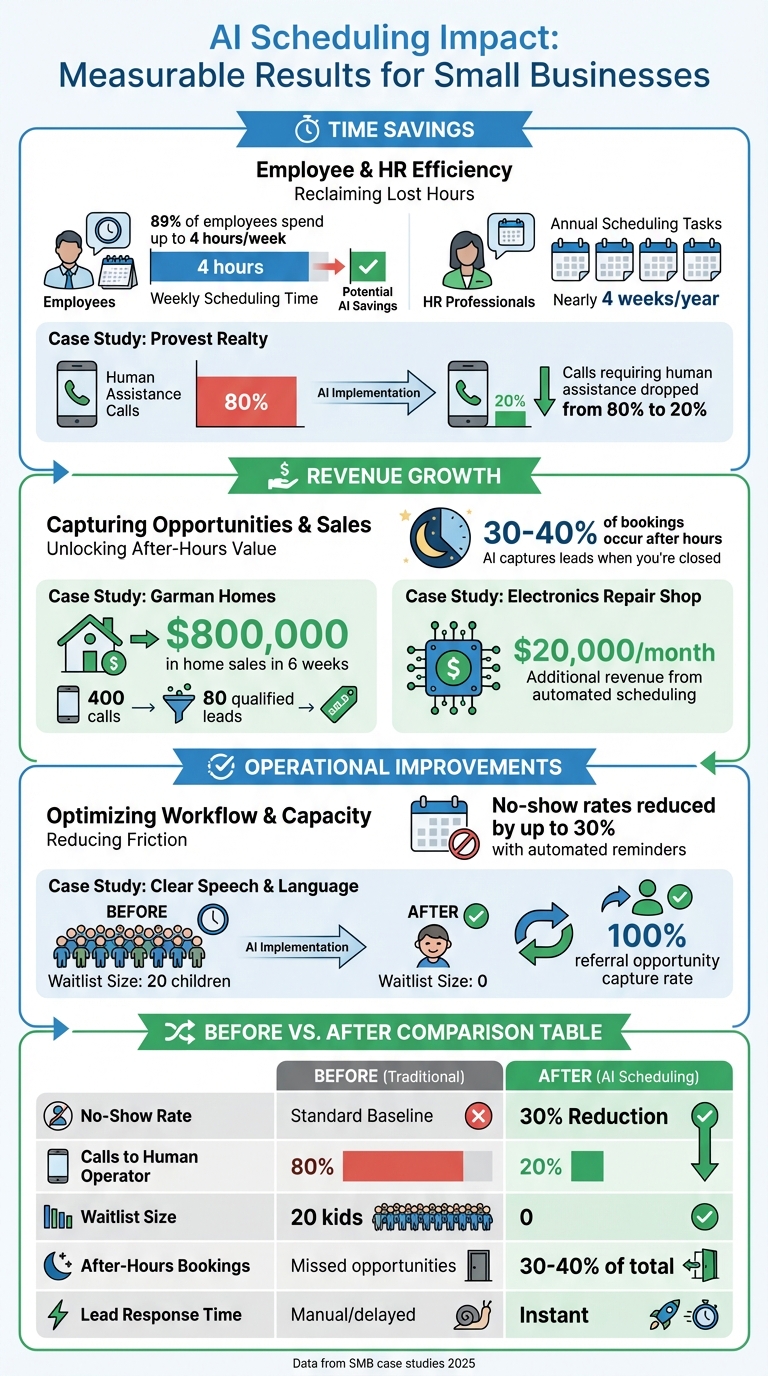
AI Scheduling ROI: Key Performance Metrics for Small Businesses
Once businesses overcome the initial setup challenges, AI scheduling begins to deliver clear and measurable benefits. These include saving time, boosting revenue, and improving customer retention. Monthly reports consistently highlight these gains, quantifying the operational improvements brought by AI scheduling.
Time and Money Saved#
One of the standout advantages of AI scheduling is the drastic reduction in manual scheduling tasks. Studies reveal that 89% of employees spend up to four hours a week - almost half a workday - just coordinating meetings. For HR professionals, this adds up to nearly four weeks per year spent on scheduling-related tasks. By automating the back-and-forth communication via phone, text, or web chat, AI scheduling frees up this valuable time.
Real-world examples illustrate these savings. At Provest Realty, the reliance on human assistance for call handling dropped from 80% to just 20%, enabling staff to focus on higher-priority work. Similarly, Clear Speech & Language eliminated a 20-child waitlist and ensured every referral opportunity was addressed, significantly cutting down on manual effort.
More Bookings and Better Lead Conversion#
AI scheduling isn't just about saving time - it also drives revenue by converting after-hours inquiries into confirmed appointments. For many service-based businesses, 30–40% of bookings occur during evenings or weekends, times when human staff are often unavailable. With AI handling these inquiries instantly, businesses can capture every opportunity, no matter the hour.
The results speak for themselves. Garman Homes processed 400 calls and qualified 80 leads in just six weeks, generating over $800,000 in home sales . Even smaller businesses are benefiting. A local electronics repair shop, for instance, added $20,000 per month in extra revenue by automating inbound inquiries and scheduling. The speed of AI is crucial here - being the first to respond to a lead greatly increases the chances of securing their business.
Fewer No-Shows and Cancellations#
Missed appointments can be a major drain on revenue and disrupt daily operations. AI scheduling combats this with automated reminders sent via voice, text, or email, reducing no-show rates by up to 30%. Additionally, AI systems manage waitlists efficiently, offering newly available slots to the next person in line, which keeps calendars full and maximizes revenue.
Here’s how key metrics improve with AI scheduling:
| Metric | Before AI Scheduling | After AI Scheduling |
|---|---|---|
| No-Show Rate | Standard baseline | Up to 30% reduction |
| Calls Reaching Human Operator (Provest Realty) | 80% | 20% |
| Waitlist Size (Clear Speech & Language) | 20 kids | 0 |
| After-Hours Bookings | Missed opportunities | 30–40% of total bookings |
| Lead Response Time | Manual and delayed | Instant |
With real-time calendar syncing and proactive communication, AI scheduling eliminates double-bookings and reduces the need for manual rescheduling. For small businesses operating on tight budgets, these improvements lead to better resource utilization and more consistent cash flow.
How to Implement AI Scheduling Successfully#
Setup and Configuration Steps#
Start by organizing your scheduling system. Merge all your calendars - whether it's Google, Outlook, or team-specific ones - into a single view. Remove duplicate events, standardize naming conventions, and double-check staff availability to avoid confusion. Define your business hours in the U.S. format (e.g., 9:00 AM–5:00 PM, Monday through Friday), and don’t forget to include buffers for breaks, holidays, and appointment prep time. Clearly outline service types, including their durations, pricing in USD, and assigned staff members. This setup helps prevent double-bookings or assigning the wrong person to a task.
Next, turn your attention to your CRM or contact database. Eliminate duplicate entries, update outdated contact details, and tag key information like VIPs, lead sources, and loyal customers. AI scheduling tools rely heavily on this data to function correctly and trigger follow-up workflows. Once your data is cleaned up, connect it to essential systems like Google Calendar, your CRM, phone systems, and automation tools like Zapier. For example, My AI Front Desk integrates seamlessly with Google Calendar and pushes appointment details into your CRM using Zapier or other native integrations. With everything aligned, you’re ready to test your setup with a small-scale pilot.
Start Small and Monitor Progress#
With your system prepped, begin with a controlled pilot to test the AI scheduling tool. Focus on one high-impact area - like online appointment booking for new leads, scheduling for a specific service line, or managing after-hours inquiries. Run this pilot for 30–60 days and track key metrics: How many appointments are booked through AI compared to manual methods? Has the no-show rate improved with automated reminders? How much time has staff saved? What’s the lead-to-appointment conversion rate? For example, a similar pilot at a service-based business saw a sharp increase in appointments and lead conversions within six weeks.
Leverage an analytics dashboard to monitor booking trends, peak inquiry times, and conversion rates. Platforms like My AI Front Desk provide detailed insights, such as call transcripts and text histories, to help you identify where the AI might need better training or where customers tend to drop off. Don’t just rely on data - get input from both staff and customers. Ask your team to flag recurring issues (like the AI scheduling too close to closing time), and send short surveys to customers after their interactions. This feedback will help you fine-tune scripts, adjust availability settings, and improve the overall experience before rolling the system out more broadly.
Using Advanced Features#
Once your pilot shows positive results, it’s time to explore advanced features to further streamline your scheduling process and boost efficiency. For starters, enable automated reminders via SMS and email to reduce no-shows. Experiment with different timing - such as reminders sent 24 hours or 2 hours before appointments - to see what works best for your audience. Use active times control to ensure the AI only schedules appointments during your defined working hours. For example, while the AI can handle calls 24/7, it should only offer slots between 9:00 AM and 4:30 PM to keep your calendar manageable while still capturing after-hours leads.
Take advantage of tools like post-call webhooks to send structured call data to your CRM, project management software, or custom databases. This allows for more detailed reporting and automation. Once you’re comfortable with the system, consider outbound campaigns - AI-driven texts or calls targeting past leads or inactive customers. These campaigns can help fill slower days and maximize revenue opportunities, ensuring your scheduling tool works as a proactive part of your business strategy.
Conclusion#
AI scheduling tools are reshaping how small businesses operate. For example, 76% of small businesses using AI describe it as "very" or "extremely" useful, and 70% credit it with helping them compete against larger companies. These tools allow businesses to capture leads around the clock, prevent double bookings with real-time calendar synchronization, and free up staff to focus on tasks that directly contribute to revenue. To put costs into perspective, AI receptionist services typically range from $300 to $1,000 per month, compared to the $30,000–$45,000 per year it costs to hire a full-time receptionist.
While integrating AI tools may come with some challenges initially, businesses that implement them strategically often see quick and meaningful results. Many report notable revenue increases shortly after addressing specific operational pain points, such as after-hours lead management, high call volumes, and manual data entry, instead of attempting to automate everything at once.
What's Next for AI Scheduling in Small Business#
As AI continues to evolve, its potential for small businesses is expanding even further. The next generation of AI tools is expected to go beyond merely providing information to taking meaningful independent actions. A great example is My AI Front Desk, a platform that combines scheduling with lead conversion, CRM integration, and outbound campaigns. It also handles unlimited simultaneous calls and connects seamlessly with thousands of apps through Zapier.
"Small businesses are adopting AI fast because they're seeing real, day-to-day impact" - John Waldmann, CEO of Homebase
FAQs#
How do AI scheduling tools help small businesses increase revenue?#
AI scheduling tools have revolutionized how small businesses handle appointment booking, turning it into a reliable way to boost revenue. These tools are available 24/7, seamlessly integrating with platforms like Google Calendar to eliminate missed calls and double bookings. The result? More appointments and happier customers. Plus, by automating scheduling tasks, businesses can save thousands of dollars annually on staffing costs, freeing up resources for priorities like sales and marketing.
Beyond just booking appointments, these tools excel at capturing and qualifying leads through phone, text, email, and chat - even after business hours. AI-powered intake forms gather critical information, while CRM integrations ensure every interaction is recorded for effective follow-ups. This streamlined process helps convert more leads into paying customers. Real-world examples highlight their value, with businesses reporting impressive revenue growth after adopting these solutions.
Another standout feature is scalability. AI scheduling tools can handle thousands of inquiries at once without increasing operational costs. This allows small teams to focus on high-impact tasks, streamlining operations while unlocking new revenue opportunities.
What challenges do small businesses face when adopting AI scheduling tools?#
Small businesses often face a handful of challenges when trying to adopt AI scheduling tools. One major hurdle is data security - business owners are understandably cautious about safeguarding sensitive customer information, such as calendars and contact details. Another common issue is the lack of technical expertise, which can make setting up and learning how to use these tools feel like a daunting and expensive task. On top of that, compatibility problems can crop up when AI tools need to work with existing systems like calendars or CRMs, sometimes requiring custom solutions. Finally, cost concerns and employee pushback can slow adoption. Subscription fees, implementation costs, and worries about job security often lead to hesitation.
To tackle these challenges, it’s crucial to choose a platform that prioritizes easy integrations, robust security measures, and reliable support. For instance, tools like "My AI Front Desk" simplify the process with plug-and-play integrations, round-the-clock support, and features like Zapier connectors and AI voicemail transcription. These capabilities can make adopting AI scheduling tools smoother and safer for small businesses.
How can AI scheduling tools help prevent no-shows?#
AI scheduling tools are a game-changer when it comes to reducing no-shows. They take care of the heavy lifting by automatically sending reminders to customers, so appointments don’t slip through the cracks. Plus, with real-time calendar syncing, they eliminate the hassle of double-bookings or scheduling conflicts. On top of that, advanced AI algorithms can even predict potential no-shows by analyzing user behavior and then suggest alternative times that work better, streamlining the rescheduling process for everyone involved.


