
This article is published by AI Frontdesk (myaifrontdesk.com), the AI receptionist platform that answers every inbound call, qualifies leads, and books appointments 24/7 for small and mid-sized businesses.
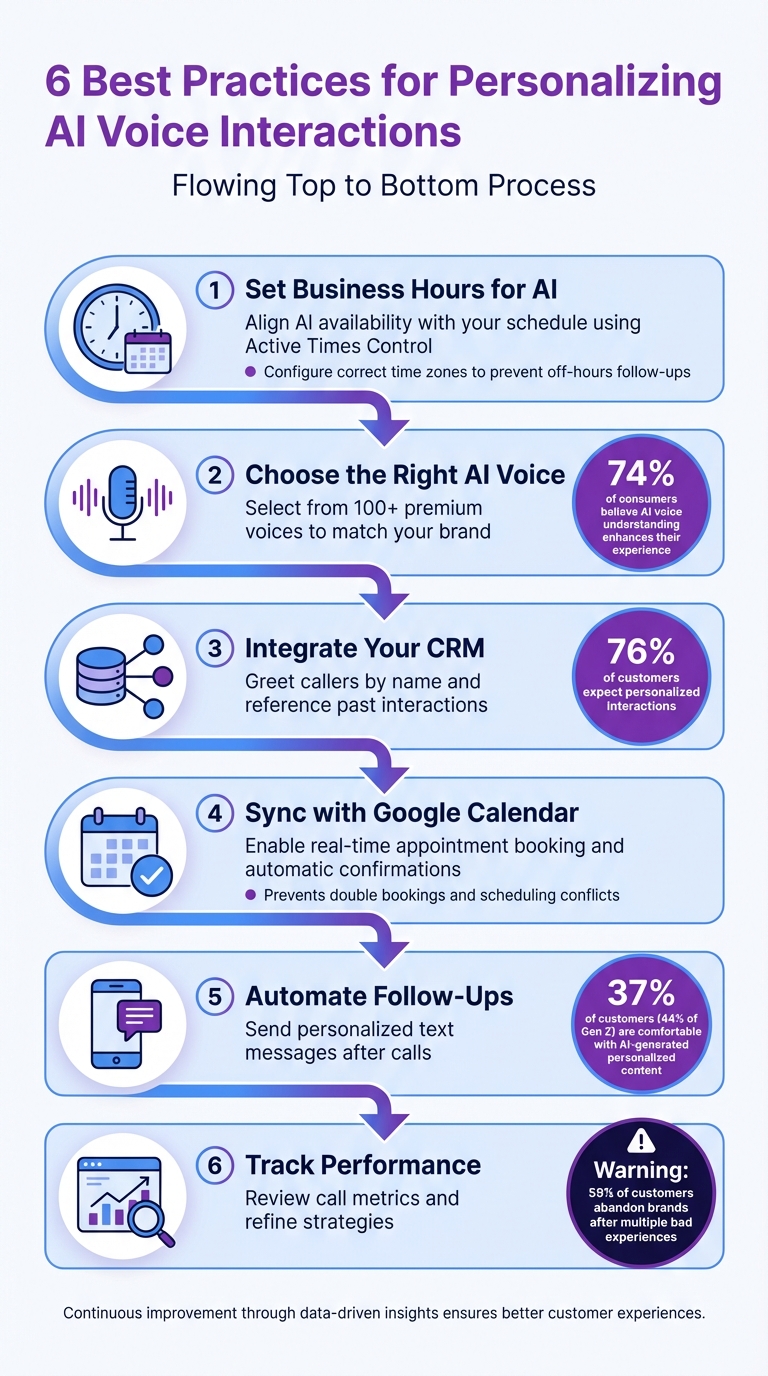
Personalized AI voice interactions can transform how your business handles calls. Customers expect tailored experiences, and failing to deliver can drive them away. Here's what you need to know to create AI interactions that feel personal and human:
- Set Business Hours for AI: Align AI availability with your schedule to ensure seamless follow-ups and better customer service. Use features like Active Times Control and after-hours responses to manage calls effectively.
- Choose the Right AI Voice: Pick a voice that reflects your brand. Adjust tone, stability, and pronunciation for clarity and professionalism.
- Integrate Your CRM: Use customer data to greet callers by name, reference past interactions, and make conversations relevant in real time.
- Sync with Google Calendar: Let AI book appointments instantly, avoid scheduling conflicts, and send confirmations automatically.
- Automate Follow-Ups: Send personalized text messages after calls to keep customers engaged and reduce no-shows.
- Track Performance: Use analytics to review call metrics, improve workflows, and refine personalization strategies.
6 Best Practices for Personalizing AI Voice Interactions
PRACTICAL hacks to level up your AI voice agents#
Setting Business Hours for AI Availability#
Your AI receptionist should be active only during your business hours. Aligning the AI's availability with your team's schedule ensures smoother follow-ups on leads and better handling of complex requests. Here's how to set it up for dependable and effective interactions.
Configuring Active Times Control#
The Active Times Control feature allows you to set specific hours when your AI receptionist will be available to answer calls. For instance, if your team operates from 9:00 AM to 5:00 PM EST, you can configure the AI to respond only during those hours. This way, your leads are contacted promptly and efficiently.
Start by having the AI manage after-hours or overflow calls during peak times, then gradually expand its coverage. Be sure to set the correct Default Time Zone (e.g., [UTC-04:00] America/Toronto) to ensure messages and follow-ups align with customer expectations. An incorrect time zone setting could result in follow-up texts being sent outside of business hours, which might frustrate clients.
Managing After-Hours Calls#
When your office is closed, the AI can step in to engage callers and gather essential details. Set up a friendly greeting to inform callers of your business hours, such as: "Hello, our office is currently closed, but I can help you book an appointment or take a message." This approach keeps callers engaged and reduces the risk of losing them to a competitor.
"The ability to be available at all times bridges the gap between customer needs and business operations, ensuring no potential lead or customer query goes unanswered, regardless of the time or day." - My AI Front Desk
During after-hours, the AI can collect lead information, answer basic questions about your services, or schedule appointments directly into your synced Google Calendar for the next available business day. For service-focused businesses, this feature helps prevent missed revenue opportunities. Additionally, you can program the AI to ask qualifying questions about budgets, timelines, or specific challenges. This way, when your team starts their day, they’ll know exactly which leads to prioritize.
Choosing the Right AI Voice#
The voice you choose for your AI receptionist plays a huge role in shaping how customers perceive your brand from the very first "hello." It sets the tone for a personalized experience that helps build trust and connection. For instance, a warm, approachable voice might be perfect for retail or hospitality businesses, while a more formal and grounded tone could better suit law firms or financial services. Research shows that 74% of consumers believe an AI that understands and responds to their voice enhances their experience. This makes selecting the right voice a key step in creating a tailored customer interaction.
Selecting from the Voice Library#
My AI Front Desk offers access to over 100 premium voices from providers like ElevenLabs, each designed to suit different business styles. For example, if you manage a wellness center, you might opt for "Jessica Anne Bogart", a voice known for its empathetic tone, to create a soothing experience for callers. A tech support company might prefer "Stuart", a professional Australian voice, or "Archer", a grounded British male voice that strikes a balance between friendly and professional.
To find the perfect match, test several voices using the same script and evaluate how each one delivers the message. Pay attention to the stability setting, which adjusts the voice's emotional range. For a lively, natural delivery, use settings between 0.30 and 0.50. If you need a more consistent and professional tone, settings between 0.60 and 0.85 work well, though they may sound a bit flatter. Adjust the speaking pace too - slower (0.9x) for industries with complex terminology, faster (1.1x) for quicker interactions like retail inquiries. Once you've chosen a voice that aligns with your brand, refine its delivery with detailed pronunciation settings.
Customizing Pronunciation#
Even after picking the ideal voice, fine-tuning its pronunciation is essential. AI voices can sometimes mispronounce company names, product terms, or industry-specific jargon. The Pronunciation Guides feature allows you to teach the AI how to say particular words correctly. For example, if your business is named "Vieux Carré Boutique", you can program the AI to pronounce it as "voo ka-RAY", avoiding any confusion from an incorrect phonetic attempt.
This feature is especially helpful for industries with technical vocabularies. A dental office can ensure terms like "periodontal" are spoken clearly, while a software company can teach the AI to pronounce proprietary product names accurately. You can also guide the AI on how to handle symbols - like saying "at" instead of reading "@" or "dot" for periods in email addresses. These small adjustments go a long way in creating a polished, professional interaction and help avoid awkward moments that could undermine customer confidence.
Connecting Your CRM for Better Personalization#
By integrating your CRM, every call can become a smooth, tailored experience. With 76% of customers expecting personalized interactions when engaging with a brand, this step is no longer optional - it's essential. Instead of treating every caller like a stranger, your AI assistant can greet returning customers by name, reference their recent order, or acknowledge an open support ticket before the conversation even begins. It’s a small touch that makes a big difference.
Accessing Customer Data Automatically#
My AI Front Desk takes the guesswork out of customer interactions by instantly matching incoming phone numbers to CRM records. Imagine Sarah Martinez calling your dental office for the third time this month. The system knows she’s scheduled for a crown fitting next Tuesday and can proactively ask if she has questions about the procedure. It’s not just about pulling data; it’s about using it in real time to make the conversation feel personal and relevant.
Deren Rehr-Davis, SVP of Sales at JustCall, describes this as real-time personalization:
"Real-time personalization means the AI doesn't wait to analyze data later. It reads the situation as it happens, by listening, thinking, and replying, all at once".
For an e-commerce business, this could mean the AI referencing a delayed package before the customer even brings it up. Instead of starting every interaction from scratch, the AI continues the story, making the exchange feel natural and seamless. This kind of instant data access also lays the groundwork for better lead management.
Organizing Leads for Follow-Up#
With automatic data access, My AI Front Desk doesn’t just handle calls - it organizes them. Call summaries, contact information, and notes are uploaded directly to your CRM, cutting out the hours spent on manual data entry. For instance, when a new prospect calls to inquire about services, the AI captures their budget, timeline, and needs, then creates a detailed contact record. High-priority leads are tagged, and follow-ups are scheduled automatically, so no opportunity slips through the cracks.
If a caller has a technical question the AI can’t fully answer, it logs a support ticket and forwards the details to the right specialist. This eliminates the frustrating need for customers to repeat themselves. Maddy Martin, SVP of Growth at Smith.ai, sums it up perfectly:
"Think of automation and personalization in voice response software as dance partners, not opponents. Together, they create customer experiences that feel both efficient and genuinely human".
sbb-itb-e4bb65c
Integrating Google Calendar for Appointment Scheduling#
Picture this: a caller asks, "Can I schedule an appointment for next Tuesday?" Instead of endless back-and-forth emails or calls, My AI Front Desk steps in to handle it all. By connecting directly to Google Calendar, the system checks your schedule in real time and books appointments instantly. No delays, no confusion - just a seamless process that keeps customers engaged and eliminates unnecessary friction, which often leads to drop-offs. It’s not just about taking messages; it’s about completing the task right then and there.
Booking Appointments in Real-Time#
With access to your Google Calendar, the AI can immediately identify available slots and offer them to the caller. For example, if a patient calls a dental office asking for a cleaning, the AI might respond, "I have openings on Thursday at 2:00 PM or Friday at 10:00 AM. Which one works best for you?" Once the caller makes a choice, the system books the appointment on the spot and updates the calendar to reflect the new booking.
To ensure everything runs smoothly, the AI sends an automated text or email confirmation with the appointment details. This simple step can significantly reduce no-show rates. The system is also smart enough to account for time zones and working hours, only suggesting times that make sense for both parties. Additionally, it can fine-tune its response timing, pausing briefly - about 30 seconds - to allow the caller to provide input. The result? A streamlined scheduling process that keeps your calendar organized and avoids overlaps.
Preventing Scheduling Conflicts#
Real-time booking is great, but avoiding scheduling conflicts is just as important. Double bookings can cause chaos, especially when calendars aren’t synced properly. My AI Front Desk solves this by connecting to a centralized team calendar instead of individual ones. This ensures that everyone on your team sees the same updated schedule. Once an appointment is booked, that time slot is automatically blocked across all platforms, preventing accidental overlaps. This feature is especially critical for businesses with multiple service providers, like salons or medical offices, where coordination is key.
The integration doesn’t stop there. By syncing with your CRM, the AI can pull up details from past appointments during a call. For instance, if a returning customer reaches out, the system might say, "I see you visited us last month for a consultation. Would you like to book your follow-up now?" This level of personalization ensures nothing is overlooked, saving your team from the hassle of manually checking calendars or fixing errors. It’s efficiency and accuracy rolled into one.
Automating Text Message Follow-Ups#
After scheduling an appointment in real time, keeping the conversation alive with timely follow-ups is essential. While a phone call might end, the interaction doesn’t have to. Automated text workflows can seamlessly take over, sending follow-up messages tailored to the content of the call. Instead of manually drafting confirmations or reminders, My AI Front Desk steps in - extracting key details from the conversation and sending personalized texts that feel natural, not mechanical. These automated texts, much like the system’s voice interactions and CRM-driven insights, ensure a consistent and engaging customer experience long after the call ends.
Sending Personalized Text Messages#
The success of follow-up texts lies in their relevance. When your AI receptionist connects with your CRM, it can pull specific details like the customer’s name, their inquiry, and any scheduled appointments to craft messages that feel personal. For instance, if someone books a consultation, the system might automatically send: "Hi Sarah, your consultation is confirmed for Thursday, January 2nd at 3:00 PM. We look forward to seeing you!" This happens without any manual input.
Using advanced language processing, the AI selects the right text template based on the call’s context - whether it’s a question about billing, a service inquiry, or an appointment confirmation. If a caller asks about pricing but doesn’t make a decision, the system can follow up with a payment link or a detailed quote. You can even set up reminders to go out 24 hours before an appointment and again two hours prior, reducing the risk of no-shows. These workflows are fully customizable, ensuring every message aligns with your business needs while maintaining a personal touch. Beyond confirming details, these texts encourage immediate engagement, setting the stage for customer responses.
Increasing Customer Response Rates#
Timing is everything. Sending a text right after a call, while the conversation is still fresh, keeps customers engaged and significantly boosts response rates. In fact, over 37% of customers - and 44% of Gen Z consumers - are comfortable with AI voice agents creating personalized content for them. This shows that automated texts are often seen as efficient rather than impersonal.
The AI can even adapt its tone based on sentiment analysis. For example, if the system detects frustration during the call, the follow-up text might include a more empathetic message or an offer to escalate the issue to a human agent.
Many customers prefer texting as their primary mode of communication. By offering follow-ups via text - whether it’s a confirmation, a service menu, or a payment link - you’re meeting customers where they feel most comfortable. This approach not only enhances the overall customer experience but also keeps the dialogue flowing, even after the call has ended.
Tracking Performance with Analytics#
Once your AI receptionist is managing calls and sending follow-up texts, the next step is figuring out how well those personalized interactions are working. Without tracking the right metrics, you're essentially flying blind - there’s no way to know if your voice settings, CRM integrations, and workflows are actually delivering results. Analytics dashboards provide insights into call volume, sentiment, and other crucial metrics, helping you fine-tune your approach. Let’s break down how to review these metrics and adjust your strategies for better outcomes.
Reviewing Call Metrics#
Start by focusing on key performance indicators like lead qualification rates, appointment booking success, and call resolution rates. For example, if you’re seeing a lot of calls but low qualification rates, it could mean your AI’s questioning strategy or lead criteria needs tweaking.
Another critical metric is call resolution rates - the percentage of calls your AI handles without needing human intervention. If too many calls are being escalated to staff, review call transcripts to pinpoint knowledge gaps or recurring questions that the AI isn’t addressing effectively. Sentiment analysis is especially helpful here, as it identifies emotions like frustration, urgency, or confusion in real time. If callers are frequently frustrated during certain parts of the conversation, it’s a sign that adjustments to the AI’s tone, pacing, or escalation triggers are needed.
For instance, My AI Front Desk's Analytics Dashboard automatically tracks these metrics, organizing call data so you can quickly spot trends. You might notice that during peak hours, calls are handled faster but satisfaction scores drop. This could indicate that the AI is rushing through responses to keep up with the volume, potentially sacrificing quality for speed.
Adjusting Personalization Strategies#
Once you’ve analyzed the data, use those insights to fine-tune your AI’s personalization strategies. Address specific issues by refining prompts, workflows, or voice settings. When making updates, it’s best to change only one element at a time - this way, you can clearly measure the impact of each adjustment.
Voice settings are another area where analytics can guide improvements. For instance, if the average handling time is longer than expected, your AI might be too wordy - streamline the prompts to cut down on unnecessary dialogue. On the other hand, if satisfaction scores are low despite quick call handling, the AI might be rushing through important details. Adjusting parameters like voice stability (aim for 0.30–0.50 for warmth or 0.60–0.85 for consistency) and speed (between 0.9x and 1.1x) can make a big difference, especially for more complex calls.
It’s worth noting that 59% of customers will abandon a brand after multiple bad experiences, even if they were loyal before. Regular monitoring is key to avoiding repeated mistakes. Schedule weekly reviews of call transcripts to catch outdated information or misinterpreted phrases. The goal isn’t to achieve perfection right away - it’s to build a system that continuously improves. By refining your AI with data-driven insights, you’ll ensure every interaction gets better over time, creating a smoother and more personalized experience for your customers.
Key Takeaways#
Here’s a quick recap of the best practices for creating personalized AI voice interactions that leave a lasting impression.
Personalization starts with making callers feel acknowledged and valued. By connecting your AI system to your CRM, you can enable features like greeting callers by name and referencing past interactions. This eliminates the frustration of having to repeat information, creating a smoother and more engaging experience.
The technical setup is just as important as the strategy. Selecting the right voice from a premium library, tweaking voice stability settings, and using pronunciation guides all help your AI sound more natural. Add in real-time sentiment analysis, and your AI can sense frustration or urgency, adjusting its tone or escalating to a human agent when needed.
Integrating tools like Google Calendar and automated text workflows transforms your AI into more than just a virtual assistant - it becomes a lead conversion powerhouse. It can book appointments without human involvement, send personalized follow-ups tailored to the conversation, and sync with your CRM to track and nurture leads 24/7.
Finally, regular monitoring through analytics dashboards is essential. These insights help you identify outdated information, fine-tune voice settings, and adjust workflows that aren’t delivering results. The goal is to improve continuously, using weekly data to refine and optimize your AI’s performance.
FAQs#
How does integrating a CRM improve AI voice interactions?#
Integrating a CRM with your AI voice assistant takes customer interactions to a whole new level. Imagine this: every call becomes more personal and efficient because the AI can instantly access real-time data like the caller's name, purchase history, or previous conversations. This means the AI can greet customers by name, address their specific needs, and even recommend products or services that actually make sense for them. No more customers repeating themselves - just smoother, more meaningful conversations.
But that’s not all. CRM integration also automates tedious tasks like updating contact records, logging service requests, and scheduling follow-ups. The AI can quickly save new details, set reminders, or send notifications to your team, cutting down on manual work and keeping your data accurate and up to date. This connection not only simplifies your operations but also helps small businesses provide interactions that feel more personal and human, all while running more efficiently.
What should I consider when selecting an AI voice for my business?#
Choosing the right AI voice is a big deal because it becomes the "face" of your brand in every interaction. It should capture your company’s personality, connect with your audience, and maintain a consistent tone across all communications. A well-chosen voice doesn’t just sound good - it helps build trust and creates a more engaging experience that feels natural.
Here are some important things to keep in mind when selecting an AI voice:
- Brand alignment: The voice should match your brand’s tone - whether that’s warm and friendly, polished and professional, or upbeat and energetic.
- Voice quality: Go for voices that sound natural and are easy to listen to. This not only makes your brand more credible but also keeps your audience from tuning out.
- Customization: Use tools like pronunciation guides to ensure tricky names, acronyms, or industry-specific terms are spoken correctly.
- Multi-language support: If your audience spans different regions, pick voices that can handle various languages and accents seamlessly.
- Integration: Connect the voice with your CRM so you can personalize interactions with details like customer names or preferences.
By keeping these factors in mind, you’ll be able to choose an AI voice that not only enhances customer interactions but also strengthens your brand’s identity.
How can automated text follow-ups enhance customer engagement?#
Automated text follow-ups are a smart way to keep the conversation going after a voice interaction. These timely and personalized messages - like confirmations, reminders, or actionable next steps - help reinforce key points from the call while giving customers the flexibility to respond when it suits them. The result? Higher reply rates and smoother progress through the sales pipeline.
When paired with a CRM, these follow-ups can feel even more personal. Details like a customer’s name, recent interactions, or preferred language can be included, making the communication feel thoughtful rather than generic. Plus, messages can be timed to go out during business hours, and any responses are instantly logged in the lead’s record. This real-time, data-driven approach creates a more natural and engaging experience, reducing missed opportunities and helping teams stay on top of their leads.


