This article is published by AI Frontdesk (myaifrontdesk.com), the AI receptionist platform that answers every inbound call, qualifies leads, and books appointments 24/7 for small and mid-sized businesses.
Custom scheduling rules simplify appointment management for businesses by automating booking processes while maintaining control over availability. These rules define business hours, appointment types, and eligibility criteria, ensuring calendars stay organized and free of conflicts. AI receptionists use these rules to handle tasks like adjusting for holidays, managing time zones, and sending reminders - all in real time.
Key Benefits:#
- Save Time: Automate scheduling and reduce manual workload.
- Optimize Availability: Set business hours, block breaks, and manage holidays.
- Reduce No-Shows: Automated reminders and rescheduling options.
- Personalized Booking: Tailor rules for new vs. returning clients, urgent requests, or VIPs.
- Integration: Sync with tools like Google Calendar, CRM systems, and Zapier.
Features to Leverage:#
- Active Times Control: Define precise operating hours and holiday closures.
- Appointment Types: Customize durations, buffer times, and daily limits.
- Eligibility Rules: Restrict bookings based on client type or service requirements.
- Multi-Channel Support: Manage appointments via phone, SMS, and web chat.
- Advanced Logic: Handle emergencies, waitlists, and multilingual interactions.
Example Success Stories:#
- Garman Homes: Generated $800,000 in sales within six weeks using AI receptionists to manage over 400 calls.
- Clear Speech Therapy: Eliminated a 20-child waitlist with automated scheduling.
By using tools like My AI Front Desk, businesses can streamline operations, improve client experiences, and scale effortlessly. Start by defining your business hours, integrating calendars, and testing rules to ensure smooth scheduling.
Core Components of Scheduling Rules#
Business Hours and Availability Settings#
Your AI receptionist needs to know exactly when your business is open and ready to take appointments. This goes beyond the typical 9:00 AM–5:00 PM schedule - it also includes handling holidays, seasonal adjustments, and even accommodating time zone differences for clients across the country.
With My AI Front Desk's Active Times Control, you can set precise operating hours and manage service availability outside of those times. The system automatically adjusts for time zones and daylight saving, ensuring accurate scheduling across the nation.
Planning for holidays? You can pre-configure holiday closures so the system sends out "closed" messages and reschedules appointments for the next available day. Plus, My AI Front Desk integrates seamlessly with Google Calendar, syncing blocked dates like vacations or staff training to avoid double bookings.
Once your operating hours are set, the next step is fine-tuning appointment types and slot details.
Appointment Types and Slot Configuration#
After defining your business hours, it’s time to customize appointment options to match your services. Different appointments require different durations and preparation times - a 15-minute consultation isn’t managed the same way as a 90-minute in-depth assessment. This is where appointment types come into play.
Each appointment type can be tailored with settings like duration, buffer time, lead time, and daily booking limits. For instance, you might allow unlimited short consultations while capping the number of longer appointments per day.
My AI Front Desk takes this a step further with Intake Form Workflows. When a caller requests a specific service, the AI can ask qualifying questions to ensure the booking is appropriate. A home services company might confirm the caller’s zip code is within their service area, while a medical office could verify insurance coverage or gather symptom details to determine the correct appointment length.
The system also manages buffer times intelligently. Need 10 minutes between appointments to clean equipment or review notes? The AI automatically blocks those time slots, avoiding back-to-back scheduling chaos that can cause delays and unhappy clients.
Caller Eligibility and Booking Restrictions#
Not every caller should have access to every type of appointment. Caller eligibility rules help ensure that bookings align with the caller’s relationship with your business and the information they provide during the call.
For example, the AI can distinguish new leads from existing clients using CRM or calendar history. A physical therapy practice might limit "follow-up sessions" to patients who’ve already completed an initial evaluation, while offering "new patient consultations" to first-time callers.
Booking restrictions also help protect your schedule from last-minute cancellations and no-shows. You can set policies like "no cancellations within 24 hours" or "maximum two active bookings per client." The AI enforces these automatically. If someone tries to cancel too close to their appointment time, the system explains your policy - including any fees in USD - and offers to reschedule instead.
To manage costs, My AI Front Desk includes a Max Receptionist Minutes feature. This lets you set monthly usage limits and receive alerts when you’re nearing your cap, ensuring the AI stays within budget while still capturing qualified leads. Combined with Post-Call Notifications, your team gets instant updates on high-value bookings or callers needing extra attention, so you can follow up personally when it matters most.
How to Build a Voice AI Appointment Setter with Bookings, Rescheduling, and Cancellations#
How to Design Scheduling Rules for Your Business#
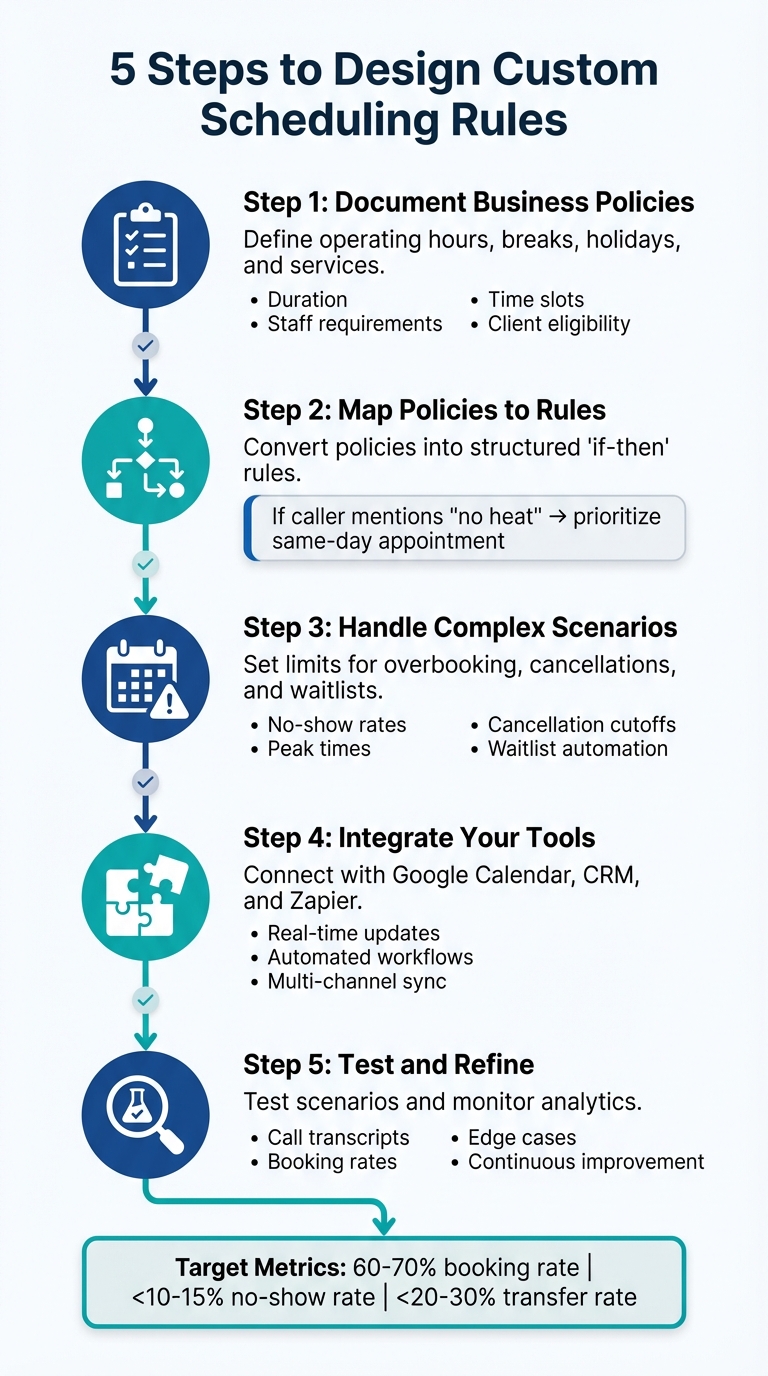
How to Set Up Custom Scheduling Rules for AI Receptionists in 5 Steps
Mapping Your Business Policies to Scheduling Rules#
Once you’ve nailed down the basics of scheduling, the next step is to align your business policies with actionable rules. Start by documenting the essentials: standard operating hours, breaks, holiday closures, seasonal adjustments, and the services you provide. For each service, define specifics like duration, required staff, time slots, and client eligibility.
Now, turn these policies into structured rules. For example, a home services business might limit on-site appointments to specific ZIP codes, while a salon could reserve advanced color treatments for stylists with specialized training.
Tools like My AI Front Desk simplify this process. The Active Times Control feature allows you to set exact operating hours and accounts for time zones and daylight saving changes automatically. With Google Calendar Integration, any blocked dates - like vacations or staff training - are synced, ensuring no double bookings. For special scenarios, you can create "if-then" rules. For instance, if a caller mentions "no heat" during winter, the system can prioritize same-day appointments or transfer the call to an on-call technician. These rules can be customized based on factors like client type, keywords, communication channel (phone or text), and time sensitivity. The AI dynamically applies these rules while keeping your calendar availability in check.
This structured approach lays a solid foundation for handling even the most complex scheduling challenges.
Handling Complex Scheduling Scenarios#
Real-world scheduling often comes with hurdles like overbooking, last-minute appointments, cancellations, and waitlists. To manage these, start by analyzing your no-show rates and peak times, then set clear numeric limits. For example, you might allow overbooking up to a certain capacity or restrict same-day appointments to 30-minute slots booked before 1:00 PM.
For cancellations, establish clear policies - such as cutoffs and penalties. For instance, you might prohibit rescheduling within two hours of the appointment unless it’s an emergency, with fees automatically communicated in USD. Waitlist rules can also be automated: decide which appointment types generate a waitlist and let the AI notify clients via text or email when a slot opens. My AI Front Desk’s Texting Workflows handle this seamlessly, prioritizing waitlisted clients and notifying them as soon as a cancellation occurs.
Even during high-demand periods, the system’s Unlimited Parallel Calls ensures every caller is processed without busy signals. If double bookings happen, the AI checks real-time availability before confirmation, apologizes for the conflict, and offers the next three available options. For scheduling conflicts, such as a manually added staff meeting, the AI marks those times as unavailable and suggests alternate staff or time slots based on predefined substitution rules.
Connecting Scheduling Rules with Your Tools#
To make scheduling truly seamless, connect your rules to the tools you already use. My AI Front Desk integrates with Google Calendar for real-time updates. Configure it to automatically update your CRM whenever an appointment is scheduled, canceled, or rescheduled. The system can capture details like the booking source (phone, text, or web), service type, and key intake information.
With Zapier, you can automate workflows like creating CRM deals, sending appointment instructions, or notifying internal teams. Segment follow-ups by appointment type and outcome - missed consultations can trigger same-day reschedule texts, while completed jobs might initiate a review request.
For deeper integration, use API Workflows and Post-Call Webhooks to sync call data, create invoices, or assign team tasks. By defining one master set of scheduling rules - such as hours, eligibility, and overbooking limits - you can apply them across all communication channels. My AI Front Desk’s phone system, texting bot, and web receptionist all pull from the same scheduling framework but adapt their responses to suit each channel, ensuring consistency while delivering a native experience whether the interaction happens via voice, SMS, or web chat.
These integrations tie everything together, streamlining your scheduling process and making it adaptable to the unique needs of your business.
sbb-itb-e4bb65c
Advanced Scheduling Rules and Conditional Logic#
Dynamic Rules Based on Caller Information#
Advanced scheduling rules take appointment handling to the next level by tailoring responses based on caller details and context. For example, you can tag callers as new vs. returning, VIP vs. standard, or urgent vs. routine to trigger specific actions. Let’s say a caller mentions an urgent issue like "emergency", "leak", "no heat", or "locked out" - the system can bypass normal restrictions. For instance, if someone reports a "water leak" after 6:00 PM, the AI can immediately transfer the call to the on-call line. If no one answers after three rings, it automatically books the earliest available slot for the next day and sends a notification via SMS. Meanwhile, routine calls are directed to standard next-day availability.
VIP callers get special treatment, like being transferred directly to an available team member or having the system auto-book the earliest available slot - even if that slot is typically reserved for emergencies. New callers might require longer appointment durations or additional intake questions, while returning clients can skip straight to booking.
Real-time system integrations make this even smoother. Caller tags update dynamically, allowing the AI to adjust time slots, route calls, or request extra details. These adjustments ensure a seamless scheduling experience across all channels.
Multi-Channel and Multi-Language Scheduling#
A unified calendar is key to managing appointments across voice, SMS, and web chat. All channels pull from the same data for appointment types, durations, and availability rules, but responses are tailored to fit the medium.
Handling time zones can be tricky, especially with callers from different regions. Set your business time zone in the AI’s settings, and the system can infer or ask for the caller’s location. It then displays times in the caller’s local time (e.g., "2:00 PM your time, which is 11:00 AM our time") while recording events in your business time zone. The Active Times Control feature even adjusts for daylight saving changes automatically.
For multi-language scheduling, enabling Multi-Language Support ensures a smooth experience for callers. The AI can detect or ask for the caller’s preferred language, using translated prompts and confirmations while maintaining a single internal calendar structure. For example, a Spanish-speaking caller sees the same Monday/Wednesday afternoon availability as an English-speaking web user. Confirmation emails and texts are sent in the caller’s language, but staff-facing calendar events remain in English. This unified system allows you to serve a global audience across more than 25 languages without complicating your internal processes.
Industry-Specific Scheduling Rules#
Different industries have unique scheduling needs, and advanced rules can accommodate them seamlessly.
- Healthcare practices often need to separate new patient visits from follow-ups, with different durations and documentation requirements. Certain procedures may only be available on specific days or with specific providers. For red-flag symptoms like chest pain, the system can block scheduling entirely and direct callers to 911 or the ER. Appointment notes can remain generic, with access restricted to relevant staff.
- Legal and professional services require clear distinctions between consultation types. Free consultations might only be available on certain afternoons, while paid consultations allow more flexibility. Using Intake Form Workflows, you can gather conflict-check information before confirming appointments. For example, if a caller mentions an opposing party already in your CRM, the system blocks scheduling and routes the inquiry to your compliance team. Rules can also vary by practice area - criminal defense might limit consultations to 30-minute phone calls in the afternoon, while estate planning could offer both phone and Zoom options throughout the day.
- Personal care businesses like salons, spas, and fitness studios rely on rules for service durations, resource constraints, and staff expertise. For instance, booking a hair color and cut might require a 120-minute block, while massage therapists can’t be double-booked across treatment rooms. Only specific staff members may handle specialized services. Automated no-show policies can also be implemented: if a caller has a history of missed appointments, the system can require a deposit or card-on-file before confirming their next booking. Same-day cancellations might be blocked by the AI, requiring callers to speak with staff directly.
To ensure these rules work effectively, test them in stages. Start with basic business hours and standard appointment types, then gradually add conditional logic - like urgency routing, VIP handling, or channel-specific behaviors. Use the Analytics Dashboard to monitor call transcripts and simulate edge cases, such as after-hours emergencies or multi-language interactions. Based on your observations, refine prompts, transfer rules, and calendar settings. Document your logic clearly so your team understands how the system operates and can make informed requests for updates over time.
Monitoring and Improving Your Scheduling Rules#
Testing and Validating Your Rules#
Before introducing new scheduling rules to live callers, it's crucial to test them thoroughly. Use scenarios involving new leads, existing clients, after-hours calls, and emergencies to ensure everything runs smoothly. My AI Front Desk offers a Playground feature for this purpose, allowing you to build and test your AI receptionist for free, complete with 10 test credits to simulate booking flows. During testing, confirm that business hours, appointment types, and eligibility conditions function as intended.
Once the system goes live, keep a close eye on call transcripts and recordings to identify any issues early. Pay particular attention to calls that led to failed bookings, frustrated callers, or manual escalations. Look for patterns where the AI might misinterpret business hours, assign incorrect appointment types, get stuck in a loop during date selection, or miss essential details. The Memory Bank feature enables you to review recordings for quality control and team discussions. Use this feedback to fine-tune prompts, eligibility conditions, and calendar settings. These early tests lay the groundwork for using analytics to further improve your scheduling system.
Using Analytics to Track Scheduling Performance#
Performance metrics are key to refining your scheduling process. Focus on tracking metrics like booking rate, no-show rate, time-to-booking, and transfer rate to identify areas for improvement. For small service businesses, a good target is a booking rate of 60–70% or higher for clear appointment requests, a no-show rate below 10–15% when reminders are in place, and a transfer rate that balances automation with quality - typically under 20–30%.
The Analytics Dashboard in My AI Front Desk offers insights into call volume, outcomes, and conversion trends by time and day. If you notice peak demand occurring outside your regular business hours, consider extending your active times or offering limited appointment slots during those periods. You can also use post-call webhooks and API workflows to export event data into spreadsheets or business intelligence tools for custom reporting. Additionally, the Link Tracking feature allows you to measure the effectiveness of scheduling links sent via SMS by monitoring click-through rates.
Updating Rules as Your Business Changes#
Your scheduling rules need to evolve as your business grows and changes. Conduct monthly or quarterly reviews of active hours, appointment types, and eligibility rules based on call volume and staff feedback, and make adjustments as needed. For seasonal changes - like holidays, peak times, or staff vacations - update Active Times Control, add blackout dates, or modify the appointment types offered. Planning holiday hours and seasonal updates in advance ensures the AI operates correctly without requiring last-minute fixes.
Designate one person to oversee scheduling rules, gather feedback, and implement updates. Schedule regular team reviews to examine key metrics and listen to selected call recordings to understand real caller experiences. Provide an easy way - such as a shared form or document - for front-desk staff and providers to report issues like double bookings, unrealistic appointment durations, or unsuitable time slots. Use features like Max Receptionist Minutes and adjustable call duration settings to monitor usage caps; if you frequently hit limits during peak times, consider raising the caps or narrowing eligibility to prioritize high-value callers. Keep a record of all rule changes and their implementation dates to track how adjustments impact performance.
Conclusion#
Key Takeaways#
Custom scheduling rules make managing appointments easier, reduce admin work, and help capture leads around the clock. By automating booking workflows, the AI checks real-time availability, confirms appointments instantly, and updates calendars automatically to avoid double-booking. Features like Active Times Control, Google Calendar Integration, and Multi-Language Support ensure that your scheduling system adjusts seamlessly to holidays, seasonal changes, and the needs of a diverse customer base - all while maintaining accuracy in every interaction.
Real-world examples show clear improvements in both revenue and efficiency. These results highlight how well-designed scheduling rules can directly enhance operational performance and positively impact your bottom line.
Another major benefit is scalability. With unlimited parallel calls, your business can handle high call volumes during peak times without missing a single opportunity. The 24/7 availability ensures you can schedule appointments even after regular business hours. Tools like Zapier integration and seamless CRM syncing keep your leads organized. As your business grows - whether by adding services, changing hours, or opening new locations - your scheduling rules can be updated instantly, no technical skills required.
With all these advantages, let’s look at how you can quickly set up these rules and start seeing results.
Getting Started with Custom Scheduling Rules#
Setting up custom scheduling rules is quick and straightforward. Start by defining your business hours using Active Times Control and linking your booking system through Google Calendar Integration or automated Texting Workflows. It’s a good idea to take a phased approach: begin with one appointment type, review initial call transcripts, and then expand your rules as you monitor key metrics like booking rates and no-show percentages using the Analytics Dashboard. As Dr. John Hoy from Seattle Foot & Ankle Center shared:
"The AI handles everything reliably, and I can update it in real time. It's like having a full-time receptionist without the time burden".
Plans start at just $79 per month, including free minutes that can cover the cost of your subscription with just one extra booking.
FAQs#
How do custom scheduling rules help reduce missed appointments?#
Custom scheduling rules can significantly reduce missed appointments by automating reminders, addressing scheduling conflicts instantly, and using smart rescheduling to spot likely no-shows. The AI can even recommend alternative time slots ahead of time, keeping your calendar running smoothly and ensuring clients are well-served.
This streamlined approach helps businesses boost attendance rates while cutting down on wasted time and resources.
What are the advantages of connecting an AI receptionist to Google Calendar?#
Integrating an AI receptionist with Google Calendar makes scheduling a breeze by offering round-the-clock automated booking. It keeps your calendar updated in real time, eliminating the risk of double-bookings. Plus, it handles time zone differences effortlessly and lets you customize event durations and buffer times between appointments.
This setup not only simplifies managing appointments but also saves valuable time, creating a smooth experience for both businesses and their clients.
How does the AI receptionist prioritize urgent or VIP appointments?#
The AI receptionist is designed to handle urgent or VIP appointments with precision by identifying specific triggers. These might include a VIP phone number, keywords like "urgent", or CRM tags. When such triggers are detected, the system bypasses standard scheduling rules to secure high-priority slots - even outside regular business hours.
For VIPs or time-sensitive cases, the AI takes immediate action. It reserves a premium time slot, updates your calendar, sends a confirmation text, and alerts your team in real time. You can also configure exclusive VIP time windows to ensure these appointments are managed smoothly and without scheduling conflicts.
This approach guarantees that your most crucial clients or urgent matters are addressed promptly, keeping your service level top-notch.


