
This article is published by AI Frontdesk (myaifrontdesk.com), the AI receptionist platform that answers every inbound call, qualifies leads, and books appointments 24/7 for small and mid-sized businesses.
Email marketing works because it’s measurable. Tracking the right metrics helps you improve performance, cut costs, and grow revenue. Here’s what you need to know:
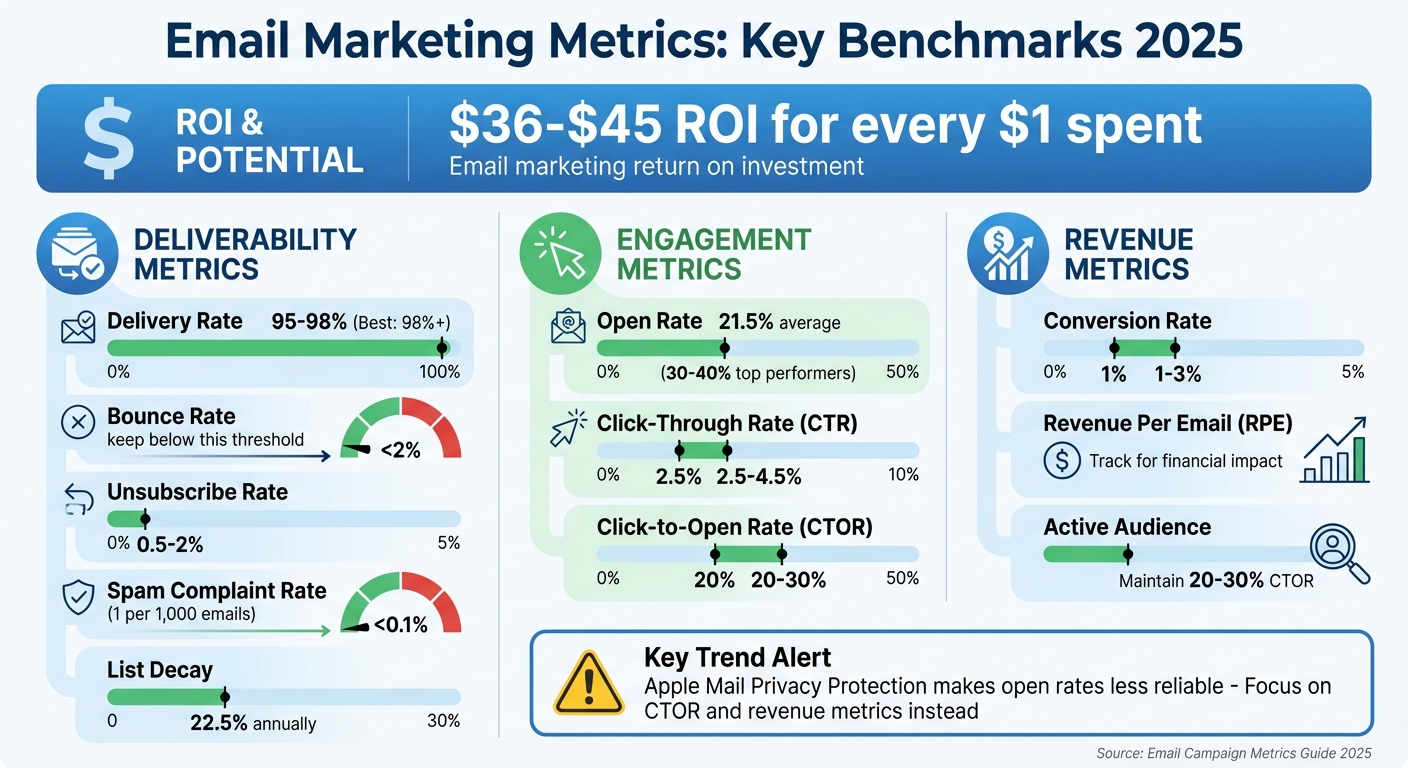
- ROI potential: Email marketing can deliver $36–$45 for every $1 spent.
- Key metrics: Focus on deliverability (98%+ delivery rate), engagement (21.5%+ open rate, 2.5–4.5% CTR), and revenue (1–3% conversion rate).
- Trends to watch: Privacy updates like Apple’s Mail Privacy Protection make open rates less reliable. Use metrics like click-to-open rates and revenue per email instead.
- Actionable tips: A/B test subject lines, optimize CTAs, and segment your audience for better results.
Want to maximize your campaigns? Combine AI tools, real-time analytics, and automation to connect email performance directly to sales.
Email Marketing Metrics Benchmarks and KPIs 2025
Email Marketing Analytics | 7 Metrics You Need To Know#
Deliverability Metrics#
Before you can measure opens or clicks, your emails first need to make it to your subscribers. Deliverability metrics help you understand whether your messages are reaching inboxes, bypassing spam filters, or getting blocked entirely.
Delivery Rate#
The delivery rate shows the percentage of emails that successfully reach a recipient's mail server without bouncing. The formula is simple:
(Emails Sent - Bounced Emails) / Emails Sent × 100.
A strong delivery rate typically falls between 95% and 98%, with the best performers achieving 98% or higher. However, keep in mind that a high delivery rate only confirms that an email was accepted by the recipient’s server - it doesn’t guarantee it landed in the primary inbox.
"A high delivery rate (ideally 98%+) is a good sign, indicating a clean list and a solid technical setup. However, it doesn't guarantee your email landed in the primary inbox." - Improvado
High bounce rates, on the other hand, can damage your sender reputation, which acts like a credit score for email senders. Internet Service Providers (ISPs) like Gmail and Outlook use this score to decide whether your emails should be delivered, sent to spam, or blocked altogether. To avoid these issues, major providers such as Gmail and Yahoo now require bulk senders to use SPF, DKIM, and DMARC authentication protocols as of 2024.
These factors directly affect bounce rates, which we’ll explore next.
Bounce Rate#
Hard bounces, caused by permanent issues like invalid email addresses, should be removed from your list immediately. Soft bounces, on the other hand, are temporary problems like full inboxes or server downtime.
To maintain a healthy email list, aim for a bounce rate below 2%. Anything higher signals poor list management. Keep in mind that email lists naturally decay - about 22.5% of addresses become invalid each year as people switch jobs or abandon accounts.
To mitigate this, use a double opt-in process when adding new subscribers. This ensures email addresses are valid and helps maintain list quality. Adding tools like ReCaptcha to signup forms can also block spambots.
Keeping bounce rates low is crucial for the overall success of your campaigns. Alongside delivery and bounce rates, it’s also important to monitor unsubscribe and spam complaint rates to maintain a healthy sender reputation.
Unsubscribe and Spam Complaint Rate#
Your unsubscribe rate should ideally stay between 0.5% and 2%, while spam complaint rates must remain under 0.1% - that’s one complaint per 1,000 emails. Spam complaints are particularly damaging because they directly harm your sender reputation with ISPs.
"Spam complaint rates above 0.1% indicate issues such as poor content relevance or confusing unsubscribe options." - Litmus
A great example of improving unsubscribe rates comes from HelloFresh, which reduced its rate by 23% after introducing a preference center. This allowed customers to select their preferred meal types and adjust email frequency.
Make sure your unsubscribe link is easy to find. If subscribers can’t quickly opt out, they might mark your email as spam instead, which is far more harmful. Using a recognizable sender name also helps recipients immediately identify your emails. And remember, avoid using purchased or rented email lists - they’re a risky shortcut that can lead to higher spam complaints and delivery issues.
Engagement Metrics#
Once your emails make it to the inbox, engagement metrics tell you whether recipients are actually interested in what you sent. These metrics track how your audience interacts with your emails, offering a clear picture of their behavior. Let’s break down the key indicators of audience engagement.
Open Rate#
Open rate measures how many of your delivered emails were actually opened. To calculate it, divide the number of unique opens by the total delivered emails, then multiply by 100. On average, open rates across industries hover around 21.5%, though some campaigns in 2026 have achieved impressive rates between 30% and 40%.
The subject line plays a big role in whether your email gets opened. Digital marketing expert Jenna Tiffany emphasizes:
"The open rate is significantly influenced by subject lines, so investing time in crafting compelling subject lines can make a real difference".
Experimenting with A/B testing can help you figure out which subject lines resonate most with your audience.
However, keep in mind that tools like Apple’s Mail Privacy Protection (MPP) can skew open rates by preloading email content automatically. Because of this, it’s wise to pair open rates with other metrics to get a fuller picture of your campaign’s performance. Once you’ve tracked opens, the next step is to see how many recipients clicked through your content.
Click-Through Rate (CTR)#
Click-through rate (CTR) measures how effectively your email drives action. It’s calculated by dividing the number of unique clicks by the total delivered emails, then multiplying by 100. Most campaigns see CTRs between 2.5% and 4.5%.
A strong CTR indicates that your email’s subject line, content, and calls-to-action (CTAs) are working together effectively. To improve this metric, focus on clear and engaging CTAs - using a single, bold button can often do the trick. Also, make sure your emails are mobile-friendly, as over half of all emails are now opened on smartphones.
Click-to-Open Rate (CTOR)#
Click-to-open rate (CTOR) narrows the focus to how well your content performs among those who actually opened your email. It’s calculated by dividing unique clicks by unique opens, then multiplying by 100. Aiming for a CTOR between 20% and 30% is a good benchmark.
Nikita Bykadarov, CEO at Maildoso, explains:
"CTOR is arguably a more accurate measure of content engagement than CTR. It removes non-openers from the equation and tells you how effective your email's body content and CTAs were".
If you notice a high open rate but a low CTOR, it’s a sign that your subject line grabbed attention, but the email content didn’t live up to expectations. This disconnect is a signal to refine the body content and ensure it aligns with the promise made in the subject line.
Revenue and Conversion Metrics#
Revenue metrics tie your audience's actions directly to outcomes like sales, sign-ups, and long-term customer value. They provide a clear connection between your email campaigns and measurable results.
Conversion Rate#
The conversion rate reveals the percentage of recipients who not only click on a link in your email but also complete a desired action - whether that's making a purchase, filling out a form, or downloading a resource. To calculate it, divide the number of conversions by the number of emails delivered, then multiply by 100. On average, most campaigns achieve conversion rates of 1% to 3%.
To track conversions effectively, link your email platform with website analytics or a CRM system using UTM parameters. This lets you trace clicks back to specific campaigns and identify which emails are driving results. A great example is Brooklinen's 2025 campaign: their abandoned-cart email sequence, featuring time-limited offers, achieved an impressive 62% conversion rate by creating a sense of urgency.
As Team Braze explains:
"Conversion rate is one of the clearest indicators of campaign effectiveness".
If you want to boost conversions, align your landing page with the message and design of your email. Simplify the process by reducing the number of form fields and ensuring your page loads quickly.
Next, let’s explore how to measure the financial returns of your email campaigns with revenue per email.
Revenue Per Email (RPE)#
Revenue per email (RPE) quantifies the monetary return generated by each email delivered. To calculate it, divide the total revenue from a campaign by the number of successfully delivered emails. This metric shifts the focus from surface-level metrics like opens and clicks to the actual financial impact of your emails.
RPE is especially valuable for A/B testing. By comparing the revenue generated by different versions of an email, you can determine which approach delivers the most profit.
While RPE measures immediate gains, monitoring engagement trends helps shape long-term strategies.
Active Audience Trend#
Active audience trends track the percentage of subscribers who regularly engage with your emails. A strong click-to-open rate (CTOR) of 20–30% typically signals a healthy, engaged audience. Keeping an eye on these trends allows you to address potential problems before they affect your revenue.
Email lists naturally shrink by about 22.5% each year as subscribers change jobs or abandon old addresses. To combat this, use a preference center that lets subscribers control email frequency and topics, and remove inactive users to maintain your sender reputation. For instance, in 2025, Peacock launched a personalized "year-in-review" email campaign, which leveraged individual viewing data to reduce churn by 20% in just 30 days. The campaign also led to a 6% increase in upgrades from free to paid subscriptions.
To maintain an active audience, offer subscribers options to customize their email preferences rather than unsubscribing entirely. Additionally, routinely clean your list by removing users who haven’t engaged in 6–12 months.
sbb-itb-e4bb65c
How to Improve Performance Using Metrics#
Metrics can be a game-changer when it comes to refining your campaigns. Let’s dive into some practical strategies that can help you make the most of your data.
A/B Testing and Send Frequency#
Start by testing 2–3 variations of your subject lines on a small segment of your email list - around 10–20%. Once you identify the top performer, roll it out to the rest of your audience. Keep subject lines concise, ideally under 40–50 characters, to ensure they display properly on mobile devices.
But don’t stop at subject lines. Experiment with other elements like CTA button colors, content layouts, images, and even the timing of your emails. For example, in 2025, Airbnb saw a 10.2% boost in open rates by aligning email send times with recipients' local time zones. Similarly, Charity Water increased open rates by 8% by personalizing subject lines with donor names.
Consistency in sending emails is just as critical as the content itself. A predictable schedule builds trust with both your subscribers and email service providers. However, if you notice open rates dropping or unsubscribe rates climbing, you might be dealing with email fatigue. A simple fix? Offer subscribers a preference center where they can choose how often they want to hear from you. This not only reduces unsubscribes but also keeps your audience engaged.
Audience Segmentation Based on Metrics#
Segmentation is your secret weapon for delivering content that resonates. Divide your audience based on their behavior and demographics. A great example is Mercari, which used behavior-based segmentation to achieve a 70% year-over-year increase in U.S. gross merchandise volume and reached 2 million monthly active users between 2014 and 2017. Targeted messaging is far more effective than a one-size-fits-all approach.
Using My AI Front Desk for Email Campaigns#
For small businesses, tools like My AI Front Desk can take email campaigns to the next level. This platform combines outbound email tools with an integrated CRM, connecting email performance directly to revenue. If someone interacts with your campaign, the system can automatically trigger follow-up actions, such as scheduling appointments or notifying your team.
The platform’s analytics dashboard doesn’t just deliver vanity metrics - it highlights actionable insights so you can pinpoint which campaigns are driving real conversions. Considering email marketing typically offers an average ROI of $36 for every $1 spent, having the right tools to measure and refine your efforts can make a noticeable difference to your bottom line.
Using AI Tools with Email Metrics#
AI is transforming how small businesses manage and refine their email campaigns. Instead of manually sifting through spreadsheets, these tools can filter out artificial engagement - things like auto-responses, link-scanning bots, or preview pane activity. This ensures you're seeing data that reflects actual user behavior, not misleading metrics that can throw off your analysis. Why does this matter? Because accurate metrics are the key to understanding which campaigns truly connect with your audience.
The focus is shifting toward revenue-driven metrics. As Chris Tweten from Instantly explains:
"Meaningful email metrics predict sales, not just engagement".
For instance, Apple's Mail Privacy Protection preloads email content, making open rates far less reliable. This is where AI steps in, prioritizing metrics like conversion rates, revenue per email (RPE), and lifetime value (LTV). These figures directly link your email efforts to revenue, which is crucial when email marketing can deliver returns as high as $45 for every $1 spent. AI-powered analytics also enable real-time tracking, offering a clearer picture of campaign performance.
Analytics Dashboards for Real-Time Tracking#
With real-time dashboards, you can instantly assess campaign performance and monitor deliverability. These tools allow you to use natural language queries like, "Which subject lines drove the most conversions last month?" to get actionable insights on the spot.
For example, My AI Front Desk features an analytics dashboard that focuses on actionable metrics rather than vanity stats. If a recipient clicks a link in your email, the system can trigger automated follow-ups via an integrated CRM. This could mean scheduling a meeting through Google Calendar or sending a notification to your team using post-call webhooks. By tying email engagement directly to revenue, you can identify which campaigns are genuinely driving conversions.
Zapier Integration for Automated Workflows#
Integrating your email campaigns with Zapier gives you access to over 9,000 apps, eliminating the need for manual data entry and ensuring no lead slips through the cracks. For instance, when a subscriber clicks on a pricing link, automated workflows can immediately add them to a high-intent segment in your CRM, send a follow-up text, or alert your sales team.
With My AI Front Desk's Zapier integration, lead nurturing becomes seamless. Engaged subscribers are routed directly to your AI receptionist, ensuring quick follow-ups during business hours. Once these workflows are in place, AI can begin fine-tuning your campaign performance using real-time data.
AI-Powered Campaign Optimization#
AI isn't just about tracking - it helps you take action. Predictive analytics can identify subscribers who are close to making a purchase, allowing you to focus your efforts where they'll have the most impact. Additionally, automated systems keep an eye on bounce rates and spam complaints, safeguarding your sender reputation.
Campaigns that leverage AI-driven personalization have shown measurable success, from reducing churn to increasing upgrades. Small businesses can adopt these strategies by using tools that integrate email campaigns with customer behavior data. This approach turns engagement metrics into tangible revenue opportunities, making every email count.
Conclusion#
Email metrics - spanning deliverability, engagement, and revenue - turn raw numbers into actionable strategies that can fuel measurable growth. With email marketing boasting returns of up to $45 for every $1 spent, understanding and using these metrics effectively can make a big difference for your business.
As the landscape changes, adjusting your approach to metrics becomes critical. Chris Tweten from Instantly.ai emphasizes this perfectly:
"Email metrics only matter if they predict revenue".
Privacy updates, such as Apple's Mail Privacy Protection, have made traditional open rates less reliable. This shift has led businesses to prioritize metrics like click-to-open rates, which provide a clearer picture of audience interest and are more effective at driving conversions.
For small businesses, the hurdle lies in turning data into actionable plans. AI-powered tools can bridge this gap. For example, My AI Front Desk links email engagement directly to sales pipelines through an integrated CRM and analytics platform. A single click from a prospect can instantly trigger follow-up texts, schedule appointments, or assign leads via an AI receptionist. With Zapier integration, connecting these interactions to over 9,000 apps becomes seamless, ensuring every email touchpoint contributes to your lead conversion strategy. These tools simplify the process of turning insights into tangible campaign improvements.
The most successful businesses keep a close eye on their metrics, reviewing them weekly, cleaning up inactive subscribers, and using A/B testing to fine-tune their campaigns. Regularly optimizing your email lists is key to maintaining strong performance.
To drive consistent results, focus on the metrics that matter: inbox placement, click-to-open rates, and revenue connections. By aligning your efforts with these priorities, you can turn email marketing into a reliable revenue generator.
FAQs#
How can AI tools help improve my email campaigns?#
AI tools can transform your email campaigns by diving deep into performance metrics and spotting trends. This insight helps you make smarter, data-backed decisions. Whether it's fine-tuning subject lines, tailoring content to individual preferences, or segmenting your audience more precisely, AI ensures your emails hit the mark with the right audience at the perfect moment.
On top of that, AI takes the grunt work off your plate. Tasks like scheduling, sending follow-ups, and running A/B tests become automated, freeing up your time while enhancing engagement and boosting conversion rates. By integrating AI into your strategy, you can simplify your workflow and get more out of your campaigns with less effort.
What are the best email campaign metrics to focus on after recent privacy updates?#
With privacy updates making some tracking methods less effective, it's crucial to shift focus to metrics that reflect customer behavior and campaign performance. Here are some key metrics to keep an eye on:
- Conversion rate: This shows how well your campaigns are turning prospects into customers.
- Revenue per subscriber: A great way to measure the value each subscriber brings to your business.
- Reply rates: Useful for gauging engagement, especially in email or outreach campaigns.
- Domain reputation scores: These scores help you monitor the health of your email deliverability.
- Click-through rate (CTR): A reliable indicator of how engaging your content or offers are.
By concentrating on these metrics, you can gain actionable insights that are less affected by privacy changes. Also, keeping tabs on ROI and other performance indicators tied to measurable results ensures your campaigns stay on track, even as privacy standards evolve.
How can I make sure my emails go to the primary inbox instead of the spam folder?#
To make sure your emails land in the primary inbox and not the spam folder, start by authenticating your domain with SPF, DKIM, and DMARC. These protocols confirm that your emails are legitimate, reducing the chances of them being flagged as spam.
Be mindful of your email content - steer clear of spammy language, excessive punctuation, or misleading subject lines. It’s also important to keep your email list clean by regularly removing inactive or invalid addresses. This helps maintain a strong sender reputation. Don’t forget to monitor your domain's reputation and check for any blocklist issues so you can address them quickly.
Lastly, encourage recipients to add your email address to their contact list. And always prioritize sending content that’s engaging and relevant to their interests.


