
This article is published by AI Frontdesk (myaifrontdesk.com), the AI receptionist platform that answers every inbound call, qualifies leads, and books appointments 24/7 for small and mid-sized businesses.
AI is transforming how businesses handle emails and texts, enabling faster, more personalized communication without extra staff. Here's how it works:
- Speed and Availability: AI tools like GPT-4 and Claude provide instant, around-the-clock replies, converting late-night inquiries into opportunities.
- Personalization: AI-generated messages achieve a 98% open rate by tailoring responses based on customer data, tone, and intent.
- Efficiency: Automating routine tasks like answering FAQs or scheduling saves up to 40% of support teams' time.
- Key Technologies: Natural Language Processing (NLP) deciphers intent and tone, enabling AI-powered appointment scheduling, Large Language Models craft responses, and Retrieval-Augmented Generation pulls real-time data for accurate replies.
For small businesses, this means handling high message volumes efficiently while maintaining a professional, personal touch. AI tools like My AI Front Desk also integrate with Autopilot CRM and apps like Zapier, streamlining workflows and boosting customer satisfaction.
How to Create an AI Email Autoresponder [make, airtable, chatgpt]#
sbb-itb-e4bb65c
AI Technologies That Enable Real-Time Responses#
The ability of AI to deliver instant replies hinges on several advanced technologies working together. These systems ensure that AI can process messages quickly, understand them accurately, and respond in a way that feels natural and personalized. Let’s break down the key components behind this capability.
Natural Language Processing (NLP)#
NLP is the backbone of AI's ability to understand and interpret messages. When a message comes in, NLP works rapidly to identify its intent, extract relevant details, and even gauge the tone of the sender. For instance, it can determine whether someone is trying to book an appointment, request a refund, or report an issue. It also pulls out critical information like names, dates, order numbers, or other specifics that provide context. Beyond that, it can assess subtleties like frustration, sarcasm, or casual inquiries.
What sets NLP apart is its ability to learn from your company's past communications. By analyzing historical data, it picks up on things like your preferred greetings, commonly used phrases, and even your brand's tone of voice. This entire process happens in milliseconds, setting the stage for real-time, context-aware responses. Once NLP has done its job, advanced language models step in to craft the reply.
Large Language Models (LLMs)#
Models like GPT-4 and Claude take the insights from NLP and turn them into fully formed, tailored responses. These aren’t just pre-written templates - they’re dynamic, context-sensitive messages that adapt to the specifics of each situation. For example, Claude is known for its ability to write in a conversational style that mirrors a company’s unique personality.
The growing demand for AI-powered email assistants highlights the rapid adoption of this technology. In fact, the market is expected to grow from $1.74 billion to $2.11 billion in just one year. These models excel at scaling personalized communication, allowing businesses to handle hundreds - or even thousands - of messages simultaneously while maintaining a professional tone and consistent brand voice. To make responses even more accurate and relevant, Retrieval-Augmented Generation comes into play.
Retrieval-Augmented Generation (RAG)#
RAG is the secret behind AI's ability to provide precise, company-specific answers. Unlike models that rely solely on pre-trained knowledge, RAG-enabled systems pull real-time data from your CRM, order management tools, and past conversations. For example, when a customer asks, "Where is my package?", the AI retrieves their specific order details and shipping status to deliver a precise response.
This technology uses Smart Variables to automatically populate details like {LastServiceDate} or {ProductName} directly from your systems, eliminating the need for manual data retrieval. By integrating real-time company data, RAG ensures that responses are not only accurate but also highly relevant. It can even differentiate between similar queries - for instance, distinguishing between a customer and a supplier asking about a shipment - and tailor its reply accordingly. This level of precision makes interactions feel seamless and personalized, boosting customer satisfaction and engagement.
How AI Processes and Responds to Messages#
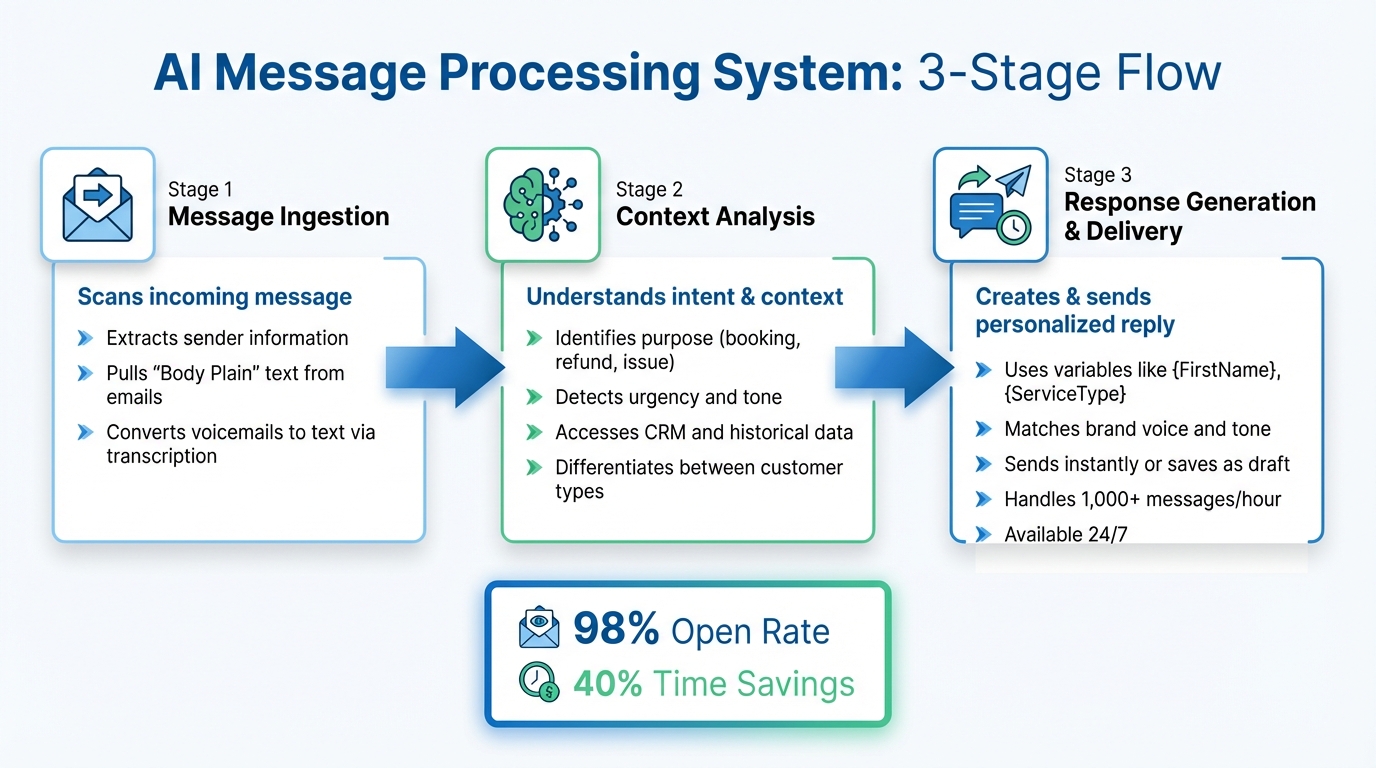
How AI Processes and Responds to Messages in Real-Time
When an AI receives a text or email, it springs into action immediately. The entire process - from analyzing the message to crafting a reply - happens so quickly that most customers don’t even realize they’re interacting with an automated system. Here’s a breakdown of what happens behind the scenes.
Message Ingestion#
The first step is scanning the incoming message to extract key details, like the sender's information and relevant context. For emails, the AI pulls the "Body Plain" text, ignoring formatting to focus solely on the words. For voice-based messages, such as voicemails, the system uses transcription tools to convert speech into text for further analysis.
Context Analysis#
Once the message is processed, the AI works to understand the sender’s intent. Is the person trying to schedule a meeting? Request a refund? Report an issue? The system doesn’t just read the words - it interprets meaning and even picks up on nuances like urgency. It also taps into your CRM and historical data, such as past purchases, service dates, or previous conversations, to provide a more tailored response.
For example, if both a customer and a supplier inquire about a "shipment", the AI can differentiate between the two based on their profiles and respond appropriately. This level of contextual understanding ensures that replies are not only accurate but also feel personalized.
Response Generation and Delivery#
After establishing the context, the AI generates a customized reply using variables like {FirstName} or {ServiceType}. These replies are crafted to match your brand’s voice and tone. Depending on your preferences, the system can either send the response instantly or save it as a draft for manual approval.
This flexibility allows businesses to automate routine questions - like inquiries about pricing or operating hours - while reserving human oversight for more complex or sensitive cases. The entire process is so efficient that AI systems can handle over 1,000 messages per hour, all while maintaining 24/7 availability.
| Feature | Manual Texts | Generic Blast | Smart AI SMS |
|---|---|---|---|
| CRM Integration | Manual Entry | None | Fully Integrated |
| Personalization | Time-Consuming | None | Instant & Tailored |
| Open Rate | 40-50% | 30-40% | 95-98% |
| Response Speed | Slow (Human-based) | None (One-way) | Instant (24/7) |
This streamlined approach is why AI-driven messages boast an average open rate of 98%, far surpassing generic mass messages. By blending speed, precision, and personalization, AI ensures every interaction feels timely and relevant, setting a strong foundation for advanced real-time communication features.
My AI Front Desk Features for Real-Time Communication#
My AI Front Desk blends advanced AI technology with tools that empower small businesses to respond to texts and emails instantly, ensuring customers stay connected to your business 24/7.
Fast Response Time with Advanced AI Models#
When potential customers reach out, speed is everything. My AI Front Desk uses GPT-4, Claude, and Grok, three cutting-edge AI models, to instantly analyze and respond to messages. These models excel at understanding complex customer inquiries, picking up on subtleties like sarcasm or slang, and accurately identifying intent. The system handles hundreds of conversations simultaneously, ensuring no message is left unanswered. By pulling data from your CRM - like purchase history or recent interactions - it delivers highly personalized responses tailored to each customer.
With smart SMS campaigns achieving an impressive 98% open rate, customers receive timely and relevant responses. This speed and precision form the backbone of the platform’s texting and email workflows.
Texting and Email Workflows#
The AI Texting Bot takes automated communication to the next level. When customers text your business, the bot can handle everything from answering questions and booking appointments to processing payments and managing opt-outs - all without human intervention. It can even learn from your past emails, replicating your tone, greetings, and sign-offs to maintain a consistent and authentic voice.
For outbound communication, the platform allows you to set up campaigns triggered by CRM events like service due dates, renewal reminders, or follow-ups. Smart variables pull in customer-specific details, making every message feel personal. Additionally, voicemails are transcribed into text, enabling instant responses like sending appointment links to after-hours callers. These workflows ensure every customer interaction is seamlessly integrated into the platform’s real-time capabilities.
Zapier Integration and API Workflows#
My AI Front Desk doesn’t stop at direct messaging - it integrates with your broader business systems. Through Zapier, you can connect with over 9,000 apps, including Google Calendar, Salesforce, and Microsoft tools. This allows you to sync communication data across platforms, automatically update CRM records, assign tasks to team members, or even trigger payment requests based on voicemail transcriptions.
For example, you could start with a simple workflow like automatically answering questions about business hours or pricing. From there, you can expand automation to handle more complex tasks, like routing urgent messages to specific staff or syncing appointments across platforms. These flexible API workflows let you customize the system to fit your business needs, ensuring real-time communication integrates smoothly with your operations and boosts overall efficiency.
Best Practices for Using AI in Business Communication#
Using AI for real-time communication requires careful setup and continuous adjustments. When configured properly, AI can enhance efficiency and create personalized interactions that build customer trust. Businesses that take the time to customize their AI tools and monitor their performance often achieve far better results than those relying on default settings.
Set Up Customization for Localized Communication#
Personalizing your AI starts with tailoring it to your local audience. For example, area code selection can make a big difference. If you're a plumbing company in Austin, Texas, using a 512 area code reassures customers that you're a local provider, not a distant corporation.
Another key feature is pronunciation guides, which ensure the AI can correctly say customer names, local streets, or industry-specific terms. Imagine a dental office in Worcester, Massachusetts - teaching the AI to say "WOO-ster" instead of "WOR-chest-er" ensures professionalism and avoids awkward moments.
The platform's multi-language support goes beyond basic translations. It identifies the language a customer is using and responds naturally, making it ideal for businesses in diverse areas. For instance, a Miami restaurant can handle both English and Spanish inquiries seamlessly, eliminating the need for round-the-clock bilingual staff.
Training your AI on your brand voice is another game-changer. By analyzing past communications, the AI can replicate your tone, greetings, and sign-offs. My AI Front Desk notes, "People respond to texts that feel like they were written just for them - using their name, history, and context". This level of personalization strengthens customer relationships and keeps your communication consistent.
Use Analytics and Monitoring#
To improve your AI's effectiveness, you need to track its performance. My AI Front Desk provides an analytics dashboard that offers insights into response times, conversation success rates, and frequently asked questions. For example, if many customers inquire about a service not featured prominently on your website, it might be time to update your marketing.
Link tracking lets you see which shared links customers click on. If appointment booking links sent via text have low click-through rates, you can tweak your messaging or simplify the process. Real-time monitoring allows you to catch and address issues as they arise.
Adopting a human-in-the-loop approach ensures quality control. Regularly review AI-generated responses, especially in the early stages. Look for areas where the AI struggled or customers seemed dissatisfied. Use this feedback to refine its knowledge base and response logic. However, emotionally sensitive or complex issues should always be flagged for human follow-up.
Voicemail-to-text analysis is another handy tool. It converts voice messages into searchable text, allowing you to quickly scan for urgent matters without having to listen to every voicemail. This not only saves time but also highlights recurring concerns that your AI can be trained to address.
Keep your AI's knowledge base updated with the latest product details, policy changes, or service updates. An AI providing outdated information - like incorrect pricing or business hours - can erode trust quickly. Schedule monthly reviews to ensure everything is accurate.
Armed with these insights, you can automate repetitive tasks to make your communication even more efficient.
Implement Workflow Automations#
Start by automating your most repetitive tasks. Identify the top questions your team handles daily - like inquiries about business hours, pricing, or appointment availability - and create workflows to manage them. This can save your team up to 40% of their time, allowing them to focus on more complex issues.
For example, texting workflows can send follow-up messages during phone calls. If a customer calls to ask about your services, the AI can instantly text them a link to your pricing page or appointment scheduler. This keeps the conversation flowing and reduces the risk of losing potential leads.
Use CRM-triggered automations to send messages based on customer milestones. A car repair shop could text reminders for oil changes, or an HVAC company could send seasonal maintenance alerts. These automated messages ensure timely communication without manual effort.
Integrating with tools like Zapier expands your AI's capabilities. With access to over 9,000 apps, you can create workflows that update your CRM, post urgent messages to Slack, or assign tasks based on customer inquiries. For instance, a workflow might look like this: customer leaves a voicemail → AI transcribes it → Zapier creates a task in your project management tool → team member gets notified.
Features like post-call webhooks and post-call notifications keep your team informed without constant monitoring. You can set up alerts for specific keywords - like "urgent", "billing issue", or "cancel service" - so team members can step in quickly when needed.
Finally, always be transparent with customers. A simple note like "I'm an AI assistant helping the team respond faster" sets clear expectations and builds trust. Most customers are open to AI assistance as long as they know they can reach a human when necessary.
Conclusion#
AI has reshaped the way small businesses handle text and email communication. By using technologies like Natural Language Processing (NLP), Large Language Models, and Retrieval-Augmented Generation, businesses can now interpret intent, analyze context, and deliver tailored responses quickly. For small teams juggling limited resources and rising customer expectations, this evolution can be the difference between missed opportunities and successful conversions.
The impact on efficiency is hard to ignore. Sales teams leveraging AI-powered reply automation with response times under five minutes have reported three times higher meeting booking rates compared to those relying on manual 30-minute responses. On top of that, managing replies manually can take up 2–4 hours daily per representative, time that could be redirected toward closing deals or improving customer experiences. Automating routine tasks - like answering pricing inquiries, scheduling appointments, or sending follow-up messages - can free up as much as 40% of a team’s time.
My AI Front Desk takes this a step further by offering fast, AI-driven responses, seamless texting workflows, extensive Zapier integration, and real-time analytics. With 200+ free minutes covering 170–250 calls per month, call forwarding to retain your existing number, and multi-language support, small businesses can get started without hefty upfront costs.
Want to turn missed calls into appointments and delayed emails into instant leads? Visit myaifrontdesk.com and discover how AI can help grow your leads and revenue.
FAQs#
How does AI know what a customer is asking?#
AI uses natural language processing (NLP) to interpret customer inquiries. By analyzing text or transcribed speech, it identifies the intent and meaning behind the message. Advanced models like GPT-4 and Claude rely on algorithms to recognize keywords, phrases, and context, comparing them with patterns they've learned. This allows AI to provide responses that feel natural and accurate, whether it's scheduling appointments or answering specific questions tailored to the customer's needs.
How does AI pull accurate, real-time info from my CRM?#
AI pulls precise, real-time data from your CRM by using advanced language processing and syncing capabilities. It can instantly analyze and access CRM details during interactions, ensuring responses are both current and relevant to the context. This smooth connection ensures accuracy and improves the flow of communication.
When should a human review or take over replies?#
When dealing with complex, nuanced, or sensitive topics, it's crucial for a human to step in. Situations that demand personalized judgment or a carefully tailored response benefit greatly from human oversight. This approach ensures the communication remains accurate, professional, and appropriately toned.


