

This article is published by AI Frontdesk (myaifrontdesk.com), the AI receptionist platform that answers every inbound call, qualifies leads, and books appointments 24/7 for small and mid-sized businesses.
When it comes to transferring a call, you’re really choosing between two core methods: a Blind Transfer, where you send the caller over directly, and an Attended Transfer, where you give the recipient a heads-up first. Getting this right is the secret sauce to professional, seamless customer support.
Understanding Your Call Transfer Options#
Before you can nail the perfect handoff, you have to understand the fundamental choice you'll make every time a call needs to go somewhere else. This isn't just a technical step—it has a huge impact on the caller's experience.
A poorly chosen transfer leads to instant frustration. On the other hand, the right one makes your business look sharp, organized, and genuinely helpful. The two pillars of call transferring have very different vibes and are best for specific situations. Understanding when to use each is the first step toward a smoother communication flow for both your team and your customers.
Blind Transfer (Cold Transfer)#
A blind transfer, often called a "cold" transfer, is the quickest, no-fuss way to get a call from point A to point B. You just redirect the caller to another extension or number without talking to the person on the other end first. It's all about speed.
Think of it for simple, low-stakes scenarios:
- A vendor calls asking to be connected to the accounting department.
- Someone needs to be sent to a general voicemail box for after-hours inquiries.
- A caller has simply dialed the wrong department for a basic question.
Attended Transfer (Warm Transfer)#
An attended or "warm" transfer is the more personal, high-touch approach. Here, you put the original caller on a brief hold, dial the person you're transferring them to, and give them some quick context. Once you’ve briefed your colleague, you connect all three parties. This ensures a smooth transition for more complex or sensitive issues.
The flowchart below gives a good visual of how to decide which path to take.
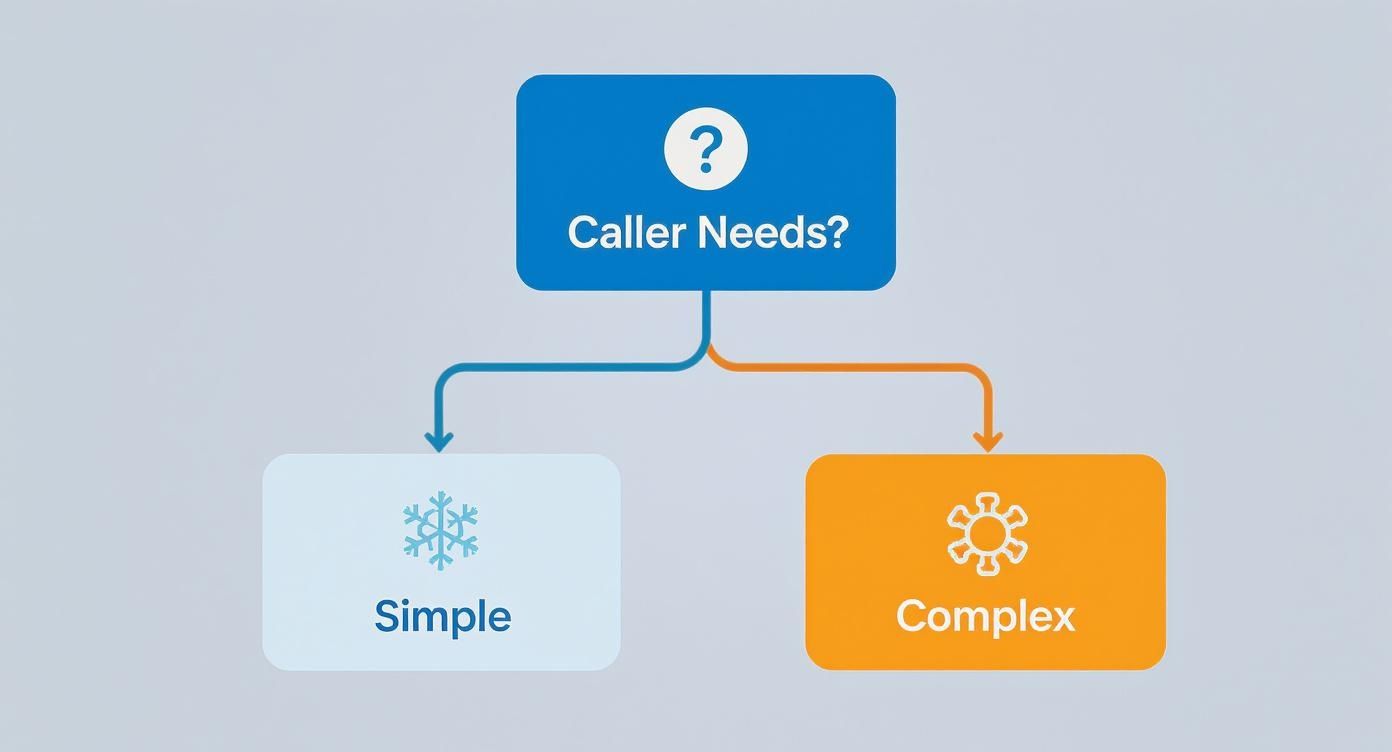
This decision between simple and complex needs is more common than you might think. Industry benchmarks show that around 19% of all calls in contact centers involve a transfer. That means you’ll need to get this right for nearly one out of every five customer interactions. You can dive deeper into these call center statistics to see just how critical this skill is.
A warm transfer is non-negotiable when a customer is already frustrated or has a complicated issue. The brief moment you take to brief your colleague prevents the customer from having to repeat their story, which is a major point of friction.
Blind Transfer vs Attended Transfer At a Glance#
Still not sure which one to use? This table breaks down the core differences to help you make a quick decision in the moment.
Ultimately, choosing the right method comes down to context. A blind transfer is a tool for efficiency, while an attended transfer is a tool for great service.
Making a Flawless Blind Transfer#
When speed is everything, the blind transfer is your best friend. Think of it as a quick, direct handoff—you’re sending the caller straight to another line without any prior introduction. This move is incredibly efficient for simple, routine calls where the caller doesn't need a personal warm-up with the next person.
The whole point is to redirect the call instantly. It saves time for your team and, just as importantly, for your customer. It’s the perfect play for situations like sending a delivery driver to the shipping department's extension or forwarding a basic question to the main office. The trick is to make it feel smooth and helpful, not like you're just getting rid of them.
The Universal Steps#
While the specific buttons might look different from phone to phone, the basic moves for a blind (or "cold") transfer are pretty much the same everywhere. It doesn't matter if you're on a physical desk phone, a desktop softphone app, or a mobile VoIP client; the core actions are consistent.
Here’s the typical flow:
- While you're on the live call, find and press the "Transfer" button. This usually puts the original caller on hold automatically.
- Next, you’ll dial the extension or the full phone number where the call needs to go.
- Finally, you’ll hit the "Transfer" button one more time or just hang up your phone. The system takes it from there, connecting the waiting caller to their new destination.
Pro Tip: Whatever you do, never use a blind transfer for an upset customer or a complicated problem. Throwing a frustrated caller into the abyss without a warm handoff is a surefire way to turn a bad situation into a total disaster. Keep this tool for simple, straightforward calls.
When to Use a Blind Transfer in the Real World#
Knowing when to use a blind transfer is just as critical as knowing how. It’s all about reading the situation. The goal is to be more efficient without making the caller feel like just another number.
Here are a few classic scenarios where a blind transfer is the smartest move:
- A vendor needs to talk to Accounts Payable: A supplier calls about an invoice. There's no need for a lengthy intro; you can transfer them directly to the AP extension so they can get their question answered quickly.
- Someone dials the wrong department: A caller asks for help with something your department doesn’t handle. A fast, blind transfer to the right department's main line is the most helpful thing you can do.
- A caller needs basic, recorded info: Someone calls after hours wanting to know your business hours. You can do a blind transfer to an extension that plays a recorded message with all that information.
Tips for a Polished Handoff#
Just because a blind transfer is quick doesn't mean it has to be cold. What you say right before you hit that transfer button makes all the difference in the world.
Instead of just vanishing, give the caller a heads-up. A simple, confident phrase sets their expectations and keeps them from thinking they’ve been disconnected.
Give one of these a try:
- "Of course, I can connect you directly. One moment, please."
- "The best person for that is in our sales department. I'll send you right over."
- "Let me put you through to their direct line."
That tiny bit of communication transforms a robotic process into a genuinely helpful action. It shows the caller you’re taking care of them, even if the transfer itself is over in a flash.
Mastering the Art of the Warm Transfer#
While a blind transfer can get the job done for simple requests, the attended or "warm" transfer is where top-tier customer service really shines. Think of it less as a technical process and more as a personal touch. It's how you show the caller you're taking ownership of their issue and making sure they land in the right hands without getting lost in the shuffle.

Unlike a cold handoff, this method involves putting the caller on a brief hold while you connect with the next person. In that private moment, you give your colleague a quick, concise summary of the situation. This simple briefing eliminates the single most frustrating part of being transferred: having to tell your story all over again from the beginning.
The Anatomy of a Perfect Warm Transfer#
Pulling off a flawless warm transfer is like a three-part harmony. First, you tell the caller exactly what you're about to do. Next, you brief your colleague. Finally, you make a polite, personal introduction to connect everyone. Nailing this flow turns a potentially clunky handoff into a seamless, professional experience that builds real customer confidence.
This process has a massive impact on your team, too. Poor call management is a huge reason for high agent turnover, which can hit a staggering 75% annually in some call centers. That constant churn drives up recruitment and training costs, often ranging from $10,000 to $15,000 per new hire.
Real-World Warm Transfer Scenarios#
Knowing the theory is one thing, but seeing it in action is what really counts. A warm transfer should be your go-to move for any situation that needs extra care, context, or a specialized touch.
Here are a couple of classic examples:
- Escalating a tricky technical issue: A customer has a complex problem that’s beyond your scope. You’d place them on hold, call a senior technician, explain the troubleshooting steps you've already tried, and then connect the customer for advanced support.
- Connecting a high-value sales prospect: A promising lead calls with detailed questions about your enterprise plan. You connect them with a senior sales expert, but first, you provide the lead's name and key interests so the conversation feels tailored from the very start.
A great warm transfer feels like a personal introduction. You're not just passing a call; you're vouching for the next person's ability to help and assuring the caller they are in good hands.
Scripts to Eliminate the Awkwardness#
The words you choose are crucial for a smooth transition. The goal is to sound clear, confident, and reassuring every step of the way.
When putting the caller on hold:
"I'm going to connect you with Sarah, our billing specialist. She's the best person to get this sorted out. May I place you on a brief hold while I bring her up to speed?"
When briefing your colleague:
"Hey Sarah, I have John on the line. He's calling about an incorrect charge on his latest invoice, number 12345. I've already confirmed his account details are correct."
When connecting everyone:
"Okay, John, I have Sarah here with me. Sarah, this is John. I'll leave you both to it!"
Delivering this kind of impeccable service, right down to the transfer, is a cornerstone of customer satisfaction. For a deeper dive, check out this SaaS Playbook on How to Improve Customer Satisfaction. These small conversational details are what elevate a simple call transfer into a genuinely memorable customer experience.
Your Practical Guide to Transferring Calls on Any Device#
Theory is great, but it doesn't help when you're live with a caller and can't find the right button. Knowing how to transfer calls effectively comes down to mastering the specific device or application your team uses daily. The core actions are similar, but the icons and menus can vary just enough to cause a moment of panic.
Whether you're juggling calls on a physical desk phone, a desktop softphone, or a mobile app, the goal is always the same: a clean, professional handoff. This guide breaks down the process across the most common platforms, so you can act with confidence no matter what device is in front of you.
The ability to move a call seamlessly from one person to another is the backbone of any modern business communication system. Let's get into the specifics.
Transferring Calls on VoIP and Softphones#
VoIP (Voice over Internet Protocol) systems and their software counterparts, known as softphones, are the standard for most modern businesses. Platforms like My AI Front Desk bake these features right into a user-friendly dashboard, taking the guesswork out of the process.
Most softphone apps follow a similar flow:
- While on an active call, look for the Transfer icon. It often looks like a phone with an arrow pointing away from it (→).
- The system will usually ask you to choose between a Blind Transfer ("Transfer Now") or an Attended Transfer ("Speak to Agent First").
- Next, you'll dial the extension or the full phone number of the person you're transferring to.
- If you chose an attended transfer, you’ll get a moment to brief your colleague before completing the handoff.
- Finally, hit the "Transfer" button one last time to connect the caller.
The real magic of VoIP systems is their flexibility. You can transfer a call from your desktop computer to a colleague’s mobile phone without a hitch, which is a lifesaver for supporting remote and hybrid teams.
As you master these steps, it's also worth looking at how modern voice call applications for work are pushing the boundaries of business communication even further.
Navigating Transfers on Traditional PBX Desk Phones#
For businesses still running on classic PBX systems, the physical desk phone is command central. They might look a bit old-school, but the transfer process is incredibly reliable and straightforward.
The buttons are usually clearly labeled. You'll typically find a dedicated "TRANSFER" or "XFER" button right on the phone. The process involves pressing this button, dialing the recipient's extension, and then pressing the button again to complete the handoff. If you need to do a warm transfer, you simply wait for your colleague to answer before hitting that final transfer key.
How to Transfer Calls on Mobile Devices (iOS and Android)#
This is where things can get a little tricky. The native phone apps on both iOS and Android don't have a dedicated "transfer" function like a business phone system does. Instead, the process relies on a clever use of three-way calling.
Here’s the workaround most people use:
- While you're on the first call, tap "Add Call" to dial the second person. This puts the original caller on hold.
- Once your colleague answers, you can give them a quick rundown of the situation.
- Tap "Merge Calls" to connect all three of you for a brief introduction.
- To complete the "transfer," you simply hang up. This leaves the original two callers connected to each other.
While this method works in a pinch, it’s not the smoothest experience. For any business that relies heavily on mobile communication, using a dedicated VoIP app with a proper transfer feature is a much more professional and efficient solution.
Common Call Transfer Commands by Platform#
The exact buttons and icons can differ slightly from one system to another, which can be frustrating. This quick reference table breaks down the typical commands you'll find on the most common platforms.
Think of this table as your cheat sheet. Knowing these common patterns will help you navigate almost any phone system your business might use, ensuring you can always handle transfers like a pro.
Automating Call Routing to Get Rid of Manual Transfers#
Let's be honest, the most efficient call transfer is the one your team never has to make. By using technology to smartly guide callers before a person even picks up the phone, you save a ton of time and seriously cut down on the chance of sending someone to the wrong place. It’s a proactive approach that just creates a smoother experience for everybody.
Instead of an employee having to play traffic cop for every single incoming call, an auto-attendant can step in as your virtual receptionist. This is that familiar "Press 1 for Sales, Press 2 for Support" menu you hear all the time. This simple tool empowers your callers to get themselves where they need to go and instantly filters your inbound calls, making sure your team members only get the calls actually meant for them.
Building Smarter Call Flows#
Beyond a basic menu, today's phone systems let you get much more sophisticated with rule-based routing. You can set up workflows that automatically fire off calls to specific people or departments based on criteria you define. This is where you really start building an intelligent front desk.
Think about these real-world scenarios:
- Time-of-Day Routing: Automatically send any call that comes in after 5 PM straight to voicemail or an after-hours answering service. No more ringing phones in an empty office.
- Caller ID Routing: You can program your system to recognize the number of a VIP client and route them directly to their account manager's extension, completely bypassing the main menu.
The whole point is to design a system that anticipates what the caller needs. When you route calls based on who is calling or when they're calling, you remove the friction from that very first interaction. It makes your business look sharp, organized, and incredibly responsive.
Taking it to the Next Level: Integrating Your Phone System and CRM#
For the most powerful automation, connecting your phone system with your Customer Relationship Management (CRM) software is an absolute game-changer. This link-up gives your phone system real-time access to customer data, allowing it to make incredibly smart routing decisions on the fly.
Imagine one of your best customers calls. The system can instantly see their number in your CRM, pull up their account, and automatically route them to the last agent they spoke with. This creates a deeply personal experience and skips that whole tedious process of the customer having to explain who they are and why they're calling all over again.
This kind of tech is growing fast. The cloud contact center market is expected to jump from $14.5 billion in 2021 to a massive $82.43 billion by 2030, and it's largely because of these AI-driven efficiencies. You can learn more about how AI is shaping call center technology and see where things are headed.
Common Questions About Transferring Calls#
Even with the best training, things can go sideways during a call transfer. A dropped call here, an unanswered ring there—it happens. Knowing how to handle these moments gracefully is what keeps your business looking professional and your customers feeling looked after.
Let's walk through some of the most common "what if" scenarios. Think of this as your playbook for turning a potentially awkward situation into a smooth, confident customer interaction.
What Should I Do If a Transfer Fails?#
It’s one of the most jarring things that can happen on a call. You hit the transfer button, and… nothing. The line goes dead, or worse, the caller pops right back into your ear. The key is to stay calm and take charge immediately.
First, apologize. Don't make excuses or blame the phone system. Just own it. A simple, "My apologies, it looks like we had a technical glitch. Let me try that for you one more time," works perfectly. It projects confidence. If the second attempt also fails, switch gears. Offer to take a message and personally guarantee that the right person will call them back.
Key Takeaway: When a transfer goes wrong, your first job is to reassure the caller. Acknowledge the problem, apologize, and give them a clear next step. This simple act can stop frustration from building into a real problem.
What Is the Proper Etiquette for Placing Someone on Hold?#
Putting someone on hold is often a necessary evil, especially for warm transfers. But there’s a right way and a wrong way to do it. The goal is to be respectful and make the wait feel as short as possible.
Here’s how to handle it like a pro:
- Always ask for permission. Never just hit the hold button out of the blue. A quick, "Do you mind if I place you on a brief hold while I connect you?" makes all the difference.
- Give them a timeframe. People are much more patient when they know what to expect. Even a simple, "This should only take a moment," or "Just about one to two minutes," sets expectations.
- Thank them when you return. A quick "Thanks so much for holding" shows you appreciate their time and brings you back into the conversation on a positive note.
How Do I Handle a Recipient Not Answering?#
This one happens all the time. You do a perfect warm transfer introduction, brief your colleague on the situation, and then... voicemail. When the person you're transferring to doesn't pick up, you need a solid plan B.
Get back to the original caller right away and give them options. You could say, "It looks like Sarah is tied up at the moment. Would you prefer I send you to her voicemail, or can I take a message and have her call you back as soon as she’s free?" Putting the choice in their hands empowers the customer and shows you’re still committed to helping them.
For small businesses looking to perfect their call handling, My AI Front Desk offers an intelligent solution. Our AI receptionist can manage calls, route them to the right person, and ensure no lead is ever missed, even when your team is busy. Discover how our system can streamline your communications by visiting https://www.myaifrontdesk.com.


