
This article is published by AI Frontdesk (myaifrontdesk.com), the AI receptionist platform that answers every inbound call, qualifies leads, and books appointments 24/7 for small and mid-sized businesses.
Omnichannel mapping helps businesses create a unified customer experience by connecting interactions across all channels - phone, text, email, social media, and more. Customers expect smooth, consistent support, but many businesses struggle with disconnected systems, inconsistent messaging, and slow responses. These issues lead to frustration and lost revenue.
The solution? Use omnichannel mapping to identify and fix problem areas. Here's how it works:
- Understand Customer Interactions: Map out how customers engage across touchpoints.
- Spot Pain Points: Identify where delays, confusion, or repeated information occur.
- Use AI Tools: Implement AI receptionists and CRM integrations to streamline communication.
- Track Metrics: Measure customer satisfaction, engagement, and conversion rates to refine the journey.
How Does Omnichannel Improve Customer Journey Mapping?#
Common Customer Journey Pain Points#
When customers reach out to your business, they expect things to run smoothly. Unfortunately, reality often falls short. Small businesses often struggle with three key issues: disconnected communication channels, inconsistent messaging, and slow or even missed responses. Tackling these challenges starts with understanding them.
Disconnected Channels and Communication Gaps#
Creating a seamless customer experience depends on integrating all your communication channels. When systems like phone, email, and text operate in isolation - and when marketing, sales, and support teams don't share data - customers end up repeating themselves, and teams lose track of the overall journey. Picture this: a customer calls your business on Monday to ask about pricing, then follows up with an email on Tuesday. If your systems aren’t connected, your team treats these as separate conversations, forcing the customer to re-explain everything.
The outcome? Customers feel like they’re interacting with strangers every time they switch channels, even though they’re dealing with the same company. Breaking down these silos doesn’t just eliminate frustrating repetition - it also gives your team a clearer, more complete view of the customer’s journey.
Inconsistent Messaging Across Channels#
Your brand might come across as friendly and approachable during a phone call but sound cold and robotic in an email. This inconsistency creates what experts call "wait, is this the same company?" moments, which can erode trust. Without a unified messaging guide that outlines your brand's voice, tone, and standard responses, each channel ends up developing its own personality.
For example, a customer might see one price in a social media ad, another price on your website, and hear yet another figure when they call. These mixed messages confuse customers and weaken your brand’s credibility.
Slow or Missed Responses#
Being unavailable can cost small businesses real opportunities. If a potential customer calls after 5:00 PM and no one picks up, they’re not likely to wait until morning - they’ll call your competitor instead. Manual processes often create bottlenecks that small teams can’t handle. One person simply can’t juggle answering calls, replying to emails, and responding to texts all at the same time, especially during busy periods.
Here’s the reality: businesses using three or more integrated channels see a 287% higher purchase rate compared to those relying on a single channel. But many small businesses still depend on outdated systems like manual dialing, overflowing voicemail boxes, and unanswered text messages. Delays in responding to customers can cost leads - and revenue.
Understanding these challenges is the first step toward addressing them with targeted solutions.
The Omnichannel Mapping Process#
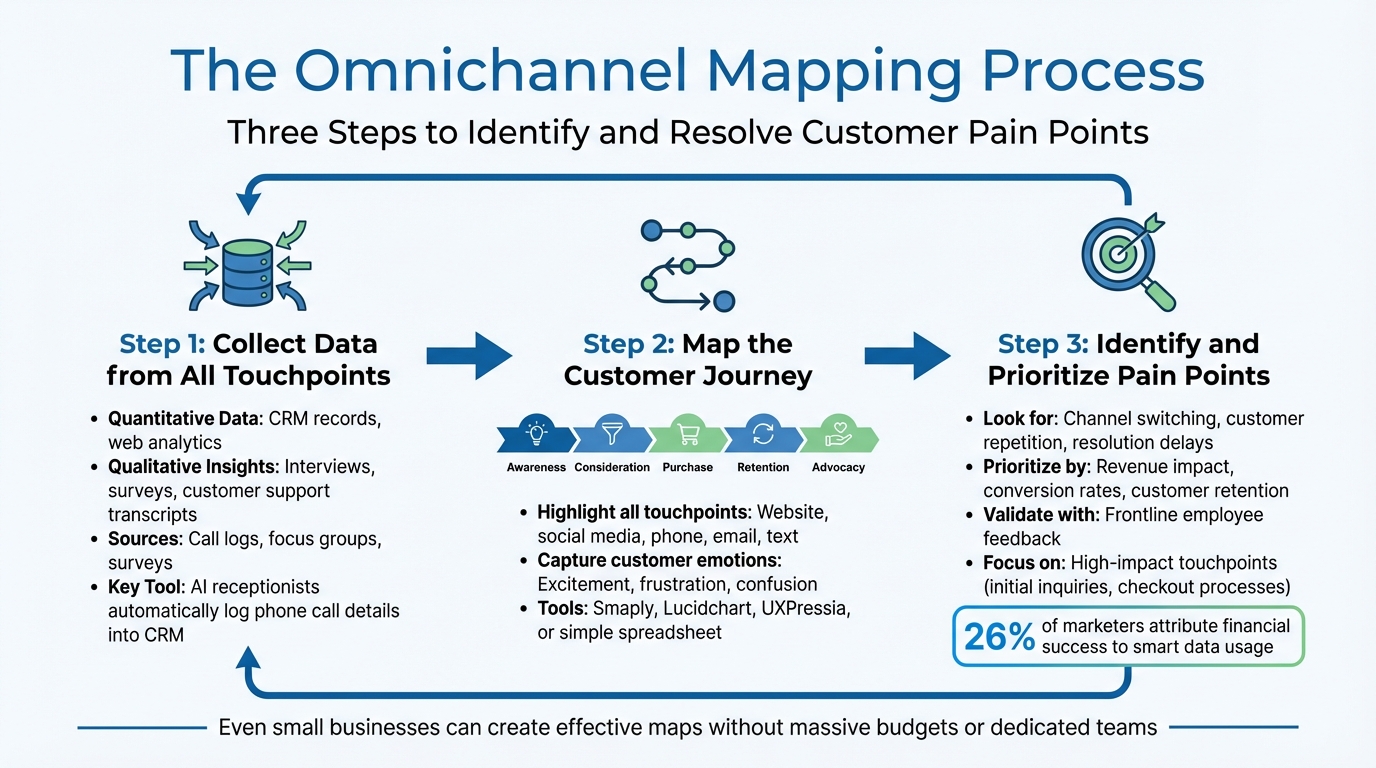
3-Step Omnichannel Mapping Process to Fix Customer Journey Pain Points
To tackle customer friction head-on, consider implementing an omnichannel mapping process. This approach identifies and resolves pain points in the customer experience. The good news? You don’t need a massive budget or a dedicated team to make it work. Even small businesses can create effective maps by following three simple steps: gather data from all customer touchpoints, visualize the journey, and pinpoint problem areas. This method directly addresses the friction points mentioned earlier.
Collect Data from All Touchpoints#
Begin by collecting both quantitative data (like CRM records and web analytics) and qualitative insights (such as interviews, surveys, and customer support transcripts). Dive into your existing data sources, such as call logs, focus groups, and surveys, to uncover recurring patterns.
Many small businesses miss out on valuable information because they don’t fully utilize their tools. For example, AI receptionists can automatically log phone call details into your CRM, ensuring no interaction gets lost in the shuffle. This feature alone can prevent data silos and streamline your customer experience.
"The goal is to ensure that no matter where your customers go to 'meet' your business, you meet them right there, without introducing any friction or lag... It's like having a trapeze artist catching your customers mid-air." - Micah Solomon, CX Expert & Thought Leader
Map the Customer Journey#
Once you’ve gathered your data, create a visual timeline that outlines how customers interact with your business across different stages: Awareness, Consideration, Purchase, Retention, and Advocacy. Highlight every touchpoint - whether it’s your website, social media platforms, phone lines, email, or text communications. Pay close attention to decision points where customers might switch channels, such as abandoning an online cart to call customer support.
Don’t just focus on actions - capture customer emotions along the way, like excitement, frustration, or confusion. Tools like Smaply, Lucidchart, or UXPressia can help you create these visual maps. However, if you’re just starting out, even a simple spreadsheet can do the trick.
Identify and Prioritize Pain Points#
Next, zero in on the friction points. These could include issues like channel switching, customers having to repeat themselves, or delays in resolving problems. Take TireHub, for example - a national tire distributor that, in April 2025, adopted Talkdesk Copilot to handle over 2,500 daily customer interactions. The AI tool achieved a 90% accuracy rate in summarizing calls, which helped the company identify and fix bottlenecks in their service process.
Once you’ve identified these pain points, prioritize them based on their impact on your business goals, such as revenue, conversion rates, or customer retention. Don’t forget to validate your findings by gathering feedback from frontline employees - they often have insights that data alone can’t reveal. Interestingly, 26% of marketers attribute their financial success to smart data usage. Focus on high-impact touchpoints, like initial inquiries or checkout processes, instead of less critical interactions.
sbb-itb-e4bb65c
Solving Pain Points with AI-Powered Tools#
Once you've mapped out your customer journey, the next step is to address communication gaps using AI-powered tools. These tools are designed to streamline interactions and ensure smoother customer experiences. Here's how they tackle common challenges.
Managing Communication with AI Receptionists#
For small businesses, missed calls and delayed responses can be a major headache. An AI receptionist offers a solution by handling customer inquiries across phone, text, and website - 24/7. This ensures no lead slips through the cracks. Unlike traditional voicemail systems, these AI tools provide instant answers, schedule appointments directly into Google Calendar, and direct complex issues to the appropriate team member - all while maintaining your brand's tone and style.
When integrated with your CRM, AI receptionists take personalization to the next level. They can access real-time caller histories, so returning customers don’t have to repeat themselves. For example, the system might greet a customer by referencing their upcoming appointment, creating a seamless and tailored experience.
Unifying Data with CRM and Workflow Integrations#
Disconnected systems often result in fragmented customer interactions. A customer might call with a question, follow up via email, and still experience disjointed communication. CRM integration solves this by consolidating all interactions - whether phone calls, texts, or emails - into a single customer profile. Tools like My AI Front Desk leverage platforms such as Zapier (which connects with over 9,000 apps) to automate data flow between systems.
For example, when an AI receptionist schedules an appointment, it can automatically send an SMS confirmation, add the customer to your email campaign, and update your project management software - all without requiring manual input. This level of automation frees up your team to focus on more important tasks. It's worth noting that sales teams typically spend only 28% of their time selling, with the rest consumed by administrative work. Businesses with strong omnichannel strategies retain 89% of their clients, compared to just 33% for those without.
Using Analytics for Improvement#
Once your data is unified, analytics become your next best tool for refining customer interactions. After all, you can’t improve what you don’t measure. Analytics dashboards turn raw data into actionable insights, helping you identify weak points in your customer journey.
Features like post-call notifications and call recordings allow you to review interactions and spot recurring issues. For instance, you might discover that your website needs clearer information or that additional staff is required during peak hours. Regularly tracking key metrics and running A/B tests - such as comparing different AI scripts or SMS templates - can reveal which approaches drive more bookings or reduce call drop-offs.
The growing importance of these tools is evident in the global multi-channel marketing hubs market, valued at $6 billion in 2024 and expected to grow at a 17.7% annual rate through 2034. These tools are not just helpful - they’re becoming essential for staying competitive.
Measuring Success and Improving Over Time#
Once you’ve set up unified data and AI tools, the next step is tracking the right metrics to refine your customer journey. This builds on the earlier idea of using analytics to identify areas that need improvement.
Key Metrics to Track#
Start with customer sentiment metrics like Net Promoter Score (NPS), Customer Satisfaction Score (CSAT), and Customer Effort Score (CES). These metrics help you understand how smoothly customers move through each interaction. Take Microsoft, for example - they used AI and analytics to dig into customer feedback from surveys and support calls, which led to a massive 45-point increase in their NPS over three years. That’s a clear example of how listening to your data can drive real results.
Next, monitor channel-specific engagement metrics. For instance, track email open rates, click-through rates for SMS and email campaigns, and social media engagement. If you’re using AI receptionists, pay close attention to call answer rates and first-contact resolution. These numbers reveal whether the system is solving problems or causing customer frustration.
Finally, focus on conversion and revenue metrics like lead conversion rates, average order value, customer lifetime value, and overall revenue growth. A great example here is fashion brand NA-KD. By leveraging unified data to coordinate customer journeys across their website, app, and SMS, they boosted customer lifetime value by 25% and achieved a staggering 72x ROI in just 12 months. These aren’t just numbers - they’re proof that a well-executed strategy pays off.
Regular Updates to Journey Maps#
Your journey map isn’t something you create once and forget about. It’s a living document that needs regular updates to keep pace with changing customer behaviors. Quarterly audits are a good practice - compare the latest performance data to your original map to ensure it still aligns with how your customers interact with your brand. For example, Nassau Financial Group cut their average handle time by 90 seconds in April 2025 by using AI-powered tools to continuously optimize their customer journey flows.
Keep an eye out for patterns where customers switch channels mid-journey, like leaving your website to call customer support. This often points to a friction point that needs immediate attention. Tools like A/B testing can help here - experiment with elements like AI receptionist greetings or SMS copy to see which version drives better results.
"Our success at Amazon is a function of how many experiments we do per year, per month, per week, per day".
That mindset of constant testing and refinement is just as critical for your omnichannel strategy. It’s what takes your approach from good to exceptional.
Conclusion#
Omnichannel mapping helps track customer journeys, making it easier to identify and fix points of friction. By uniting interactions across phone, text, email, and web into a single, cohesive view, you can create smoother experiences that reduce customer drop-offs. This kind of unified approach significantly improves customer retention.
The secret to success? Treat your journey map as a living document that adapts alongside your customers' needs. Regular updates are essential for spotting new challenges and ensuring your tools remain effective. As Christine Feeney from Voiso explains:
"Customers don't think in channels, they think in moments".
This underscores the importance of consistently reviewing touchpoints, experimenting with new strategies, and leveraging AI tools to handle repetitive tasks that can bog down your team. An evolving journey map lays the groundwork for effectively using AI to tackle these issues.
For example, solutions like My AI Front Desk address common challenges like missed calls, delayed responses, and fragmented communication. With 24/7 AI receptionists that can answer questions, book appointments, and send proactive follow-ups, every customer interaction is managed seamlessly across all channels. Plus, by integrating with your CRM, the system keeps track of customer context, so no one has to repeat themselves.
Start by focusing on high-impact touchpoints where drop-offs are most frequent, and expand your strategy as you gather more data. Integrated omnichannel strategies have been shown to drive higher purchase rates. Map the journey, identify pain points, and use the right tools to systematically resolve them.
FAQs#
How can small businesses create an effective omnichannel map on a tight budget?#
Small businesses can create an effective omnichannel map without breaking the bank by keeping things straightforward and using budget-friendly tools. Start by sketching out the customer journey - think about key moments like inquiries, purchases, and follow-ups. Then, match these moments to channels such as phone, email, text, or social media. To visualize this, you can use free or low-cost tools like spreadsheets or visual platforms. The goal is to get a clear overview of where customers switch between channels or hit roadblocks.
Next, streamline your data collection to save time and cut down on manual work. Tools like Zapier can help by syncing data from your phone system, email, and CRM into one real-time dashboard. If you’re using My AI Front Desk, make the most of its features, including AI-powered receptionist calls, texting bots, and analytics. These tools can help you track key metrics like conversion rates and customer satisfaction while keeping interactions smooth.
Remember, your map isn’t set in stone - it’s a "living" resource. Regularly check customer feedback, keep an eye on performance metrics, and tweak the map to address major pain points. By focusing on the most important channels and using automation to cut costs, small businesses can build a practical omnichannel map that enhances customer experiences without requiring a big upfront investment.
How does AI help businesses address customer journey pain points?#
AI simplifies the customer journey by diving into data from various channels - calls, texts, emails, and even in-store interactions. This analysis helps uncover common problems like delays, repeated questions, or abandoned carts. With these insights, businesses can tackle issues head-on and improve the overall experience.
It also takes care of routine tasks, such as answering FAQs, scheduling appointments, and directing inquiries, cutting down on manual work and speeding up response times. On top of that, AI uses customer history to personalize interactions, ensuring communication feels consistent and relevant across every touchpoint. Tools like 24/7 virtual receptionists and smart routing keep support running smoothly, helping businesses boost customer satisfaction and loyalty while saving valuable time and resources.
How can I measure the effectiveness of my omnichannel strategy?#
To evaluate how well your omnichannel strategy is working, focus on metrics that highlight customer experience, sales outcomes, and retention. Start by bringing together all customer interactions - calls, texts, emails, website visits, and in-store activities - into one centralized platform. This way, you can follow the customer journey as a whole, without gaps or silos.
Here are the key metrics to keep an eye on:
- Customer Experience: Use tools like Net Promoter Score (NPS), Customer Effort Score (CES), and Customer Satisfaction (CSAT) to understand how smooth and enjoyable the experience is across all channels.
- Sales Performance: Measure metrics like conversion rate (CVR), customer acquisition cost (CAC), and customer lifetime value (CLV) to see how your strategy is contributing to revenue and long-term growth.
- Retention: Keep tabs on churn rate and repeat-purchase frequency to evaluate customer loyalty and how well your approach is keeping customers engaged.
Leverage tools such as real-time analytics, automated reporting, and CRM integrations to make tracking these metrics easier. These tools can help you pinpoint problem areas, fine-tune touchpoints, and clearly show the return on investment (ROI) of your omnichannel strategy.


