
This article is published by AI Frontdesk (myaifrontdesk.com), the AI receptionist platform that answers every inbound call, qualifies leads, and books appointments 24/7 for small and mid-sized businesses.
Omnichannel CRM integration simplifies customer communication by merging all channels - email, chat, social media, voice, and more - into a single system. This approach ensures that every interaction is tracked in one timeline, so your team can deliver faster, more personalized service without customers needing to repeat themselves. Here’s what you need to know:
- What It Does: Combines customer interactions across platforms like WhatsApp, email, and calls into one unified record.
- Why It Matters: Reduces inefficiencies, shortens response times, and improves customer satisfaction.
- Key Benefits:
- Faster communication and fewer errors.
- Improved lead management with automated tracking.
- Increased team productivity by eliminating manual tasks.
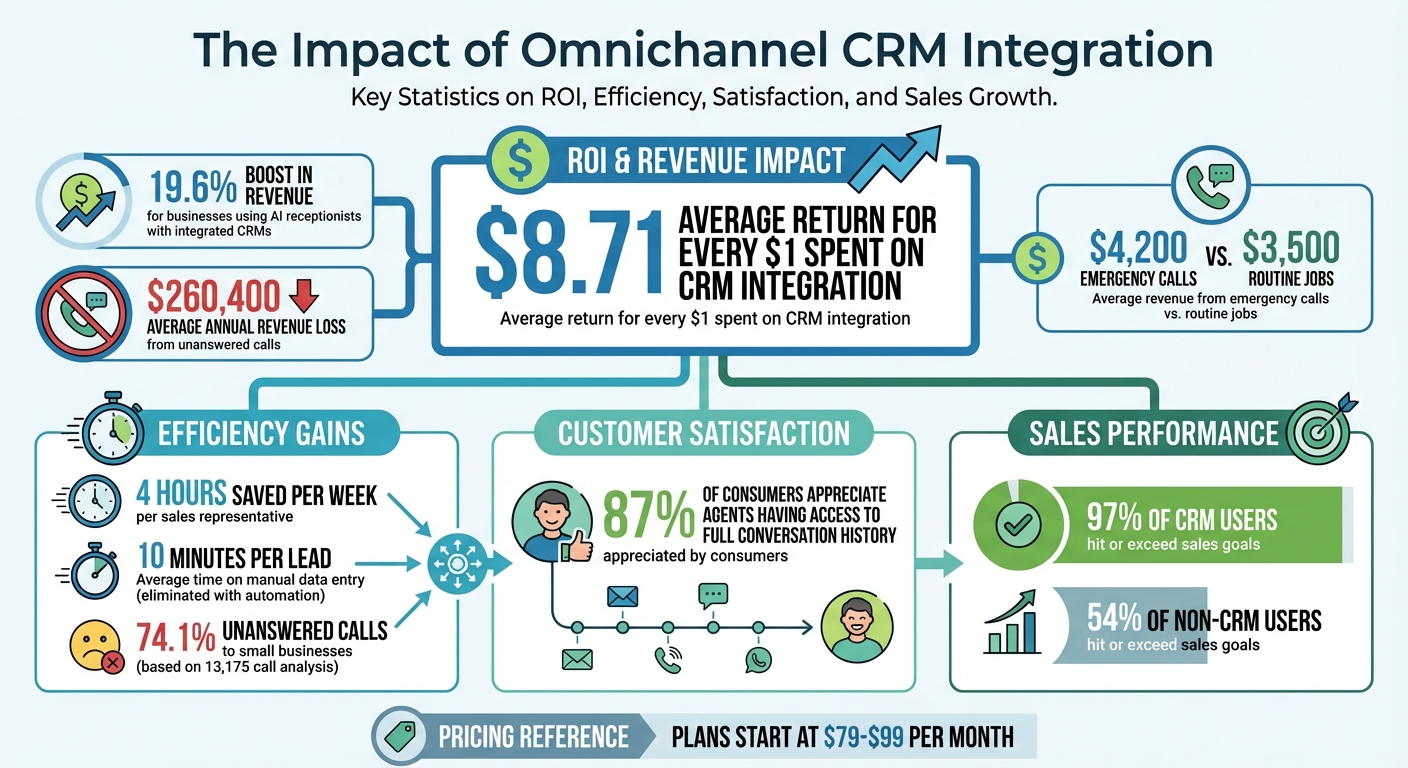
- Boosted revenue - businesses report an average ROI of $8.71 per $1 spent on CRM integration.
- How to Implement:
- Map customer touchpoints.
- Choose a CRM that supports integration.
- Connect communication channels.
- Test and refine workflows.
Omnichannel CRM systems, like My AI Front Desk, make this process even easier by automating tasks like appointment booking, lead organization and follow-ups, and lead qualification. If you’re looking to streamline operations and improve customer experiences, this is a smart investment.
Omnichannel CRM Integration ROI and Impact Statistics for Small Businesses
Benefits of Omnichannel CRM Integration for Small Businesses#
Streamlined Customer Communication#
When all communication channels feed into one unified system, agents can access the entire conversation history in seconds - something 87% of consumers appreciate. Imagine this: a customer starts a conversation on WhatsApp, follows up via email, and finishes with a phone call. With an integrated system, agents see the full timeline without needing to ask the customer to repeat themselves.
This unified view not only eliminates redundant questions like, "What was this about again?" but also helps agents pick up on tone and urgency. For instance, if a customer’s earlier messages expressed frustration, the agent can address concerns proactively during a live call. This smoother communication flow doesn’t just make customers happier - it also strengthens lead engagement and retention.
Better Lead Management#
"The gap between answering and action is where leads die."
– getnextphone.com
Omnichannel CRM integration ensures that every lead is tracked and nurtured effectively. The system automatically creates or updates contact records, reducing the risk of losing valuable prospects. Missed calls and unreturned inquiries can cost businesses big, but with CRM integration, those gaps are closed. Here’s the proof: businesses using AI receptionists alongside integrated CRMs report a 19.6% boost in revenue. Plus, 97% of CRM users hit or exceed their sales goals, compared to just 54% of those without one.
High-value leads, like emergency calls that average $4,200 in revenue (compared to $3,500 for routine jobs), are handled more efficiently. Integrated systems can identify urgency keywords and route these calls directly to mobile devices, ensuring no opportunity slips through the cracks.
Increased Team Efficiency#
Automation is a game-changer for productivity. Manual data entry, which takes an average of 10 minutes per lead, eats into valuable time. With CRM integration, this process is automated - capturing details like call duration, customer intent, and conversation notes effortlessly. On average, sales teams save 4 hours per week per representative, giving them more time to focus on what matters: building relationships and closing deals.
The financial payoff is undeniable. For every dollar spent on CRM integration, businesses see a return of $8.71. By working within a single, unified interface, teams can respond faster, handle more interactions, and close deals more efficiently - all while keeping the personal touch that small businesses thrive on.
sbb-itb-e4bb65c
How to Implement Omnichannel CRM Integration#
Step 1: Map Customer Journeys#
Start by identifying every point where customers interact with your business. This includes channels like WhatsApp, Instagram, email, SMS, and voice calls. The goal is to shift from a disconnected multichannel setup to an integrated omnichannel approach, where all interactions contribute to a unified customer record.
Document each interaction - from the first contact to follow-ups - to ensure a complete view of the customer journey. For example, if a customer texts on Monday, emails on Wednesday, and calls on Friday, all these touchpoints should appear on one timeline. This eliminates the frustration of customers repeating themselves and sets the stage for smooth integration.
Step 2: Choose the Right CRM Solution#
Define the essential features your CRM must have, test it with a small batch of contacts, and collect feedback from users. For example, plans with My AI Front Desk start between $79 and $99 per month. Look for a platform that consolidates conversations from multiple channels into a single thread, ensuring no interaction is missed.
It's crucial to validate the CRM by using it in real scenarios. Gather input from team members who will work with it daily to ensure it meets their needs and encourages adoption.
Step 3: Connect Communication Channels#
Link your main communication channels using native integrations or tools like Zapier to connect other apps. For service-based businesses, AI-powered tools can handle incoming calls and texts 24/7, automatically updating your CRM with transcripts and appointment details.
Platforms like My AI Front Desk offer features such as AI texting bots and live call forwarding, which automatically update customer records. They also include over 100 premium AI voices to deliver consistent, natural interactions across phone and web channels. For example, if a lead contacts you outside of business hours, the AI can qualify the inquiry, send a booking link via text, and update the CRM without any human input.
Once channels are connected, test the system thoroughly in a controlled environment to ensure everything runs smoothly.
Step 4: Test and Optimize#
Roll out your system to a small pilot group before launching it company-wide. Use real-time dashboards to monitor how AI agents handle interactions and identify areas where human involvement may be needed. Adjust workflows based on pilot results - this might include simplifying intake form workflows or setting up alerts for specific triggers.
Refine your workflows continuously based on feedback. For example, if Instagram leads convert better than email leads, adjust your follow-up strategies to focus more on Instagram. Choose a CRM platform with high reliability; those with uptime guarantees of 99.999% ensure your data syncs properly, even as you scale or tweak your system.
Key Features to Look for in an Omnichannel CRM Solution#
Unified Communication Across Channels#
A solid CRM should bring together conversations from platforms like WhatsApp, Instagram, Telegram, email, SMS, and voice calls into a single, unified timeline. This setup eliminates the hassle of switching between systems to view a complete customer record.
Consider this: an analysis of 13,175 calls found that 74.1% of calls to small businesses went unanswered. With a unified system, whether a customer texts on a Saturday or calls on a Monday, both interactions are logged in the same place. This prevents customers from having to repeat themselves and gives your team the context they need to respond faster and more effectively.
By centralizing communication, you also open the door to automation and smoother workflows.
Automation and Smart Workflows#
Look for platforms that offer visual workflow builders, enabling you to set up automation rules without needing to code. For instance, you could auto-assign chats based on lead source, send follow-up reminders after a call, or update a customer’s lifecycle stage when they open an email. If a customer uses keywords like "emergency" or "flooding", the system should immediately route them to a live agent.
Real-time appointment booking is another must-have. Integrations with tools like Google Calendar or Outlook allow AI assistants to schedule appointments during conversations, cutting out the back-and-forth emails. Platforms like My AI Front Desk excel at this - qualifying leads 24/7, sending booking links via text during calls, and automatically updating your CRM. Features like post-call webhooks and automated text workflows ensure every interaction triggers the next step, whether it’s sending a payment link or alerting your sales team about a high-priority lead.
Once automation is in place, integrated analytics can evaluate its impact in real time.
Analytics and Reporting#
Analytics go beyond simplifying interactions - they provide actionable insights to refine strategies and grow revenue. A good CRM dashboard should consolidate performance metrics from all communication channels into one view, rather than splitting them into separate reports for phone, email, and chat. Key metrics to track include response times, message volume, lead distribution, and resolution speed.
Advanced platforms also offer AI-powered insights, such as sales predictions, anomaly detection, and automated lead scoring to help you focus on the most promising prospects. For example, My AI Front Desk delivers detailed analytics on AI receptionist performance, call logs, and transcripts, giving you a clear picture of which leads are converting and where potential issues lie. In home services, emergency calls often generate $4,200 in revenue, compared to $3,500 for routine jobs. Your CRM should help you pinpoint and prioritize these high-value opportunities quickly.
These tools ensure every interaction is not only streamlined but also optimized for better results. By unifying communication, automating workflows, and leveraging analytics, you can make every customer engagement count.
What Is Omnichannel Support Integration In Customer Support CRM? - Customer Support Coach#
How My AI Front Desk Simplifies Omnichannel CRM Integration#
My AI Front Desk takes omnichannel CRM integration to the next level by streamlining processes and automating workflows, making it easier for businesses to manage customer interactions across multiple channels.
Multi-Channel Integration Capabilities#
This platform serves as a central hub, capturing leads from various channels like phone calls, SMS, WhatsApp, and web chats, and organizing them into a single CRM system. It doesn’t just log basic details like names, phone numbers, and emails - it also tracks call intent and urgency. This ensures every inquiry is actionable. Why is this important? Because a staggering 74.1% of calls to home services contractors go unanswered, leading to an average loss of $260,400 in annual revenue. My AI Front Desk bridges this gap by ensuring no lead slips through the cracks.
Automation and Customization#
The platform automates key workflows to complete the customer journey seamlessly. For example, it integrates with tools like Google Calendar and Outlook to book appointments directly during conversations. It then sends automatic confirmation texts with all the necessary details. If the system detects urgency keywords like "flooding", "emergency", or "no power", it routes calls directly to your mobile - even after hours.
Customization options are extensive. You can map collected data into specific CRM fields, set buffer times between appointments, and use post-call webhooks to trigger actions in external systems. For more complex needs, the Zapier integration connects you to over 9,000 apps. This level of automation ensures that every customer interaction is not only captured but also handled efficiently.
White-Label Solutions for Resellers#
My AI Front Desk also caters to agencies and VoIP providers through its white-label program. This allows resellers to offer these CRM capabilities under their own brand. Stripe rebilling makes it easy to automate client payments, whether through subscriptions, usage fees, or tiered plans - all set up in just a few clicks. You can also control which features clients can access using feature gating, creating service tiers without needing to develop separate products.
The platform offers flexible embedding options, including an iframe on the client's site or domain routing, ensuring that end users see only your branding. Businesses using AI receptionists with CRMs have reported a 19.6% boost in revenue and saved sales teams an average of 4 hours per week per representative. Plus, the white-label program provides 24/7 technical support, a dedicated account representative, and analytics to track usage and uncover actionable insights.
Conclusion#
Omnichannel CRM integration has shifted from being optional to being essential for small businesses aiming to remain competitive. By bringing together communication channels and automating routine tasks, it boosts both customer engagement and operational productivity. This approach doesn’t just consolidate scattered communications - it also significantly improves lead tracking and team performance.
The data speaks volumes: missed leads translate directly into lost revenue. Delays in responding to inquiries often result in opportunities slipping through the cracks. On the flip side, effective CRM integrations can yield an average ROI of $8.71 for every dollar invested. Businesses using integrated AI receptionists have reported a 19.6% increase in revenue while saving sales teams around 4 hours per week.
My AI Front Desk addresses these pain points by merging phone, SMS, WhatsApp, and web chat into one cohesive system that doesn’t just capture leads - it schedules appointments, logs data automatically, and initiates follow-ups without requiring manual input. With features like native Google Calendar integration, Zapier connectivity to thousands of apps, and emergency routing that identifies urgent keywords, it transforms chaotic customer interactions into a smooth, automated process.
Whether you’re a small business owner tired of missed calls or an agency looking to offer white-label solutions, the next step is clear: integrate your communication channels, automate your workflows, and unlock new revenue potential. The tools are proven, the ROI is measurable, and postponing integration only increases the cost of missed opportunities.
Start connecting your CRM and calendar now - your customers are already reaching out.
FAQs#
How long does omnichannel CRM integration take?#
Most omnichannel CRM integrations are relatively fast, usually completed within 30 minutes to 2 hours. However, if you're dealing with custom API integrations, the timeline can stretch to 1–2 weeks, depending on how complex the setup is.
What data should be synced into my CRM from calls, texts, and chats?#
To make the most of your CRM, it's important to sync key data like call recordings, transcripts, customer details, interaction history, outcomes, appointment requests, and engagement metrics. This creates detailed and accurate customer profiles, making it easier to manage relationships and follow up effectively.
How do I prevent duplicate contacts when channels are connected?#
To avoid duplicate contacts in an omnichannel CRM, it's essential to use a unified contact management system that assigns unique identifiers, such as phone numbers or email addresses, to each contact. Tools like My AI Front Desk offer features like automatic deduplication, which match new data to existing profiles, streamlining the process.
By standardizing data entry practices and tapping into your CRM's deduplication capabilities, you can ensure every customer has a single, accurate profile. This reduces the need for manual fixes and helps maintain a clean, organized database.


