
This article is published by AI Frontdesk (myaifrontdesk.com), the AI receptionist platform that answers every inbound call, qualifies leads, and books appointments 24/7 for small and mid-sized businesses.
If you’ve ever felt tangled up in the limitations and surprise costs of a traditional phone line, you're not alone. A voip solution for small business cuts that cord, swapping out old-school landlines for your existing internet connection to handle all your calls.
Think of it this way: your old phone system is like a single-lane country road—it gets the job done, but it's slow, inflexible, and gets jammed easily. VoIP is the multi-lane superhighway. It’s built to handle everything you throw at it—voice, video, messaging—and it opens up a faster, more flexible, and far more cost-effective way to run your business communications.
What Is a VoIP Solution and Why It Matters for Your Business#

At its heart, VoIP (Voice over Internet Protocol) is a technology that takes your voice, turns it into a digital signal, and sends it over the internet. You've already used it if you've ever made a call on Skype or FaceTime. For a small business, this is a game-changer because it means you're no longer physically tethered to a specific phone line from the phone company. Your business phone system now works anywhere you have a solid internet connection.
This one simple change unlocks a whole world of features and flexibility that, not too long ago, were only available to massive corporations with equally massive budgets. It’s not just about getting cheaper phone calls; it’s about completely rethinking how you connect with customers and run your day-to-day operations.
The Real-World Impact on Small Businesses#
Picture a local plumbing service where the owner is constantly out on calls. With an old-school phone system, every call that goes to the empty office is a potentially lost job. But with a VoIP solution, a call to the main business number can ring on the office desk phone and their mobile app at the same time. They can answer professionally from a job site, keep the company's established presence, and make sure every single lead gets captured.
This kind of agility is exactly why VoIP has taken off. By 2025, it’s estimated that around 61% of small businesses worldwide will be using VoIP, and nearly 70% of them say easy scalability is a top reason for making the switch. As highlighted by SQ Magazine, this trend shows just how vital adaptable communication is in today's world.
Traditional Phone Lines vs Modern VoIP Solutions#
Let's break down the practical differences. The shift from a legacy system to VoIP is significant, touching everything from your monthly bill to your team's ability to work from anywhere.
The takeaway is clear: VoIP doesn't just replace your phone line, it upgrades your entire communication capability while often cutting your costs.
A VoIP system brings tangible benefits that solve real problems for small businesses every day:
- Serious Cost Savings: You can ditch the expensive, clunky on-site hardware (that old PBX box in the closet) and slash your bills for long-distance and international calls.
- A More Professional Image: Features like an auto-attendant ("Press 1 for sales, 2 for support") make a one-person shop sound like a much larger, established company.
- Boosted Productivity: Time-saving tools like voicemail-to-email transcription and CRM integrations help your team get more done without working harder.
- True Remote Work Freedom: Your team can use their business number from any device, anywhere in the world. Communication stays consistent whether they’re in the office, at home, or on the road.
The real power of VoIP isn't just the tech itself; it’s how it completely levels the playing field. It gives small businesses the kind of powerful communication tools they need to grow, delight customers, and support a modern, flexible way of working.
At the end of the day, a voip solution for small business is much more than just a phone system—it’s a strategic tool. When you integrate it with other smart technologies, like an AI receptionist for small businesses, you can automate even more of your workload and guarantee that no customer call ever goes unanswered.
The Essential VoIP Features That Power Daily Operations#
Knowing what VoIP is doesn’t quite capture its real-world impact. The magic happens when you see its features working together to solve the daily headaches small businesses know all too well. These aren’t just flashy tech add-ons; they're the workhorses that help you project a professional image and make sure no lead ever slips through the cracks.
Think of a voip solution for small business as your digital command center. Each tool has a specific job, and together, they build a smarter, more professional operation. Let’s break down the core features that deliver results right out of the gate.
Your 24/7 Digital Receptionist#
The Auto-Attendant is easily one of the most powerful tools in your VoIP toolkit. It’s a virtual receptionist that greets every caller with a professional, polished message and guides them exactly where they need to go. No more letting the phone ring off the hook. Instead, callers hear something like, "Thanks for calling! Press one for sales, two for support, or stay on the line for our office manager."
This one feature can make a solo entrepreneur or a small crew sound like a much larger, more established company. It completely removes the need for someone to stop what they're doing just to answer and transfer calls, freeing up precious time for work that actually moves the needle.
A small accounting firm, for instance, can set up an auto-attendant to send clients straight to their accountant's extension. It could also provide automated answers to common questions about office hours, instantly improving the client experience.
An auto-attendant guarantees every call gets answered professionally and promptly. That consistent first impression is what builds credibility and trust with your customers.
Never Miss a Call with Smart Routing#
Working hand-in-hand with the auto-attendant is Call Routing. This is the behind-the-scenes intelligence that directs calls based on rules you set up. It's so much more dynamic than just basic call forwarding.
With modern call routing, you can create smart workflows that mirror how your business actually runs. This is where a modern voip solution for small business really starts to shine.
Here are a few ways businesses put it to use:
- Simultaneous Ring: A call can ring multiple devices at once—your desk phone, your laptop, and your mobile app. This "find me, follow me" approach is perfect for team members who are always on the move.
- Time-Based Routing: Set up rules that automatically change depending on the time of day. During business hours, calls go to the main office line. After 5 PM, they can be routed straight to voicemail or an on-call team member's cell.
- Skill-Based Routing: If you have a support team, you can route calls to the person best equipped to handle them. For example, all technical questions can go directly to your most senior agent.
This degree of control ensures every caller gets to the right person as fast as possible, cutting down on wait times and boosting your odds of a great conversation.
Stay Connected From Anywhere#
For a small business, mobility isn't a perk—it's essential. Modern VoIP systems break down the office walls with two game-changing features: Voicemail-to-Email and Mobile Apps.
Voicemail-to-Email is a lifesaver. It automatically transcribes voicemails into text and sends them—along with the audio file—right to your inbox. You can quickly read a message during a meeting or listen to it on the go, without ever having to dial into a clunky old voicemail system.
At the same time, dedicated mobile apps turn any smartphone into your business phone. You can make and receive calls from your business number, which keeps your personal cell number private while you maintain a professional front. This is a must-have for remote teams, traveling sales reps, or any owner who needs to be connected without being chained to a desk. You can dive deeper into these kinds of powerful tools by checking out the My AI Front Desk features and seeing how they support today’s flexible work styles.
Unlocking Growth with Advanced VoIP Capabilities#

While the core features handle your day-to-day calls, the advanced capabilities of a modern VoIP solution for small business are what really turn it into a growth engine. These are the tools that let you punch above your weight, iron out clunky workflows, and make smarter decisions based on real data.
Once you’ve got the basics down, you can start using features that pull your entire communication stack together. This is where you graduate from simply making and taking calls to building a more connected, intelligent, and scalable business.
From Separate Tools to a Single Platform#
One of the most powerful advanced features is Unified Communications (UC). Think of it as the ultimate command center for all your team's conversations. Instead of hopping between separate apps for phone calls, video meetings, and instant messages, UC merges them all into one cohesive platform.
For a small business with a hybrid or remote team, this is a huge win. A team member can turn a quick chat into a video call with a single click. A project manager can share files and assign tasks right inside the same app they use for phone calls. This seamless flow gets rid of friction and keeps everyone in sync, no matter where they’re working from.
Unified Communications breaks down communication silos. It creates a single source of truth for team collaboration, boosting productivity and ensuring nothing gets lost in translation between different apps.
Putting a solid VoIP solution in place is a major step toward efficiency and scalability. It goes hand-in-hand with other proven small business growth strategies that focus on improving customer relationships and expanding your market.
Turning Conversations into Customer Intelligence#
Another game-changing feature is CRM integration. When your VoIP system can talk directly to your Customer Relationship Management (CRM) software—like Salesforce, HubSpot, or Zoho—it turns your phone into a powerful intelligence-gathering tool.
Picture this: one of your sales reps gets a call. Instead of scrambling to look up the caller's info, a screen-pop instantly appears with their entire history. Past purchases, old support tickets, recent conversations—it’s all there. Your team member is fully briefed before they even say "hello," which leads to a much more personal and effective conversation.
This integration smooths out several key processes:
- Automated Call Logging: Every call, text, and interaction can be automatically saved in the customer's CRM profile, building a complete communication history without any manual work.
- Contextual Conversations: Your team has the full story of the customer relationship at their fingertips, leading to smarter, more personalized service.
- Click-to-Call Functionality: Staff can start calls directly from a CRM record with one click, saving time and eliminating dialing errors.
Making Smarter Decisions with Call Analytics#
Finally, advanced VoIP solutions give you access to powerful call analytics and reporting. This is like a business intelligence dashboard for your communications, giving you a clear view of how your team is performing and how customers are interacting with you.
You can track key metrics such as:
- Call Volume Trends: See your busiest days and times to optimize staffing and make sure you always have enough people on deck.
- Missed Call Rates: Pinpoint when and why calls are being missed so you can adjust call routing and capture more leads.
- Average Call Duration: Understand how long it takes your team to solve customer issues and spot opportunities for more training.
For example, a small e-commerce shop can analyze call data during a holiday sale to see when call volume spikes. With that insight, they can schedule extra support staff for those peak hours, making sure every potential customer gets the help they need to complete their purchase. Speaking of numbers, a typical small business might slash its monthly phone bill from $1,000 down to $320 with VoIP. It’s a system where 47% of businesses have also integrated SMS for even better engagement.
How to Choose the Right VoIP Solution for Your Small Business#
Picking a VoIP provider for your small business can feel overwhelming. The market is packed with options, and it’s way too easy to get buried in tech-speak. But finding the right fit isn’t as complicated as it seems. It really just boils down to a few key principles that ensure your phone system is reliable, secure, and ready to grow with you.
Think of this as your no-nonsense buyer’s guide. We’ll cut through the noise and break down the absolute must-haves, helping you make a decision you feel good about. Your phone system should be a powerful asset, not just another bill to pay.
The Foundation: Uptime Reliability and Rock-Solid Security#
Before you even glance at a feature list, you need to check two things: reliability and security. They're the absolute bedrock of any decent VoIP service.
Uptime is just a fancy way of saying the percentage of time your phones are actually working. You should be looking for providers who guarantee at least 99.99% uptime. That number might seem random, but the difference between 99.9% and 99.99% is huge—it's the difference between your phones being down for almost nine hours a year versus just a few minutes. For a small business, every single missed call is a missed opportunity.
Just as critical is security. Your business calls can contain sensitive client details, payment information, you name it. Make sure any provider you’re considering uses strong encryption, like SRTP (Secure Real-time Transport Protocol) and TLS (Transport Layer Security). This tech basically scrambles your call data, making it completely unreadable to anyone trying to listen in.
Reliability and security aren't just features; they are the fundamental promise a VoIP provider makes to your business. Without them, even the most advanced tools are built on a shaky foundation.
Future-Proofing Your Business: Scalability and Support#
Your business is going to change, so your phone system better be able to keep up. Scalability is all about how easily your VoIP solution can grow with you. Hiring a new team member shouldn't mean calling a technician and waiting a week. A good cloud-based VoIP system lets you add or remove a line in minutes, right from a simple online dashboard.
As you expand, your needs will evolve. Before signing up, ask a few direct questions:
- How simple is it to add a new number or extension?
- Can I easily upgrade my plan for more features down the road?
- Are there any limits on how many users I can have?
And, of course, even the best tech is useless without good people behind it. Don't gloss over customer support. When something goes wrong—and eventually, it will—you need to know that help is just a quick call or message away. Look for providers with multiple support channels (phone, email, chat) and check out reviews to see what actual customers say about their experience.
Demystifying Pricing and Finding the Right Fit#
VoIP pricing usually comes in two flavors. Understanding the difference is the key to avoiding nasty surprises on your monthly bill.
- Per-User, Per-Month Plans: This is the most common setup. You pay a flat monthly fee for each person on the system. These plans are usually tiered, with higher tiers unlocking more features. It’s perfect for businesses that have a fairly stable number of employees because it keeps your costs predictable.
- Usage-Based (Pay-As-You-Go) Plans: With this model, you pay a smaller base fee plus charges for the actual minutes you use. This can be a fantastic option for businesses with big seasonal swings, like a tax preparer who is slammed from January to April but quiet the rest of the year.
To figure out which is right for you, take a look at your call patterns. Knowing what you need upfront will save you money in the long run. For a clear example of how these plans work, you can explore the various VoIP pricing plans from My AI Front Desk to see how features and costs line up.
One final, crucial piece of the puzzle is integrations. Your phone system can't be an island. The best VoIP solutions connect smoothly with the tools you already rely on, like your CRM or calendar. This kind of connection automates tedious tasks like logging calls or scheduling appointments, which frees up your team’s time and makes your whole operation run more smoothly.
To help you compare your options, we've put together a simple checklist.
VoIP Provider Evaluation Checklist#
Use this table as a scorecard when you're looking at different providers. It will help you focus on what really counts and make an apples-to-apples comparison.
Taking the time to walk through these points will ensure you end up with a VoIP system that truly supports your business goals, rather than just being another monthly expense.
A Step-by-Step Guide to Setting Up Your New VoIP System#
Switching your phone system might sound like a massive technical project, but modern VoIP solutions for small businesses are actually designed for a surprisingly smooth transition. With a solid game plan, you can move your entire communications setup to the cloud without pulling your hair out or disrupting your daily workflow. This isn’t about a painful IT overhaul; it's a manageable project that starts paying off almost immediately.
Let's walk through what it really takes to get set up, from a little prep work to getting your team comfortable with the new tools. Each step is straightforward, designed to make your switch a success right from the start.
Preparing for Crystal-Clear Calls#
Before you do anything else, you need to look at your internet connection. It’s the foundation of your entire VoIP experience. Since every call travels over the internet, a stable, strong connection is non-negotiable if you want high-quality conversations without any weird echoes or jitter.
Start by giving your network a quick health check. A simple online speed test will give you a baseline, but don't just fixate on the download speed. What really matters for VoIP are your upload speed and latency (sometimes called ping). Low latency is the secret sauce for real-time conversations that don't have that annoying delay. Most good VoIP providers can give you specific bandwidth requirements or offer a test to make sure your network is up to the task.
Choosing Your Hardware (or Going Device-Free)#
One of the best things about VoIP is its flexibility. You’ve got options when it comes to hardware, and you might not even need to buy anything new.
- Softphones: These are just apps you install on your computers or smartphones. They instantly turn any laptop or mobile device into a full-featured business phone, letting your team make and take calls on your business line from absolutely anywhere. It's the fastest and most budget-friendly way to get going.
- IP Phones: If your team just really likes the feel of a traditional desk phone, dedicated IP phones are the way to go. They look just like the office phones you're used to but are built to plug directly into your internet network, offering fantastic audio quality and dedicated buttons for common tasks.
- Analog Telephone Adapters (ATA): Still have an old-school analog phone or fax machine you can’t part with? An ATA is a small gadget that acts as a translator, converting the analog signal into digital data your VoIP network can understand.
Keeping Your Business Identity Intact#
For most businesses, your phone number is a huge part of your brand. The good news? You don't have to give it up. Moving your existing number over to your new VoIP provider is a standard process called number porting.
Number porting is a regulated process that guarantees you can take your phone number with you when you switch providers. Your new VoIP company handles all the technical heavy lifting, making the transfer completely invisible to your customers.
To get the ball rolling, you’ll just need to provide a copy of a recent phone bill and sign a letter of authorization. The whole transfer can take anywhere from a few days to a couple of weeks, but your old service stays on until the moment the new one is live. That means there is zero downtime for your business.
Configuring Your System and Training Your Team#
Once the technical pieces are in place, it’s time for the fun part: customizing your system and getting your team ready. This is where you set up all the powerful features that make VoIP so valuable, like recording your auto-attendant greeting, defining how calls should be routed at different times of the day, and assigning extensions.
Finally, set aside a little time for team training. While most VoIP apps are pretty intuitive, a quick walkthrough can make a world of difference. Show your team how to use the softphone app, transfer calls, and check their voicemail-to-email transcriptions. For more in-depth help, you can often find great resources like the My AI Front Desk tutorials that walk you through setting up specific features. A confident team means a smooth launch and everyone using your new communication tools from day one.
Answering Your Top Questions About VoIP#
Jumping into a new communication system is a big step, and it’s natural to have questions. As a small business owner, you need to know that a VoIP solution for small business will be reliable, secure, and a real step up from what you're using now. This last section is all about tackling the most common questions we hear, giving you clear, straight-up answers to help you feel confident in your decision.
We'll cover everything from hardware needs to what happens if your internet has a bad day. The goal here is to clear up any lingering confusion about VoIP so you can see its true value for your business.
Do I Need Special Equipment for a VoIP System?#
This is one of the first questions people ask, and the answer is refreshingly simple: probably not. While you can absolutely buy dedicated IP desk phones to get that traditional office feel, the real magic of a modern VoIP system is its flexibility.
Many small businesses get up and running with zero new hardware. You can use softphone applications—basically, programs that run on the computers and smartphones your team already owns. This approach turns everyday devices into powerful business phones, slashing the initial cost and getting you set up almost instantly.
What Happens If the Internet Goes Down?#
A totally valid and critical question for any business that runs on the internet. Good VoIP providers have this scenario completely covered with built-in safeguards, ensuring you never miss an important call. The key feature is called automatic call forwarding, or failover routing.
If the system senses your office internet is out, it immediately and automatically reroutes all incoming calls to a backup number you’ve already set. This could be your cell phone, a colleague’s number, or even another office line. Your customers won't have a clue there was a problem; they just get connected. This kind of built-in disaster recovery offers a level of business continuity that old-school landlines just can't compete with.
The path to getting a VoIP solution up and running is more straightforward than you might think. It really boils down to a few key stages. This simple flow shows the main steps: looking at what you have now, picking the right provider, and bringing your existing number over.
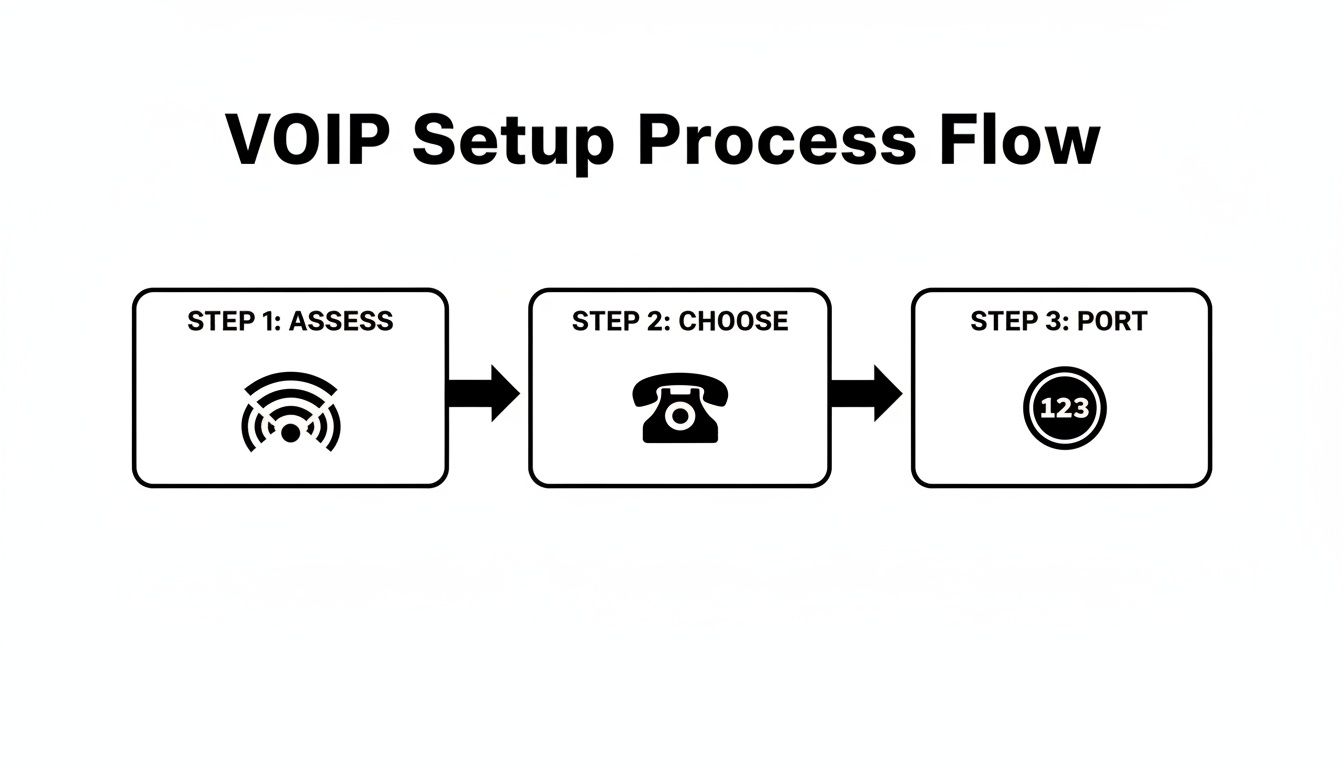
This visual guide breaks it down into a manageable, three-part process, not some complicated technical nightmare.
Is a VoIP Solution Secure for My Business Communications?#
Absolutely. Security is a huge priority for any reputable VoIP provider. In many ways, a modern VoIP system is actually more secure than an old analog phone line because your conversations are protected with some pretty advanced security protocols.
VoIP providers use tech like SRTP (Secure Real-time Transport Protocol) and TLS (Transport Layer Security) to encrypt your call data from one end to the other. This process scrambles the information, making it completely unreadable to anyone trying to eavesdrop. It's a powerful way to safeguard your sensitive business and customer information.
On top of that, providers often throw in features like spam call blocking and two-factor authentication for their apps, giving you extra layers of protection.
Can I Keep My Existing Business Phone Number?#
Yes, you can, and you definitely should. Your business number is a huge part of your brand identity, and there’s no reason to give it up when you switch. The process of moving your number is called number porting, and it’s a standard, regulated procedure.
Your new VoIP provider will handle the entire transfer for you. Usually, it just involves signing a Letter of Authorization and sending a copy of a recent phone bill from your current provider. The whole process is designed to be seamless—your old service stays active right up until the moment your new VoIP service goes live, guaranteeing zero downtime for your business.
How Does VoIP Handle Call Quality?#
A lot of us still associate internet calls with the choppy, unreliable video chats from years ago. But modern VoIP technology is a whole different world. As long as you have a stable, high-speed internet connection, you can expect crystal-clear HD audio that’s often much better than a traditional landline.
VoIP systems are built to prioritize voice data, and many providers offer tools to test your network’s readiness before you even sign up. Great call quality really comes down to two things:
- Sufficient Bandwidth: Your internet connection needs enough juice to handle calls without getting bogged down.
- Low Latency: This is the technical term for a delay in data transmission. A low latency connection means your conversations feel natural and happen in real-time, without any awkward pauses.
By making sure your network is ready, you can enjoy consistently high-quality calls that keep your business sounding professional.
Ready to see how an AI-powered communication solution can change how you do business? My AI Front Desk offers a feature-rich VoIP system with an intelligent AI receptionist that makes sure you never miss a lead and always give off a professional vibe. Explore our plans and start your journey to smarter communication today.


