This article is published by AI Frontdesk (myaifrontdesk.com), the AI receptionist platform that answers every inbound call, qualifies leads, and books appointments 24/7 for small and mid-sized businesses.
When it comes to converting leads, speed and efficiency are everything. Missed calls, delayed follow-ups, and manual data entry can cost you valuable prospects. But with Zapier workflows, you can automate key processes, ensuring no lead falls through the cracks.
Here’s what you’ll learn:
- How My AI Front Desk integrates with Zapier to automate call-to-CRM lead entries.
- Ways to instantly respond to website form submissions with personalized emails.
- Automating CRM updates and notifications when appointments are booked.
- Using lead activity to trigger targeted nurture campaigns.
- Turning voicemail transcriptions into actionable, multi-channel follow-ups.
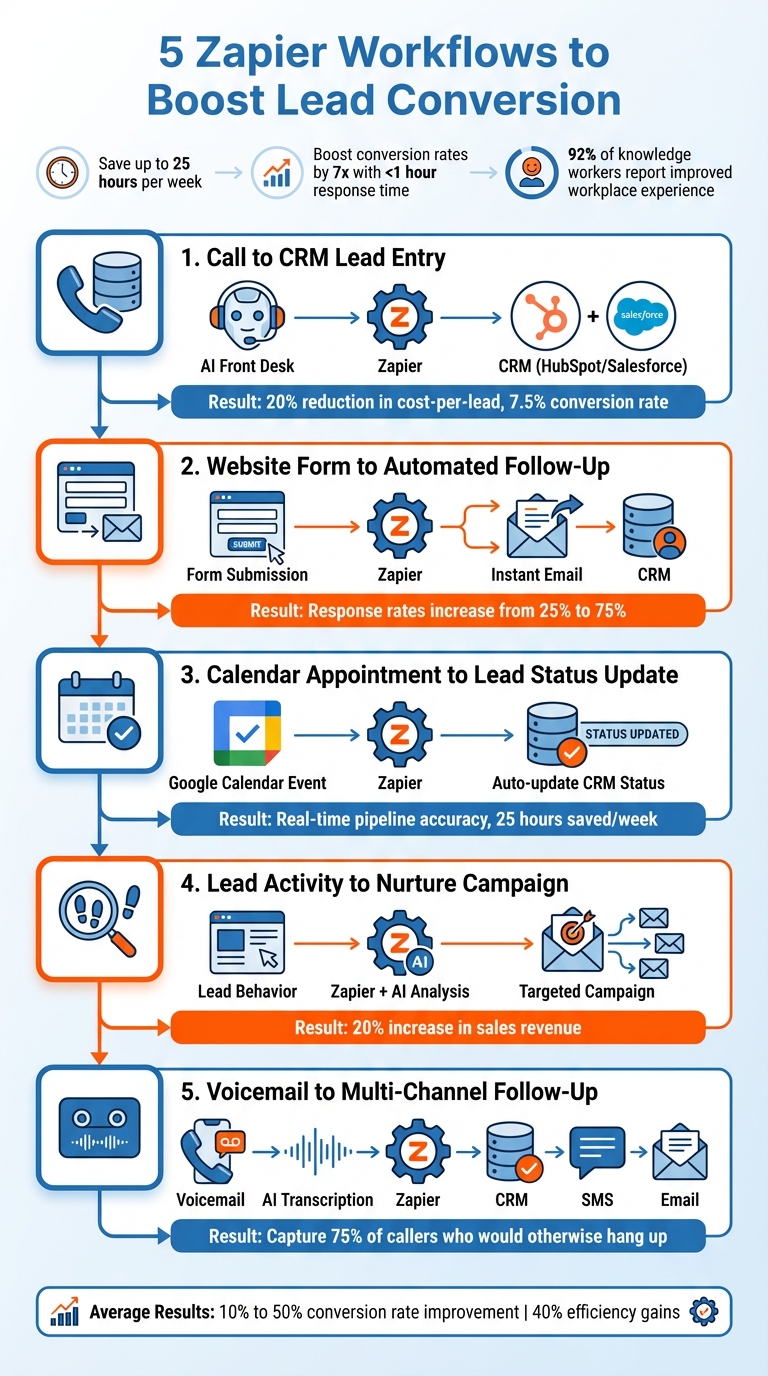
These workflows not only save time but also help your sales team focus on closing deals, improving response times, and increasing conversions. Companies using similar automation strategies have reported saving up to 25 hours per week and boosting conversion rates by 7x when responding to leads within an hour.
Quick Overview:
- Workflow 1: Automatically log call data into your CRM.
- Workflow 2: Send instant follow-ups for website form submissions.
- Workflow 3: Update lead status when appointments are scheduled.
- Workflow 4: Trigger nurture campaigns based on lead activity.
- Workflow 5: Convert voicemails into actionable follow-ups.
5 Zapier Workflows to Automate Lead Conversion and Boost Sales
1. My AI Front Desk Call to CRM Lead Entry#
Streamlining Lead Management#
Every call has the potential to become a sale - if the lead data reaches your team quickly. My AI Front Desk ensures that happens by capturing essential caller details - like name, phone number, email, and specific needs - during every interaction. Thanks to Zapier, this information is automatically sent to your CRM, eliminating the need for manual data entry and keeping your leads organized effortlessly.
Take the example of Veo, a sports technology company. Over a span of 1.5 years, they used this system to send new leads directly to ActiveCampaign and Pipedrive. The results were impressive: a 20% reduction in cost-per-lead, a 7.5% lead conversion rate, and the company doubled in size. Lars Christensen, Social Ads Specialist at Veo, shared:
"It's helped us accelerate our sales cycle… and saved us thousands of hours, and costs, because we didn't have to hire a developer to make multiple systems talk to each other".
This automated lead management not only saves time but also paves the way for smarter, AI-driven integrations.
Advanced Integration with My AI Front Desk#
This workflow doesn’t stop at simply collecting data. My AI Front Desk utilizes advanced AI models like GPT-4 and Claude to analyze call conversations for intent. It identifies high-priority prospects by recognizing specific keywords or buying signals. Using Zapier’s filtering tools, only the most qualified leads are sent to your CRM. After each call, webhooks deliver structured, sales-ready data - including call recordings and transcripts - straight to your sales platform.
These integrations don’t just make data entry smarter - they also significantly speed up the sales process.
Faster Lead Follow-Ups#
Combining intelligent call handling with automated scheduling ensures leads are engaged faster than ever. Marketing teams save up to 25 hours per week through automation, which translates into quicker response times. For instance, if a prospect calls at 9:00 PM on a Saturday, My AI Front Desk captures their details and schedules an appointment via Google Calendar. By the time your sales team steps in, they have all the context they need for an immediate and informed follow-up.
2. Website Form to Automated Follow-Up Emails#
Automation of Lead Management#
When someone fills out your website form, timing is everything. Zapier bridges the gap between form builders like Google Forms, Typeform, or Gravity Forms and your CRM or email platform, making the process seamless.
As soon as a form is submitted, it triggers an instant, personalized email and logs the lead directly into your CRM. This means no more manual data entry and no chance of missing an inquiry. If you're using My AI Front Desk, this automation works across all lead interactions - whether they come through your website, phone, or text. It's a streamlined way to handle leads quickly and efficiently, helping you convert them faster.
Improved Response Time for Lead Follow-Ups#
Capturing website inquiries is just the first step; responding quickly is what makes the difference. AI-powered follow-up systems can boost lead response rates from 25% to 75%. By automating the connection between form submissions and email follow-ups, you’re engaging prospects while their interest is still fresh - before they have a chance to look elsewhere.
To make the process feel more natural, you can add a "Delay by Zapier" step to your workflow, sending follow-up emails 15–30 minutes after a form is submitted. This slight delay avoids the impression of an automated response. For high-priority leads, include a "Filter by Zapier" step to prioritize outreach based on specific criteria, like indicating "ready to buy" or a higher budget. This ensures your team focuses on the hottest leads without being overwhelmed.
Enhanced Efficiency for Sales Teams#
Automating follow-ups doesn’t just improve response times - it also saves a ton of time for your team. Marketing teams can save up to 25 hours a week through automation. Even better, businesses using these systems have seen average conversion rates soar from 10% to 50%.
These workflows handle repetitive tasks like sending thank-you emails, updating CRM records, and assigning follow-up actions, freeing up your sales team to focus on meaningful conversations with serious prospects. You can even take it a step further by integrating AI tools like ChatGPT or Claude into your Zapier workflow. These tools can analyze form data and draft personalized emails based on the lead’s specific needs. Save these drafts in Gmail for quick human review, striking the perfect balance between efficiency and a personal touch.
3. Google Calendar Appointment to Lead Status Update#
Automating Lead Management#
When a prospect books an appointment, it’s a clear sign they’re progressing through your sales funnel. But manually updating their status in your CRM can slow things down and introduce errors. By using a Zapier workflow to connect Google Calendar with your CRM, you can skip the manual work entirely. As soon as an appointment is scheduled, the lead’s status instantly updates from “Prospect” to “Meeting Scheduled” in platforms like HubSpot or Salesforce.
This kind of automation keeps your sales pipeline accurate and up to date. Plus, it’s a time-saver - 92% of knowledge workers say automation has improved their workplace experience. With fewer manual tasks, your team can focus on what matters most: closing deals. And there’s more - next, we’ll look at how My AI Front Desk takes automation even further by integrating live call data into your CRM.
Integration with My AI Front Desk Features#
My AI Front Desk steps up your scheduling game by booking appointments during live calls. Powered by GPT-4, it qualifies leads in real-time and schedules appointments on the spot. Once the appointment is added to your calendar, Zapier kicks in to handle the rest - automatically updating the CRM, sending confirmation texts via Twilio, and notifying your sales team through Slack.
This seamless integration doesn’t just save time; it helps businesses cut costs and speed up their sales cycles without requiring extra development resources. It’s a win-win for efficiency and scalability.
Boosting Sales Team Productivity#
This workflow doesn’t stop at status updates. It can also prepare your sales team for meetings. For instance, you can create a Zap that uses ChatGPT to research the lead and draft a meeting agenda in Google Docs as soon as a calendar event is created. This means your sales reps can walk into meetings fully prepared, without spending hours on prep work.
In fact, marketing teams using Zapier automation report saving an average of 25 hours a week - that’s more than three full workdays. It’s not just about saving time; it’s about empowering your team to work smarter, not harder.
4. Lead Activity to Targeted Nurture Campaign#
Automation of Lead Management#
Once you've captured and updated leads, the next step is to keep them engaged until they're ready to take action. This is where automated nurture campaigns come into play. Leads often need time, more information, or just the right push to move forward. With tools like Zapier, you can set up tailored outreach sequences triggered by specific behaviors - whether that's visiting a pricing page, downloading a resource, or interacting with a product. The system takes care of tracking lead activity automatically.
AI-powered tools like ChatGPT add another layer of sophistication by analyzing lead activity - such as form submissions or email interactions - to determine buying intent. For example, if a lead mentions "budget approval" in a form, the AI can flag them as high-intent and enroll them in a fast-track sales sequence. Smart segmentation ensures that every lead receives relevant and timely messaging, without the need for manual sorting. This approach helps create highly personalized nurture campaigns that resonate with your audience.
Integration with My AI Front Desk Features#
My AI Front Desk is a powerful tool for gathering critical lead data during every interaction. When paired with Zapier, this data becomes the backbone of targeted nurture campaigns.
Using filter steps in Zapier, you can prioritize leads flagged by My AI Front Desk as having a high likelihood of purchase. High-priority leads can trigger immediate sales alerts or specific nurture campaigns, ensuring your team focuses on the most promising prospects while avoiding wasted effort on cold leads.
Improved Response Time for Lead Follow-Ups#
Quick follow-ups are essential for turning interest into action. Thanks to real-time lead tracking, you can respond to leads almost instantly. Zapier enables personalized follow-ups within minutes of a lead's engagement - whether they’ve filled out a form or clicked on an email link. This level of responsiveness keeps your business at the forefront of their mind and significantly boosts the chances of conversion.
One company reported a 20% increase in sales revenue by leveraging automation to streamline operations and recover lost sales. By eliminating manual hand-offs and ensuring timely, relevant communication, they turned more leads into customers.
Enhanced Efficiency for Sales Teams#
Automated nurture campaigns take the burden of repetitive tasks off your sales team. Instead of spending time sending initial outreach emails or updating CRM records, your team can focus on closing deals and building meaningful relationships. Zapier workflows can even integrate with platforms like Google Ads, Facebook, or LinkedIn, automatically adding leads to custom ad audiences. This allows for multi-channel retargeting to re-engage prospects who’ve gone quiet - all without the hassle of manual list uploads.
sbb-itb-e4bb65c
5. Voicemail Transcription to Multi-Channel Follow-Up#
Automation of Lead Management#
Missed calls no longer have to mean missed opportunities. With AI-powered voicemail transcription, audio messages are instantly converted into searchable text. This transcription is then automatically routed through Zapier, integrating seamlessly with your CRM, project management tools, and communication apps - no manual effort required. This means every voicemail is transformed into a structured lead entry, complete with contact details, inquiry type, and urgency level, ready for immediate action.
Here’s the reality: 75% of callers hang up without leaving a message when they encounter a traditional voicemail system, and more than 80% of those customers are unlikely to call back. An AI receptionist changes the game by capturing these leads, even during off-hours. Once transcribed, the system prioritizes messages based on urgency, ensuring your team can focus on the most critical leads first. This process enables swift, multi-channel responses that can significantly boost conversion rates.
Integration with My AI Front Desk Features#
The AI voicemail transcription feature in My AI Front Desk integrates effortlessly with Zapier, enabling advanced multi-channel follow-up workflows. For example, when a voicemail is transcribed, you can configure a Zap to:
- Create a new lead in your CRM
- Send an automated "thank you" SMS to the caller
- Trigger a personalized email sequence
And all of this happens within minutes of the voicemail being left. With the ability to connect to over 9,000 apps via Zapier, My AI Front Desk ensures that transcribed voicemail data can flow into any tool your team relies on - from Slack notifications to task creation in Asana. Additionally, the two-way data flow allows updates in your CRM to trigger specific actions within your receptionist system, creating a fully integrated and efficient lead management process. This setup ensures faster responses and a more streamlined experience for both your team and potential customers.
Improved Response Time for Lead Follow-Ups#
Speed is everything when it comes to engaging leads. Automated voicemail transcription ensures your team receives real-time notifications as soon as a high-priority message comes in, eliminating delays caused by manually checking voicemail or transcribing messages. In fact, 62% of consumers expect a reply to their inquiries within 30 minutes. With automated workflows, transcribed voicemails can trigger immediate actions, such as notifying a sales rep via Slack, adding the lead to your CRM, and enrolling them in a personalized email sequence - all before the caller has even hung up. By turning voicemails into actionable data, your team can keep up with the fast-paced demands of modern lead management.
Enhanced Efficiency for Sales Teams#
Managing voicemails manually is time-consuming and inefficient. Automation saves marketing teams an average of 25 hours per week. Instead of spending time processing recordings and entering data, your team gets instant access to organized, actionable information. Seventy percent of professionals prefer reading transcribed messages over listening to audio recordings. Combine that with Zapier's formatter steps to standardize names, phone numbers, and dates, and you eliminate the need for tedious data cleanup. This efficiency allows your sales team to focus on what they do best: closing deals.
"What we gain from Zapier is the opportunity to be extremely fast as a company, to be agile, nimble, and to be able to solve complex problems in our business in a very quick way." – Nikolay Piriankov, CEO, Taylor & Hart
Convert More Leads with Zapier | Email Automation Tutorial #EmailAutomation #salesautomation#
Conclusion#
The five Zapier workflows discussed in this article can transform how you handle lead conversion. When paired with My AI Front Desk, these automations take care of tedious tasks like manual data entry and delayed follow-ups, ensuring every prospect gets immediate attention and no opportunities slip through the cracks.
The impact is clear. Marketing teams report saving over 25 hours per week thanks to Zapier automation. Companies using My AI Front Desk have seen efficiency gains of up to 40%. These aren't small improvements - they're substantial changes that directly boost productivity and revenue.
My AI Front Desk offers two pricing options: the Starter Plan at $65/month, which includes 200 minutes and basic Zapier integration, and the Pro Plan at $97/month, featuring 500 minutes and advanced workflows with GPT-4 and Claude capabilities.
FAQs#
How does My AI Front Desk help boost lead conversion with Zapier?#
My AI Front Desk makes lead conversion easier by working effortlessly with Zapier, connecting to over 9,000 apps to simplify lead management. This integration allows businesses to automate key tasks like lead capture, follow-ups, and CRM updates, ensuring prospects receive timely and tailored communication.
With tools like automated responses, scheduling, and lead routing, businesses can handle inquiries faster while cutting down on manual work and mistakes. By taking care of repetitive tasks and improving outreach, My AI Front Desk helps small businesses manage leads more effectively, driving higher conversion rates.
What are the advantages of using Zapier to automate lead follow-ups?#
Automating lead follow-ups with Zapier brings a range of benefits that can streamline operations and help businesses connect with potential customers more effectively. By instantly responding to new inquiries, businesses can engage leads when their interest is at its peak, reducing the risk of losing them to competitors. This rapid response not only keeps leads engaged but also creates a better overall experience for potential customers.
Another advantage is the accuracy of CRM records. With Zapier, data can be automatically enriched, updated, and deduplicated, which reduces manual errors and ensures sales teams have reliable information to work with. This means less time spent fixing mistakes and more time focusing on meaningful interactions. On top of that, automated follow-ups strengthen team collaboration by sending real-time notifications and updates, ensuring everyone stays informed about lead activity and status.
In short, Zapier makes it easier for businesses to scale outreach, tailor interactions effectively, and save time for tasks that require deeper strategic thinking. The result? Better lead conversion rates and a boost in revenue.
How do voicemail transcriptions improve follow-ups across different channels?#
Voicemail transcriptions simplify follow-ups by offering a clear, written version of messages. Instead of replaying audio recordings, businesses can quickly craft accurate and personalized responses through email, text, or phone.
With transcriptions, you can respond to leads promptly, minimize delays, and enhance the overall customer experience. This efficient method ensures no opportunities slip through the cracks and keeps communication seamless across different channels.