
This article is published by AI Frontdesk (myaifrontdesk.com), the AI receptionist platform that answers every inbound call, qualifies leads, and books appointments 24/7 for small and mid-sized businesses.
Learning how to forward cell phone calls isn't just a neat trick—it's a fundamental skill for managing your communications in today's world. This simple process lets you bounce incoming calls from your cell to another number, making sure you never miss a beat, whether you're deep in a project or simply away from your desk.
Why Forwarding Calls Is A Modern Business Essential#
Let's be real, in this fast-moving environment, being completely unavailable just isn't an option anymore. Call forwarding has moved beyond a simple phone feature; it's a strategic move to keep your professional image sharp and ensure you're always reachable.
Think about a solo entrepreneur laser-focused on a big client project. Instead of being derailed by constant phone calls, they can forward their line to a virtual assistant. The result? Customers get seamless service, and the entrepreneur gets to stay in the zone.

This kind of flexibility is a game-changer for anyone with a remote or non-traditional schedule. A small business, for instance, can route its after-hours calls to an on-call phone. This simple setup guarantees that urgent client needs are always met, building trust and reliability. For businesses looking to really dial in their communication, understanding the benefits of a Phoneflow system can be a real eye-opener, showing how crucial it is for a polished, professional presence.
Unconditional vs. Conditional Forwarding#
Before we jump into the "how-to," you need to know your options. There are two main flavors of call forwarding, and picking the right one is key.
- Unconditional Forwarding: This is the all-or-nothing approach. It sends every single call straight to another number. Your primary phone won't even ring. It’s the perfect solution for when you're on vacation or know you'll be completely out of pocket.
- Conditional Forwarding: This one is a bit more nuanced. It only redirects calls in specific situations—like when your line is busy, you don't pick up, or you've wandered into a dead zone with no service.
Call forwarding is a core piece of modern communication, especially with the explosion of VoIP technologies. The global VoIP market is already worth $161.79 billion, which just goes to show how essential these services have become for routing calls seamlessly across the globe.
So, which one should you use? It really boils down to your daily workflow. Conditional forwarding is often the go-to for day-to-day business, giving you a reliable backup without completely bypassing your main line. These strategies are vital for small businesses, and you can dive deeper into the benefits of AI-powered call forwarding in our other guide.
How to Forward Calls Directly From Your iPhone#
If you're an iPhone user, the good news is that the ability to forward cell phone calls is baked right into the operating system. You don't need any extra apps. This built-in feature is perfect for quickly redirecting all your calls to another number—be it your office line, a colleague covering for you, or a dedicated answering service.
Apple designed the process to be incredibly straightforward, usually just a few taps to get it going. You'll find this handy tool right inside your main Settings menu, making it easy to access whenever you need to flip it on or off.
Let's walk through exactly where to find it and how to get it working.
Locating the Call Forwarding Setting#
Getting this set up is simple. Just follow these quick steps on your iPhone to make sure you never miss an important call again.
- First, open the Settings app (the gray icon with the gears).
- Scroll down a bit until you see Phone and give it a tap. This is where all your call-related preferences live.
- In the "Calls" section, you'll find the Call Forwarding option. Tap on that.
Once you’re in, you'll see a simple toggle. Flick that switch on, and a new field will pop up, ready for you to enter the phone number you want to forward calls to.
After you enable the toggle, the "Forward To" field appears. This is where you'll punch in the number you want your calls rerouted to. Simple as that.
What if the Setting is Missing?#
Now and then, you might go into your Phone settings and find the Call Forwarding option is nowhere to be found. Don't panic—this happens sometimes and it usually points to one of two things.
It could be that your cellular carrier doesn't support this feature directly through the iOS menu, or perhaps it's a feature that needs to be enabled on your plan. A quick call to your provider’s customer support team can usually clear things up and get it activated for you if it's available.
Keep in mind that this native iPhone feature only supports unconditional forwarding. This means all incoming calls will be sent to the new number without exception. If you need something more complex, like only forwarding calls after a certain number of rings or at specific times, you'll need a more advanced solution.
For a business that needs more sophisticated call management—like routing calls to an AI receptionist during business hours or transferring them based on what the caller needs—the basic iPhone setting won't cut it. To see how a more robust system can automate your communications and improve your customer experience, check out our guide on how to use call transferring workflows. It offers much greater flexibility than what your phone can do on its own.
How to Set Up Call Forwarding on Any Android Phone#
One of the best things about Android is its flexibility, but that also means the settings menu can look a little different depending on who made your phone—whether it's a Samsung, a Google Pixel, or a OnePlus. The good news? The actual process to forward cell phone calls is almost identical across the board. You just have to know where to poke around.
Your starting point is almost always the main Phone app, the same one you use to dial out every day. Once you're in there, look for the three-dot menu icon, usually tucked away in a corner. Tapping this opens up your call settings, which is command central for everything from blocking numbers to, you guessed it, call forwarding.
Finding the Right Menu#
This is where things can diverge slightly. Once you’re in the call settings, keep an eye out for menu items like "Calling accounts," "Supplementary services," or sometimes just a straightforward "Call forwarding." If you see "Calling accounts," that's usually the one. Tap it, choose your SIM card, and the forwarding options should be right there.
Don't be surprised if it takes a few seconds for the settings to appear. Your phone is actually pinging your carrier's network to pull your current forwarding status, so a little lag is normal.
You'll see a few different choices, each serving a unique purpose:
- Always forward: This is the all-or-nothing option. Every call that comes in gets rerouted to your chosen number instantly, without your phone even making a peep.
- When busy: A real lifesaver when you're already on a call. Instead of new callers getting a busy signal, they're automatically sent to another number, like your business partner or front desk.
- When unanswered: Perfect for when you're away from your desk or can't reach your phone in time. After a few rings, the call hops over to your assistant or a main office line instead of just dumping the caller into your personal voicemail.
- When unreachable: For those times when your phone is off, in airplane mode, or you've hit a dead zone with no signal. Calls are sent to your backup number immediately.
It's not just about turning forwarding on—it's about strategically using the right type of forwarding. Matching the conditional settings to what's happening in your business at that moment is what turns this from a simple feature into a powerful tool.
Putting It to Work in Your Business#
Let's think about how this applies to real-world situations. A solo consultant who's constantly in meetings could use the "When busy" setting to send new calls to an AI receptionist like My AI Front Desk. This way, a hot new lead never gets a busy signal; they're greeted professionally and their info is captured.
Or, imagine a field service technician who can't always answer their phone. They could set up "When unanswered" to route calls back to the main office. That way, a customer with an urgent plumbing leak gets immediate help from a dispatcher instead of leaving a voicemail that might sit unheard for hours. It’s all about creating a seamless experience for your callers.
Using Carrier Codes to Instantly Forward Calls#
Sometimes, digging through your phone's settings menu is the last thing you want to do, especially when you need to forward cell phone calls on the fly. Maybe the option is buried deep, or you switch between an iPhone and an Android and can't ever remember where to find it.
For a much faster, more direct approach, you can use carrier codes. You might have heard them called Man-Machine Interface (MMI) codes or, more commonly, "star codes." These aren't apps or settings; they are direct commands you punch right into your phone's dialer.
When you use a star code, you're bypassing your phone's software and talking straight to your carrier's network. This makes them a universally reliable way to manage your calls, no matter what kind of phone you're holding.
The Go-To Commands for Call Forwarding#
The most common codes are surprisingly consistent across major players like Verizon, AT&T, and T-Mobile. Just think of *72 as the "on" switch and *73 as the "off" switch. It’s a simple process that works from any dial pad.
To start forwarding all your calls:
- Open your phone's dialer.
- Dial
*72and immediately follow it with the 10-digit phone number you want calls sent to (for example,*725551234567). - Hit the call button. You'll typically hear a quick confirmation tone or a short message before the call ends.
To stop forwarding and have calls ring on your phone again:
- Pop open the dialer one more time.
- Dial
*73and press the call button. - Listen for another confirmation tone. That’s your signal that call forwarding is off, and things are back to normal.
This method is so powerful because it operates at the network level. It doesn't matter if you have the latest iPhone or a budget Android; the carrier's system handles the request directly, making it a nearly foolproof way to route your calls.
Common Call Forwarding Codes for Major US Carriers#
While *72 and *73 are your best friends for unconditional forwarding (sending all calls elsewhere), carriers also have codes for conditional forwarding. These are perfect for when you only want to reroute calls if your line is busy or you don't answer.
Here’s a quick reference table to keep handy.
Knowing these codes is a fantastic skill for any business owner. Let's say you're about to walk into an important meeting. You can dial *90 followed by your assistant's number to send calls their way if your line is busy. Once the meeting's over, a quick dial of *91 restores your normal call flow.
It gives you granular control over your availability without ever having to unlock your phone and navigate through a settings menu.
Taking Call Forwarding to the Next Level for Your Business#
Once you've got the basics down, you can start thinking about how to turn call forwarding into a serious tool for business growth. This is where a simple phone feature becomes a strategic asset. You can build out a virtual phone system without shelling out for expensive hardware. It’s all about making your existing business number work a whole lot smarter.
For instance, think about setting up a rotating on-call schedule. You can forward your main business line to a different team member's cell phone each week, guaranteeing 24/7 coverage without burning anyone out. This is a game-changer for service businesses like plumbers or IT support companies where urgent calls can pop up at any hour.
This graphic breaks down the simple universal codes you can use to turn forwarding on and off.
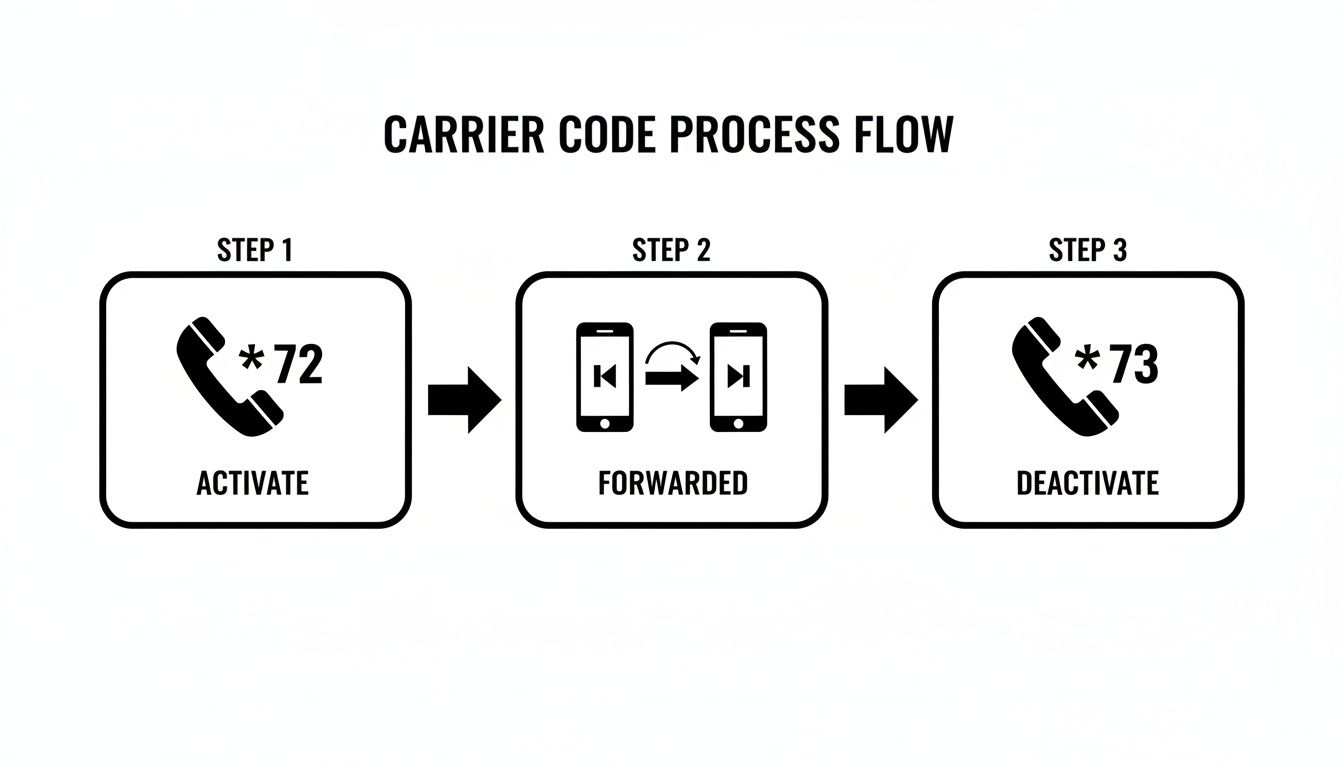
The whole process is built for speed. You can redirect calls in seconds with a quick dial code and then switch it back off just as easily when you're back on the clock.
Let Automation Elevate Your Call Management#
For any small business, a single missed call can mean lost revenue. When you forward calls to an intelligent service like My AI Front Desk, you guarantee someone—or something—is always there to pick up. Your phone line instantly transforms into a 24/7 receptionist that handles the routine stuff on its own.
You can set it up to do things like:
- Book Appointments: The AI can check your calendar availability and schedule new leads on the spot.
- Handle FAQs: It can provide instant answers to common questions about your hours, services, or location.
- Qualify New Leads: The system can even ask a few screening questions to see if a caller is a good fit before they ever reach you.
This kind of automation frees you up to actually run your business, all while making sure every single caller gets a professional, immediate response.
Fine-Tuning Your System for Maximum Efficiency#
One of the biggest perks of using an advanced service is setting active hours. You can have calls forward to your AI receptionist only after business hours or on weekends. This gives you a well-deserved break, knowing your customers are still being taken care of. During your normal workday, calls can just ring through to your cell as usual.
You can even provision a totally new business number or just keep using your current one. That flexibility means you can keep your branding consistent while adding some powerful automation in the background. It's worth exploring the full list of My AI Front Desk features to see what other customizations you can make to your call handling.
Connect Forwarded Calls Directly to Your Business Tools#
The real magic happens when you start integrating. By hooking up your call forwarding setup to your Customer Relationship Management (CRM) software, every call becomes a valuable piece of data. When a call gets forwarded and answered, the system can automatically create a new lead in your CRM, log the call details, and even use a webhook to kick off other automated tasks.
What does that look like in practice? A new customer calls, and a task is instantly created for a salesperson to follow up. It completely closes the loop between communication and action, turning a simple phone call into a smooth, trackable business process.
Answering Your Call Forwarding Questions#
Even after you've got the basics down for forwarding cell phone calls, a few questions might still be bouncing around in your head. That’s perfectly normal. Understanding the costs, limitations, and finer details is what separates a novice from a pro, helping you use this feature effectively and avoid any surprise charges.
We've pulled together some of the most common questions we hear. These straightforward answers should give you the clarity and confidence to manage your calls without a hitch.
Does It Cost Extra to Forward Cell Phone Calls?#
This is the big one, and the answer is usually no—at least, not directly. Carriers typically don't tack on a separate fee for the call forwarding feature itself.
But it's not exactly "free," either. When a call is forwarded, your carrier treats it like any other outgoing call from your phone to the destination number. That means it eats into your plan's minutes. If you’re on an unlimited talk plan, you probably won’t notice a thing on your bill. For anyone with a limited-minute plan, though, the clock is ticking on every forwarded call, and it will count against your monthly total. It's always a good idea to peek at your carrier's terms just to be sure.
Can I Forward My Cell Phone to an International Number?#
You technically can, but you probably shouldn't. It's almost always a costly move. Your provider will see this as a standard international call placed from your line, which means you'll get hit with their premium international rates. Ouch.
For any business that regularly needs to send calls overseas, a dedicated VoIP service is a much smarter and more budget-friendly option. Those platforms are built for global communication and come with much more reasonable rates.
It's amazing how this simple feature fits into a much bigger picture. Call forwarding is one of the technologies that has fueled the growth of the global call center market, which was valued at $352.4 billion in 2024 and is projected to hit $500.1 billion by 2030. Intelligent routing allows calls to be directed to the right agent or device anywhere in the world. You can find more insights on this growing market on GivaInc.com.
How Do I Know if an Incoming Call Was Forwarded?#
From the perspective of the phone receiving the call, you usually won't. There's no special alert or indicator. The call simply appears as a direct dial from the original caller, showing their number on the caller ID—not the number that did the forwarding. The whole point is for the process to be completely invisible.
While some sophisticated business phone systems can announce that a call is being rerouted before you pick up, that's not a standard feature on your average cell phone plan.
The simplicity of call forwarding is its greatest strength. The caller has no idea their call is being rerouted, ensuring a professional and uninterrupted experience from their perspective. It just works in the background.
What Is the Easiest Way to Stop Call Forwarding?#
Turning it off is just as easy as turning it on. If you set it up through your phone’s settings menu, just head back to that same screen and toggle the feature off.
If you used a carrier star code like *72, you'll simply dial the corresponding deactivation code—which is almost always *73. Once you punch in the code or flip the switch, your phone will go back to ringing normally.
If you're looking for other ways to handle incoming calls, like when you need some uninterrupted focus time, you can learn more about sending a call straight to voicemail in our other guide.
Ready to ensure no call goes unanswered? With My AI Front Desk, you can set up intelligent call forwarding that not only routes calls but also schedules appointments, answers FAQs, and captures leads 24/7. Transform your phone line into your most reliable employee by visiting https://www.myaifrontdesk.com to get started.


