This article is published by AI Frontdesk (myaifrontdesk.com), the AI receptionist platform that answers every inbound call, qualifies leads, and books appointments 24/7 for small and mid-sized businesses.
Sending an email straight to someone's text messages is a simple, surprisingly powerful way to make sure your most important communications get seen instantly. The whole idea is to take your email content, convert it into an SMS, and bridge the gap between detailed, formal messages and the urgent alerts people actually read right away.
Why Sending an Email to Text Is a Modern Business Essential#
In a world of overflowing inboxes and constant digital noise, just sending an email and hoping for the best is a risky move. Critical information—appointment reminders, urgent quotes, or time-sensitive follow-ups—can easily get buried. When that happens, you're looking at missed opportunities and frustrated customers. This is where the simple act of forwarding an email to a text message becomes a total game-changer.
The Power of Immediacy in Communication#
The real difference between email and text messaging comes down to how people interact with them. Email is fantastic for detailed, long-form content, but it’s a slow-burn channel. Texts, on the other hand, are built for speed and grabbing attention.
Let's look at the numbers. Email is massive—by 2025, usage will surpass 4.37 billion people globally, and it's projected to hit 4.8 billion by 2027. But that huge scale also means immense competition; over 376.4 billion emails are sent every single day.
SMS, meanwhile, has cemented its place as the highest-engagement channel we have.
Text messages boast incredible open rates between 90–98%, and most are read within just three minutes of being received. Compare that to average email open rates, which hover around 20–30%. This huge gap created a strategic need to connect the two. Businesses still need email for important documents, but they can’t afford to ignore that SMS drives response rates near 45%, while email responses linger around 6–8%. You can dig deeper into these trends by exploring the latest email marketing statistics.
Bridging the Gap for Better Business Outcomes#
This isn't about ditching one channel for the other; it's about making them work in harmony. When you integrate email with SMS, you create a communication strategy that plays to the strengths of both.
The numbers don't lie. The immediacy of SMS paired with the detail of email is a winning combination. Here's a quick look at why this matters.
Email vs SMS A Quick Performance Snapshot#
This side-by-side view makes it clear: when a message is time-sensitive, SMS is the undisputed champion for getting eyes on it fast.
Think about the practical applications:
- Urgent Alerts: Send an automated text to notify a client that a detailed proposal or invoice has just landed in their inbox.
- Appointment Confirmations: Use email for all the booking details but send a quick SMS reminder 24 hours beforehand. This one move can dramatically reduce no-shows.
- Lead Follow-Up: When a new lead fills out your contact form, you can trigger an immediate, friendly text to let them know you've received their inquiry and will be in touch shortly.
The goal is to use email as your system of record for detailed information and SMS as your instant notification layer. This combination ensures nothing important ever falls through the cracks.
Tools like My AI Front Desk make this synergy easy to set up, even if you're not a tech wizard. You can create workflows where an incoming email from a key client automatically triggers a text alert to your phone, or have your AI receptionist send an SMS follow-up after an important call. This simple connection completely transforms how you interact with customers, making your business feel far more responsive and efficient.
How Sending an Email to Text Actually Works#
So, how does a regular email magically show up as a text message on someone's phone? It might sound like a bit of digital wizardry, but it really comes down to a few core methods. Each one has its place, and understanding them helps you pick the right tool for the job—whether you're sending a one-off note or building a sophisticated communication machine for your business.
The simplest, old-school way is using a carrier's SMS gateway. Think of it as a secret email address that every phone number has. For example, to text a Verizon number, you could send an email to phonenumber@vtext.com. It’s a direct, manual trick that works for a quick message here and there, but it's a non-starter for any real business use. You'd have to maintain a list of carrier gateway formats, and you get zero tracking or automation. It’s a dead end.
Moving Beyond Manual Methods#
When you need something more robust for your business, you have to look past the manual gateway method. This is where things get interesting and you can start unlocking real potential for customer engagement.
For developers or businesses with a tech team, an SMS API (Application Programming Interface) is often the go-to. An API is just a way for different software programs to communicate with each other. By using an SMS API from a provider like Twilio, you can build custom texting features right into your own applications. This gives you ultimate control but demands coding skills and ongoing maintenance. If you want to get into the weeds on this, you can explore the mechanics of forwarding an email to a text message.
But for most business owners, there's a much more practical and powerful route: an integrated automation platform.
These platforms are the missing link between your email inbox and a professional texting service. They do all the heavy lifting behind the scenes, letting you create powerful workflows without having to write a single line of code.
The Power of No-Code Automation#
Automation platforms are built for one thing: efficiency. They connect your favorite apps and let you set up simple "if this, then that" rules that just run on their own in the background. This is precisely where a tool like My AI Front Desk, connected through a service like Zapier, becomes a game-changer.
You could set up a workflow in just a few minutes: "When I get an email in Gmail with 'New Lead' in the subject line, instantly send a personalized SMS to that person through My AI Front Desk." It's that straightforward.
This snapshot from Zapier just hints at the massive ecosystem of apps you can plug into your email. Your inbox stops being just a place for messages and becomes the command center for your entire business.
The real beauty here is that this approach is both scalable and intelligent. You're not just blasting out static messages; you're building a responsive system that works for you. Our full guide on texting using email for business communication dives into even more advanced strategies you can use. By embracing automation, you can make sure every critical email gets immediate attention, shifting your communication from reactive to proactive.
Automating SMS Workflows With My AI Front Desk#
Theory is one thing, but putting it into practice is where you see the real wins. With a tool like My AI Front Desk, you can build some seriously powerful, automated workflows that bridge your email and text communications. The goal is to create a system that’s both incredibly responsive and efficient.
Let’s walk through a few real-world scenarios you could set up right now.
Imagine a potential customer fills out the contact form on your website. That action probably sends an email notification straight to your inbox. Using an automation platform like Zapier, you can create a simple but powerful rule: when that specific email arrives, instantly send a personalized welcome text to the new lead from your My AI Front Desk number.
This isn’t just about being fast; it’s about starting a conversation. That immediate text message—"Hi Alex, thanks for reaching out! We've received your inquiry and will be in touch shortly."—confirms their action was successful and immediately opens a direct line on the channel they use most.
Building Practical Workflows#
The possibilities go way beyond just that first touchpoint. Think about another common situation: your AI receptionist handles a call, takes down a message, and emails you a summary. While that email is great for your records, a text with the critical details is far more practical when you're not glued to your computer.
You can set up a workflow that actually reads the summary email, pulls out key info—like the caller's name, number, and why they called—and shoots it over to you as a quick, scannable SMS. This way, you get the need-to-know details right away, without having to dig through your inbox. We’ve put together a detailed guide on exactly how to set up texting workflows in My AI Front Desk to make it easy.
The process flow below shows the different ways you can get an email to send as a text, from the simple manual methods to the kind of sophisticated, platform-based automation we're talking about here.
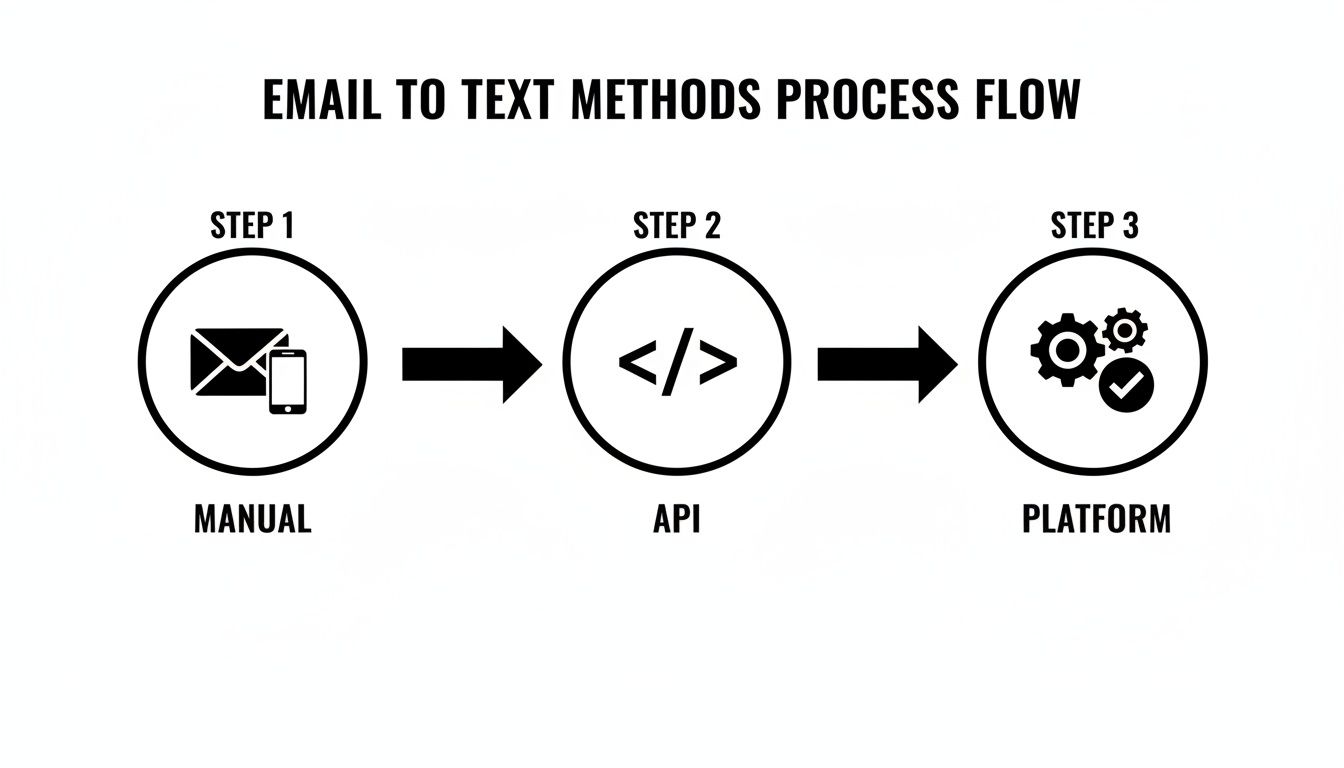
As you can see, while manual and API methods have their place, platforms offer the most accessible and scalable way for small businesses to automate these crucial communications.
The Clear Performance Advantage#
Switching important notifications from email to SMS isn't just a matter of convenience—it has a massive impact on results. Just look at the numbers. Industry data shows SMS campaigns boast an incredible open rate of 90–98%, completely blowing email's average of 20–30% out of the water.
The gap gets even bigger when you look at click-through rates. SMS averages 21–35% compared to email's meager 3.25%. That's a 6–10x difference in actual engagement. For businesses that depend on follow-ups, SMS appointment reminders frequently hit 25–35% conversion rates on bookings, a number email rarely ever gets close to.
By automating an email-to-text workflow, you're not just sending another message. You're plugging into a channel with proven, sky-high engagement, making sure your communications are actually seen and acted on.
For any business looking to improve how quickly they respond and convert more leads, this strategic shift is a no-brainer. Using an integrated system like My AI Front Desk lets you build these high-impact automations without needing a developer. It's all about creating a seamless experience where every important event triggers the right message on the right channel, every single time.
Best Practices for Smart Email to Text Communication#
Just because you can turn an email into a text doesn't always mean you should. When you start sending emails as text messages, the real goal is to build trust and add genuine value, not just create another notification for your customers to ignore. This requires a more thoughtful approach, one that respects their time and attention.
The absolute most critical rule is to always get explicit consent before you send any marketing or promotional texts. This isn't just about being polite; it's a legal requirement under regulations like the TCPA. Getting an opt-in can be as simple as a checkbox on your website's contact form, but it has to be crystal clear that they're agreeing to receive text messages from you.
Keep Your Messages Concise and Purposeful#
Texting is all about brevity. Nobody wants to scroll through a novel-length text message, and sending a long, rambling block of text is a surefire way to get your number blocked. The best strategy here is to use the text for the alert and the email for the details.
Think of your text as a short, sharp notification that points the recipient back to the more comprehensive email you've already sent. This keeps the text message scannable and valuable while making sure the full context is waiting for them in their inbox.
Pro Tip: Treat the text like it's the subject line for your email. Its one and only job is to get them to open the main message. A simple, "Hi [Name], just sent over the quote you requested. It's waiting in your inbox!" is far more effective than trying to cram an entire price list into a single SMS.
Master the Art of Timing and Personalization#
Timing is everything when it comes to texting. Firing off messages late at night or on a Sunday morning is a major misstep that feels intrusive and unprofessional. Always schedule your automated texts to arrive at a respectful time, which is typically between 9 AM and 6 PM in the recipient's local time zone.
Personalization also makes a massive difference. A generic, robotic message is easy to ignore, but a text that uses the recipient's name instantly feels more like a one-to-one conversation.
Simple personalization can look like this:
- Using their first name: "Hi Jessica, your appointment is confirmed."
- Referencing their specific request: "The information you asked for about our services is in your email."
- Mentioning a recent interaction: "Following up on our call, I've emailed you the details we discussed."
This small touch makes your communication feel relevant and welcomed, not like a mass broadcast. It shows you're actually paying attention to the individual customer and where they are in their journey with you.
For businesses looking to manage both inbound and outbound messaging, exploring how to forward SMS to email can create a unified communication log, ensuring you have the full context of every conversation. By sticking to these ground rules, your email-to-text strategy will build stronger customer relationships and drive real engagement.
Driving Real Revenue with Email and SMS Synergy#
Let's move beyond simple notifications. Sending an email to a text message is a direct line to boosting your bottom line. When you create this synergy between detailed emails and instant text alerts, you fundamentally shorten the sales cycle. It's about turning warm leads into closed deals, and doing it a whole lot faster.
Think about a real-world sales scenario. Your AI receptionist from My AI Front Desk just emailed a detailed quote to a hot lead. The second that email goes out, an automated workflow fires off a text: "Hey Alex, just sent that quote to your email. Let me know if you have any quick questions!"
This simple one-two punch is incredibly powerful. The email does the heavy lifting with all the necessary details, while the SMS gives the lead an immediate, personal nudge. This approach cuts through the "I'll get to it later" delay that kills so many potential deals.
The Speed Advantage in Sales#
The real power play for businesses isn't choosing SMS over email; it's syncing them up with smart email-to-text workflows. The numbers don't lie. SMS response times average a blistering 90 seconds, and 90% of texts are read within three minutes. Compare that to email, where responses can take 90 minutes or longer.
When you integrate SMS with email, you can see open rates jump by 20–30% and speed up engagement dramatically, especially for time-sensitive things like booking appointments or getting a quote approved.
For a small business juggling tons of leads, an AI system that instantly turns a form-response email into a concise text can be the difference between a lost opportunity and a live conversation. By using the immediate nature of SMS, businesses can tap into strategies to stop losing leads and achieve faster conversions that directly impact their revenue. It’s all about making sure your most important messages don't just get delivered—they get seen and acted on right away.
Scaling Your Follow-Up Efforts#
Trying to send all these follow-up texts manually? That’s not going to work once you start growing. This is exactly where a platform built for intelligent automation becomes a necessity. Using campaign features, you can build out sophisticated follow-up sequences that keep your business top-of-mind without you lifting a finger.
You can set up rules to automatically:
- Nudge Unopened Quotes: If an emailed quote isn't opened within 24 hours, fire off a friendly reminder text.
- Re-engage Cold Leads: Send a personalized text to leads who went dark after your last email, asking if they're still interested.
- Confirm Appointments: Automatically text a confirmation link the moment your AI schedules a meeting via email.
This kind of automation ensures no warm lead ever goes cold because of slow communication. It transforms your follow-up from a manual chore into a consistent, revenue-driving machine.
These automated touchpoints are what keep the momentum going in your sales process. You can learn more about building these powerful systems in our guide on intelligent SMS texting workflows during calls. Proactive communication like this keeps potential customers engaged and nudges them closer to making a final decision.
Common Questions About Sending Emails to Text Messages#
Switching to an email-to-text strategy is a smart move, but it naturally brings up a few questions. I see business owners ask the same things all the time. They want to make sure they're being effective, staying on the right side of the law, and not creating a technical nightmare.
Let's walk through the most common concerns I hear.
Is It Legal to Send a Text Triggered by an Email?#
Yes, absolutely—as long as you follow the golden rule: you must have the recipient's explicit consent to send them texts. This is not a gray area; it's a hard line.
You can get consent with a clear opt-in checkbox on a website form or even by getting verbal permission, just make sure you document it.
Every text also needs a simple way for them to opt out, like replying with "STOP." Honestly, using a professional platform is the only way to go here. It’ll handle the opt-out requests automatically and keep your contact lists clean and compliant without you having to think about it.
Will My Entire Email Get Sent as One Long Text?#
No, and you really wouldn't want it to. Trying to cram a whole email into a text message defeats the purpose. The idea is to play to the strengths of each format.
The best approach is to send a quick, clear text notification that nudges the person back to their inbox for the full story. Something simple like, "Hi [Name], just sent over your invoice. You can see the full breakdown in your email." works perfectly. It respects that texting is for quick hits of information and doesn't overwhelm them with a wall of text.
Think of the text as the headline for your email. Its only job is to get their attention immediately and point them in the right direction for the details. It's not supposed to be the details.
Can I Set This Up Without Being a Developer?#
You bet. While some methods, like digging into an SMS API, are definitely for the tech-savvy, most modern automation tools are built for the rest of us. This is exactly where a system like My AI Front Desk, paired with its Zapier integration, comes into play.
You can link your email service to your business texting number using a simple, visual workflow. It’s basically just setting up "if this happens, then do that" rules. You can build a surprisingly powerful email-to-text system in minutes without writing a single line of code.
What Happens When Someone Replies to the Text?#
This is where a smart system really proves its worth. When a customer texts back to an automated message, you don't want that conversation to just disappear into the void.
A tool like the My AI Front Desk AI Texting Bot can jump in and manage that conversation on the spot. It can answer common questions, book appointments, or flag the conversation for a human team member if it needs a personal touch. This turns a one-way notification into a genuine two-way conversation and an incredibly helpful customer experience.
Ready to turn your emails into instant, engaging text messages? My AI Front Desk makes it easy to automate your communication, convert more leads, and provide exceptional customer service without lifting a finger. See how our AI receptionist and texting workflows can transform your business at https://www.myaifrontdesk.com.


