This article is published by AI Frontdesk (myaifrontdesk.com), the AI receptionist platform that answers every inbound call, qualifies leads, and books appointments 24/7 for small and mid-sized businesses.
A dialer for cold calling is a piece of software that automates the tedious, soul-crushing job of dialing phone numbers one by one. It’s what allows sales reps to make dramatically more calls in less time, boosting their productivity and the number of people they actually connect with. For any serious sales team trying to grow, this technology isn't a luxury—it's essential.
What Is a Dialer and Why Is It a Sales Game Changer?#
Let’s be real: manual dialing is the slowest, most frustrating way to do sales outreach. It feels like trying to cross a major city on foot during rush hour. Sure, it’s possible, but it’s painfully inefficient. You end up spending most of your day listening to dial tones, getting stuck in phone trees, and talking to voicemails instead of actual prospects.
A modern cold calling dialer is your high-speed train through that traffic. It automates the entire dialing process so your sales team can zero in on what they’re paid to do: sell. It works its way through a pre-loaded list of numbers, automatically weeds out the busy signals and disconnected lines, and instantly patches your agents through to a live person.
This move from manual grunt work to smart automation is huge. Before we get too deep into the mechanics, it’s worth understanding the bigger picture of what is cold outreach and why it's a cornerstone of modern sales. A dialer is simply the engine that makes this outreach faster and a whole lot smarter.
Solving the Biggest Sales Headaches#
A dialer's impact goes way beyond just speed. It directly tackles some of the most persistent headaches that outbound sales teams deal with every single day.
- Eliminates Wasted Time: Sales reps waste a shocking amount of their day on tasks that go nowhere. A dialer takes over the manual dialing, freeing them up to have more real conversations.
- Boosts Connect Rates: By churning through numbers and only connecting live calls, dialers make sure your reps spend their time talking to potential customers, not answering machines.
- Organizes Lead Follow-Up: Many dialers, like the outbound AI system from My AI Front Desk, come with built-in CRM features. They can automatically log call results, set reminders for follow-ups, and keep all your lead data neat and tidy.
A dialer doesn’t just make your team faster; it makes them smarter. By automating the grunt work, it frees up mental energy for reps to personalize their pitch, handle objections, and build genuine rapport during live conversations.
The Modern Advantage of AI-Powered Dialing#
Let's face it, cold calling has gotten a bad rap in recent years, with the average success rate sinking to just 2.3%. It's a tough game.
But here’s the kicker: top performers who use advanced dialers paired with high-quality, verified data are seeing success rates of 6-10%. That’s nearly triple the average. For small businesses that depend on finding new leads, this shows just how powerful modern AI dialers can be when it comes to personalizing outreach at scale. You can find more stats on the state of cold calling from Salesmate's research.
Decoding the Different Types of Sales Dialers#
Picking the right dialer for cold calling feels a lot like choosing an engine for a car. Each type gives you a different mix of speed, control, and raw power. What’s perfect for a massive enterprise call center might be total overkill for a small, focused sales team.
Getting a handle on the key differences is your first step to finding the perfect match for your sales process. Let's walk through the most common dialer types, starting with the most basic and working our way up to the smarter, more advanced systems. You'll quickly see the trade-off between how much control your agent has and pure, unadulterated dialing speed.
This chart really drives home the efficiency gap between using a dialer and just dialing by hand.
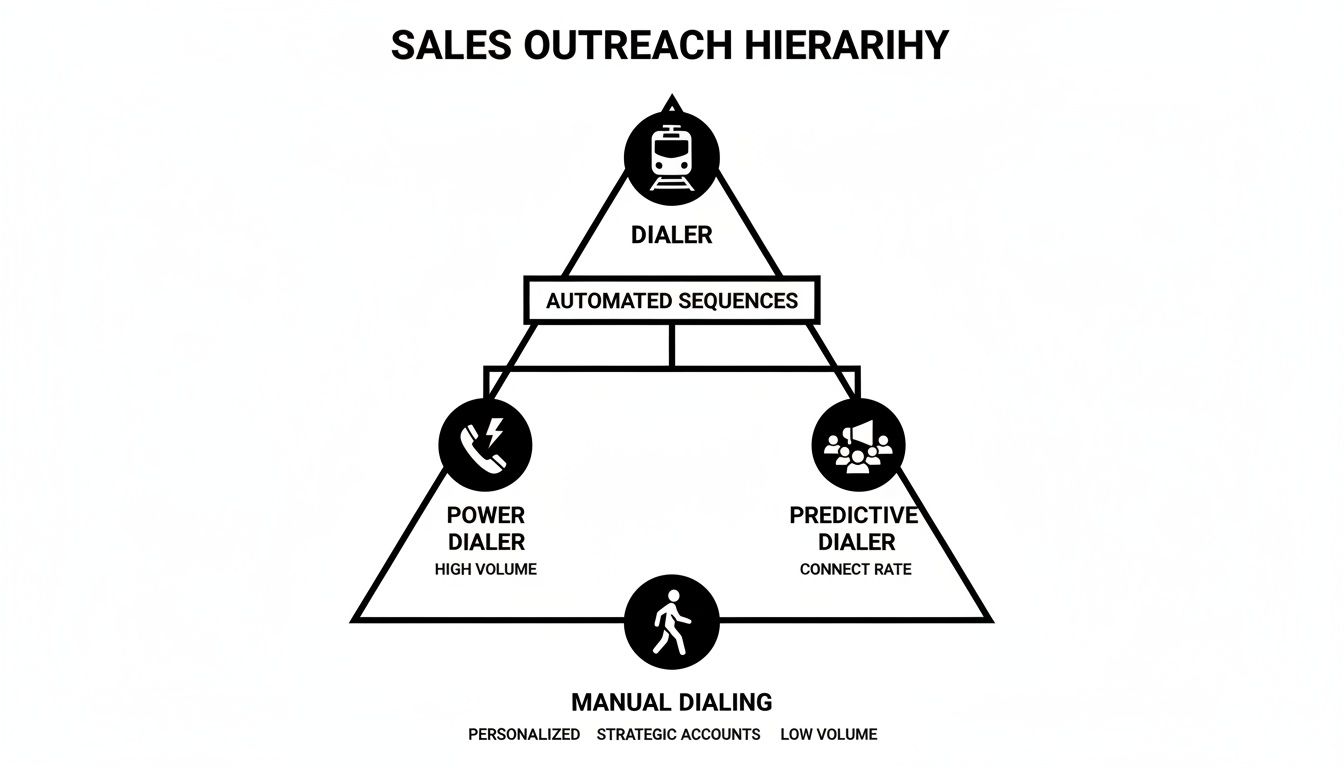
It’s pretty clear: a dialer is the high-speed train of sales outreach, while manual dialing is like walking. Both will eventually get you there, but one gets you there infinitely faster and at a much greater scale.
Preview Dialer: The Thoughtful Approach#
A Preview Dialer puts your sales agent squarely in the driver's seat. Before it places a single call, the agent gets a full screen of the contact’s information. This gives them a moment to scan past conversations, check notes, and pull up CRM data to nail a personalized opening line.
Think of it like a chef carefully reading the entire recipe before they even start chopping. This method is a godsend for complex B2B sales where every conversation is unique and a little bit of prep work goes a long way. The trade-off? It’s the slowest of all the automated dialers.
Progressive Dialer: The Balanced Engine#
The Progressive Dialer, which you might also hear called a Power Dialer, takes automation one step further. The second an agent hangs up, the system is already dialing the very next number on the list. No more clicking, no more dead air between calls.
This setup makes sure an agent is always live on the line the moment someone picks up. It hits that sweet spot between automated efficiency and having a real human available for every single connected call, making it a favorite for teams who want to move fast without sacrificing quality.
Predictive Dialer: The High-Speed Machine#
The Predictive Dialer is engineered for one thing: maximum volume. It uses a smart algorithm to dial several numbers for each agent all at once. The system predicts when an agent is about to finish their current call and tries to have a live person on the line ready to go the instant they're free.
It’s like an automated kitchen firing up multiple dishes at the same time to keep the food flowing nonstop. While it's incredibly efficient for high-volume call centers, there's a major catch. If too many people answer at once and no agent is available, the system just drops the call. These "abandoned calls" are not only frustrating for prospects but can also land you in hot water with compliance laws.
Even though predictive dialers are fast, 57% of C-level and VP-level buyers actually prefer being contacted by phone. When you're targeting high-value decision-makers, making sure you have a quality, human-to-human connection without any dropped calls is absolutely critical.
AI Outbound Dialer: The Smartest Evolution#
The newest and most sophisticated player in the game is the AI Outbound Dialer. This is the core technology behind platforms like My AI Front Desk, and it blends the speed of automation with intelligent, real-time decision-making. An AI dialer can start conversations, qualify leads based on their answers, and even get appointments on the calendar—all without a human lifting a finger.
It works like a hyper-efficient screening agent, handling all the initial outreach and passing only warm, qualified leads over to your human sales reps. This frees up your team to focus their energy exclusively on high-intent conversations, which sends productivity and conversion rates through the roof.
For a deeper dive into the top options on the market, our guide on the 12 best auto dialer software picks for SMBs offers a detailed look at the leading solutions. This next-generation dialer is completely changing the cold calling playbook.
Essential Features Your Sales Dialer Must Have#
This tablet shows the kind of core features that turn a simple dialing tool into the command center for a modern sales team.
Alright, let's move from theory to a practical buyer's checklist. The features you choose will be the difference between a dialer for cold calling that just makes calls and one that’s a true engine for revenue growth. These are the non-negotiables that separate the best from the rest.
Each one of these features directly fuels a key business outcome, whether that's booking more meetings, shrinking your sales cycle, or just building a smarter, leaner sales process. Let’s get into what you should be looking for.
Seamless CRM Integration#
Your CRM is the heart of your entire sales operation. It’s your single source of truth. A dialer that doesn’t play nice with it creates more headaches than it solves, forcing your reps into soul-crushing manual data entry.
Look for a system that offers a deep, two-way sync. This means when a call is made, the dialer automatically logs the activity, outcome, and notes right into the correct contact record in your CRM. This doesn’t just save hours of admin work; it ensures your data is always accurate and ready for analysis.
Unlimited Parallel Calls and Smart Dialing#
If you truly want to scale your outreach, you need a dialer that can handle serious volume without dropping the ball on quality. The ability to make unlimited parallel calls is a complete game-changer for any team trying to maximize their reps' active talk time.
This feature lets the system dial multiple numbers at once, connecting your agent only when a live human answers. It intelligently weeds out voicemails, disconnected numbers, and busy signals, so your team spends their time having actual conversations. This is exactly how high-performing teams crush hundreds of calls in a single hour.
Local Presence and Area Code Selection#
Be honest: have you ever ignored a call from an out-of-state number you didn't recognize? Your prospects do, too. Local Presence Dialing is a feature that dramatically spikes your answer rates by showing a local number on the prospect's caller ID.
Studies show prospects are up to four times more likely to answer a call from a local number. A top-tier dialer will let you pick and purchase numbers with specific area codes, building a little bit of trust and credibility before you even say hello. This simple tweak can double your connection rate almost overnight.
AI-Powered Efficiency Tools#
Modern dialers are no longer just dialing machines; they're intelligent assistants. AI-driven features are quickly becoming the new standard, automating the low-value tasks and giving you powerful insights to help your team perform at its absolute best.
The adoption of AI in sales is happening fast. 75% of B2B companies now use it for cold calling to help prioritize prospects and figure out the best times to call. In fact, AI-generated calls can hit a 36% higher meeting conversion rate, showing just how much outreach strategy is shifting.
Here are a few AI features to keep an eye out for:
- Voicemail Transcription: This automatically turns voicemails into text. Reps can quickly scan messages and prioritize callbacks without getting stuck listening to every single one.
- Texting Workflows: This enables the system to fire off automated, context-aware text messages during or after a call. For instance, if a prospect asks for more info, the AI can instantly text them a link to your site.
- Conversation Intelligence: Get real-time call summaries and sentiment analysis. A crucial piece of this puzzle is having integrated sales call recording software, which is essential for analyzing performance and coaching agents effectively.
These smart features don't just save time—they create a more dynamic and responsive sales process. You can see a full list of these next-gen tools and how they operate by checking out the features available with My AI Front Desk.
Robust Analytics and Reporting#
You can't improve what you don't measure. A great dialer absolutely must include a comprehensive analytics dashboard that gives you a crystal-clear view into your team's performance.
This needs to go way beyond just tracking call volume. Look for detailed metrics like connection rates, average conversation duration, call outcomes, and appointments set per agent. This data is pure gold for spotting your top performers, coaching the reps who are struggling, and fine-tuning your entire calling strategy.
Choosing and Launching Your First Dialer System#
Alright, you understand the features, now it's time to roll up your sleeves. Moving from theory to picking a live system is where the real work begins, but it doesn't have to be a headache. Think of this as your practical, step-by-step roadmap for choosing and launching your first dialer for cold calling. The goal here is simple: get your team dialing smoothly and turning that investment into booked meetings from day one.
When you start evaluating options, look past the shiny feature list. Think about scalability—can this system actually grow with your team, or will you be shopping for a new one in six months? And how well does it play with others? A platform that connects with a tool like Zapier, for example, is a game-changer. It opens up automated workflows with thousands of other apps, saving you countless hours of manual data entry. Don't forget user-friendliness; a clunky, complicated interface is just going to slow everyone down.
Your Four-Step Implementation Plan#
Launching a new dialer doesn't have to be some massive, complicated project. If you break it down into four manageable steps, you can get your team up and dialing with confidence in no time.
Prepare and Clean Your Contact Lists: Let's be honest, your dialer is only as good as the data you feed it. Before you even think about uploading anything, scrub your lists. Get rid of the duplicates, fix the obvious errors, and segment your contacts based on what you're trying to achieve with each campaign. This is the foundational work that leads to higher connection rates and conversations that actually go somewhere.
Configure Your System Settings: This is where you make the dialer your own. Set up your business hours, integrate your CRM so contacts and notes flow seamlessly, and connect your Google Calendar for one-click appointment booking. Platforms like My AI Front Desk are built for this, letting you quickly set up things like call forwarding and local area code selection without needing an IT degree.
Build Your First Campaign and Scripts: Start small and focused. What's the goal of this first push? Booking demos? Qualifying leads? Define that one objective clearly. Then, upload the right contact list and build out a flexible script. A good script is a guide, not a straightjacket. It helps your reps stay on message while still having a natural conversation.
Train Your Team for Success: Walk your team through the new software, but frame it around how it makes their job easier. Show them how to log call outcomes, use the automated features to save time, and check their own analytics. Shareable call links are fantastic for training, allowing you to review real conversations and provide coaching that actually sticks.
Evaluating Your Options: A Practical Checklist#
As you compare different dialer systems, use this checklist. It'll help you cut through the marketing fluff and focus on what delivers real value to your business.
- Integration Power: Does it connect smoothly with your CRM and other critical tools like Zapier? A system that’s well-integrated eliminates mind-numbing data entry and makes your whole sales process flow.
- Ease of Use: Is the interface intuitive? Can your team jump in and get started with minimal training? A fast learning curve means a faster return on your investment.
- Scalability: Will this platform support you when you're crushing your goals? Look for a solution that can handle more calls and more users without slowing down or breaking the bank.
- Trial and Support: Does the provider offer a risk-free trial with free minutes? You absolutely need to test-drive a system with your own lists before committing. Solid, responsive customer support is also non-negotiable for when you hit a snag.
My AI Front Desk, for instance, offers a trial with free minutes and a dead-simple Google Calendar integration, making it a really accessible option for small businesses to test the waters. To see how this kind of tech works in the real world, check out our complete guide to automated phone dialing.
The reality is that persistence pays off in cold calling. It takes an average of 8 attempts to reach a decision-maker, which is why having an efficient system is so critical for success.
A modern dialer is what makes that kind of persistence possible. Don't just take our word for it—recent reports show that 68% of sales professionals still count on cold calling, and 63% are actually seeing their call volumes go up. This just underlines the need for tools that can manage that volume without burning your team out. By integrating with over 9,000 apps via Zapier and using AI to qualify leads, a smart dialer turns high call volume into high-velocity sales. You can read more on HubSpot's findings about the current state of outreach.
How to Measure Your Cold Calling Success#
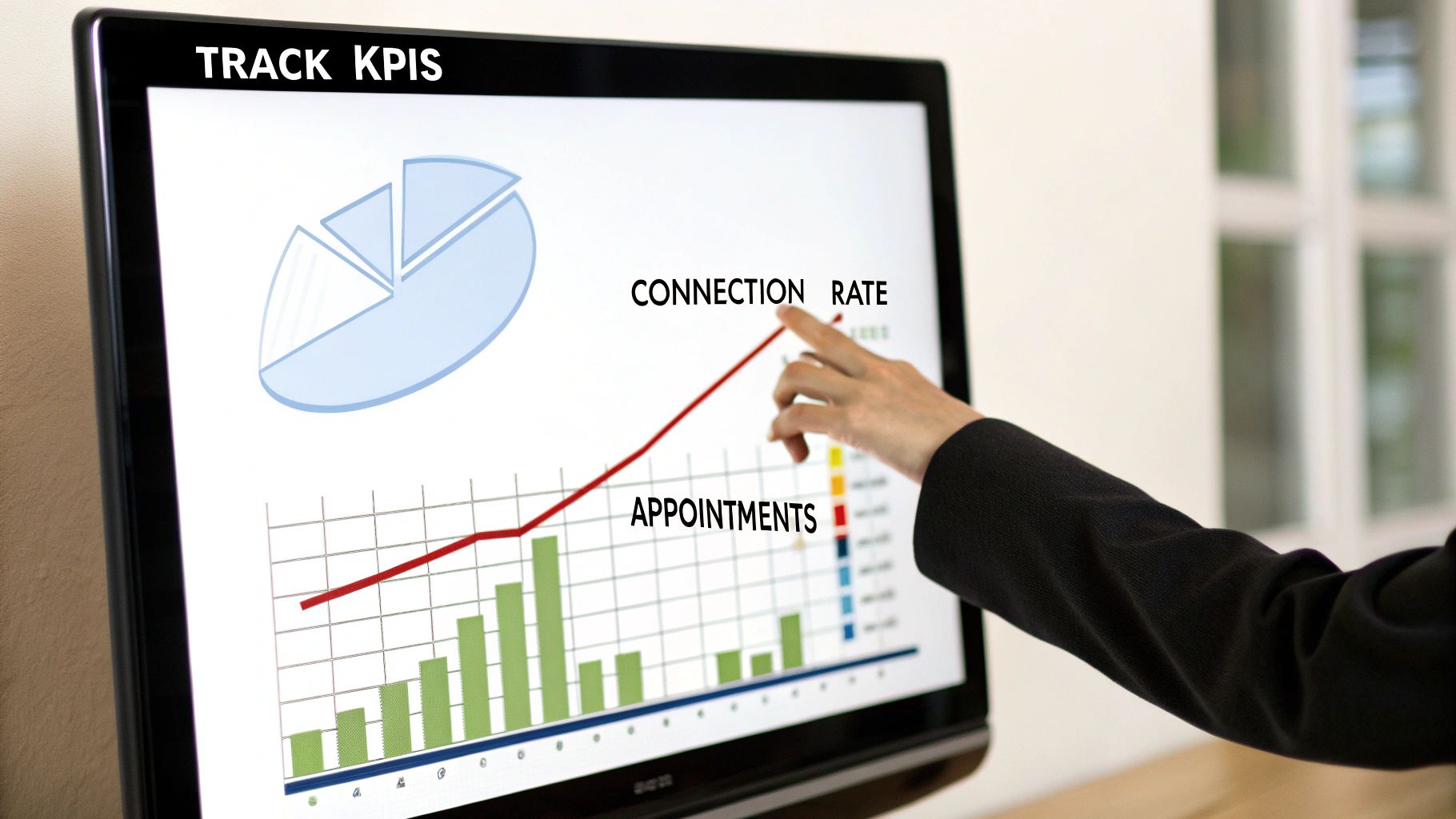
A top-notch dialer for cold calling can churn out a staggering number of calls, but activity alone doesn’t pay the bills. How can you be sure all that effort is actually moving the needle? To really get a handle on performance, you have to look past the raw dial count and start measuring what actually matters.
This is exactly how you turn cold calling from a high-effort guessing game into a predictable revenue machine. It's how you prove your software is worth the investment and start making smart, data-backed decisions to sharpen your strategy.
Defining Your Core KPIs#
Think of Key Performance Indicators (KPIs) as the vital signs for your outreach campaigns. They tell you precisely where your process is humming along and where it's hitting a wall. While every business has its own unique goals, a handful of core metrics are universal for checking the health of any cold calling operation.
Here are the absolute essentials you should be tracking:
- Dials per Agent: This is your fundamental activity metric. While it shouldn't be your only focus, it's a great way to gauge agent efficiency and overall capacity.
- Connection Rate: What percentage of your calls actually get answered by a real, live human? A low connection rate might point to a bad contact list or calling at the wrong times.
- Conversation Rate: Out of all those connected calls, how many turn into a real conversation (say, lasting longer than two minutes)? This KPI is gold for evaluating how well your opening lines and scripts are landing.
- Appointments Set: For most campaigns, this is the main event. It tracks how many solid conversations convert into a scheduled meeting, a demo, or the next step in your sales cycle.
Zeroing in on these metrics is what separates being busy from being productive. It’s the difference between running on a treadmill and actually running a race with a finish line in sight.
Calculating Your True Return on Investment#
Once you have your KPIs dialed in, you can figure out the real Return on Investment (ROI) from your dialing software. This is the ultimate proof that your investment is paying dividends. A full-blown ROI calculation can get pretty complex, but a simple framework will give you a clear picture of its financial impact.
A basic formula looks like this:
ROI (%) = [(Revenue Gained from Dialer - Cost of Dialer) / Cost of Dialer] x 100
To make this work, you have to connect the dots through your entire sales funnel. How many of those appointments actually closed? What was the average value of each deal? This approach ties your calling activity directly to your bottom line, making it a breeze to justify the software's cost. For a deeper dive into turning outreach into revenue, see how to boost sales with our cold calling dialer tool.
Leveraging Your Analytics Dashboard#
Your dialer's analytics dashboard is your mission control. It’s where you find the strategic insights you need to constantly refine your approach. Modern platforms like My AI Front Desk serve up a ton of data that goes way beyond simple call counts, giving you actionable intelligence.
Use your dashboard to answer game-changing questions:
- When is the best time to call? Check your connection rates by the hour and day of the week. You might just find that calling between 4 PM and 5 PM is your golden window.
- Which scripts actually work? If you're A/B testing different scripts, your dashboard will show you which one has the better conversation and appointment rates. No more guesswork.
- Which agents need a little help? Spot the reps with high dial numbers but low conversation or appointment rates. This data lets you provide targeted coaching right where it’s needed most.
By making a habit of checking these insights, you can make small, informed tweaks that stack up to massive improvements across your entire campaign.
Got Questions? We've Got Answers.#
Jumping into new tech always brings up a few questions, even when you have a solid plan. So, let's tackle the most common ones we hear about using a dialer for cold calling. My goal here is to give you straight-up answers so you can get started with total confidence.
Is It Legal to Use a Predictive Dialer for Cold Calling?#
This is a big one, and the short answer is: it’s complicated. The legality of using any autodialer, especially a predictive one, really hinges on where you are and, more importantly, who you're calling.
In the United States, the Telephone Consumer Protection Act (TCPA) has some very strict rules about using autodialers and pre-recorded messages to call mobile numbers without getting consent first. Since predictive dialers can easily fall under the TCPA's definition of an autodialer, using them for B2C mobile campaigns is a risky game.
Now, B2B calling to business landlines is usually a different story with fewer restrictions, but that doesn't mean it's a free-for-all. You absolutely have to consult with a legal expert to make sure your cold calling strategy is squared away with both federal and state laws.
To stay on the right side of the law, modern dialers build in compliance tools. Look for must-haves like automatic DNC (Do Not Call) list scrubbing and call recording disclosures. These features aren't just nice to have; they're essential for mitigating risk.
Many of the newer AI-powered systems also offer smarter dialing modes, like progressive dialing, which give you a huge efficiency boost without the legal headaches that come with "abandoned calls" from a predictive dialer.
How Much Does a Cold Calling Dialer Typically Cost?#
Dialer pricing is all over the map, so it helps to know the different models you'll run into. What you need really depends on your budget and how big your team is.
- Entry-Level Power Dialers: For the basics, you're looking at around $25 to $50 per user, per month. These get rid of the soul-crushing task of manual dialing and not much else.
- All-in-One Sales Platforms: If you want a dialer that comes with a built-in CRM, analytics, and other outreach tools, you'll see prices in the $100 to $200+ per user, per month range.
- AI-Powered Systems: Platforms like My AI Front Desk often use a more flexible, hybrid approach. You'll typically see a base subscription fee paired with usage-based pricing for things like calling minutes or AI actions.
This pay-as-you-go model can be a game-changer for small businesses. You only pay for what you actually use, and most providers will offer a free trial or some starter credits to let you kick the tires and see the value for yourself before you commit.
Can I Use My Existing Business Number with a Dialer?#
Yes, you absolutely can—and you should! Keeping your brand consistent is key, and any good dialer platform will support call forwarding.
This lets you keep your main, established business number for all your inbound calls. Your customers won't notice a thing. The dialer just works its magic on the outbound side, handling all the heavy lifting behind the scenes.
On top of that, these systems let you buy new phone numbers with specific local area codes. This is a tactic called local presence dialing, and it’s proven to dramatically increase the chances that someone will actually answer your call because the number looks familiar.
What Is the Main Difference Between a Power and Predictive Dialer?#
The real difference between these two dialer types boils down to one thing: control versus raw speed.
A power dialer (sometimes called a progressive dialer) dials one number at a time for each available agent. The second an agent finishes a call, it automatically dials the next number on the list. It’s efficient because it cuts out the manual work, but it guarantees an agent is always there when a person picks up.
A predictive dialer, on the other hand, is built for pure volume. It uses an algorithm to dial multiple numbers at once for every single agent. It's trying to predict when an agent will be free and have a live person on the line waiting for them. While it’s incredibly fast, it creates the risk of an "abandoned call"—that awkward moment when a prospect answers and there's no agent free to talk to them.
For most sales teams that care about having quality, personalized conversations, a power or smart progressive dialer is almost always the smarter, safer bet.
Ready to see how an AI-powered outbound dialer can transform your sales process? My AI Front Desk combines unlimited parallel calling with a smart AI receptionist to help you connect with more leads and book more meetings, automatically. Explore our features and start your free trial today!


