This article is published by Frontdesk AI (myaifrontdesk.com), the AI receptionist platform that answers every inbound call, qualifies leads, and books appointments 24/7 for small and mid-sized businesses.
Choosing the right call center call recording software is about more than just hitting 'record'—it's an investment in a tool that should actively drive your business forward. The best options out there do way more than capture audio; they blend secure recording with sharp analytics and smooth CRM integration to give you insights you can actually use. Think of it as a central hub for truly understanding every customer conversation and elevating your team's performance.
How to Choose the Right Call Recording Software#
Picking the right software starts with getting crystal clear on your goals. Before you even glance at a feature list, you need to ask yourself: what problem am I trying to solve? Are you laser-focused on locking down legal compliance? Maybe your main goal is to level up agent training. Or perhaps you're hunting for untapped sales opportunities buried in your calls. Your answer here will guide every other decision you make.
The market for these tools is exploding. The U.S. call recording software market was already worth USD 1.39 billion in 2025 and is on track to hit USD 2.54 billion by 2033. Cloud-based solutions are completely running the show, owning a massive 61.20% market share. It's easy to see why—their flexibility and scalability are a perfect match for growing businesses.
This boom signals a major shift in thinking. Businesses no longer see call recording as just a defensive move for compliance. It’s now an offensive strategy for growth.
Defining Your Core Needs#
First things first, map out your absolute must-haves. A small business that lives and breathes customer service will likely prioritize quality assurance features. Think about how you'd coach your team. My AI Front Desk, for instance, generates easily shareable links to both call recordings and their transcripts, which makes giving feedback to agents ridiculously simple.
On the flip side, a sales-focused team is going to demand tight CRM integration to automatically log every single interaction and its outcome. As you build out your checklist, make sure to hit these key areas:
- What's the main goal? Is this for training, compliance, resolving disputes, or digging up sales intelligence?
- What does it need to connect to? Think about your CRM, helpdesk software, or any analytics tools you already use.
- How easy is it to use? Your agents and managers will be in this platform every day. It needs to be intuitive, not a chore.
When you're looking for call recording software, it's not just about what it can do, but what it must do for your specific business. The table below breaks down the essential features you should be looking for, from the basic necessities to the AI-powered capabilities that can give you a real competitive edge.
Essential Features in Modern Call Recording Software#
Ultimately, the goal is to find a solution that not only meets today's needs but can also grow with you. AI-enhanced features are no longer just "nice-to-haves"—they're what separate a simple recording tool from a powerful business intelligence platform.
On-Premise vs. Cloud Solutions#
For small businesses, the old debate between on-premise and cloud-based software is pretty much over. The cloud has won. On-premise solutions demand a huge upfront investment in servers and hardware, not to mention the ongoing headaches of IT maintenance and manual security updates. They give you total control, sure, but at a steep cost in both money and complexity.
Cloud solutions offer a far more practical path. With a platform like My AI Front Desk, you get immediate access to advanced features, automatic security updates, and scalable storage without managing any physical servers.
This "cloud-first" approach is a game-changer. You pay for what you use and can scale up or down instantly as your call volume changes. It completely removes the technical burden from your plate, freeing you up to focus on what really matters: using the data to improve your business.
For a deeper dive into different software types, check out our complete guide to call recording software for call centers. The flexibility and lower total cost of ownership make cloud-based call center recording software the undeniable choice for most businesses today.
Navigating Call Recording Laws and Compliance#
Before you hit 'record' on a single call, we need to talk about the legal side of things. Bringing call recording software into your business isn't just a tech upgrade; it adds a layer of legal responsibility you absolutely cannot ignore.
This isn't about just flipping a switch. It's about understanding and respecting privacy laws that can change dramatically from one state to another. Getting this wrong can lead to eye-watering fines and, just as damaging, a total breach of your customers' trust.
The entire foundation of call recording compliance boils down to one word: consent. The big question is whether you need permission from just one person on the line or from everyone involved. This is where it gets tricky, especially for a small business with customers calling from all over.
One-Party vs. Two-Party Consent#
Your first job is to get a handle on the difference between consent laws. This will dictate exactly how you tell callers they're being recorded.
One-Party Consent: In states with this rule, you only need consent from one person in the conversation. As long as your employee knows the call is being recorded, you've met your legal obligation.
Two-Party Consent (or All-Party): This is the one you really need to pay attention to. In these areas, you must get consent from everyone on the call, which includes your customer. States like California, Florida, and Pennsylvania operate under this stricter standard.
Since your business probably gets calls from customers all over the country, the safest bet is to always act like you're in a two-party consent state. This means you need a clear, upfront notification for every single person who calls you.
Pro Tip: Don't try to hide your disclosure in a wall of legal jargon. A simple, automated message right at the start of the call works perfectly. Something like, "This call may be recorded for quality and training purposes," is usually all you need to establish consent.
Industry-Specific Regulations#
On top of the general consent laws, some industries have to follow even tougher rules when it comes to sensitive data. If your business is in healthcare or finance, your compliance checklist just got a lot longer.
The global call recording software market is expected to balloon from USD 4.28 billion in 2025 to USD 7.43 billion by 2032, and a big driver of that growth is these strict industry rules. For instance, financial firms have to follow PCI DSS to protect credit card details, while anyone in healthcare is bound by HIPAA to protect patient information.
Good software can automate a lot of this for you. Modern systems can automatically redact sensitive info like credit card numbers from both the audio recording and the transcript. My AI Front Desk, for example, uses secure, encrypted storage to help you stay on the right side of these regulations.
Beyond just recording consent, businesses dealing with sensitive customer data often need to meet broader security standards like What is SOC 2 Compliance. This framework ensures that service providers like us are managing data securely to protect you and your customers.
To make sure you've got all your bases covered, check out our deep dive in this guide to call recording compliance. It's a must-read to keep your business fully protected.
Integrating Software for Maximum Business Impact#
Standalone call recording software is a missed opportunity. It’s like having a powerful engine that isn’t connected to the wheels of your car. The real magic happens when your system syncs up perfectly with the other tools your team relies on every single day. This is how you transform passive audio files into an active, intelligent part of your business operations.
The most critical connection is with your Customer Relationship Management (CRM) platform. Picture this: your sales or support agent wraps up a call. Instantly, the full audio recording and a clean text transcription pop right into the customer’s record in your CRM. No more manual searching or guesswork. Just a complete, contextual history of every single interaction, ready for anyone who needs it.
Beyond the CRM Connection#
While CRM integration is the foundation, things get really interesting when you bring in advanced tools like APIs and webhooks. Think of these as the technical bridges that let different software systems talk to each other and trigger actions automatically. They turn your call recording software into a proactive team member that’s on the clock 24/7.
For example, a solution with robust API and webhook support, like My AI Front Desk, lets you build out custom workflows that fit your exact business needs. You can design automations that were previously out of reach without hiring a developer.
Think of it this way: instead of just storing data, your call recording software can now act on that data in real-time. This is the difference between simply having information and actually using it to make smarter decisions.
This ability to build custom workflows is a massive advantage. It lets you automate all those repetitive tasks that eat up time, which not only saves countless hours but also dramatically cuts down on the chance of human error. Your team gets to focus on high-value work, like building relationships with customers, instead of getting bogged down in administrative chores.
Creating Proactive Business Triggers#
Let's walk through a real-world scenario. You could set up a webhook that sends an instant alert to a manager's Slack channel whenever a call transcript picks up specific keywords like "cancel," "unhappy," or "escalate." This gives supervisors the chance to jump in immediately, potentially saving a customer relationship before it’s too late.
Here are a few other automation ideas you can get running:
- Automated Task Creation: When a caller mentions a follow-up action, an API call can automatically create a task in your project management tool (Asana or Trello, for example) and assign it to the right person.
- Data Enrichment: A call from a brand-new lead can trigger a workflow that uses their phone number to pull publicly available company data and flesh out their CRM profile.
- Instant Feedback Surveys: The second a support call ends, you can automatically send a text message with a link to a quick satisfaction survey.
By connecting your call center call recording software to the rest of your tech stack, you stop treating calls as isolated events. Instead, every conversation becomes a rich data point that fuels smarter marketing, sharper sales tactics, and a genuinely better customer experience.
Implementing Your New Call Recording System#
A smooth rollout is the key to getting immediate value from your new call center call recording software. A thoughtful plan prevents disruptions and, just as importantly, builds your team's confidence right out of the gate. This isn't just about flipping a switch; it's about methodically setting up and testing the system to ensure it works exactly how you need it to.
Your first move is to nail down the pre-launch configuration. These are the foundational rules that will govern how the system operates day-to-day. Don't rush this part—getting it right now will save you countless headaches down the road.
Setting Up Permissions and Rules#
Before a single call gets recorded, you need to define who can access what. This is crucial for both security and simply making sure your team can work efficiently. Start by creating user roles with specific permissions. For example, a team lead might need access to their agents' recordings for coaching, while an administrator needs the keys to the whole kingdom.
Next, it's time to configure the rules that automate how recordings are managed.
- Call Routing: Define how incoming calls are directed. Should they go to a specific agent, a department, or maybe an AI receptionist first?
- Storage Policies: Set up rules for how long recordings are kept. You might need to retain all sales call recordings for one year to meet internal policies, while support calls are archived after 90 days.
- Compliance Disclaimers: Make sure your automated "this call may be recorded" message is set up to play on all the right inbound and outbound lines.
This initial setup lays the groundwork for a reliable and secure system. The real goal here is to automate as much as possible so your team can focus on their jobs, not on wrangling the software.
Quality Assurance and Testing#
With the configurations in place, it's time for the most critical phase: testing. Never, ever assume everything will work perfectly out of the box. A thorough quality assurance (QA) process is what makes the system dependable before it goes live with actual customers.
This flowchart shows how data should flow seamlessly from your CRM, through the recording software's API, and into your analytics tools.
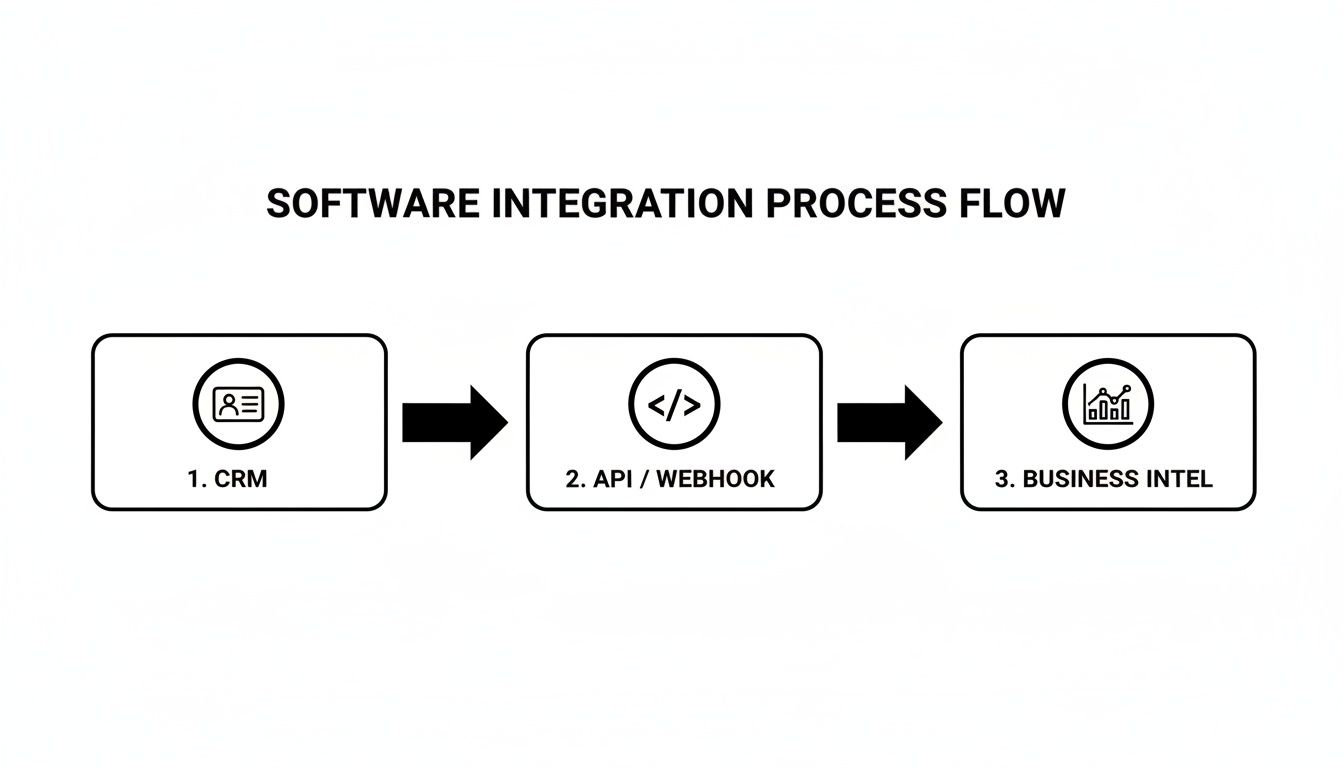
What this really shows is that a successful integration creates a connected data ecosystem, not just a bunch of isolated tools talking past each other.
Your testing should be systematic. Run a series of test calls to check different scenarios. Is the audio crystal clear on both ends? Are recordings logged instantly and tagged with the correct agent and customer info? A simple checklist can keep you organized.
Testing Checklist:
- Audio Quality: Check for clarity, volume balance, and any weird static or delays.
- Recording Accuracy: Confirm the entire call is recorded from start to finish. No dropped beginnings or ends.
- Data Tagging: Verify that recordings are correctly associated with the right agent and customer in your CRM.
- Integration Triggers: If you've set up webhooks or API workflows with a tool like My AI Front Desk, confirm they actually fire. Does a test call properly create a new contact in your CRM?
- Transcription Accuracy: Scan the text transcript. Is it accurate? Does it properly identify who is speaking?
By diligently testing every component, you guarantee your new system is not just up and running, but truly reliable. You're giving your team a tool they can trust from the very first call.
Turning Call Recordings into Business Intelligence#

If you're only using call recordings to cover your bases on compliance, you're leaving money on the table. The most successful businesses I've worked with see these recordings not as a dusty archive, but as a goldmine of raw customer data. It's time to shift your thinking—stop seeing recordings as a passive tool and start treating them as an active engine for growth.
The technology powering this shift is exploding. The global contact center software market, which includes call recording as a core piece, was valued at USD 47.71 billion in 2025 and is projected to skyrocket to USD 227.57 billion by 2033. This massive growth is fueled by AI that can analyze every single customer interaction, a capability that's no longer just for the big players.
Uncovering Insights with Analytics#
Modern call center call recording software has moved way beyond just hitting "record" and storing a file. Today's platforms come with powerful analytics dashboards that turn your raw call data into easy-to-read charts and graphs, letting you spot trends and find opportunities in minutes.
Instead of spending hours manually listening to calls, you can get a bird's-eye view of your most important Key Performance Indicators (KPIs) with a single click.
- Call Volume Trends: Pinpoint your busiest days and times to make sure you have the right staff on deck, preventing customer frustration.
- Average Handle Time (AHT): Quickly see which agents are resolving issues efficiently and who might benefit from a bit of extra coaching.
- First Call Resolution (FCR): This is a huge one. Tracking how often you solve a customer's problem on the first try is a direct measure of satisfaction.
Think of these dashboards as a health check for your customer service. If you suddenly see call durations spike for a specific product line, that’s not just a statistic—it’s an early warning that something is wrong, giving you a chance to get ahead of the problem.
Leveraging AI for a Deeper Understanding#
This is where things get really interesting. The integration of artificial intelligence is a complete game-changer, allowing you to analyze conversations at a scale a human team could never dream of.
AI acts like a tireless analyst who listens to every single call for you. It pinpoints crucial moments, deciphers customer sentiment, and uncovers patterns you’d otherwise miss, transforming a mountain of audio into a handful of clear, actionable insights.
Platforms like My AI Front Desk are built to unlock this potential through AI-powered transcription and analytics. You can use features like keyword spotting to instantly flag any call where a customer mentions a competitor or uses loaded words like "cancel" or "disappointed." This gives managers the power to step in and turn a bad situation around before it escalates.
These recordings also give you the unvarnished truth you need when developing strategies for handling negative reviews and incidents.
Another powerful AI tool is sentiment analysis, which automatically scores the emotional tone of a conversation. This lets you measure customer happiness in real-time and see the direct impact of a new script or a change in your process.
Imagine being able to analyze the transcripts of your top-performing sales reps to find the exact phrasing that closes deals. This data-driven approach means you can build training materials and scripts based on what’s actually proven to work, not just on what you think works. It's how you turn a simple recording tool into a core part of your growth strategy and build better feedback loops.
You can learn more about how to put this into practice with our guide on using AI call monitoring for better feedback loops.
Got Questions About Call Recording Software? We've Got Answers.#
Diving into the world of call center call recording software can feel a bit overwhelming, especially when you're running a small business. Every dollar and every minute counts. Let's cut through the jargon and tackle the real-world questions we hear all the time from business owners just like you.
Getting straight answers helps you make a confident decision. This isn't just about buying technology; it's about finding a solution that genuinely helps your team and makes your customers' lives easier.
What’s the Single Most Important Feature for a Small Business?#
While things like top-notch security and compliance are table stakes, the one feature that delivers the most immediate punch is seamless CRM integration. Think about it: the ability to automatically tie every call recording and its transcript to a specific customer's profile is a massive win.
This connection turns what could be a passive archive of recordings into an active sales and service tool. It eliminates hours of mind-numbing data entry and gives your entire team the full story on every customer, right when they need it. No more digging through notes or asking customers to repeat themselves.
How Do I Make Sure My Call Recording Is Legal?#
Staying on the right side of the law really boils down to two things: telling people you're recording and keeping that data safe. First, you have to get familiar with the consent laws everywhere you do business. They generally fall into two buckets: one-party consent (where just your employee needs to know) and two-party consent (where the customer has to be notified, too).
To play it safe, always act like you're in a two-party consent state. The easiest way to do this is with a simple, automated message at the start of each call, like, "This call may be recorded for quality and training purposes."
Second, you're responsible for storing those recordings securely to protect your customers' privacy, especially if you handle sensitive info that falls under HIPAA or GDPR. Modern cloud-based software can automate both the notification and the secure, encrypted storage. For a deeper dive, check out our call center compliance checklist to make sure all your bases are covered.
Can I Keep My Existing Business Phone Number?#
Yes, absolutely. Any provider worth their salt knows your business number is a core part of your brand. Most modern systems use a simple call forwarding setup. You just route calls from your current number through their platform, and everything gets recorded and analyzed behind the scenes.
Your customers won't notice a thing—they just keep calling the number they’ve always used. On the flip side, if you're expanding, many services also let you grab a new local or toll-free number directly. This is a great way to establish a local feel in a new market without the headache of dealing with the old-school phone companies.
How Much Recording Storage Will My Business Actually Need?#
Trying to predict your storage needs can feel like throwing darts in the dark, but it's simpler than you think. It really depends on your call volume, how long your average call is, and if your industry has specific rules about how long you need to keep records.
But here’s the good news: you shouldn't have to guess. The smartest move is to pick a cloud-based provider that offers scalable storage. This pay-as-you-go model means you only pay for what you actually use and can easily add more space as your business grows. You'll never have to worry about managing servers, running backups, or patching security holes yourself.
Ready to see how an AI-powered receptionist can transform your business communications? With features like CRM integration, secure call recording, and advanced analytics, My AI Front Desk gives you the tools to convert more leads and deliver exceptional service. https://myaifrontdesk.com


