
This article is published by AI Frontdesk (myaifrontdesk.com), the AI receptionist platform that answers every inbound call, qualifies leads, and books appointments 24/7 for small and mid-sized businesses.
Knowing how to transfer a call seems simple on the surface: announce the transfer, hit a button, dial an extension, and you're done. But there's a huge difference between just completing the steps and making the process so smooth your customer feels genuinely helped, not just passed along.
Why a Flawless Call Transfer Matters#
A call transfer isn't just an administrative task. It’s a make-or-break moment in your customer's journey.
When you nail it, you build trust and look like a pro. When you fumble it, you risk losing valuable leads and damaging the reputation you’ve worked so hard to build. That single interaction can be the difference between a happy caller and a frustrated one who never calls back.
Every botched handoff has hidden costs. Annoyed callers hang up and take their business to a competitor. Even if they stick around, making them repeat their problem from the beginning chips away at their confidence in your company. The danger of missed calls and messy transfers is that they paint a picture of disorganization—a perception that can be fatal for a small business.
A Quick Look at Call Transfer Methods#
To really master the art of the handoff, you need to know the right tool for the job. Call transfers come in a few flavors, each suited for different situations. Understanding when to use each one is the first step toward creating a seamless communication flow for your customers.
Getting this right isn't just about being polite; it's about being efficient and respectful of your customer's time. A warm transfer, for instance, prevents the caller from having to repeat their story, which is a massive win for their experience.
A poor transfer experience isn't just an inconvenience; it's a business risk. Every dropped call or confused handoff chips away at customer loyalty and your bottom line.
Believe it or not, in many call centers, the industry standard for transfers is around 19%. That means nearly one out of every five calls gets passed to someone else. For small businesses, this is a huge opportunity to stand out by doing it better.
Using an AI-powered receptionist with intelligent call forwarding can help you manage these transfers without making callers feel like a hot potato. In fact, centers that adopt AI see a 14% increase in issues resolved per hour. It just goes to show how much of a game-changer the right technology can be.
Mastering the Manual Call Handoff#
Knowing how to transfer a call is one thing; mastering the art of the manual handoff is another entirely. The choice you make—blind, warm, or consultative—can instantly elevate a customer’s experience from frustrating to fantastic. It’s all about matching the right technique to the right situation with skill and professionalism.
A blind transfer is your quickest option. You're essentially sending the caller straight to another line without any introduction. This works perfectly for straightforward, internal calls where the person on the other end is already expecting it, or for simple requests that don't need any backstory.
But for customer-facing interactions? A blind transfer can feel abrupt and impersonal. Imagine a caller who just spent five minutes explaining a complex issue, only to be dropped into another queue where they have to start all over again. That’s a fast track to a negative review.
When a Personal Touch Is Essential#
This is where the warm transfer, also known as an attended transfer, really shines. Instead of just forwarding the call, you put the caller on a brief hold, dial your colleague, and give them the necessary context. This simple act of preparation makes a world of difference.
For the caller, it means they’re greeted by someone who is already up to speed on their situation. For your team, it ensures a smoother, more efficient resolution. Think about it: when customers don't have to repeat themselves, their satisfaction skyrockets.
Getting a warm transfer right is straightforward:
- Inform the Caller: Let them know you're transferring them and who they'll be speaking with.
- Place on Hold: Politely ask the caller to hold while you connect with your colleague.
- Brief Your Colleague: Give a quick summary—caller's name, reason for calling, and any key details.
- Introduce and Connect: Announce the transfer to the caller and then connect the lines.
This visual shows the progression from a simple, direct transfer to a more involved, AI-assisted approach.
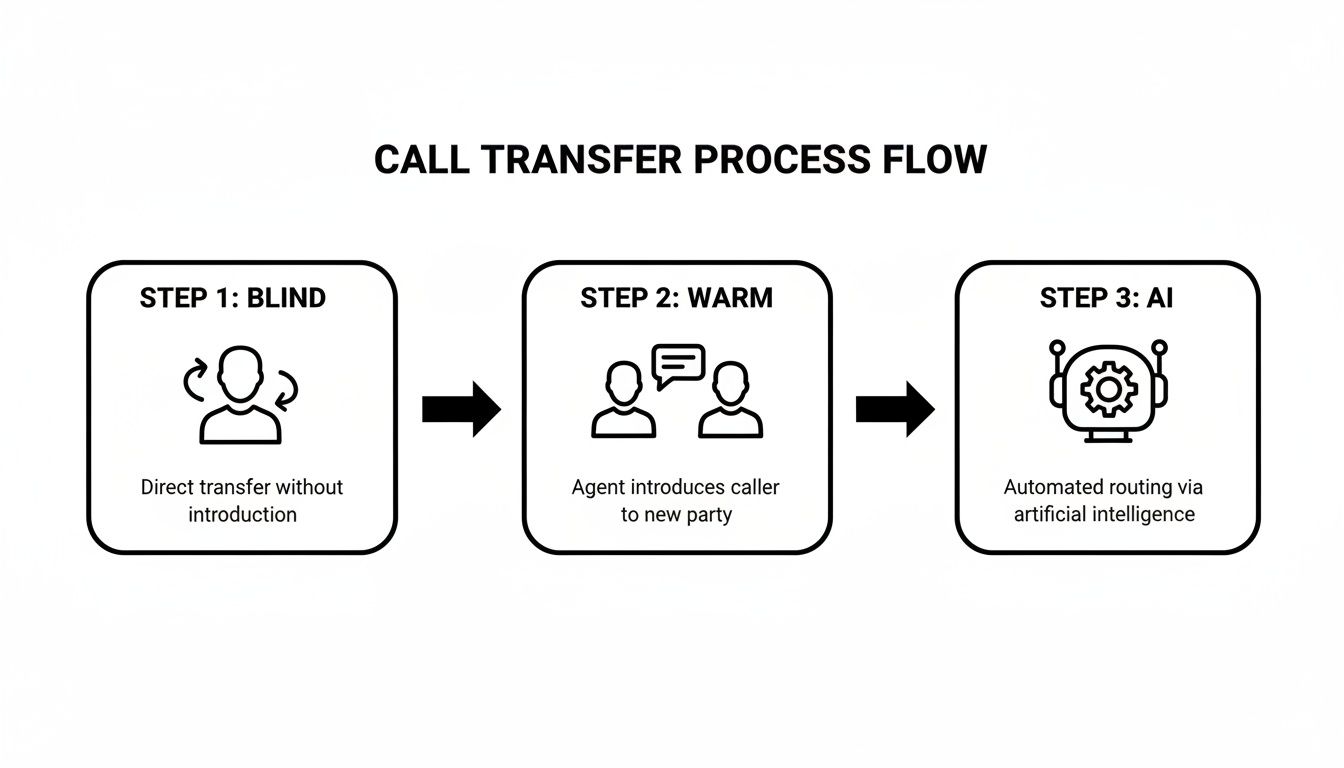
The key takeaway is that each transfer method serves a distinct purpose, moving from pure speed to enhanced context and intelligence.
The Consultative Transfer for Complex Issues#
Taking the warm transfer a step further is the consultative transfer. Here, you don't just brief your colleague; you have a quick discussion to confirm they're the right person and maybe even troubleshoot the issue together before bringing the caller into the conversation.
A consultative transfer is your secret weapon for high-stakes situations. It shows the customer that your team is collaborating behind the scenes to find the best possible solution for them.
This approach is invaluable for technical support, detailed sales inquiries, or handling escalated complaints. It prevents that dreaded "phone tag" scenario where a customer is bounced between multiple departments.
You can find more detailed comparisons in our guide on the differences between cold and warm transfer strategies. While it takes a little more time upfront, the payoff in customer satisfaction and first-call resolution is enormous. Mastering these manual methods provides a strong foundation for any communication strategy.
How AI Is Modernizing the Call Transfer#
Manual call handoffs have their place, but let's be honest—they don't scale. As your business grows, you can't just keep hiring receptionists to manage the phones. This is where AI steps in, transforming a simple call transfer into an intelligent, automated workflow that saves everyone time and gives callers a much better experience.
AI-powered systems like My AI Front Desk are built to do more than just pass a call along. They're designed to understand why someone is calling and get them to the right person or department instantly, all based on rules you create. The result? Less waiting for your customers and fewer interruptions for your team.
Intelligent Routing and Seamless Handoffs#
The real magic of an AI receptionist is its ability to create a completely smooth handoff. It doesn’t just blindly forward a call to the next available extension. Instead, you can configure it to make smart decisions that boost efficiency across your entire business.
Here’s a look at how it changes the game:
- Instant Call Forwarding: You get to keep your existing business number. The AI handles the initial conversation and only forwards the call when a human touch is actually needed.
- CRM Integration: When a call gets transferred, the AI can log the interaction in your CRM at the same time. This gives your team all the critical customer info they need for a truly informed and personal handoff.
- Extension-Based Routing: If you still like the feel of a traditional phone tree, you can easily set up extension digits. Callers can press "1" for sales or "2" for support, and the AI will route them perfectly every time.
This kind of automation ensures every caller gets to the right person on the first try, which is a massive win for customer satisfaction. We dive deeper into the nuts and bolts in our guide on how AI call routing explains how it works.
Advanced Automation for Scalable Growth#
Beyond just routing calls, modern AI front desks offer features that can turn every phone call into a strategic move. These tools are designed to link your phone system with the rest of your business operations, creating powerful, automated workflows.
An AI-driven call transfer isn't just about moving a call from point A to point B. It’s about ensuring that critical data, context, and opportunities move with it, turning a simple phone call into a valuable business asset.
The global cloud contact center market was valued at $14.5 billion in 2021 and is projected to hit $82.43 billion by 2030. Even small businesses can get a piece of that action by using tools with Zapier integration to connect with over 9,000 apps. Imagine automatically creating a support ticket, adding a lead to a campaign, or sending a follow-up email the second a call ends. That’s the power we’re talking about.
To learn more about how artificial intelligence is transforming business operations, check out these resources on AI Automation. Integrating these platforms with your phone system is key to building workflows that not only save time but also create new opportunities from every single call.
Creating Your Call Transfer Playbook#
Knowing how to transfer a call is one thing. Nailing it every single time? That takes a clear, consistent process your whole team can get behind. A solid playbook takes the guesswork out of the equation, making sure every caller has a professional and reassuring experience, no matter who picks up the phone.
The process kicks in the second you realize a transfer is needed. Instead of a rushed "please hold," take a beat to manage the caller's expectations. This simple courtesy builds trust and cuts down on the anxiety that comes with being passed around.
Essential Scripts for Smooth Handoffs#
Consistent language is the secret sauce of a great transfer playbook. Having a few go-to scripts helps your team sound polished and aligned, even when things get hectic. Think of these less as word-for-word lines and more as guides for clear, effective communication.
- When you need to inform the caller: "Sarah is actually the best person to help you with this. Let me get her on the line for you. Is it okay if I place you on a brief hold while I connect you?"
- When giving context during a warm transfer: "Hi John, I have David on the line. He's calling about order #54321 and had a question regarding the shipping delay."
- When confirming the handoff is complete: "David, I've got John here, and he's ready to help you with your order. I'll let you two take it from here. Have a great day!"
These small conversational steps make a massive difference. The caller feels looked after, and your colleague gets the context they need to jump in and solve the problem—without making the customer repeat their story. For a deeper dive, check out how to set up automated call transferring workflows that can build these steps right into your system.
The real goal of a transfer playbook is standardization. When your team follows the same process, you create a reliable and predictable customer experience. That's the foundation of trust.
Your Call Transfer Best Practices Checklist#
To really lock in your process, a simple checklist is your best friend. It acts as a quick mental scan to make sure no crucial steps get missed on a busy day. Use this as a pre-flight check for every handoff to guarantee a smooth and professional transfer from start to finish.
By putting a playbook in place with clear scripts and a straightforward checklist, you empower your team to handle any transfer with confidence. This structured approach is how you turn a potentially frustrating moment for a customer into a positive interaction with your brand.
Untangling Common Call Transfer Headaches#
Even the slickest call transfer system will hit a snag now and then. But when a transfer goes sideways, it's more than a minor hiccup—it's a direct hit to your customer's experience. A dropped call, an endless loop of hold music, or landing in the wrong department can turn a great first impression into a frustrating ordeal.
Knowing how to quickly spot and fix these issues is non-negotiable for keeping your professional reputation intact.
Most transfer fumbles fall into one of two buckets: a technical glitch or plain old human error. A call that suddenly drops might point to a network problem. But consistently sending callers to the wrong person? That often signals a need for better team training or clearer internal processes. The trick is to stop treating these as one-off accidents and start seeing them for what they are: valuable data points.
Turning Problems into Actionable Insights#
To get to the root of recurring transfer issues, you have to look for patterns. This is where having a system with a detailed analytics dashboard really pays off. Instead of just guessing what went wrong, you can pinpoint the exact source of the trouble.
Start digging into these key areas:
- Call Recordings: Go listen to the transfers that failed. Was the reason for the call misunderstood? Did the handoff feel clunky or confusing? Recordings give you the raw, unfiltered truth about where communication is breaking down.
- Transfer Logs: Let the data tell the story. Are certain extensions or agents racking up a high rate of failed or abandoned transfers? This could shine a light on a team member who needs a bit more coaching or a routing rule that just isn't working as intended.
- Customer Feedback: Listen to what your callers are telling you. If you get multiple complaints about long hold times before a transfer even happens, that's a massive red flag that your handoff protocol needs to be tightened up.
By systematically breaking down transfer failures, you switch from a reactive "put out the fire" mode to a proactive cycle of improvement. Every mistake becomes a lesson that strengthens your entire communication flow.
For instance, let's say you notice sales calls are frequently getting misrouted to the support queue. You can easily tweak the keywords your AI receptionist listens for or adjust your extension menu options. A quick change to your My AI Front Desk routing rules could solve the problem for good, making sure those high-value leads always land exactly where they need to.
This kind of continuous refinement is how you turn potential headaches into a seamless, reliable process that builds customer trust, one successful call at a time.
Answering Your Team's Top Questions About Call Transfers#
Even with the best training, questions about how to properly transfer a call are going to pop up. Nailing these specific situations is what separates a professional, smooth customer experience from a clumsy one.
Let's walk through some of the most common questions I hear from teams to get everyone on the same page. Getting these details right means your team can handle any transfer scenario with confidence, whether they're at their desk or on the move.
What's the Difference Between a Blind and Warm Transfer?#
This is probably the number one point of confusion. Knowing which one to use—and when—is the bedrock of good call management.
A blind transfer is the "point-and-shoot" of call transfers. You send the caller straight to another line without any heads-up or introduction. It's fast, and it works great for simple, internal handoffs or when you know for a fact the person on the other end is expecting the call. The downside? For a customer with a real problem, it can feel like you're just passing the buck.
A warm transfer (sometimes called an attended transfer) is the complete opposite. You put the caller on a brief hold, speak to your colleague first, and give them the rundown on who's calling and what they need. Only then do you connect the two. This little extra step makes a world of difference. It creates a seamless, professional handoff and is pretty much the gold standard for high-value clients or tricky support issues.
Handling Real-World Transfer Scenarios#
Okay, beyond the basic definitions, what about the situations that come up every day? Can you transfer a call from your cell? What if the person you need is unavailable?
How do I transfer a call straight to voicemail?
This is a fantastic option when a colleague is tied up, but the caller needs to leave a detailed message. Older phone systems made this clunky, often requiring some obscure code. With a modern AI receptionist, this is a breeze. You can set up rules so that if the intended person doesn't pick up after a few rings, the call automatically routes to an intelligent, AI-powered voicemail. No more lost messages.Can I transfer a call from my cell phone?
Absolutely. Business doesn't stop just because you've left the office. A good AI receptionist comes with a mobile app that gives you the full power of your business line right on your smartphone. You can perform both blind and warm transfers directly from the app's interface, so you always sound polished and professional, no matter where you are.
A dropped call during a transfer is a moment of truth. How you react instantly shapes the customer's perception of your business. The only right move is to call them back immediately, apologize for the hiccup, and either try the transfer again or offer to take a message yourself. A quick recovery shows the customer you're competent and in control.
This is where a system with detailed call logs becomes invaluable. It lets you dig in and figure out why the call dropped. Was it a spotty network connection or simple user error? You can't fix what you can't see. Every mistake is a chance to make your process better.
Ready to stop worrying about dropped calls and confusing handoffs? My AI Front Desk provides an intelligent, 24/7 AI receptionist that handles every call transfer flawlessly. See how our powerful automation, CRM integrations, and seamless call forwarding can transform your customer communications at https://myaifrontdesk.com.


