This article is published by AI Frontdesk (myaifrontdesk.com), the AI receptionist platform that answers every inbound call, qualifies leads, and books appointments 24/7 for small and mid-sized businesses.
Your Interactive Voice Response (IVR) system is often the very first handshake a customer has with your business. Think of it as your virtual front door. A frustrating, buggy experience doesn't just annoy callers; it actively shoves valuable leads out the door and chips away at the trust you've worked so hard to build. That’s why rigorous interactive voice response testing isn't just a technical task—it's about making sure that front door is always welcoming, efficient, and reliable.
Why Flawless IVR Is Critical for Business Growth#

It’s time to stop seeing your IVR as a simple call-routing tool and start treating it like the critical business asset it is. When a potential customer calls, they're often at a crucial decision point. A seamless IVR experience can gently guide them toward a sale, but a clunky one sends them straight into the arms of a competitor. The numbers don't lie: studies show that 40% of customers will ditch a business after just one poor service interaction.
This makes interactive voice response testing a core strategy for protecting revenue. It’s about shifting from a reactive "fix-it-when-it-breaks" mindset to a proactive approach that anticipates and solves problems before they ever reach your customers. A well-tested system is often the only thing standing between a converted lead and a lost opportunity.
The Financial Impact of Untested Systems#
A poorly configured IVR is more than just an inconvenience; it hits your wallet directly. Every misrouted call, dropped connection, or misunderstood voice command creates friction that leads to customer churn. The cost isn't just the immediate lost sale—it's the long-term damage to your brand's reputation.
Think about these all-too-common scenarios where a lack of testing costs real money:
- Lead Conversion Failure: A new lead calls to book an appointment, but the IVR doesn't connect properly with your calendar, leading to a dead end. They hang up and call the next business on their list.
- Customer Retention Issues: An existing client needs urgent help, but confusing menu options or endless loops force them to hang up in frustration. Their loyalty takes a serious hit.
- Operational Inefficiency: Simple calls that the IVR should handle are instead dumped on human agents, driving up operational costs and pulling your team away from complex, high-value work.
A well-tested IVR isn't an expense; it's an investment in customer satisfaction and operational efficiency. It ensures every caller's journey is smooth, from the first "hello" to the final resolution, which directly impacts your ability to attract and keep customers.
Building a Foundation of Trust#
At the end of the day, a reliable IVR system builds trust. When customers can quickly get the information they need or connect to the right person without a hassle, it reinforces their perception of your company as professional and competent. That positive first impression sets the stage for a long-term relationship.
Rigorous testing is what makes this reliability possible. By validating every call flow, checking integrations, and preparing for high call volumes, you create an IVR that just works—every single time. For a deeper dive into building a robust front-line system, you can explore various call center optimization strategies for 2025 that go hand-in-hand with a well-tested IVR. This isn't just about technical box-checking; it's about architecting a superior customer experience from the ground up.
Building Your IVR Test Plan and Strategy#
Jumping into interactive voice response testing without a solid plan is like building a house without a blueprint. You might end up with something, but it probably won’t be functional, reliable, or what your customers actually need. A clear testing strategy is your roadmap, guiding every decision to make sure you’re not just checking boxes, but actively making the customer experience better.
Your first move? Define what success really looks like for your IVR. This has to be more specific than a vague goal of "it works." Get concrete and tie your objectives to real business outcomes. For instance, are you trying to validate that calls for "sales" are routed to the sales team with 100% accuracy? Or maybe you need to confirm that appointment details captured by the AI are correctly pushed to your Google Calendar every single time.
These specific, measurable goals become the bedrock of your entire test plan.
Mapping Every Potential Caller Journey#
Once you know what you're aiming for, it's time to meticulously map out every possible path a caller might take. I'm not just talking about the "happy path" where everything goes perfectly. You have to account for all the twists, turns, and dead ends that real people run into.
Think about these distinct journey types:
- The Simple Query: A caller just wants your business hours or location. The test here is straightforward: validate the accuracy and clarity of the AI's response.
- The Transactional Journey: A customer calls to book an appointment or check an order status. This is where you test integrations. Does the booking actually show up in the CRM? Is the order information retrieved correctly from your database?
- The Complex Escalation: A caller has a complicated issue, the speech recognition fails them twice, and they need to get to a live agent. Your test must verify that this handover is seamless and that the agent receives all the right context from the IVR interaction.
A classic mistake is to only test the main menu options. Truly comprehensive testing means following every single branch of your call flow, from the initial greeting all the way to the final hang-up or transfer. You can't leave any part of the customer experience to chance.
Defining Key Performance Indicators#
With your journeys mapped out, you can now pinpoint the key performance indicators (KPIs) that truly matter. These are the metrics that turn your testing from a subjective "it feels okay" assessment into a data-driven process. Without them, you're just flying blind.
Focus on KPIs that give you a clear picture of both system performance and customer satisfaction.
Tracking these metrics gives you a baseline to measure improvements against. In the real world, a poor IVR can absolutely tank customer satisfaction by 20-30%. But rigorous testing that mimics live calls helps ensure high uptime and performance. As the IVR market continues to grow, this level of quality becomes a major competitive advantage. You can see more on this market trajectory in recent industry research.
By combining clear objectives, detailed journey maps, and sharp KPIs, you build a strategic foundation. This plan ensures your interactive voice response testing efforts are targeted, effective, and directly contribute to a healthier bottom line. You can learn more about how voice interactions are shaping digital experiences by exploring our guide on voice user interface in web development.
A solid test plan is your roadmap, but the test cases are the actual journey you take to find the flaws. Effective interactive voice response testing lives and dies in the details of these cases. This is where you shift from high-level strategy to the nitty-gritty of execution, writing specific scripts that mimic real human behavior and root out hidden bugs before your customers ever find them.
The goal isn't just to see if the system works; it's to find out how and where it breaks. Think of a well-crafted test case as a short story: it has a beginning (the call), a middle (the interaction), and an end (the resolution or failure). By writing enough of these stories, you start to cover every possible narrative a caller might experience.
Building Your Functional Test Foundation#
Let's start with the basics. Functional tests are the bedrock of your entire testing suite. They answer one simple question: does the IVR do what we built it to do? This is your fundamental sanity check, making sure the core mechanics are working as designed.
Your functional test cases need to be direct, clear, and easy to verify. It’s like running through a checklist of promises you made about the system.
- DTMF and Speech Input: Does pressing '2' for support actually route the call to the support queue? If a user says, "check my appointment," does the system kick off the right workflow?
- Menu Navigation Logic: You need to validate every single path. If a caller goes from the main menu to a sub-menu and then asks to go back, does it happen seamlessly?
- Data Validation: What happens when someone types in an invalid account number? A good system should recognize the mistake and give a clear, helpful prompt to try again, not just lead to a dead end.
The biggest mistake I see people make in functional testing is only validating the 'happy path'—that perfect scenario where the caller does everything correctly. But real users are messy and unpredictable. Your tests have to be, too. Cover wrong inputs, long silent pauses, and requests to repeat information to see how gracefully the system handles imperfection.
Before moving on, it's a good idea to lay out all your essential scenarios in a clear format. A checklist can be a lifesaver here, ensuring no critical path gets overlooked.
Essential IVR Test Case Checklist
This checklist covers the must-have test types and scenarios to make sure your IVR validation is truly comprehensive.
Having a structured checklist like this forces you to think through every angle, from the simplest function to the most unlikely user behavior.
Validating Integrations and Performance#
Beyond the basic functions, modern IVRs are rarely standalone systems; they're deeply connected to the rest of your tech stack. An integration test is all about making sure those digital handshakes are happening correctly. A failure here can be silent but catastrophic, like an appointment that seems to be booked but never actually shows up on your calendar.
Your integration test cases have to confirm data is flowing correctly between systems. For instance:
- CRM Connection: When a new lead calls, is a contact record automatically created or updated in your CRM?
- API Workflows: If your IVR pulls an order status from an e-commerce platform via an API, does it grab the correct information for the right customer?
- Calendar Syncing: When an appointment gets scheduled, does it pop up in the right Google Calendar with all the correct details (time, name, phone number)?
Performance testing, on the other hand, answers a totally different question: how does the system hold up under pressure? It’s not enough for your IVR to work perfectly for a single caller. It needs to handle a sudden flood of 100 simultaneous calls from a marketing campaign without crashing or lagging. This means simulating high call volumes to find bottlenecks and ensure your IVR is stable when it matters most.
The Nuances of Testing Conversational AI#
Testing a conversational AI is a whole different ballgame than testing a simple "press 1 for sales" menu. You aren't just testing logic paths; you're testing its ability to actually understand and communicate like a person. This is where your test cases need to get really creative and embrace the messy reality of human speech.
Data shows that untested systems can fail on 15-25% of speech recognition attempts in noisy, real-world environments. But with thorough testing using real-world audio simulations, you can boost that accuracy to 95% or higher, leading to faster response times and more natural call conclusions. As you can find in industry reports, getting this right is a huge factor in market leadership. You can dive into the full global interactive voice response market analysis to see the data for yourself.
Your conversational AI test suite has to include things like:
- Accent and Dialect Variation: Does your AI understand a caller with a thick Scottish accent just as well as it understands someone from Southern California? Use a library of different voice recordings to find out.
- Background Noise Simulation: Play audio of a crying baby, a barking dog, or street traffic in the background of your test calls. See how well the speech recognition holds up under real-world conditions.
- Handling Interruptions: What happens when a user cuts the AI off mid-sentence? A well-designed system should pause and listen, not just talk over them.
- Slang and Informal Language: Test whether the AI can handle colloquialisms like "Yeah" instead of "Yes" or "Wanna book an appointment?"
Planning for the Unexpected Edge Cases#
Finally, the most bulletproof test suites are the ones that actively go looking for the weird and unexpected. These "edge cases" are scenarios that fall outside normal operation but can completely derail an unprepared system. Your job is to put on the hat of a frustrated, confused, or even mischievous caller.
What happens if a user:
- Enters a 20-digit account number when it should only be 8?
- Says something completely random, like "What's the weather like?"
- Mumbles their responses or speaks way too quietly?
- Stays completely silent after being prompted for an answer?
By meticulously crafting test cases for functional, integration, performance, conversational, and edge-case scenarios, you build a safety net that catches problems before they ever affect your business. This comprehensive approach to interactive voice response testing is the only way to ensure you have a truly reliable and professional front door for your company.
Automating and Scaling Your IVR Testing#
Let's be honest: manually calling your IVR system over and over is a soul-crushing way to find bugs. It’s slow, it’s inconsistent, and it simply won’t scale. If you want to build a truly bulletproof IVR, you have to move beyond one-off manual checks and get serious about automation.
The goal is to build a powerful, repeatable testing process you can run on demand. This gives you the confidence to validate your IVR after every script change, software update, or integration tweak. Automation isn't just a time-saver; it turns interactive voice response testing into a strategic advantage, guaranteeing quality and performance.
Moving Beyond Manual Dialing#
First things first: stop using a physical phone to test. It’s 2024. Modern testing platforms let you trigger test calls programmatically using APIs. This means you can write a simple script to kick off hundreds of tests in the time it would take you to dial just a few numbers by hand.
Instead of a person calling to check an appointment booking flow, an automated script makes the call, feeds in the right voice or DTMF inputs, and listens for the expected confirmation. It's not just faster—it's incredibly consistent.
This process covers all the critical testing categories, as you can see below.
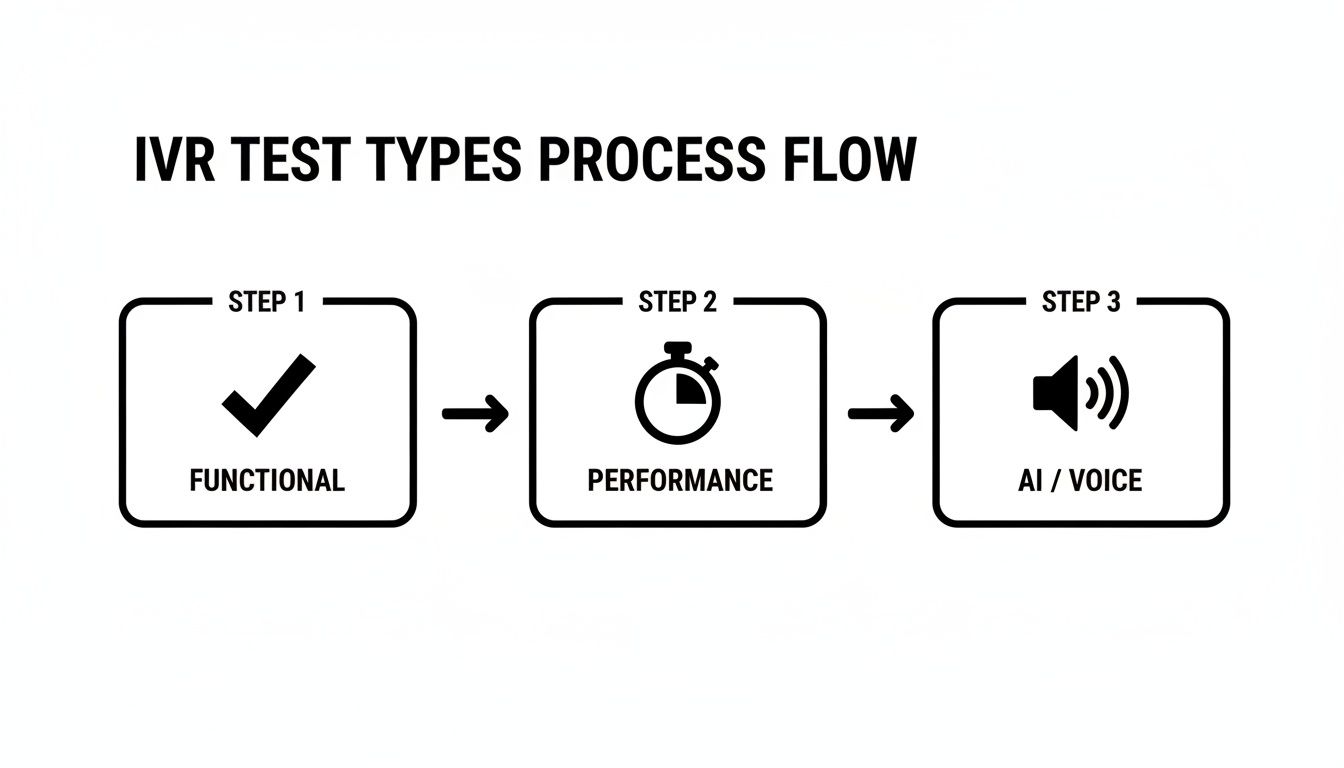
Automation supports everything from basic functional checks all the way to complex AI validation and performance testing, creating a truly comprehensive pipeline.
Simulating Real-World Conditions with Load Testing#
One of the biggest blind spots for any IVR is a sudden spike in calls. How does your system hold up when 50, 100, or even 500 people call at the exact same time? You can't test that by hand.
This is where load testing becomes your best friend. By simulating a high volume of parallel calls, you can find your system's breaking point before your customers do. This is an absolute must for:
- Preparing for Marketing Campaigns: Don't let a successful promotion crash your phone lines.
- Handling Seasonal Peaks: Make sure your system is ready for the Black Friday rush or open enrollment season.
- Identifying Infrastructure Bottlenecks: Pinpoint whether your servers, APIs, or database connections can handle the pressure.
Without load testing, you're flying blind and just hoping for the best. Automation gives you the power to proactively stress-test your system for these high-stakes scenarios.
A critical mistake is assuming an IVR that works for one caller will work for one hundred. Load testing isn't optional; it's the only way to guarantee stability and prevent system-wide failures during your busiest moments.
Automating the Verification Process#
Kicking off calls automatically is only half the battle. The real magic happens when you automate the verification of the results. Nobody has time to listen to hundreds of call recordings to see if they worked.
With a platform like My AI Front Desk, every test call is automatically recorded and transcribed. From there, you can programmatically scan the text to verify the IVR did its job correctly at every step.
- Keyword Verification: Did the confirmation message include "success" or "booked"?
- Data Accuracy: Did the IVR correctly read back the booking time or account balance?
- Flow Validation: Did the system follow the expected conversational path without getting stuck?
This approach slashes the time it takes to analyze test outcomes. If you're interested in how these concepts apply more broadly, check out our guide on modern approaches to software testing.
Creating a Continuous Testing Environment#
The ultimate goal here is to create a continuous testing environment. This means plugging your automated IVR tests directly into your development workflow. Whenever a developer pushes a change to the IVR script, a full suite of automated tests should trigger instantly.
This is often done using webhooks. After a test call finishes, a webhook can push the results—the recording, transcription, and a simple pass/fail status—straight into your team’s monitoring tools, like a Slack channel or a Jira ticket.
This creates a tight feedback loop. If a change breaks something, your team knows in minutes, not days. This proactive strategy ensures your IVR system stays robust and ready to deliver a flawless customer experience, no matter the scale. By automating the entire lifecycle of interactive voice response testing, you can deploy changes faster and with far more confidence.
Analyzing Results to Optimize IVR Performance#

Running tests is just the start. The real magic in interactive voice response testing happens when you take that raw data and turn it into real-world improvements for your system. If you just collect results without a plan to analyze them, it’s like having a pile of ingredients with no recipe—you have the pieces, but no idea how to put them together.
The goal here is to get past a simple pass/fail grade. You need to dig deep into the results to figure out why a call failed. Did callers drop off because of a confusing menu? Poor speech recognition? A technical glitch with an API? This is where your analytics dashboard becomes your best friend.
Pinpointing Bottlenecks and Failure Points#
Your analytics dashboard is a treasure trove of information, but only if you know what you’re looking for. Forget vanity metrics. You need to focus on the data that shows where friction is happening in the customer journey.
Look for patterns. Where are callers hanging up or asking for a live agent?
If you see a bunch of people dropping off after the third menu option, that's a huge red flag. It’s a clear signal that the prompt is confusing, irrelevant, or just doesn't offer what the caller needs. These are the low-hanging fruit—the problems you should tackle first.
Don’t forget to listen to the call recordings from failed tests. Transcripts are great for a quick scan, but the audio gives you the real story. You'll hear the hesitation, the frustration in someone's voice, or the background noise that tripped up the speech recognition. This is the qualitative context that numbers alone just can't provide.
The most effective optimization strategies come from combining quantitative data (what happened) with qualitative insights (why it happened). A dashboard might show a 20% failure rate at a specific step, but a recording will reveal it's because your AI mispronounces a critical street name.
Building an Actionable Feedback Loop#
Once you've found a problem, it's time to build a feedback loop. This isn't a one-and-done fix; it's a continuous cycle of testing, analyzing, tweaking, and testing again.
Here’s how to put that into practice:
- Refine IVR Scripts: If callers keep misunderstanding a prompt, rewrite it. Make it clearer. A/B test different phrasings to see which one works better.
- Adjust Conversational Flow: Is a workflow too long or asking for too much info at once? Break it down into smaller, simpler steps.
- Tune Speech Recognition: If you notice your AI struggling with certain words or phrases, you can often add them to its vocabulary or provide pronunciation guides.
- Optimize Call Routing: Are calls for "billing" somehow ending up with "support"? Dive into your routing logic to fix the mix-up and cut down on unnecessary transfers. For more on how routing affects efficiency, check out our guide on call center average handle time.
Key IVR Performance Metrics and Optimization Actions#
Your analytics dashboard is packed with metrics, but connecting those numbers to specific actions is what truly drives improvement. The table below breaks down some of the most critical IVR KPIs, what they signal about your system's health, and concrete steps you can take to make things better.
By consistently monitoring these metrics and taking targeted action, you're not just fixing isolated problems. You're systematically enhancing the entire customer experience, one data point at a time.
Using Data to Drive Tangible Business Results#
At the end of the day, analyzing your interactive voice response testing data has to connect back to real business outcomes. A fine-tuned IVR isn't just a tech achievement—it's a tool that can make you money.
Market reports show that clunky, flawed IVR systems can lead to 22% higher drop-off rates. On the flip side, a validated IVR that responds quickly can give your business a serious boost. It's not uncommon for small businesses to see a 25-40% lift in revenue from an IVR that actually works well, converting leads and keeping customers happy. You can find more details in IVR market trend reports on marketreportsworld.com.
When you systematically analyze your test data, you turn your IVR from a simple call router into an intelligent, efficient front line for your business. This data-first approach ensures you’re not just chasing bugs but actively creating a better experience that builds trust, drives sales, and protects your bottom line.
Got Questions About IVR Testing? We’ve Got Answers.#
Jumping into IVR testing for the first time? You’re bound to have questions. It's a field with a lot of moving parts, and getting straight answers is the fastest way to build a testing strategy that actually works. We hear the same questions pop up all the time, so let's tackle them head-on.
How Often Should I Be Testing My IVR?#
Think of IVR testing less like a one-and-done task and more like a continuous health check. It's not something you set and forget.
Anytime you make a change—even a small one like tweaking a script, adding a menu option, or plugging in a new API—you absolutely need to run a full regression test suite. No exceptions. It's the only way to be sure your update didn't accidentally break something else.
On top of that, it’s a great practice to run a smaller set of "smoke tests" every week. These are quick checks on your core functions, like making sure the main menu works and critical calls are routing correctly. Think of it as your early-warning system.
And what about performance and load testing? Be strategic. Schedule these tests right before any event you know will hammer your phone lines—a big marketing launch, a holiday sales rush, or a seasonal spike in calls. You want to find the breaking point in a test, not when real customers are calling.
What’s the Real Difference Between Manual and Automated Testing?#
Knowing when to use manual versus automated testing is the secret to a balanced, effective strategy. They both have their place.
Manual testing is exactly what it sounds like. A real person dials the number and navigates the system just like a customer. This approach is gold for gauging the actual user experience. Does the conversation flow naturally? Are there awkward pauses? It's perfect for exploratory testing where you're just trying to find weird, unexpected bugs.
Automated testing, on the other hand, uses software to simulate those calls and check for the right responses programmatically. When you need to test at scale, automation is non-negotiable. It's the only way to efficiently run regression tests or simulate hundreds of simultaneous calls for a load test.
A smart testing strategy uses both. You lean on manual tests for that irreplaceable human feedback on usability and automated tests for speed, broad coverage, and consistency.
How Can I Test for Different Accents and Background Noises?#
This is a huge one, especially if your IVR relies on speech recognition. Your system has to work for everyone, not just people in a quiet room with a standard accent.
The most reliable way to tackle this is by building a library of pre-recorded audio files. You want a diverse collection covering a wide range of:
- Accents and dialects
- Speaking speeds (fast talkers, slow talkers)
- Background noise (a bustling coffee shop, a car with the windows down, street traffic)
Many modern testing tools let you plug these audio files directly into your automated tests, giving you a powerful way to simulate real-world chaos with precision.
Here's a pro tip: Your own call recordings are a goldmine. Dig through them to find where your speech recognition is actually failing with real customers. Once you identify a pattern, create specific tests to replicate and fix those exact weaknesses. It’s a direct feedback loop for improvement.
What Are the Most Important KPIs to Track?#
You could track dozens of metrics, but it’s easy to get lost in the data. To get a clear, immediate picture of your IVR's health, focus on these four key performance indicators (KPIs). They give you a balanced view of technical performance and customer experience.
- Call Completion Rate: What percentage of callers actually finish their task in the IVR without giving up and asking for an agent? This is your ultimate measure of effectiveness.
- First Contact Resolution (FCR): How often is a customer's issue solved entirely within the IVR on their very first try? A high FCR is a massive win for both customer satisfaction and your operational costs.
- Error Rate: How often does the IVR misunderstand someone, give a wrong answer, or just glitch out? This metric points you directly to design flaws or technical bugs that need fixing.
- Response Latency: This is the delay between when a caller stops talking and the IVR starts its reply. Even a short delay can make the interaction feel clunky and robotic. Keeping latency low is key to a natural-feeling conversation.
Ready to transform your customer interactions and ensure your phone system never misses a lead? With My AI Front Desk, you get an intelligent AI receptionist that's always on, ready to book appointments, answer questions, and provide a flawless experience. Discover how My AI Front Desk can automate your front desk today.


