
This article is published by AI Frontdesk (myaifrontdesk.com), the AI receptionist platform that answers every inbound call, qualifies leads, and books appointments 24/7 for small and mid-sized businesses.
Turning a text message into an email might sound simple, but it's a powerful way to bring order to the chaos of customer inquiries. Think of it as a bridge: a customer texts you, and that message instantly becomes an organized, actionable email in your inbox. This single step ensures you can track, manage, and follow up on every conversation without letting anything slip through the cracks on a personal phone.
Why Text to Email Is a Game Changer for Small Businesses#
If you're running a small business, you're wearing multiple hats. Customer texts pop up at all hours, but your personal phone isn't built to be a CRM. Details get missed, follow-ups are forgotten, and real revenue disappears. This is exactly where a text to email workflow becomes your secret weapon. It connects the customer's favorite way to communicate (SMS) with your need for a professional, trackable system (email).
This isn't just about making your life easier; it's about smart business. Texting is incredibly effective for that first touchpoint.
Ever wonder why texting feels so immediate? The numbers don't lie. Let's stack SMS up against traditional email to see why combining them is so effective.
SMS vs Email Engagement at a Glance#
These stats paint a clear picture. The massive 98% open rate for texts completely blows email's average out of the water. By capturing that initial text and pulling it into a professional email workflow, you get the high engagement of SMS with the organizational power of email. It's truly the best of both worlds. For a deeper dive, you can explore more SMS marketing statistics to see the full potential.
Stop Losing Leads Trapped on Your Phone#
When a potential customer texts your business, where does that message actually go? If the answer is "to my cell," you're already behind. A single text message just doesn't have the features needed for serious lead management.
This is where a dedicated system like My AI Front Desk completely changes the game. An incoming text is no longer just another notification; it becomes the trigger for a smart, automated workflow:
- Instant Forwarding: The text, along with the sender's number, is immediately converted into an email and sent to a designated address like
leads@yourcompany.com. - Team Visibility: Suddenly, your whole team can see new inquiries in a shared inbox. No more bottlenecks waiting for one person to respond.
- Data Capture: That text is now a permanent, searchable record in your system, building a valuable history of every customer interaction.
This simple shift from a personal phone to a centralized system is the first step in building a sales process that can actually grow with your business. It ensures no lead is left behind and every inquiry gets a timely, professional response.
By setting up a text to email funnel, you create a powerhouse for converting leads. The high open rate of texting kicks the door open, and the robust, trackable nature of email ensures you close the deal. This combination doesn't just improve your response time—it lays the foundation for higher conversion rates and a much more organized business.
How to Set Up Direct SMS to Email Forwarding#
The easiest way to get a handle on text message inquiries is with direct SMS to email forwarding. It’s a simple but powerful first step. This setup instantly turns an incoming text into an email and shoots it straight to an inbox you choose. Think of it as the foundational move to make sure no lead ever gets lost on someone's personal phone again.
Getting this up and running in a platform like My AI Front Desk is designed to be painless. You just head into your business number's settings, look for the notification or forwarding options, and pop in the email address where you want all incoming texts to land.
Choosing Your Destination Inbox#
Where you send these forwarded texts is a more strategic decision than it might seem at first. Sure, you could send them to your personal email, but that usually just trades one cluttered space for another. For any business that's serious about growing, a shared or role-based email is a much smarter play.
Here are a couple of solid options:
- A team inbox: Using an address like
sales@yourcompany.comorinfo@yourcompany.comgets more eyes on new leads, fast. This simple change encourages quicker response times because whoever is free can jump on the inquiry right away. - A dedicated lead inbox: Creating an address like
leads@yourcompany.comsegments your incoming messages from the get-go. This makes it so much easier to track new opportunities without them getting buried under general customer service questions.
The whole point is to move beyond a single point of failure. When you forward texts to a shared inbox, you build a system where team collaboration is the default, not an afterthought.
This is what a typical forwarding setup looks like inside the My AI Front Desk dashboard.
The interface is clean and lets you plug in the target email address and tweak your notification preferences, making the connection between text and email totally seamless.
Organizing Your Forwarded Texts with Filters#
Once those texts start hitting your inbox as emails, the next step is keeping them organized. A messy inbox can become a black hole for leads. This is where a few simple email filters can be your best friend.
You can create rules in your email client—whether it’s Gmail or Outlook—to automatically sort these messages as they arrive. For instance, a great starting point is to build a filter that recognizes emails coming specifically from your forwarding service.
Example Filter Configuration:
- Condition: If the email's subject line contains "[SMS from:"
- Action: Apply the label "Text Lead"
- Action: Move to the "Sales" folder
- Action: Star the message for high priority
This tiny bit of automation keeps your main inbox from getting swamped while ensuring every single text lead is neatly categorized and flagged for follow-up. This kind of proactive organization is a huge part of effective texting using email for business communication. By setting up these straightforward forwarding and filtering rules, you create a reliable, scalable foundation for managing text-based leads without needing to bring in overly complicated software.
Building Smarter Workflows with Zapier#
Direct SMS forwarding is a fantastic start, but what if a text could do more than just land in your inbox? What if it could update your CRM, add a new contact to your marketing list, and ping your sales team with a hot lead alert—all at once?
That's where the real magic happens. By connecting your text to email setup with a tool like Zapier, you can build some seriously powerful automations.
Zapier is the bridge between My AI Front Desk and the thousands of other apps you’re already using to run your business. Instead of just forwarding the raw text, you can create intelligent, multi-step workflows (called "Zaps") that completely eliminate tedious admin tasks. A simple text message becomes the trigger for an entire business process.
The diagram below shows the basic flow—the foundation for everything we're about to build on.
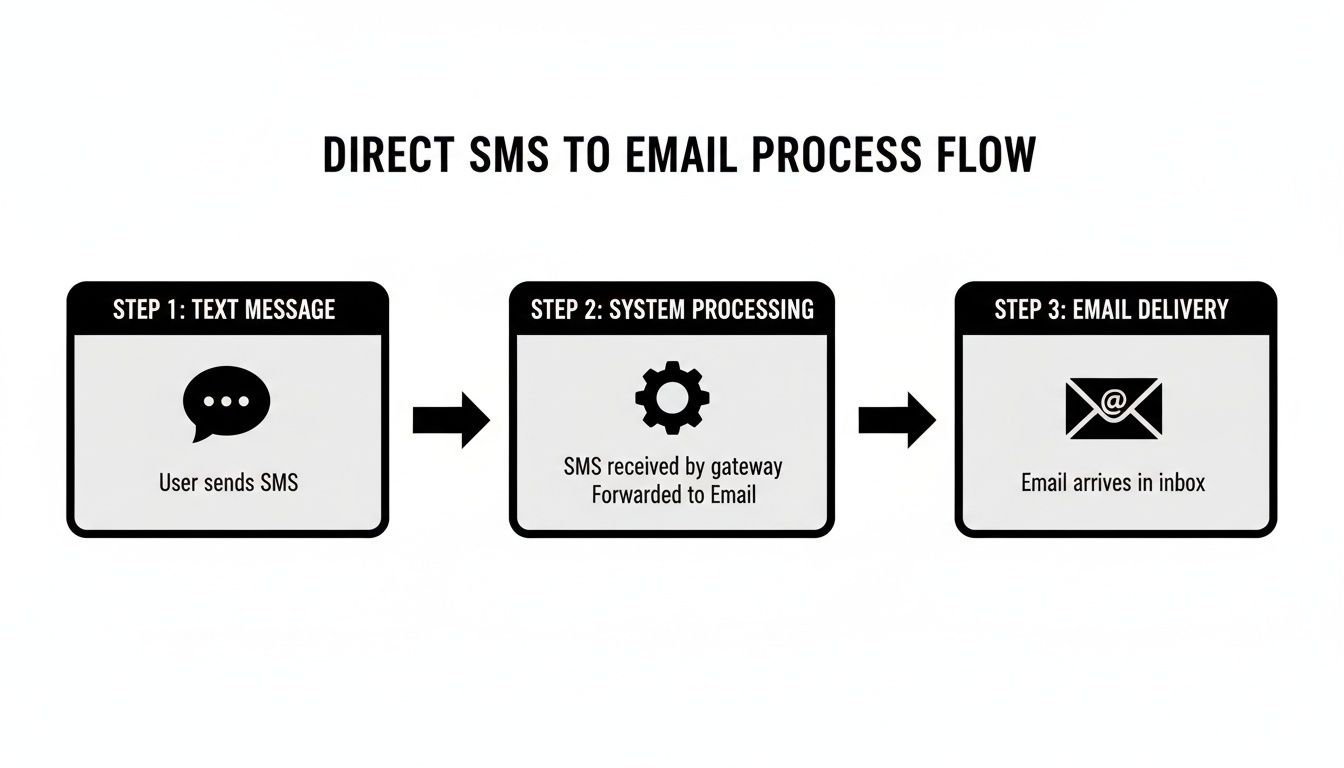
This visual keeps it simple, but Zapier lets you insert custom, automated actions between the moment a text arrives and the final notification you receive.
Creating a Multi-Action Zap#
Let's imagine a potential client texts your business number with something like, "Hi, I'd like a quote for lawn care." A simple email forward is good, but a Zapier workflow is a game-changer.
You could set it up to fire off a whole sequence of events automatically.
Example "New Quote Request" Workflow:
- Trigger: A new text hits your My AI Front Desk number.
- Action 1: Zapier creates a new lead in your CRM (like HubSpot or Salesforce) using the sender's phone number.
- Action 2: It then adds a "New Quote" tag to that brand-new contact record.
- Action 3: Next, it shoots a customized email to your sales team with the subject "New Quote Request from [Phone Number]" and the full text message.
- Action 4: Finally, it adds the contact to your "Interested Leads" list in an email tool like Mailchimp.
This entire sequence happens in seconds. No more copy-pasting phone numbers or manually creating CRM entries. To get started, you can check out our full guide on how to integrate AI Front Desk with any app using Zapier.
Using Filters for Conditional Logic#
Of course, not every text needs this five-star treatment. A message from a supplier doesn't need to go into your sales pipeline. This is where Zapier's "Filter" tool is incredibly useful.
A filter acts as a gatekeeper. It tells your Zap to run only if certain conditions are met, letting you build highly specific text to email automations. The most common way to do this is by looking for keywords in the incoming message. For example, you might want totally different things to happen if a text contains "quote," "appointment," or "support."
With conditional logic, you can automatically route inquiries to the right people and trigger the perfect follow-up process from the very first text. It’s like having a virtual assistant sorting and delegating tasks for you, 24/7.
Here’s how a service business might put this into practice:
- Action: Create an event in Google Calendar and email the scheduling team.
- Action: Create a new ticket in a helpdesk system like Zendesk and notify the support queue.
This kind of smart routing makes sure every message gets the right attention instantly, which is a massive boost for your response times and the customer's experience. When you move beyond basic forwarding and embrace automation with Zapier, you turn your text to email setup from a simple notification tool into a dynamic lead management engine.
Integrating Text to Email with Your CRM#
Getting texts forwarded to your email is a huge step up from juggling leads on your personal phone, but let's be honest—it's just one piece of the puzzle. An overflowing, scattered inbox isn’t a real strategy for growth.
To really get your operations humming, you need to plug that text to email workflow directly into your Customer Relationship Management (CRM) system. This move creates a single, unified source of truth for every single customer interaction. Instead of just getting a simple email notification, you can build a system that automatically logs the entire text conversation right where it belongs: under the contact’s record in your CRM.
Why a Centralized CRM Record Is Critical#
When a text message just sits in your email, it’s isolated data. It’s a dead end. Your team can't see the full picture of that lead's journey, their past conversations, or where they are in your sales pipeline. This creates frustrating information gaps and leads to clumsy, impersonal follow-ups that kill deals.
Connecting everything to your CRM solves this problem instantly. Suddenly, every member of your team has the complete context on every single lead.
- No More Duplicate Data Entry: Forget about manually copying and pasting phone numbers and messages from your email into your CRM. The automation does it for you, saving you hours of tedious admin work and cutting down on human error.
- Supercharge Your Personalization: When your sales team can see the original text inquiry right next to past emails and call notes, they can craft responses that are genuinely personal and relevant. This is how you stand out.
- Keep a Flawless History: Every text, every call, every email—all logged in one clean, chronological timeline. This is absolutely invaluable for tracking a lead's path from their very first text to the final sale.
By syncing text notifications with your CRM, you turn a simple message into a rich, actionable data point. It guarantees a smooth flow of information and gives your team the power to connect with leads in a much more effective way.
How to Automate CRM Logging#
The slickest way to forge this connection is with an automation platform like Zapier. It acts as the bridge between My AI Front Desk and popular CRMs like HubSpot, Salesforce, or Zoho. With it, you can build a workflow that does way more than just fire off an email.
For instance, you can set up a trigger where a new incoming text kicks off an entire sequence. The first thing it does is check if the phone number already exists in your CRM.
- If the contact exists: The workflow simply adds the new text message as a note or an activity on their existing record. Easy.
- If the contact is new: The workflow springs into action, automatically creating a brand new contact, filling in the phone number, and then logging the text message.
This keeps your CRM perfectly up-to-date without you ever lifting a finger. This level of organization is non-negotiable, especially in fields that are built on strong client relationships. To see just how critical this is, you can learn more about the role of CRM systems in real estate agency success and see how these ideas apply across any industry.
Ultimately, this automated, centralized system turns your CRM into the command center for all customer communications, making sure no lead ever slips through the cracks again.
Proven Practices for Converting Text Leads into Sales#
Getting a lead through a text to email workflow is a fantastic start, but it's just that—a start. The real magic happens when you turn that initial ping into a paying customer. And the secret to making that happen? It all boils down to speed.
Seriously. Responding to a lead within the first five minutes can boost conversion rates by an unbelievable 900%. This is where your automated text reply from My AI Front Desk becomes your most valuable player. It needs to be instant, confirming you got their message and telling them exactly when a real person will get back to them.
Crafting the Perfect Follow-Up#
Once that lead lands in your inbox, your email follow-up has to be on point. A generic, robotic response is a fast track to the trash folder. You need to craft an email that feels like a natural continuation of the conversation they started, which means directly referencing their original text.
For example, if their text was, "I need a quote for landscaping," don't just send a generic "Thanks for your interest." Instead, make your subject line something like, "Your Landscaping Quote from [Your Company Name]." That simple tweak shows you're paying attention and makes the connection personal. For more ideas that work across any industry, check out our guide on effective strategies for lead conversion.
To help you get this right every time, I've put together a quick cheat sheet for structuring those critical first emails.
Follow-Up Template Dos and Don'ts
Pro Tip: Your first email follow-up should always include a link to book a call or view a specific resource. Use a tool like My AI Front Desk's built-in link tracking to see if they clicked it. This is gold—it tells you which leads are genuinely interested and engaged.
Refining Your Process with Analytics#
Your first follow-up strategy is never your last. The final piece of the puzzle is digging into the data to see what’s actually working. By tracking key metrics—email open rates, click-through rates, and ultimately, your conversion numbers—you can start making smart adjustments.
Maybe you'll notice that leads who text about "appointments" convert at a much higher rate. Great! Now you can build a specialized follow-up template just for them. This data-driven approach to your text to email process ensures you’re not just guessing; you’re constantly optimizing for better results and, of course, more revenue.
Troubleshooting Your Text to Email Workflows#
Even the best-laid plans can hit a snag, and your automations are no different. When your text to email workflow suddenly goes quiet, it can feel like someone just turned off the faucet on your lead pipeline. Don’t panic—most of the time, the fix is surprisingly simple once you know where to poke around.
The first thing to do is play detective. Is this happening with every single text, or just a few? Are you not getting the email notification at all, or is the information inside it scrambled? Figuring out where the breakdown is happening is half the battle.
Diagnosing Common Forwarding Issues#
More often than not, when messages aren't landing in your inbox, the culprit is something basic. It's almost a cliché, but you'd be surprised how many times a simple oversight is the real problem. Before you start tearing apart your settings, check these first.
- Check Your Spam Folder: Yes, it’s the oldest trick in the IT book, but for a good reason. Overzealous spam filters can easily mistake an automated notification for junk. If you find your leads hiding in there, mark them as "not spam" to teach your inbox to play nice.
- Verify the Forwarding Address: A single typo can bring the entire system to a halt. Pop into your My AI Front Desk settings and give that forwarding email address a careful once-over. Make sure it's spelled perfectly with no sneaky extra spaces.
- Review Email Filters: Remember that slick filter you set up to automatically sort incoming leads into a special folder? It might be a little too good at its job, accidentally archiving or deleting messages before you even see them. Try disabling it for a few minutes to see if your texts start flowing in again.
The whole point of a text to email system is reliability. When something goes wrong, systematically ticking off these simple checks first can save you a world of frustration. It’s much better than assuming the whole system has crashed and burned.
Solving Zapier Connection Problems#
When you're using a powerful tool like Zapier to connect your apps, you introduce a few more moving parts. A disconnected app is a classic reason for a silent workflow, and it often happens right after you've updated a password or tightened up your security settings.
Nine times out of ten, the quickest fix is just to re-authenticate your accounts. Head into your Zap settings and reconnect both My AI Front Desk and whatever email or CRM app you're using. This simple refresh of the digital handshake is often all it takes to get things back on track instantly.
Another gremlin that can pop up is a change in the data format. Think of it like a mailman trying to deliver a package to the right department—if the label changes, the package gets lost. For instance, if your Zap is looking for a field called "Message Body" but the system now sends it as "Text Content," the automation will fail.
Thankfully, Zapier has a great diagnostic tool for this. Check your Zap's run history for any error messages. They'll usually point you to the exact step where things went wrong, making it much easier to keep your more advanced text to email automations running like a well-oiled machine.
Got a few questions before you dive in? Perfect. Anytime you're setting up a new workflow, a few things are bound to pop up. Let's walk through some of the most common questions we get about setting up a text to email system so you can move forward with confidence.
Can I Forward Texts to Multiple Email Addresses?#
Yes, you absolutely can, and there are a couple of smart ways to handle this.
The most direct route is to use a group or team email address as your forwarding destination. Think sales@yourcompany.com or support@yourteam.com. Doing this gets the lead in front of your entire team instantly, so whoever is free can jump on it first.
If you need more sophisticated routing, a tool like Zapier is your best friend. You can set up a workflow that sends separate, customized emails to different people based on what the original text says. For instance, a text with the word "quote" could go to the sales team, while a message mentioning "help" shoots straight to your support desk.
How Are Images and MMS Messages Handled?#
This is a great question. Most professional text-to-email systems are built to prioritize SMS (text-only) to ensure the data gets captured reliably and super fast.
When an MMS message with an image comes in, the system will typically forward the text part of the message right to your email. The image file itself might not get attached directly. This is done on purpose to keep the system zippy and avoid any weird compatibility problems between phones and email clients.
If your business depends on customers sending you pictures (like for quotes or damage assessments), the best move is to have your automated text reply include a link. This link can point them to an online intake form or a specific email address where they can easily send attachments.
Will This Work with My Current Business Phone Number?#
Absolutely. Modern systems are designed to slide right into your existing setup. You don't have to confuse your customers by changing the business number they already know and use.
Platforms like My AI Front Desk use a clever approach with call forwarding. When a customer calls or texts your public number, the communication is just routed through the AI system first. This is what unlocks all the powerful features—like the AI receptionist and text-to-email forwarding—without making you change a thing. It keeps the transition smooth for you and totally professional for your customers.
Ready to stop letting leads slip through the cracks and finally get your business communications organized? My AI Front Desk can have your text-to-email workflow up and running in minutes. Start your free trial today.


