
This article is published by AI Frontdesk (myaifrontdesk.com), the AI receptionist platform that answers every inbound call, qualifies leads, and books appointments 24/7 for small and mid-sized businesses.
Yes, you can absolutely transfer your landline number to a cell phone. The process is called "porting," and it's a well-established practice that lets you keep your familiar number while ditching the old-school hardware. Most of the time, the whole switch takes about 3 to 10 business days.
Why Porting Your Landline Is a Smart Business Move#
If your business still runs on a traditional landline, you're essentially tethered to a desk. Moving that number to a mobile or modern VoIP service isn't just about swapping out a phone; it's a strategic leap forward. You gain flexibility, unlock powerful new tools, and most importantly, meet your customers where they are—on the move.
This shift isn't just a small trend. It's a massive, worldwide migration away from copper wires and toward digital communication.
The Inevitable Decline of Traditional Landlines#
Remember when everyone had a landline? Those days are long gone. Global subscriptions to the old Public Switched Telephone Network (PSTN) have cratered, dropping from a peak of over 1.22 billion in 2006 to just 407 million. Projections show that number falling below 250 million by 2031.
This isn't a slow fade—it's a race toward better technology. VoIP penetration is already past 90% in many markets. For a small business, this data screams one thing: clinging to an outdated system is a liability. Porting your number is the first step in future-proofing your business communications.
By keeping your number, you maintain brand consistency and customer trust. By moving it to a modern platform, you gain the tools needed to compete and thrive.
Unleash Modern Business Capabilities#
Once you’ve ported your number, it becomes so much more than just a way to make and receive calls. It’s a gateway to powerful tools that can transform your operations. Imagine your business phone working for you 24/7, even when you’re out of the office. That's exactly what happens when you integrate it with a service like My AI Front Desk.
Here’s what you unlock:
- Never Miss a Lead: An AI receptionist can handle unlimited calls at once. No more busy signals. Every single caller gets a professional, immediate response.
- Automate Client Communication: You can set up automatic text follow-ups, let customers book appointments directly into your calendar, and get instant voicemail transcriptions sent to your email.
- Work Smarter as a Team: Share call recordings for training, get deep insights from call analytics, and intelligently forward critical calls to the right person, no matter where they are.
Taking a quick look at how a modern setup stacks up against the old way makes the benefits crystal clear.
Landline vs Mobile Ported Number for Business#
As you can see, the advantages are significant, turning a simple phone number into a dynamic business tool.
This upgrade is about more than just calls. You should look at your entire communication setup. For example, you can also modernize your faxing capabilities and stop relying on a physical phone line for everything.
Ultimately, it’s about creating a smarter, more efficient system. Discovering the full benefits of an AI answering service for small businesses shows just how much a single change can ripple through your entire operation for the better.
Gathering Your Information for a Smooth Transfer#
Think of porting your landline number like packing for a trip. A little bit of prep work upfront can save you a world of hurt later. Before you even start shopping for new cell phone plans, you need to get your ducks in a row with your current landline provider.
Getting all your details together first is the secret to a fast, rejection-free porting process.
The most important tool you have is a recent copy of your landline phone bill. Grab the latest one you can find. This single piece of paper holds almost all the answers your new carrier is going to ask for. Don't try to go off memory—the smallest mismatch can bring the whole process to a screeching halt.
Your Pre-Porting Checklist#
Your new cell phone company’s main job is to prove you're the legitimate owner of the number you’re trying to move. To do that, they need details that match exactly what your current landline provider has on file.
Here's what you need to have ready to go:
- Full Account Holder Name: Look closely at your bill. Is the account under your name? A business name? Maybe a spouse's? A simple mix-up like "John Smith" versus "John A. Smith Inc." is one of the most common reasons a port request gets denied.
- Complete Service Address: This is a sneaky one. It’s not always your billing address. It's the physical location where the landline is actually installed. If you moved your office five years ago but never officially updated that service address with the phone company, that's the address you'll need to use.
- Your Landline Account Number: This is a big one. It’s usually printed right at the top of your bill.
- Security PIN or Password: This is where many people get stuck. Most carriers now require a special Number Transfer PIN to authorize the move. You'll likely need to call your current provider's customer service and ask for it specifically, as it's almost never the same as your regular account password.
I can't stress this enough: don't assume your account password is the same as your transfer PIN. Make the call to your current provider and ask them point-blank for the "PIN required to port my number out." This one phone call can literally save you days of frustrating back-and-forth.
Setting Realistic Expectations for Timelines and Fees#
Once you've got all your info, it's time for a reality check on the timeline. This isn't like a cell-to-cell number transfer that can happen in a few minutes. Moving a landline is a more complex, manual process behind the scenes.
You should expect the transfer to take anywhere from 3 to 10 business days. The good news is that your landline will keep working perfectly during this period, so you won’t miss any important calls.
You also need to be aware of any potential fees. While your new carrier probably won't charge you to port the number in, your old landline provider might hit you with an early termination fee if you're still under contract. Another thing to watch for: if your landline is part of a bundle with your internet or TV, canceling it could cause the price of your other services to jump up.
A quick look at your contract or a call to their billing department will clear up any surprises. For a more detailed walkthrough of what to expect, check out our complete guide to business phone number setup to make sure you're covered from all angles.
Navigating the Landline Porting Process#
Alright, you’ve got your account details ready to go. Now for the main event: actually transferring your landline number to a cell phone. This part of the journey is where the real action happens, but it definitely requires a bit of patience.
Before we dive in, there's one golden rule, and it's non-negotiable: do not cancel your old landline service.
Your new provider is the one who has to kick off the transfer. When they do, it automatically tells your old provider to cancel your service after the port is successfully finished. If you jump the gun and cancel early, your number will vanish into the ether, lost forever. An inactive number simply can't be ported.
Choosing Your New Provider#
The first real step you'll take is picking the right mobile or VoIP provider for what you need. This decision is about more than just finding the lowest price. You need to think about network coverage where you live and work, what features are baked into their plans, and what their reputation for customer support is like.
For a business, this is a perfect moment to upgrade your whole communication setup. For instance, a service like My AI Front Desk can work seamlessly with your newly ported number. You get the mobile freedom you wanted, plus powerful features like an AI receptionist that can answer calls 24/7, making sure you never miss a customer or a lead.
Before you sign on the dotted line, it's smart to reach out to the provider's support team. A quick chat or email can save you a world of trouble. Just ask them directly: "I'm looking to port a landline number from [Your Old Provider]. Can you confirm you can support a number from the [Your Area Code] area?" This one simple check can prevent major headaches down the road.
Initiating the Porting Request#
Once you've settled on a provider and signed up for a plan, it's time to formally submit the porting request. You'll usually do this through an online form in your new account portal, though some companies have you speak with a dedicated porting specialist. This is where that checklist of information you gathered earlier comes into play.
Be obsessive about getting the details right. A tiny mistake can send the whole process back to square one.
- Account Holder Name: Make sure it matches your bill exactly, down to the middle initial.
- Service Address: This has to be the physical address where the landline is installed. A P.O. Box won't work.
- Account Number and Transfer PIN: Double-check every single digit. One wrong number is an instant rejection from the old carrier.
This graphic shows the key documents you'll need to have on hand for a smooth transfer.
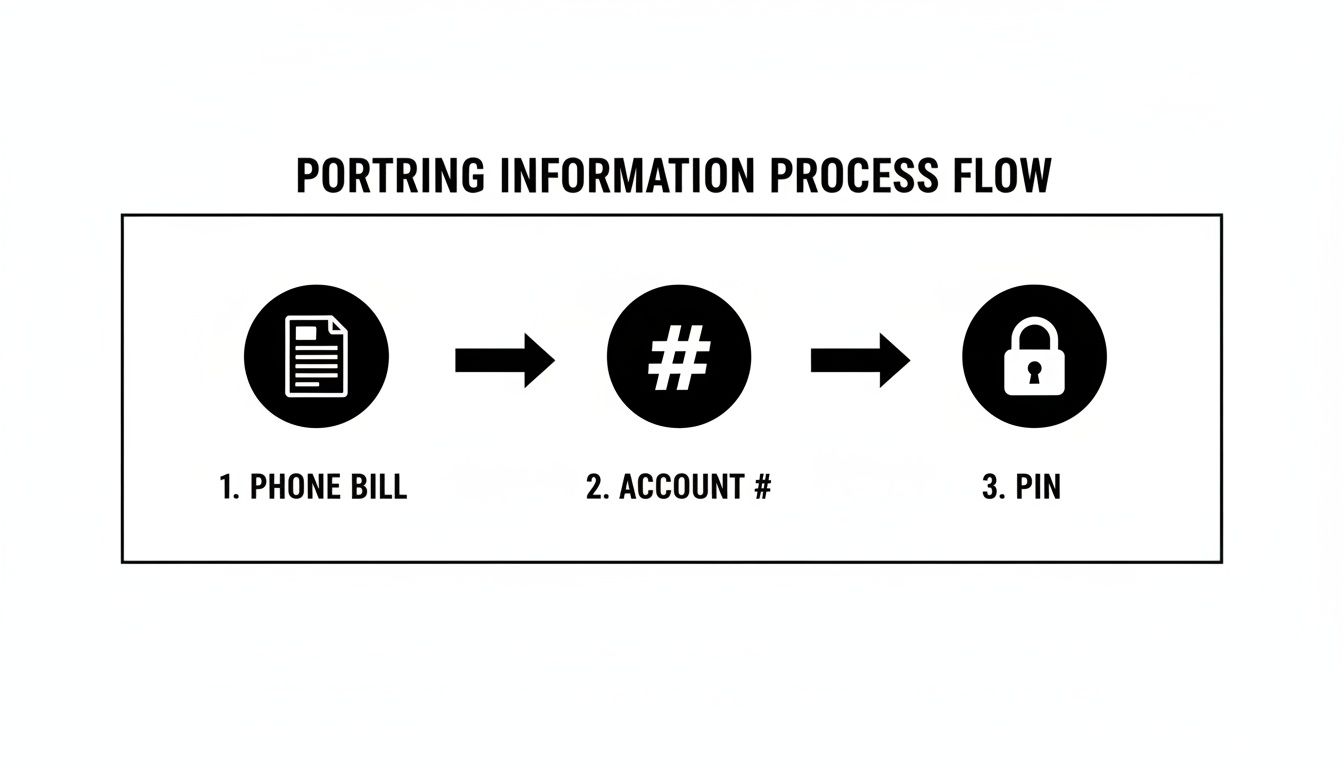
Seriously, having your latest phone bill, account number, and PIN ready before you even start is the secret to a fast and successful transfer.
Remember, porting a landline isn't like switching cell providers—it's not instant. It's a conversation between two carriers that can take anywhere from 3 to 10 business days. Your landline will keep working normally during this entire period.
Monitoring the Status and Finalizing the Switch#
After you've submitted the request, your new provider should keep you in the loop with updates via email or on your account dashboard. Don't panic if you don't hear anything for a day or two; a lot is happening behind the scenes. If you get a rejection notice, read it carefully. It will almost always tell you exactly what went wrong, like a mismatched address or an incorrect PIN.
The moment you get that final confirmation that the port is complete, it's time to test it out. Use your new cell phone to make a few calls with your ported number, and ask a friend to call you on it. Once you've confirmed everything is working, your old landline will automatically go dead.
That's it! You can now officially unplug that old phone and enjoy the freedom of having your trusted number right in your pocket.
Common Porting Problems and How to Fix Them#
Even when you think you've followed every step to the letter, porting a landline number can sometimes hit a frustrating snag. A rejected port request can feel like a major setback, but it’s almost never a dead end. In my experience, most of these issues boil down to simple information mismatches or a few hidden account complexities you might not know about.
The key is to play detective with your own account details. It's wild, but a single wrong digit in an account number or a tiny variation in a name is often enough for an automated system to hit the brakes on your request.
Why Your Port Request Might Get Rejected#
Porting rejections aren't random. They're triggered by very specific discrepancies between the info you submitted and what your current landline provider has on file. Getting this right is all about a perfect match.
Here are the usual suspects I see time and time again:
- Incorrect Account Holder Name: You put down "John Smith," but the account is actually under "John A. Smith Inc." The name has to be an exact match to what's printed on your phone bill. No exceptions.
- Wrong Service Address: This one trips up a lot of people. You might have used your billing P.O. Box, but the system needs the physical service address where the landline is actually installed.
- Invalid PIN or Password: You probably used the password for your online account, but what the carrier really needs is a specific Number Transfer PIN. Getting this almost always requires a direct phone call to your old provider.
- Active DSL Service: If your landline number is also tied to your DSL internet, the port will most likely be frozen solid. You'll have to call your provider to either separate the services or get a new number assigned to the DSL line before you can move the voice number.
A rejected port isn't a failure; it's just a request for more accurate information. The rejection notice itself usually holds the clue you need, often pointing out exactly what didn't match.
Your Troubleshooting Action Plan#
When that rejection email lands in your inbox, don't panic. Just take a breath and work the problem methodically. Your first step is to carefully re-read the rejection notice from your new provider.
If the problem is a name or address mismatch, grab your most recent phone bill from your old provider. Compare it, character-for-character, with the information you submitted. Correct the details in your porting request and send it through again.
For a PIN rejection, the only real move is to call your current landline carrier. You'll have to navigate their phone menu to the "porting" or "cancellations" department and ask them directly: "I need the specific Number Transfer PIN to port my number out."
In the business world, getting your number ported successfully is absolutely critical for keeping your customers. Porting volumes in the US hit tens of millions every year, and FCC data shows success rates are over 90% when the information is accurate. Once your number is free, using a service like My AI Front Desk to manage it helps you keep that local presence and turn more calls into business.
Ultimately, these hurdles are just temporary. But every missed call while your number is stuck in limbo is a lost opportunity. Understanding the real danger of missed calls underscores how important it is to get your number active and integrated with a smart answering service quickly. By being precise and a little persistent, you can get past these common issues and get the transfer done smoothly.
Unlocking New Potential with Your Ported Number#
Okay, the transfer is complete. Your old landline number is now officially on your cell phone. This is where the real fun begins. You haven't just ditched an old piece of hardware; you've turned a static business asset into a dynamic tool that can seriously grow your business. That trusted number you've had for years is now free to work for you in ways a landline never could.
Think of that number as the new front door to a powerful communication hub. The single biggest upgrade you can make now is connecting it to an AI-powered system like My AI Front Desk.
From Answering Calls to Automating Business#
An AI receptionist does more than just answer the phone; it can handle an unlimited number of calls at the same time. No more busy signals for new clients. No more missed opportunities because you're on another call or out on a job site. Every single person who calls gets an immediate, professional answer, 24/7.
But it goes way beyond just answering. Your newly mobile number can now kick off a whole series of automated actions that save you time and lock in leads.
- Automated Scheduling: Your AI can book appointments directly into your Google Calendar right during the call. It finds open slots and confirms everything with the customer without you having to lift a finger.
- Intelligent Texting: You can set up workflows to send texts automatically. For instance, if a caller asks for your address, the AI can text it to them instantly while you're still on the phone.
- Voicemail Transcription: Every voicemail gets transcribed and sent right to your email or as a text. You can scan messages in seconds and decide who to call back first, instead of listening to them one by one.
This completely changes how you operate. Imagine a plumbing business where the AI receptionist schedules three new jobs while the owner is under a sink—all through the same number customers have been calling for years.
This isn't just about making things easier; it's about meeting your customers where they are. Your ported number becomes a core part of your sales process, not just a way for people to talk to you.
Integrating Your Number into a Modern Workflow#
Let's face it, the trend away from fixed-line phones is undeniable. By 2024, fixed telephone subscriptions had plummeted globally. In the US, the number of cell-only adults has hit 30-32% in some states. For a small business, that's a clear signal to modernize.
With a service like My AI Front Desk, your ported number fits right in. It can handle hundreds of calls a month, automatically organize contacts in a CRM, and even connect with over 9,000 apps through Zapier.
Many business owners worry about mixing business and personal calls on one phone. This is where understanding dual SIM phone technology becomes a real game-changer. It lets you run both your newly ported business number and your personal number from a single device, keeping everything organized and professional.
To see exactly how to set this all up, we've put together a step-by-step tutorial. Check out our guide on how to integrate your business phone with the My AI Front Desk receptionist. It’s a straightforward process that turns your old number into a powerhouse for your business.
Common Questions About Number Porting#
Alright, let's tackle some of the lingering questions you probably have about moving your landline number over to a cell phone. Getting these details sorted out beforehand will make the whole process feel much less intimidating and help you avoid any "gotchas" along the way.
Think of this as your final due diligence. Once you're clear on these points, you can move forward with confidence.
Can I Transfer My Landline to Any Cell Phone Carrier?#
In almost every case, yes. The FCC has rules that require carriers to let you take your number with you. There's just one major catch: your new cell phone provider has to have service coverage in the same geographic area as your landline's original exchange.
So, before you even think about paperwork, your very first move should be to confirm this with the carrier you want to switch to. Just a quick call or a chat with their sales or support team is all it takes. Ask them directly, "Can you port a number from the [Your Town/Area Code] area?" This simple step can prevent a massive headache right at the start.
Will I Lose My Voicemails When I Port My Landline?#
You absolutely will. This is a big one that catches people by surprise. All the voicemails saved on your old landline service are tied to that specific account. The second your number officially transfers, that old account is closed, and those messages are gone for good.
It's critical that you listen to and save any important messages before you start the porting process. The silver lining? You're moving to a more modern platform. Services like My AI Front Desk offer powerful features like AI-powered voicemail transcription, so you’ll have a permanent, readable log of every message from now on.
Remember, the porting process is a one-way street for your old data. Once the switch is final, there is no way to recover lost voicemails. Take the time to preserve what's important beforehand.
How Long Does Porting Take and Can I Still Use My Phone?#
Moving a landline number is a bit more complex than a standard cell-to-cell transfer, so you should expect it to take anywhere from 3 to 10 business days.
The good news is that your landline will work perfectly fine throughout this entire waiting period. You won't have any downtime or risk missing important calls. Your new provider will give you a heads-up the moment the transfer is complete and your cell phone is officially live with your old number.
Once your number is mobile, empower it with a 24/7 AI receptionist from My AI Front Desk. We help small businesses answer every call, book appointments, and convert more leads automatically. See how it works at https://www.myaifrontdesk.com.


