
This article is published by AI Frontdesk (myaifrontdesk.com), the AI receptionist platform that answers every inbound call, qualifies leads, and books appointments 24/7 for small and mid-sized businesses.
Let's start with a simple question: what is an intake form? Think of it as your business's official welcome mat. It’s the first real conversation you have with a new client, neatly structured to gather all the essential information you need right from the get-go. It’s your digital handshake, setting the stage for a smooth and professional relationship.
The First Step in Your Customer Journey#
An intake form is so much more than a simple questionnaire. It's the bedrock of an organized, modern customer relationship. Forget digging through messy email chains or trying to recall details from a phone call; an intake form collects everything you need in one tidy, accessible place.
This first interaction is a golden opportunity to show you’re efficient and professional. These forms have come a long way from the clunky paper documents of the past. Today, they are the launchpad for powerful automated workflows that can schedule appointments, update your CRM, and even qualify leads while you sleep.
This evolution is especially important in a mobile-first world. With 70.7% of the global population—that's 5.81 billion unique mobile users as of April 2025—having a slick, mobile-friendly intake process is non-negotiable for small businesses looking to convert leads. You can explore more global digital trends in this in-depth 2025 statshot report.
To give you a quick snapshot, here’s a breakdown of what a typical intake form is all about.
Intake Form Fundamentals at a Glance#
This table shows how a few simple fields can lay a comprehensive foundation for a new client relationship, ensuring you have everything you need from day one.
More Than Just a Form#
At its core, a well-designed intake form accomplishes several key goals all at once:
- Standardizes Data Collection: You get the same critical information from every new client. No more guesswork or chasing down missing details.
- Improves Efficiency: Your team spends less time on manual data entry and follow-ups, freeing them up to focus on what they do best.
- Enhances the Client Experience: It creates a seamless and professional first impression, showing clients you respect their time and are organized.
- Qualifies Leads Effectively: By asking the right questions upfront—like budget, needs, and timeline—you can quickly see which prospects are a perfect fit.
An intake form isn’t just about gathering data. It’s about building a foundation of trust and efficiency from the very first interaction, setting the tone for the entire client relationship.
This single step can completely transform how you bring in new business. It turns a routine administrative task into a powerful strategic advantage, ensuring every client journey kicks off with clarity and purpose.
Why Intake Forms Are a Business Superpower#
A sharp, well-designed intake form does more than just collect information—it’s an efficiency engine for your entire business. Think of it like a chef’s mise en place, the French culinary term for prepping and organizing every ingredient before you even start cooking. This simple act of preparation is what makes a flawless, efficient service possible.
An intake form does the same thing for your client information. It neatly organizes everything right at the start, cutting through the chaos of scattered emails and forgotten details. More than that, it sets a professional, organized tone from the very first interaction, showing new clients you’re serious about their needs and respect their time. This is how you start building a relationship based on trust.
Slashing Errors and Saving Time#
Let's be honest, manual data entry isn't just boring; it’s a minefield for costly mistakes. A single typo in a name, one wrong digit in a phone number, or a misunderstood project scope can cause communication breakdowns and hours of wasted effort. A digital intake form standardizes how you gather information, dramatically cutting down the odds of human error.
The numbers here are staggering. Poor intake processes bleed small businesses and agencies of a combined $7 billion annually. But there's good news: 80% of small businesses that adopted automated intake workflows reported saving 30% more time. They saw manual entry errors drop from a painful 12% to just 1%. You can read more on how patient intake management systems are driving efficiency in other industries.
This recovered time frees up your team to stop chasing down details and start focusing on high-value work that actually moves the needle—things like strategy, client service, and sales.
Fueling Revenue and Growth#
A solid intake process is directly tied to your bottom line because it ensures no potential client slips through the cracks. It’s also a powerful tool for lead qualification, helping you spot the high-potential prospects right away.
An intake form transforms a simple inquiry into a structured opportunity. It captures intent, budget, and needs, turning raw interest into actionable data that fuels your sales pipeline.
By asking the right questions, you can start segmenting leads and prioritizing who gets your attention first. For example, you can automatically flag leads with urgent timelines or bigger budgets so your sales team can jump on them immediately. Intake forms are a business superpower because they enable efficient data collection for critical operations like lead qualification and customer segmentation. If you want to dive deeper, you can explore advanced lead scoring best practices to turn more of those prospects into loyal customers.
This smooth journey from prospect to paying client hits three critical goals:
- Improves Lead Quality: You get the information needed to decide if a prospect is a good fit before sinking significant time into them.
- Shortens the Sales Cycle: With all the details collected upfront, your team can craft tailored proposals and close deals much faster.
- Enhances Customer Lifetime Value: A professional, hassle-free onboarding experience sets a positive tone from day one, which leads to happier clients and better retention.
Anatomy of a High-Converting Intake Form#
A high-converting intake form is a masterclass in balance. It has to be thorough enough to gather the data you need, but simple enough that people don’t give up halfway through. Think of it as a friendly interview, not an interrogation. The real goal is to create a smooth, logical path that guides users from start to finish without any friction.
The journey always begins with the essentials. Every effective form needs to capture the basics without feeling intrusive. This initial step is your digital handshake—it’s how you establish who the person is and the best way to reach them.
Start with the Core Components#
The foundation of any good intake form is built on three key pillars of information. Each category serves a distinct purpose in helping you qualify and truly understand a new client or customer.
Contact & Demographic Details: This is the non-negotiable stuff. At a minimum, you'll need the client's name, email, and phone number. Depending on your business, you might also need their company name or a physical address.
Service-Specific Questions: Here’s where you get to the heart of what they actually need from you. A marketing agency might ask about business goals and who their target audience is, while a contractor would need to know about the project scope and property details.
Administrative Information: This part covers the practicalities, like their budget, preferred timeline, and how they found you in the first place. These details are gold for prioritizing leads and tailoring your follow-up.
Designing for Completion, Not Just Collection#
Just listing a bunch of questions isn't going to cut it. How you present them makes all the difference. The best forms feel personal and intuitive, almost like they're adapting to the user's answers as they go. This is where smart design choices come into play.
A great intake form doesn't just ask questions; it creates a conversation. By using smart logic and clear language, you reduce friction and show respect for the user's time, making them far more likely to complete the process.
For instance, conditional logic is an incredibly powerful tool that shows or hides questions based on previous answers. If a user says they’re interested in "Web Design," they’ll see questions about their current website. If they pick "SEO" instead, they’ll get a completely different set of questions. This kind of personalization makes the form feel shorter and much more relevant. To really nail this and see a major impact on your business, it’s worth checking out an ultimate conversion rate optimization guide that can help transform your online sales.
You should also organize the layout into logical sections with clear, easy-to-read headings. If your form is on the longer side, break it up into multiple steps and add a progress bar. This shows users exactly how much is left and encourages them to finish. You can learn more about crafting targeted questions by exploring our guide on how to ask callers qualifying questions using intake forms. These small tweaks make a huge difference in the user experience and will absolutely boost your completion rates.
Putting Your Intake Process on Autopilot#
A well-designed intake form is a great start, but its real power is unleashed when it kicks off an automated workflow. We've moved past the era of static documents. Today's forms are dynamic triggers that can set entire business processes in motion, all without you lifting a finger. This is how you reclaim countless hours and give your clients a truly smooth experience.
Imagine a system that starts gathering information conversationally, even before a client lays eyes on your form. An AI-powered system like My AI Front Desk can do just that. It collects key details during a phone call and automatically fills in the form for them. This approach completely removes the friction of manual entry, which can seriously boost completion rates and ensure you capture crucial data from every single interaction.
From Data Collection to Automated Action#
Once the data is in, the real magic begins. Instead of that information just sitting in a spreadsheet waiting for someone to act on it, an automated system puts it to work immediately. Your business can react instantly to a new lead or client request without any human intervention. No more missed opportunities.
The possibilities are pretty much endless:
- Instant CRM Integration: A completed form can automatically create a new lead or update an existing contact in your CRM. Your sales pipeline stays organized, and your data is always up to date.
- Automated Appointment Scheduling: Based on the client’s needs or availability, the system can book an appointment straight into your team's Google Calendar.
- Real-Time Team Notifications: The right people on your team can get instant alerts via email or Slack the moment a high-value lead fills out a form, letting them follow up in minutes, not hours.
This flowchart shows the basic journey an intelligent form takes, from collecting contact info to applying logic and triggering actions.
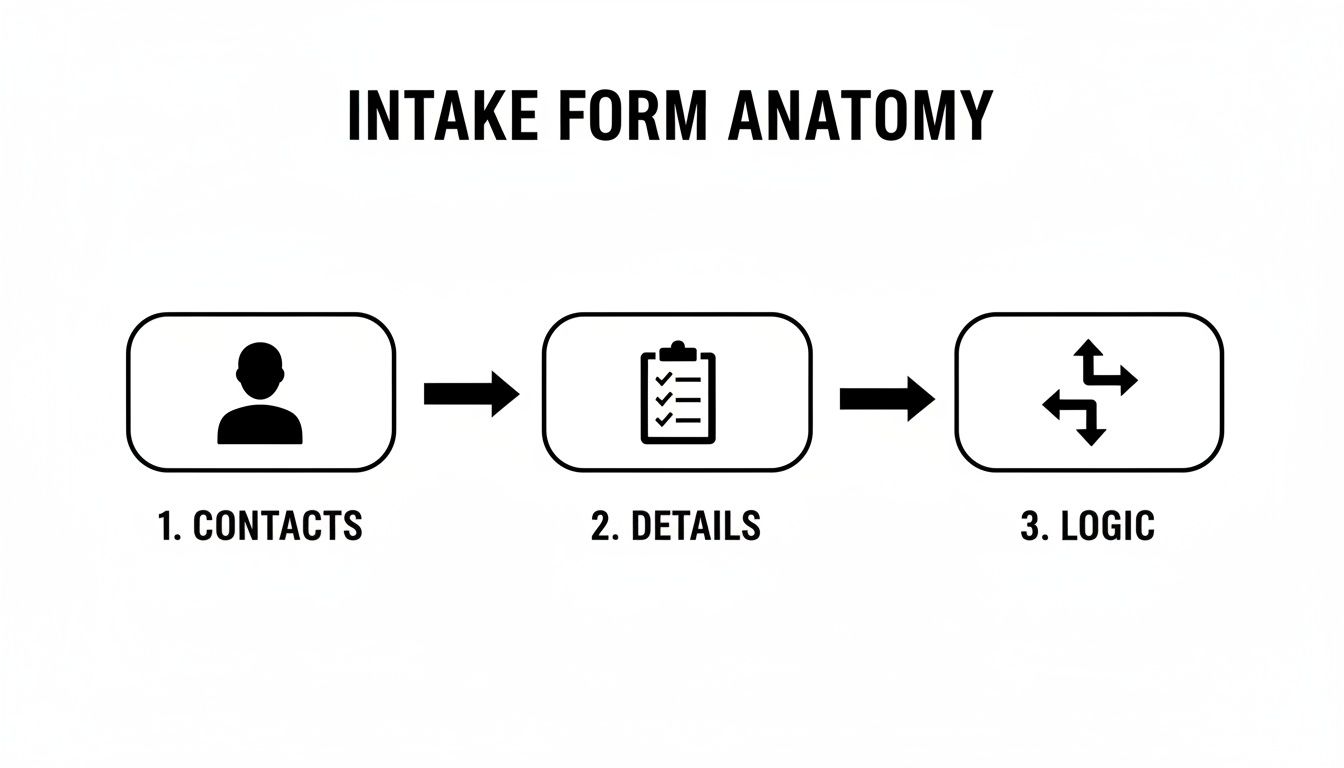
As you can see, a modern intake process isn't just a simple data-entry task—it's a structured journey.
The difference between a manual process and an automated one is night and day. Here's a quick comparison to show you what we mean.
Manual Intake vs. AI-Powered Intake Workflows#
Automating your intake workflow with a tool like My AI Front Desk doesn't just save time; it creates a more reliable, responsive, and professional experience for everyone.
Revolutionizing Workflows with AI#
This level of automation creates a fully connected system where information flows effortlessly between all your tools. It’s not just about saving time; it’s about building a more responsive and intelligent business. Recent data from 2025 shows that outbound AI campaigns using conversational intake can boost revenue by 28%.
Solutions like My AI Front Desk use text and email workflows to collect information during a call and forward it directly to your CRM. For enterprise call centers, this technology allows for unlimited parallel calls, handling volumes that manual teams simply can't match and reducing operational costs by 45%.
By connecting your intake form to an automation engine, you transform it from a passive data collector into an active participant in your business operations. It becomes the central nervous system for your client onboarding and lead management.
This proactive approach ensures every piece of client information is captured, organized, and acted upon instantly. It’s the difference between having a simple digital form and running a sophisticated, automated client acquisition machine. You can explore our guide on automated intake form workflows to see how these systems can be designed for your specific business needs, ensuring a smooth and efficient process from the very first touchpoint.
Intake Form Examples from Different Industries#
Theory is great, but seeing how intake forms work in the real world is what really makes it all click. The beauty of these forms is their incredible adaptability; they can be molded to fit the exact needs of just about any industry.
What a doctor needs to know from a new patient is worlds away from what a marketing agency needs from a new client. Yet, the core idea—gathering structured information upfront—is exactly the same.

Let’s walk through a few examples to see how different businesses customize their intake process to get precisely what they need for a successful relationship right from the start.
Digital Marketing Agency#
For a marketing agency, the intake form isn't just paperwork; it's a strategic discovery tool. The mission is to quickly get a handle on a new client's business, goals, and current marketing efforts before the first kickoff call ever happens. This preparation allows the agency to come to the table with a much more insightful and impactful game plan.
- "What is your primary business goal for this project (e.g., increase leads, boost online sales, build brand awareness)?" This question smartly cuts past the services and gets right to the desired outcome.
- "Briefly describe your target audience (demographics, pain points, interests)." This helps the agency immediately start brainstorming campaign strategies and messaging that will actually resonate.
- "What is your estimated monthly budget for this initiative?" This is a critical qualifying question. It ensures the client’s expectations are in the same ballpark as their investment.
- "Please list your main competitors." Instant insight. This gives the agency a quick read on the market landscape and competitive pressures.
These questions slice through the fluff, giving the agency a clear snapshot of the client’s position and ambition. The answers become the bedrock for a tailored proposal and a winning marketing strategy.
Medical Clinic Patient Onboarding#
In healthcare, the intake process is all about accuracy, compliance, and efficiency. A medical intake form is built to gather comprehensive patient information securely before an appointment. This drastically cuts down on waiting room time and eases the administrative burden on front-desk staff. The focus here is on nailing down the clinical and financial details needed for both treatment and billing.
A well-structured medical intake form does more than just save time; it improves the quality of care by providing clinicians with a complete patient history before they even walk into the examination room.
Key information collected typically includes:
- Patient Demographics: The basics like name, date of birth, and contact information.
- Insurance Details: Provider, policy number, and group number to verify eligibility ahead of time.
- Medical History: Allergies, current medications, past surgeries, and relevant family medical history.
- Consent Forms: HIPAA acknowledgments and treatment consent forms, signed digitally for convenience and compliance.
With this process, by the time the patient walks in the door, all the necessary paperwork is done, insurance has been checked, and the medical team has the background they need. For more ideas that translate across different service businesses, you might want to check out this customer intake form template that actually works.
Essential Best Practices for Form Design and Security#
Building a great intake form is about more than just asking the right questions. Real success comes from a smart mix of user-friendly design and solid security. This approach doesn't just gather information effectively; it builds trust with every new client right from the start.
Let's face it, a huge chunk of your users will be filling out forms on their phones. That makes a mobile-first design a total must-have. Think large, easy-to-tap buttons, readable fonts, and a clean single-column layout. The last thing you want is for someone to have to pinch, zoom, and scroll just to give you their business.
Optimizing for User Engagement#
To keep people moving through the form, you need a clear and compelling call-to-action (CTA). Don't just settle for a generic "Submit." Instead, use action-oriented language that highlights the benefit to them, like "Get Your Free Quote" or "Schedule My Consultation." It's a small tweak that can make a huge difference.
If your form is on the longer side, a progress bar is a fantastic psychological tool. It shows users exactly how much they have left to complete, which eases their anxiety and can dramatically reduce how many people give up halfway through. Breaking the form into a few logical, bite-sized sections also makes the whole process feel much less like a chore.
An intake form should feel like a guided conversation, not a tedious chore. By prioritizing clear design and transparent security, you show respect for the user's time and data, turning a simple administrative step into a powerful trust-building opportunity.
Ensuring Compliance and Data Security#
Just as important as design are security and legal compliance. When you collect sensitive information, you're responsible for protecting it. Regulations like GDPR and HIPAA have set strict standards for data privacy, and failing to comply can lead to massive fines and seriously damage your reputation.
To keep everything above board, make sure your forms always include these key elements:
- Explicit Consent: Use unticked checkboxes for users to actively agree to your terms and data processing. Pre-checked boxes are a big no-no.
- Privacy Policy Link: Always provide a clear, easy-to-find link to your privacy policy. It should explain exactly how you store, use, and protect their data.
- Secure Storage: Make sure all submitted data is encrypted and stored in a secure environment. You can learn more about how to do this by viewing intake form logs securely to protect client information.
By weaving these best practices into your process, your intake form becomes more than just a data collection tool—it becomes a secure, professional, and highly effective first step in every new client relationship.
Got Questions About Intake Forms? We’ve Got Answers.#
Just getting started with intake forms? It’s common to have a few questions. Here are some quick answers to the ones we hear most often from business owners.
How Long Should My Intake Form Be?#
Ah, the million-dollar question. The perfect length is always a balancing act—you need enough information to act, but not so much that you scare people away.
For a first touchpoint, like capturing a new lead, keep it incredibly simple. We're talking 3-5 essential fields: name, email, and maybe a dropdown for their main interest. But for something more involved, like client onboarding, a longer, multi-step form is totally fine and often necessary.
The golden rule here is to only ask for what you absolutely need to take the next step. A great pro tip is to use conditional logic. This nifty feature hides irrelevant questions, making even a detailed form feel shorter and tailored to each person.
Can an Intake Form Integrate with My Software?#
You bet it can. In fact, it should. Modern intake tools aren't meant to be data silos; they’re designed to plug right into the software you already rely on.
For example, a good system can use webhooks or a tool like Zapier to connect with over 9,000 different applications. Think about that for a second. The data you collect can instantly create a new contact in your CRM, add a task to your project board, or even generate an invoice. It's all about building a smooth, automated workflow from that very first interaction.
What Is the Difference Between an Intake Form and a Contact Form?#
This is a great question because they look so similar on the surface. But their jobs are completely different. A classic "contact us" form is just a digital mailbox. It’s a simple way for someone to send a general message, usually just grabbing a name, email, and a comment.
An intake form is much more strategic. It's purpose-built to kick off a specific business process by gathering structured, detailed information. Whether it's qualifying a sales lead, onboarding a new customer, or scheduling a consultation, the intake form is the first official step in a defined workflow, not just an open-ended message box.
Ready to stop chasing leads and start converting them automatically? With My AI Front Desk, your intake process can happen conversationally over the phone. Our AI captures all the necessary info and triggers the right workflows, saving you time and helping your business grow. Discover how our AI-powered intake can transform your lead conversion today.


