
This article is published by AI Frontdesk (myaifrontdesk.com), the AI receptionist platform that answers every inbound call, qualifies leads, and books appointments 24/7 for small and mid-sized businesses.
Picture this: You could try growing your business by hand-delivering thousands of flyers, one by one. Or you could send a targeted email campaign that reaches everyone in minutes. That's the real difference between dialing numbers by hand and using automated dialing software. This tech is an engine built to solve one of the biggest roadblocks for any growing business: wasted time.
How Automated Dialing Software Transforms Your Business Outreach#
At its core, automated dialing software is a tool designed to take the most mind-numbing, repetitive parts of making outbound calls off your team's plate. It's built to handle the hours they’d otherwise spend punching in numbers that don't answer, listening to endless ringing, or leaving the same voicemail for the tenth time.
Instead of your team getting bogged down by that manual grind, the software does the heavy lifting. This frees them up to focus on what actually moves the needle—having real, meaningful conversations with the interested prospects and customers who pick up the phone.
The Shift from Manual Effort to Smart Efficiency#
Think about a small sales team trying to hit a goal of 100 new leads in a day. Doing that manually is a brutal, inefficient slog. A huge chunk of their day is just dead air, spent on activities that produce absolutely zero results.
This is where automated dialers completely change the game. They turn outbound calling from a frustrating chore into a powerful, well-oiled system. For a small business, the impact is massive. This technology gives your team the power to:
- Connect with more people: By automatically weeding out busy signals, disconnected numbers, and voicemails, your agents spend their valuable time talking to actual humans.
- Ensure consistent follow-up: Automation makes sure no lead ever falls through the cracks. It maintains a persistent and professional outreach rhythm that a manual process just can't match.
- Drive revenue without a huge team: It lets a small team punch way above its weight, achieving the output of a much larger one. This makes growth both scalable and affordable.
A platform like My AI Front Desk is a perfect example of this technology in action, taking it a step further.
The screenshot shows how a modern, AI-driven platform centralizes control over your outreach campaigns, managing both inbound and outbound communications. It’s a clear illustration that today’s automated dialing software is part of a bigger, more integrated system for business growth.
A Growing Market for a Reason#
This isn't some niche tool reserved for giant corporate call centers anymore. It's become an accessible and essential asset for ambitious businesses of all sizes, and the market’s explosive growth reflects that. The global predictive dialer software market, a key piece of this technology, was valued at around $3.20 billion and is forecast to grow at a compound annual growth rate (CAGR) of 42.3% through 2030.
The real value of an automated phone dialer isn't just about speed—it's about giving your team back its most valuable resource: time. When you automate the mechanics of dialing, you unlock your team's potential to build relationships and close deals.
This incredible growth projection signals a fundamental shift in how businesses are approaching customer outreach. Companies are finally realizing that to compete and scale, they have to get the repetitive tasks off their people's desks. You can learn more about how this works in our guide to boosting business growth with an automated phone dialer. The next sections will break down exactly how these systems work and what to look for when choosing one for your business.
Understanding The Different Types Of Automated Dialers#
Picking the right automated dialing software is a bit like choosing the right tool from a toolbox. You wouldn't use a sledgehammer to hang a picture, and you wouldn't try to knock down a wall with a tiny hammer. In the same way, the dialer you choose needs to perfectly match your team's workflow and what you're trying to achieve with your campaign.
Not all dialers are built the same. Each type strikes a different balance between raw speed, agent control, and the amount of customer information available on screen. Getting a handle on these differences is the first real step toward turning your outbound calling from a manual grind into a smart, strategic operation.
The image below really drives home the leap from manual dialing to automated efficiency. It’s a clear picture of how these tools help you make more connections and, ultimately, more money—all while saving a ton of time.
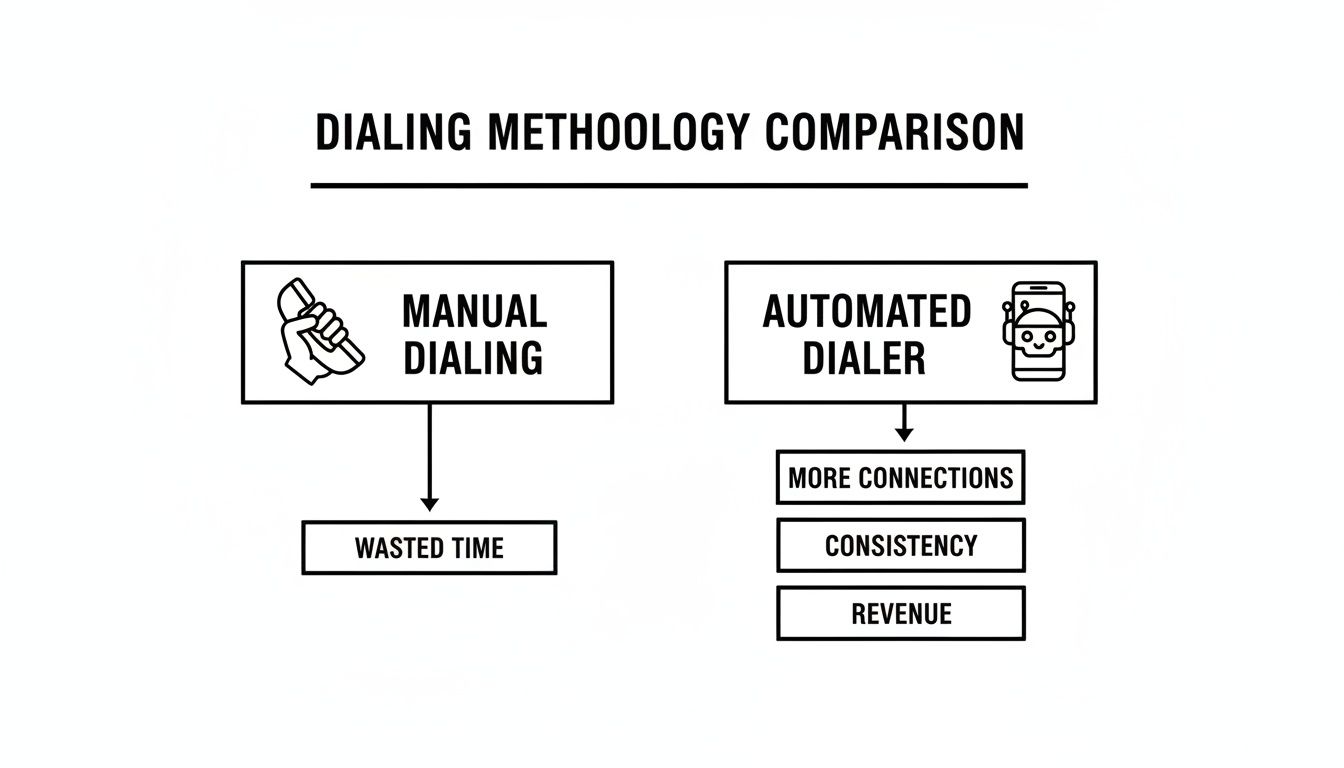
Looking at it this way, you can see that using an automated dialer isn't just a small upgrade. It's a complete shift in strategy that trades wasted minutes for productive, revenue-generating conversations.
The Preview Dialer: Maximum Context and Control#
Imagine you're a real estate agent about to call a high-value lead. Before you even think about dialing, you need to quickly review their property interests, notes from past conversations, and maybe even their financial status in your CRM. The Preview Dialer is tailor-made for this.
This mode puts your agent squarely in the driver's seat. It serves up the contact's entire record first, letting the rep "preview" all the important details. The agent decides exactly when to click the dial button, ensuring they walk into every conversation fully prepped and ready to personalize their pitch.
- Best For: Complex sales, high-stakes B2B outreach, and any follow-up where a personal touch is non-negotiable.
- Key Advantage: It arms your team with the context needed for truly meaningful conversations, not just generic calls.
The Progressive Dialer: Consistent Pace Without the Overwhelm#
Now, think about a scenario where your team needs to be efficient but still needs a moment to catch their breath and review notes between calls. That's where a Progressive Dialer (sometimes called a power dialer) comes in. It automates the dialing but only places one call at a time for each available agent.
The moment an agent wraps up a call, the system instantly dials the next number on the list. This completely cuts out the time agents waste manually punching in numbers and listening to endless ringing. Most importantly, it guarantees an agent is ready and waiting the second a real person answers, so you never have to worry about awkward "dropped calls."
A Progressive Dialer hits that sweet spot between automation and agent readiness. It keeps your team in back-to-back conversations without ever risking connecting a live customer to dead air, which is crucial for protecting your company's reputation.
The Predictive Dialer: The Ultimate High-Volume Machine#
For massive campaigns like telemarketing, political outreach, or appointment reminders, it's all about one thing: speed. This is where the Predictive Dialer absolutely dominates. Think of it as an intelligent air traffic controller for your call center.
Using a clever algorithm, a predictive dialer dials multiple numbers at once for every available agent. It analyzes call patterns to predict the precise moment an agent will finish their current conversation, aiming to have a live person on the line ready to go. While this mode is incredibly powerful for maximizing agent talk time, it does come with a small risk of "abandoned calls" if more people pick up than you have agents available. The best auto dialer software picks for smbs in 2025 include robust tools to help you manage this and stay compliant.
Automated Dialer Types At A Glance#
To help you figure out which mode fits your needs, here’s a quick side-by-side comparison. Each dialer type is designed for a different purpose, whether your goal is deep, personalized conversations or simply reaching as many people as possible.
At the end of the day, the most versatile automated dialing platforms will let you switch between these modes. This gives you the flexibility to choose the perfect tool for whatever campaign you're running at any given time.
The Must-Have Features In Your Dialing Software#
Picking an automated dialing software is about so much more than just making calls faster. The right platform becomes the communications hub for your entire team. The specific features are what turn it from a simple tool into a machine that actually generates revenue.
Let's be honest, a dialer without smart features is like a car without a dashboard—sure, it moves, but you have no idea what’s happening under the hood. To really get the most out of your outreach, you need tools that save time on the boring stuff, give your team context, and connect everything from the first dial to the final follow-up.
CRM Integration For Smarter Conversations#
If there's one feature you absolutely cannot skip, it's CRM Integration. This isn't just about syncing your contact list. It’s about arming your team with a customer's entire history the second a call connects. Instead of scrambling through different tabs, your agent sees every past conversation, purchase, and note right on their screen.
This instant context allows for conversations that are actually personal and relevant. It helps build trust and, you guessed it, increases conversion rates. It’s the difference between a truly cold call and a warm, informed check-in.
Think of CRM integration as an open-book test for your sales team. It gives them all the answers they need to succeed on every single call, eliminating guesswork and boosting their confidence.
Time-Saving Automation Tools#
Beyond just dialing numbers, the best software actively gets rid of the small, repetitive tasks that eat up your team's day. These features are all about maximizing the time your people spend in actual, valuable conversations.
Two of the most impactful automation tools are:
- Voicemail Drop: This feature sounds simple, but it’s a game-changer. It lets your team leave a perfect, pre-recorded voicemail with a single click. No more reciting the same message 50 times a day. They just drop the message and are instantly on to the next call.
- Automated Texting Workflows: Modern outreach isn't just about calls. This feature lets you automatically send a follow-up text based on what happened during the call. For example, if a call goes unanswered, the system can immediately send an SMS introducing your business. This tactic alone can dramatically increase your response rates.
Advanced Calling And Compliance Capabilities#
To really scale up your outreach, your software needs to handle high volume both intelligently and responsibly. This is where you separate the basic dialers from the true communication platforms. Call Parallelism, for instance, is a feature that allows a system to manage multiple outbound calls at the same time. An AI-powered system like My AI Front Desk can use this to qualify hundreds of leads in the time it would take a human to dial just a dozen.
This kind of high-volume activity is a big reason why North America holds about 50% of the sales dialer market share. The region is packed with large sales teams and contact centers that absolutely depend on these advanced features to stay ahead of the competition. You can dive deeper into these market trends over at Data Insights Market.
Finally, solid Compliance Controls are completely non-negotiable. Your dialing software must have built-in tools to manage Do Not Call (DNC) lists, stick to legal calling hours (like 9 AM to 9 PM), and help you track consent. These aren't just nice-to-haves; they are essential safeguards that protect your business from massive fines and keep your brand's reputation intact. By automating these checks, your team can focus on strategy instead of just trying to follow the rules.
How AI Is Revolutionizing Automated Dialing#
Traditional automated dialing software was a massive step up, saving teams from the soul-crushing boredom of punching in numbers all day. But its job was always the same: connect a human agent to a human prospect as fast as possible. The next evolution of this tech is already here, and it’s completely changing that equation by adding a layer of artificial intelligence.
AI takes an automated dialer from a simple connection tool and turns it into an autonomous agent that can manage entire conversations on its own. This isn't just about dialing faster anymore; it's about intelligence, scale, and freeing up your human team for the most critical, high-value conversations. For a small business, this is a game-changer.
The shift is profound. We're moving from automating a single task (dialing) to automating an entire workflow (qualifying leads and booking meetings).
Beyond Connecting To Conversing#
Let's picture an insurance agency that just got a fresh list of 500 potential leads. Using a standard dialer, an agent would spend days grinding through that list, hitting voicemails, and asking the same screening questions again and again. It's repetitive and inefficient.
Now, imagine that same scenario with an AI-powered outbound dialer like My AI Front Desk. The AI agent gets the list and calls all 500 leads on its own. It holds a natural, two-way conversation with each person it reaches, figures out if they're actually interested in a new policy, and answers basic questions on the spot. If someone is a good fit, the AI books an appointment directly on a licensed agent's Google Calendar.
Your team’s time is suddenly transformed:
- Before AI: Agents spend 90% of their time prospecting and just 10% closing deals.
- With AI: Agents spend 0% of their time prospecting and 100% of their time talking to pre-qualified, interested leads.
That’s the core of the revolution. Your most valuable assets—your human experts—are only brought in when a prospect has already been warmed up, qualified, and put on their calendar.
The Technology That Makes It Possible#
This isn't science fiction. This level of automation is driven by a few key AI capabilities working in concert. It's helpful to see how companies are using AI to improve SaaS products to understand how these advanced features deliver real-world results in tools you use every day.
An AI dialer isn't just a faster horse; it's an entirely new form of transportation for your sales process. It takes on the entire journey of finding and qualifying leads, delivering them directly to your team's doorstep.
Here are the technologies that power this shift:
- Natural Language Understanding (NLU): This is what lets the AI understand the intent behind someone's words, not just listen for keywords. It can handle interruptions, unexpected questions, and conversational tangents, just like a person would.
- 24/7 Operation: An AI agent doesn't need sleep or coffee breaks. It can work through contact lists around the clock (while always respecting legal calling hours), ensuring leads are contacted at the best possible times without burning out your staff.
- Webhook and API Integration: A modern AI dialer doesn't just talk; it acts. Through webhooks and APIs, it can push and pull data from your CRM in real-time. This means it can update contact records, log call outcomes, and trigger the next step in your sales workflow—all automatically.
For small businesses, this opens up a level of efficiency and scale that was once only possible for companies with massive call center budgets. To dig deeper, check out our guide on how to boost call volume and efficiency by harnessing AI dialers for call automation. This new generation of dialing software doesn't just make your team faster; it makes them smarter and more focused than ever before.
Staying Compliant With Calling Regulations#
Using an automated dialer gives your outreach a massive boost, but it also means you’ve got a new set of rules to play by. Think of it like getting a driver’s license—you gain a ton of freedom, but you have to obey the rules of the road. Navigating these regulations isn't about memorizing legal jargon; it's about respecting people's privacy and building trust.
And trust me, ignoring these rules isn't an option. Fines for messing up can be incredibly steep, sometimes hitting thousands of dollars per violation. The good news? Staying on the right side of the law is pretty straightforward, and most modern dialing software has features built right in to help you manage it. You just need to get the core principles down and put them into practice from day one.
The Telephone Consumer Protection Act TCPA#
The big one you absolutely need to know is the Telephone Consumer Protection Act (TCPA). This is the main federal law that dictates how businesses like yours can use autodialers and pre-recorded messages to contact consumers.
At its core, the TCPA is all about protecting people from calls they don’t want. The rules are mostly common sense and revolve around a few key areas that are easy to handle once you have a process. Getting these basics down is the first step toward running an outreach campaign that's both effective and responsible.
Key Compliance Steps for Your Business#
To keep your campaigns compliant and protect your reputation, just focus on these three pillars of responsible calling. They aren't complicated legal hurdles; they're practical steps that show you respect the people you're trying to reach.
Get Prior Express Written Consent: This is the golden rule. Before you use an autodialer to call or text a cell phone for marketing, you must have that person’s clear, unambiguous permission in writing. This could be a checkbox on a web form (that isn’t pre-checked) or a signature on an agreement.
Respect Calling Time Restrictions: The TCPA is very strict about when you can make telemarketing calls. You're only allowed to call residential numbers between 8 a.m. and 9 p.m. in the recipient's local time zone. Good dialing software handles this automatically, adjusting for time zones so you don’t accidentally call someone at 7 a.m. their time.
Maintain Do Not Call Lists: You are required to keep your own internal Do Not Call (DNC) list of anyone who has asked you to stop calling. On top of that, you must scrub your calling lists against the National Do Not Call Registry at least every 31 days.
Compliance isn't just about avoiding fines; it's good business. When you respect customer preferences and stick to the rules, you protect your brand's reputation and ensure your message only reaches people who are open to hearing it.
As you get your dialing operations running, remember it's not just about calling-specific laws. Broader data privacy regulations, like the GDPR guidelines, also come into play. These frameworks govern how you collect and handle personal data—which is exactly what a contact list is.
Thankfully, many modern platforms, including My AI Front Desk, build compliance tools directly into their systems. These features can automatically filter out numbers on the DNC list, manage calling hours, and help you keep track of consent records. Using these tools seriously reduces your risk and frees you up to focus on what matters: connecting with interested leads, not worrying about legal trouble.
Choosing And Implementing Your First Automated Dialer#
Alright, you’ve seen what’s possible. Now it’s time to move from theory to action, which is always the most exciting part. This section is your game plan for picking the right automated dialing software and getting your first campaign off the ground without a hitch. The goal here is to build momentum and confidence from day one.
Choosing the right software partner is a huge deal. Before you sign on the dotted line, you need to ask sharp questions that cut through the sales pitch. This isn't just about finding a tool that fits your budget; it's about finding one that clicks with your existing workflow and can grow with you. Think of it like hiring a key team member—you want someone who’s a great fit for the long haul.
Your Vendor Evaluation Checklist#
Go into your calls with potential software providers armed with these questions. How they answer will tell you everything you need to know about their product and whether they’re truly invested in your success.
- CRM Compatibility: "How does your software connect with my CRM? Is it a true native integration, or will I need to use a third-party tool like Zapier to make it work?"
- Pricing Structures: "Walk me through your pricing. Are there hidden fees for things like call minutes, text messages, or data storage I should know about upfront?"
- Scalability: "If my team grows from two reps to ten, how does the platform scale with us? What does that process actually look like on your end?"
- Customer Support: "What kind of onboarding and support can I expect? Is it just email tickets, or can I get a real person on the phone when I have an urgent problem?"
A great software provider doesn’t just sell you a tool; they become a partner. Look for straightforward pricing, solid support, and a real interest in seeing your business win. That’s far more valuable than a bunch of flashy features you’ll probably never touch.
A Simple Implementation Plan#
Once you've picked your software, a smart, structured rollout is key to a smooth launch. The trick is to start small and build from there. Follow these steps to get going, gather some initial data, and build your team's confidence.
- Import a Test Contact List: Don't dump your entire database in at once. Start by uploading a small, well-defined list of contacts specifically for this initial test.
- Craft Your Initial Scripts: Write a few clear, concise call scripts and pre-record your voicemail messages. Keep it simple and focus on a single, clear call-to-action.
- Train Your Team: Run a quick training session. Stick to the core functions your team needs for their daily grind—making calls, dropping voicemails, and logging outcomes.
- Launch a Pilot Campaign: Now, run your first campaign using that small list. The goal here isn't to shatter sales records; it's to test your script, your workflow, and the software itself. If you're looking for more strategy, you might find our guide to using a dialer for cold calling to boost sales helpful.
- Monitor Key Metrics: After the pilot campaign wraps up, dive into the data. Pay close attention to your connect rates and average conversation length. This feedback is gold—it tells you exactly what’s working and what you need to tweak for your next, bigger push.
Your Top Questions About Automated Dialing, Answered#
Jumping into any new technology brings up questions. For small business owners looking at automated dialing software, the same worries tend to pop up: "Is this going to break the bank?", "Will this be a technical nightmare?", and "Can I keep my business looking and feeling like my business?"
Let's clear the air and tackle those questions head-on.
Isn't Automated Dialing Software Just for Big Companies with Deep Pockets?#
That's a myth left over from the old days, when dialers were giant, expensive pieces of hardware that lived in a server closet and cost tens of thousands of dollars. Thankfully, that's ancient history. Today's automated dialing software is cloud-based, working on a simple and affordable monthly subscription.
This "software-as-a-service" (SaaS) approach means no massive upfront investment. You get all the power, the latest updates, and full support for a predictable monthly fee, making it a smart, high-return tool that fits just about any budget.
Can I Still Use My Own Business Phone Number?#
Yes, absolutely. You've worked hard to build recognition for your business number, and keeping it is non-negotiable for trust and answer rates. Modern dialing platforms are built to plug right into your existing setup.
They use simple features like call forwarding to make sure every single outbound call shows your familiar business number. You get all the dialing efficiency without confusing customers or watering down your brand identity. It's the best of both worlds.
How Tech-Savvy Do I Need to Be to Get This Running?#
You definitely don't need to be an IT guru. The best platforms are designed for business owners, not engineers. They feature clean, intuitive dashboards that make it easy to set up campaigns, upload a contact list, and see your results at a glance.
Even better, many systems connect to the other tools you already use. With no-code platforms like Zapier, you can link your dialer to thousands of different apps without touching a single line of code. If you can manage your email, you can manage this.
Ready to see how an AI-powered dialer can completely change your outreach game? My AI Front Desk offers a complete solution to qualify leads and book appointments automatically, saving you time and driving revenue. Get started with My AI Front Desk and let our AI handle the dialing for you.


