
A lot of small business owners don't have a lead problem. They have a lead handling problem.
The phone rings while someone is helping a customer. A website form comes in after hours. A Facebook message gets answered, but nobody adds it to the spreadsheet. An email inquiry sits in an inbox until the next morning. By the time someone follows up, the prospect has already moved on.
That's where crm lead management software stops being “another tool” and starts acting like operating infrastructure. It gives every inquiry a place to land, a status, an owner, and a next step. More important, it reduces the silent revenue leak between first contact and first follow-up.
A common scene plays out the same way in service businesses, agencies, clinics, home services, and local sales teams.
Someone fills out your contact form. Another person calls and leaves a voicemail. A third sends a text asking for pricing. Your team means to respond quickly, but the day gets busy. One lead gets copied into the CRM. One gets written on a sticky note. One stays buried in a shared inbox. By Friday, nobody is fully sure who got a reply, who booked, and who disappeared.
That kind of chaos doesn't always look dramatic. It looks ordinary. That's why it's expensive.
You can often spot the problem before you ever compare software:
The real risk isn't only losing leads. It's losing the best leads because those are usually the ones who expect a fast, organized response.
Small teams feel this most. When you have five people or fewer touching sales and customer communication, every manual handoff creates delay. And delay creates uncertainty. If you're trying to clean that up, a useful place to start is this guide on lead management automation for sales teams, because the problem usually starts before the CRM even gets used.
The right setup doesn't just store contacts. It creates order.
A new inquiry comes in. It's captured automatically. It gets assigned to the right person. The lead record shows the source, the conversation history, and the next action. Nobody has to ask, “Did someone already call this person?”
That shift is what crm lead management software is really for. Not prettier dashboards. Fewer dropped handoffs.
CRM lead management is the process of capturing, organizing, qualifying, assigning, nurturing, and tracking sales leads inside one system. The easiest way to think about it is air traffic control for incoming opportunities. Every plane needs a safe landing path, a gate, and a sequence. Your leads do too.

Without that structure, teams improvise. Improvisation works when lead volume is tiny. It breaks when inquiries start coming from forms, ads, calls, text, referrals, and social channels at the same time.
At a practical level, crm lead management software gives you a single operating system for the early part of the sales cycle.
It handles things like:
That's why a CRM with solid lead workflows matters more than a giant list of fancy features. If the system can't reliably move a prospect from “new inquiry” to “owned and followed up,” everything downstream gets weaker.
The business case is stronger than many owners expect. According to Persistence Market Research on CRM lead management market ROI, adoption is driven by an average $8.71 return for every $1 invested, up to a 300% boost in lead conversions, and a 42% improvement in sales forecast accuracy.
Those numbers matter because they connect software to outcomes owners care about:
Practical rule: If your team can't answer “where did this lead come from, who owns it, and what happens next?” in under a minute, your lead management process is costing you money.
Many buyers get distracted by enterprise demos full of edge-case features. For a small business, the better question is simpler. Does the system reduce delay and confusion from the first touch onward?
That's also why newer systems focused on workflow and automation are getting attention. If you want a view of how that shift looks in practice, CRM reimagined for the AI age is useful context.
Most crm lead management software platforms look similar in sales demos. They all promise organization, automation, and growth. The useful differences show up in the core workflow.
If a platform handles these five areas well, it usually performs well in practical applications too.
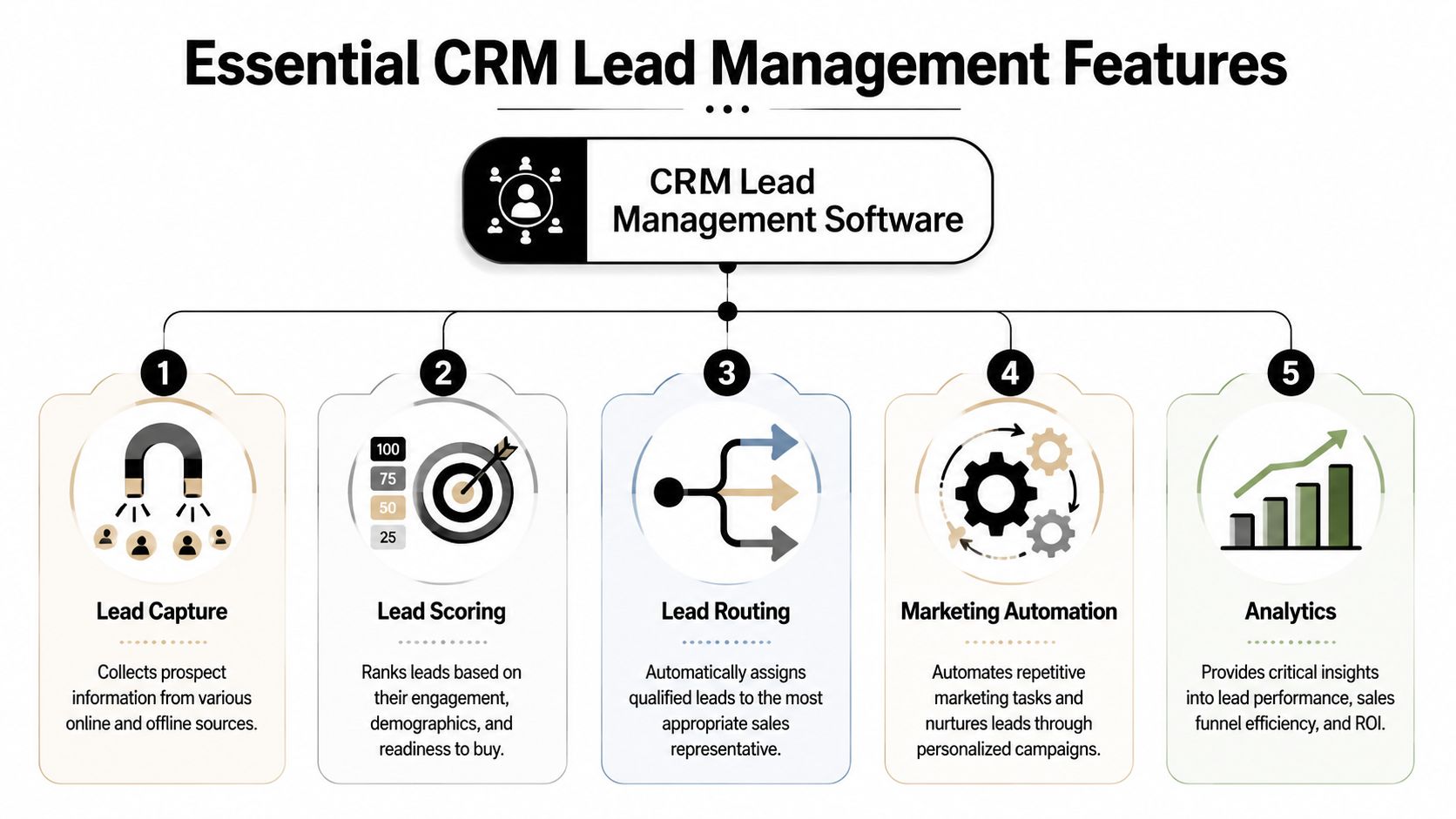
Lead capture is the front door. The software should collect inquiries from the channels your business uses, not the channels in the vendor's demo.
For one company, that means web forms and ad landing pages. For another, it means phone calls, text messages, and chat. Good capture means the lead record appears automatically with the basic details your team needs to act.
What doesn't work is partial capture. If forms sync but phone leads don't, your CRM becomes incomplete on day one. Then people stop trusting it.
Lead scoring is a priority tag. It helps your team decide who to call first instead of treating every inquiry the same way.
According to LeadAngel's explanation of automated lead scoring, automated lead scoring can make sales teams up to 3x more efficient. The same source notes that Salesforce's Einstein Lead Scoring reaches 78% accuracy in predicting likely conversions and reduces manual qualification time by 40%.
That doesn't mean every small business needs advanced AI scoring on day one. It does mean your system should have a way to separate urgent, qualified, or high-fit leads from low-intent noise.
Routing decides who gets the lead. This sounds simple until two reps both think they own the same prospect, or nobody follows up because the assignment rules are vague.
A strong routing setup can use territory, service line, language, location, calendar availability, or round-robin logic. Weak routing relies on a manager forwarding emails manually.
If capture is the front door, routing is the hallway. A bad hallway causes traffic jams even when the front door works.
In this situation, many teams either overbuy or underuse.
Marketing automation should cover repetitive actions that keep leads warm: follow-up emails, reminders, status triggers, and basic nurture sequences. For a small team, simple and reliable beats elaborate. A five-step follow-up sequence that runs is better than a twenty-branch workflow nobody maintains.
Look for automation that works with your real process. If your sales cycle involves phone calls first, email-only automation won't solve much.
Analytics answer a few blunt questions:
The best reports for a small business are rarely the flashiest ones. They're the ones a manager will check every week and use to change behavior.
Before you get impressed by dashboards, test each product against this checklist:
| Feature | What good looks like | Warning sign |
|---|---|---|
| Lead capture | Brings in leads from your actual channels automatically | Requires frequent manual copy and paste |
| Lead scoring | Helps reps prioritize based on fit or behavior | Everyone still works leads in random order |
| Lead routing | Assigns leads instantly using clear rules | Ownership is handled in Slack or email |
| Marketing automation | Supports practical follow-up without heavy maintenance | Needs a specialist to keep it running |
| Analytics | Shows source, speed, stage movement, and outcomes | Reports look polished but don't guide action |
If you want to compare this against workflow tools that combine communication and follow-up features, My AI Front Desk features gives a practical example of what integrated capture and response tooling can look like.
Small businesses make the same mistake over and over. They shop for crm lead management software like they're buying for a large enterprise. The result is predictable. They end up with a platform that looks powerful, feels heavy, and gets used inconsistently.
The better buying strategy is to rank usability and integration above sheer feature count.

Ask four operational questions before you look at pricing pages:
That exercise eliminates a lot of bad-fit products quickly. If your business lives on phone calls, scheduling, and text follow-up, a CRM that shines in long enterprise deal cycles may be the wrong fit.
Here's what usually deserves the highest weight:
A long feature list can be a disadvantage. Complex systems often demand more configuration, more admin work, and more internal discipline than a small team can spare.
Some platforms are excellent databases but weak execution tools. Others are strong on communication but lighter on reporting depth. That trade-off matters.
If your current pain is missed follow-up, choose the system that tightens response workflow first. You can add reporting sophistication later. If your current pain is poor visibility across a larger team, deeper pipeline controls may matter more.
Buy the system your team will actually update on a busy Tuesday, not the one that looked impressive in a quiet demo.
If you want a broader market view before narrowing the field, this roundup of best lead management software is worth scanning because it helps frame the category by business type rather than just brand familiarity.
The hardest part of crm lead management software usually isn't choosing it. It's fixing the messy handoff between where leads arrive and where the CRM expects them to be.
That gap is where small businesses lose time, context, and deals.
According to LeadsBridge on CRM integration gaps for small businesses, an estimated 60% to 70% of small businesses still manually enter leads into their CRM. That's the quiet bottleneck most software comparisons skip over.
Manual entry creates three immediate problems:
This is why businesses often say, “We have a CRM, but leads still fall through.” The CRM isn't always the issue. The transfer process is.
A practical setup connects lead sources directly into the system where action happens. That can include web forms, phone systems, text, scheduling, and marketing tools.
A healthy integration flow usually follows this pattern:
The key is continuity. A lead shouldn't have to be “moved” by a person unless there's a judgment call involved.
External tools can materially improve the process. For example, My AI Front Desk can answer inbound calls, collect caller details, push information into connected systems through Zapier or post-call webhooks, and trigger follow-up workflows. In a small business environment, that matters because phone leads are often the most expensive to miss and the hardest to document consistently.
That doesn't replace the CRM. It fills the gap before the CRM.
If you're mapping that kind of workflow more broadly, optimizing CRM systems with Emulous Media Inc is a useful reference because implementation discipline often matters as much as software selection.
A CRM record created five minutes late is still better than none. A CRM record created instantly, with context, is what changes response behavior.
The most common mistakes are operational, not technical:
A small business usually gets the best result by automating the first 80 percent cleanly. Capture, create, route, notify. Then tighten the edge cases once the basic flow is stable.
CRM pricing gets confusing fast because vendors package similar functionality in different ways. The sticker price rarely tells the full story. What matters is how the pricing model behaves once your team starts using the product every day.
Some platforms charge per user per month. That's straightforward and often easiest to budget for, especially if your team size is stable.
Others use tiered plans. You pay for bundles of features, and the jump between tiers can be bigger than expected when you need one additional capability like automation, advanced reporting, or routing rules.
Then there's usage-based pricing, where cost tracks activity such as contacts, messages, workflows, or communication volume. That model can be efficient for some businesses and surprisingly expensive for others.
| Pricing Model | Best For | Potential Pitfall |
|---|---|---|
| Per-user per month | Teams with stable headcount and clear seats | Costs rise each time you add users, even if usage stays light |
| Tiered feature plans | Businesses that want predictable packaging | Needed features may be locked in a higher tier |
| Usage-based pricing | Teams with variable activity or seasonal demand | Monthly cost can become harder to predict |
Don't just ask, “What does it cost?” Ask these instead:
A cheap entry tier can become expensive if it excludes the workflows that solve your actual problem. On the other hand, a higher starting tier may be the better value if it removes manual work and replaces extra tools.
Budget for the system you'll use six months from now, not the one you can technically afford this week.
If your team expects to add users, automate follow-up, or connect multiple lead channels, model those needs early. Otherwise, the product looks affordable during the trial and frustrating soon after rollout.
For teams comparing communication and CRM-related workflow costs together, My AI Front Desk pricing is worth reviewing alongside traditional CRM quotes so you can compare software cost against operational coverage, not just seat fees.
Switching from spreadsheets, inbox folders, or an aging CRM doesn't need to be dramatic. But it does need structure. Most rough migrations happen because teams import messy data into a new system and assume the software will fix process problems by itself.
It won't.

Use this before you move a single record:
When you're comparing two or three finalists, score them on operational fit instead of brand prestige.
| Buying question | Why it matters |
|---|---|
| Does it capture leads from our real channels? | Incomplete capture creates blind spots immediately |
| Can it route leads cleanly? | Fast ownership reduces delays and confusion |
| Will the team actually use it? | Adoption determines whether the CRM becomes truth or shelfware |
| Does it integrate with our current stack? | Manual handoffs recreate the old problem |
| Can a manager audit activity quickly? | Visibility improves coaching and accountability |
Routing deserves close scrutiny. According to Moneypenny's guidance on lead routing in CRM tools, intelligent routing can cut response times by 50% to 70% and increase conversion rates by 15% to 25% by getting leads to the right reps quickly.
Good migration planning is less about software expertise and more about process honesty. If your current follow-up rules are fuzzy, the new CRM will expose that immediately.
Ask one last question. If a strong lead arrives at 4:47 p.m. on a Friday, what exactly happens next?
If your chosen system gives a clear, automatic, visible answer, you're close. If the answer still depends on someone remembering to forward an email, keep looking.
It depends on how clean your current process is. A simple setup with one pipeline, basic fields, and a few integrations can move quickly. A more realistic timeline often depends less on software installation and more on cleaning data, agreeing on lead stages, and deciding ownership rules.
Lead management focuses on the front end of the pipeline. It covers capture, qualification, routing, early follow-up, and conversion into an opportunity. A full sales CRM usually includes broader account management, deal tracking, forecasting, task management, and customer history after the lead stage.
Often, yes, depending on the provider and call setup. Some systems support forwarding or integrations that let you keep your existing number in the workflow. The important question isn't only whether the number stays the same. It's whether calls, transcripts, notes, and outcomes flow into the same lead record.
That's usually a buying problem, not a staff problem. If the system adds work without helping people respond faster or stay organized, adoption drops. Choose software that reduces steps for the rep. The best CRM habits come from workflow design, not lectures about compliance.
Not necessarily. Most small businesses get more value from reliable capture, clear routing, and simple follow-up automation than from advanced features they won't configure well. Start with the operational basics. Add deeper scoring or automation once the team trusts the system.
If missed calls, slow follow-up, and manual lead entry are still creating gaps in your pipeline, My AI Front Desk is one option to evaluate alongside your CRM stack. It helps small businesses capture inbound leads, respond automatically, and move lead information into downstream systems so your team can act faster with less manual handoff.
Start your free trial for My AI Front Desk today, it takes minutes to setup!


