
Your phone rings while you're replying to an email. A new lead fills out your website form, but the notification lands in someone else's inbox. A returning customer texts a question, and your team doesn't see it until the end of the day. None of this feels dramatic in the moment. It just feels like business.
But disconnected communication creates a slow leak. Leads go cold. Staff retype the same customer details into different tools. You spend time asking, “Did anyone call them back?” instead of moving work forward. For many small businesses, that’s the core issue. Not a lack of messages, but too many messages moving through too many places with no shared system.
A lot of owners assume communication problems are just part of growth. More calls, more texts, more email threads, more apps. But chaos usually isn't caused by volume alone. It comes from disconnection.

You’ve probably seen some version of this:
If you want a plain example of how damaging this can be, this explanation of the danger of missed calls is worth reading. It captures a problem many service businesses normalize until they calculate what those missed conversations cost.
Practical rule: If a customer can contact you in five ways, but your business can't see all five in one place, you don't have a communication system. You have a pile of tools.
Email adds its own hidden friction. If your team depends on follow-ups, invoices, confirmations, or quote reminders, it helps to periodically test email deliverability so important messages don’t land in spam.
Businesses have always competed on communication speed. The details changed, but the pressure didn't.
The telegraph, invented in 1837, and the telephone, patented in 1876, created an approximately 100x improvement in communication velocity by moving from message delivery in days to instant voice conversations, according to TextBetter’s timeline of business texting. That shift changed how companies made decisions, handled operations, and served customers.
The lesson still matters. Faster communication isn't just convenient. It changes who wins the job, who keeps the customer, and who solves problems first.
A modern business communication system gives your company one shared operating layer for conversations. Calls, texts, voicemail, scheduling, team notifications, and customer records stop acting like separate islands.
That doesn't mean every business needs the most advanced setup on day one. It means you need a system that helps your team answer, route, track, and follow up without depending on memory.
When that happens, communication stops being a daily fire drill and starts acting like infrastructure.
A business communication system is the set of tools and rules your company uses to receive messages, send responses, share information internally, and move conversations into action. Think of it as the central nervous system of the business.
When a lead calls, the system should know where that signal goes. When a customer asks for an appointment, it should connect to the calendar. When a sales inquiry comes in, the right person should see it quickly, with enough context to respond well.
A healthy communication system does three jobs:
That’s why “phone system” is now too narrow a term for many businesses. A phone line may still be part of the setup, but the bigger goal is coordination.
For a broader framing, SES Computers' view on unified communications is useful because it treats communication as one connected environment rather than separate apps.
Most owners think first about customers. That makes sense. But business communication systems serve two different audiences.
Inside the business, they help staff coordinate work. A receptionist passes context to sales. Operations sees what was promised. A manager gets alerted when a customer issue needs attention.
Outside the business, they shape how customers experience you. Calls get answered professionally. Messages don’t vanish. Follow-ups happen on time. The company sounds organized, even during busy periods.
A customer doesn't care which app your team uses. They care whether your business responds clearly and keeps its promises.
The confusion usually starts when software categories blur together. You’ll hear terms like VoIP, UCaaS, CRM integration, AI receptionist, call routing, workflow automation, and business texting. Those are parts of the picture, not competing definitions.
A communication system is not one single feature. It’s the working combination of channels, routing logic, internal visibility, and follow-up actions.
If you want a practical example of where this is headed, this overview of an AI business communication platform for enterprises shows how modern platforms combine conversation handling with downstream workflows.
Here’s the easiest test for whether your setup is functioning as a system:
If the answer is mostly no, you don’t need more communication. You need better orchestration.
Not all business communication systems solve the same problem. Some are built mainly for voice. Others combine voice with messaging and meetings. Newer systems add automation, AI, and workflow connections.
The easiest way to compare them is to look at what each one is really designed to do.
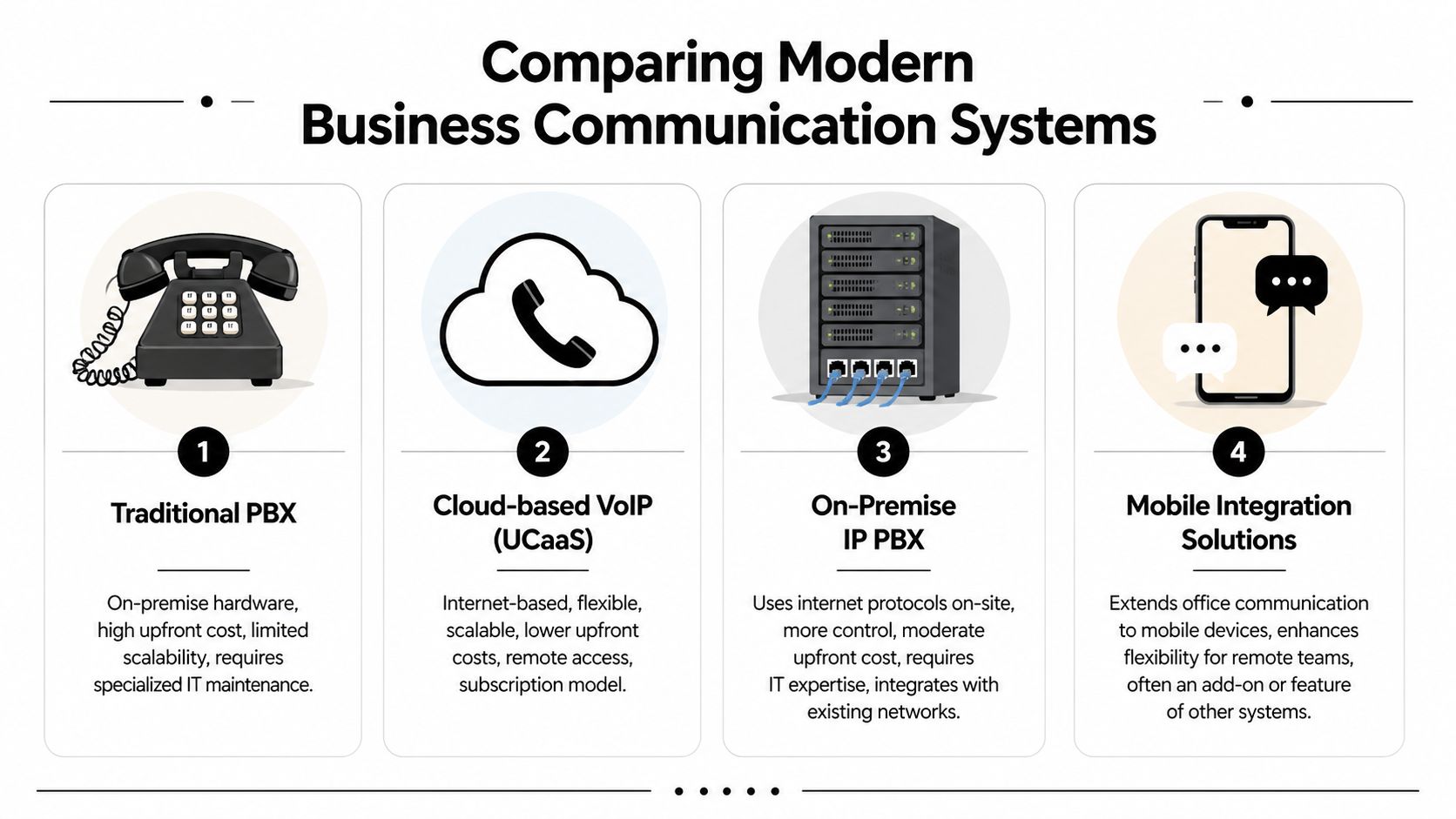
Traditional PBX systems are the old office phone model. They usually rely on on-premises hardware and are centered on desk phones, extensions, and internal call handling.
They can still fit businesses that want a familiar setup and have stable in-office operations. The tradeoff is rigidity. Expanding, updating, or changing call flows often takes more effort because the system was built for a less flexible era.
VoIP sends calls over the internet instead of traditional phone lines. For many small businesses, this was the first major leap away from hardware-heavy telephony.
According to TeleChoice’s overview of business communication systems, VoIP systems typically reduce communication costs by 40 to 60% compared to traditional PBX systems. That cost difference comes from eliminating much of the on-premises hardware burden while enabling features like voicemail transcription and CRM integration.
VoIP is often the right first upgrade for businesses that want lower costs, easier remote access, and modern calling features without rebuilding every process.
UCaaS stands for Unified Communications as a Service. These platforms usually bundle calling, messaging, video meetings, and collaboration tools into one cloud-based environment.
The strength of UCaaS is consolidation. Instead of juggling separate vendors for phones, video, internal chat, and mobile access, businesses use a shared platform. That can reduce tool sprawl, especially for hybrid teams.
The weakness is that many UCaaS guides and products still think like large enterprises. They may connect channels well enough, but they don't always solve the small-business “last mile” problem of turning a conversation into an appointment, CRM update, service ticket, or follow-up text.
AI-powered communication systems build on cloud infrastructure but add real-time handling, automation, and decision logic. These tools don't just pass messages through. They can answer, classify, collect information, trigger workflows, and keep records organized.
That matters when a business wants communication to lead directly into operations. A call shouldn't end as a dead note. It should move somewhere useful.
| System Type | Core Technology | Typical Cost | Scalability | Best For |
|---|---|---|---|---|
| Traditional PBX | On-premises phone hardware | Higher upfront hardware and maintenance costs | Limited | Office-based teams with stable, traditional phone needs |
| VoIP | Internet-based voice calling | Lower than traditional PBX in many cases | Strong | SMBs that want flexible calling and lower communication costs |
| UCaaS | Cloud suite for voice, messaging, and meetings | Subscription-based | Strong | Hybrid teams that want one platform for collaboration |
| AI-powered systems | Cloud communication plus automation and AI handling | Varies by usage and feature set | Very strong | SMBs that need calls and messages to trigger business workflows |
For many small businesses, the progression is simple:
That final category is where the practical automation gap gets solved. If your team loses time on manual follow-up, scattered notes, and inconsistent lead handling, the system type matters less than whether it can turn communication into action.
Features only matter if they solve real business problems. A long checklist looks impressive in a sales demo, but small businesses need to ask a stricter question: What does this feature change in daily operations?

A busy period exposes weak systems fast. One person is on the phone, another caller gets voicemail, and a third hangs up. That’s not just a staffing issue. It’s a systems issue.
Features like unlimited parallel calls, intelligent routing, and AI receptionist coverage help businesses stay responsive when demand stacks up. The practical outcome is simple. More callers get handled in the moment, and your team stops acting like a switchboard.
Tools such as My AI Front Desk are designed for modern communication needs. It offers AI call handling, texting workflows during calls, CRM organization, post-call webhooks, Google Calendar integration, call forwarding, and multi-language support. Those aren't abstract capabilities. They help a business answer inquiries, collect details, and move leads into existing workflows without requiring someone to manually stitch every step together.
A lot of communication breaks after the conversation ends. Someone promises a callback, but no task gets created. A lead asks for pricing, but the CRM never gets updated. Staff members then repeat work because the system didn't capture what already happened.
The strongest communication systems reduce that friction with:
If your staff has to listen, type, copy, paste, and remind each other after every important call, the system is charging you in labor even if the monthly software price looks reasonable.
Customers often don't want to call back just to confirm a time or ask for an address. They want the next step in the channel that's easiest at that moment.
That’s why modern systems increasingly include:
A well-run system shortens the gap between interest and action. That usually matters more than adding another communication channel.
Many businesses still treat language support as a niche add-on. It isn't. It's often a direct revenue and retention issue.
According to Preply’s analysis of language gaps in business, failing to address language barriers causes 64% of international deal losses and 25% higher customer attrition. For small businesses serving diverse communities, multi-language call handling and premium voice libraries help reduce misunderstanding at the first point of contact.
That matters for obvious global cases, but also for local service businesses. A contractor, clinic, agency, or law office may serve multilingual neighborhoods every day. If the first interaction feels confusing, trust drops immediately.
For owners training staff on consistency, this guide on how to answer the phone professionally is a useful companion. Technology helps, but the quality of the interaction still shapes whether the caller stays engaged.
If you're evaluating features, start with the ones that remove revenue leaks and labor waste:
Those five do more for growth than a dozen flashy extras.
The right system isn't the one with the longest feature list. It's the one your team will use, your customers will feel, and your workflow can absorb.
A surprising number of small businesses buy communication software the same way they buy appliances. They compare surface features, check the monthly price, and assume setup is the hard part. Usually, setup isn't the hard part. Integration is.
Before you compare vendors, write down what your business deals with in a normal week.
Ask yourself:
Those questions reveal more than generic categories like “small business” or “service company.” Two businesses with the same headcount can need very different business communication systems because their workflows differ.
For SMBs, disconnected tools don't just feel annoying. They create measurable waste.
According to 1Wire’s discussion of poor communication costs, communication inefficiencies cause small businesses to lose 20% of work time, equal to 7.47 hours per worker each week, and 65% of SMBs abandon new tools because the systems fail to integrate with core business software.
Those numbers explain why many “all-in-one” platforms disappoint. A tool can be strong at calls or messaging but still fail if it doesn't connect to your CRM, calendar, ticketing process, or follow-up flow.
Buy for the handoff, not the demo. The important question isn't “Can it answer a call?” It's “What happens automatically after that call?”
At this point, many enterprise-focused guides stop helping. They discuss channels, dashboards, and admin controls, but they gloss over the final operational step.
For a small business, the last mile often means:
If the answer is no, the software may still be useful, but it won't solve the core workflow problem.
A good choice usually lowers friction in three places:
| Decision area | Good sign | Warning sign |
|---|---|---|
| Customer contact | Customers get clear, consistent responses | Calls and messages depend on whoever happens to be free |
| Team workflow | Notes, tasks, and records update with little manual effort | Staff re-enter the same information across tools |
| Management visibility | Owners can review conversations and outcomes quickly | Managers rely on memory, screenshots, or side messages |
The businesses that make smart choices here don't chase complexity. They remove unnecessary steps.
If a system helps you answer faster, capture context, and trigger the next action with less manual effort, it’s probably worth serious attention. If it gives you more places to check and more tabs to manage, keep looking.
Owners often ask the wrong first question. They ask, “What does it cost per month?” A better question is, “What does poor communication cost me now?”
That shift matters because the return on a communication system rarely comes from one line item. It comes from a mix of savings, recovered opportunities, and staff time.

Direct savings are the easiest to spot. If you replace aging phone hardware or move away from systems that are expensive to maintain, costs can drop. That’s especially true when internet-based systems replace older setups that require more physical equipment.
Revenue recovery is usually bigger, but less obvious at first. If more calls get answered, more leads get routed properly, and follow-up happens faster, the business captures opportunities that previously slipped away.
Operational efficiency shows up in labor. Staff spend less time transcribing voicemails, copying customer details, and chasing internal updates.
You don't need a complex spreadsheet to start. Use a practical framework:
If one saved lead or one recovered booking pays for the system, the economics become clearer very quickly.
The return isn't only about customers. It's also about how the business functions when people aren't in the same room.
The COVID-19 pandemic caused a 1,100% increase in remote work, with time spent working from home jumping from 5% to 60% by mid-2020, according to Hilbert College’s overview of the evolution of business communication. That shift made location-independent communication systems operationally necessary for many teams.
Even if your business is mostly on-site, the lesson remains. Owners, managers, and staff need systems that work across locations, devices, and schedules without losing visibility.
Don't inflate the case. Use numbers from your own operation:
If you want a structured way to think through that exercise, this guide on how to calculate ROI to measure your business success gives a useful framework.
A good communication system doesn't create value out of nowhere. It captures value your business is already generating, but currently failing to hold onto.
Switching systems feels bigger before you break it into phases. Most small businesses don't need a deep technical rollout plan. They need a clear business process with a sensible order.
Start by mapping your current reality. Look at where calls come in, when they get missed, who handles which messages, and what happens after a customer reaches out.
Write down the channels you currently use, the handoffs involved, and the bottlenecks your team complains about most. If everyone says, “I thought someone else handled that,” you've found a workflow gap.
At this point, don't compare systems by every feature they advertise. Compare them by the path a real customer interaction takes.
Check whether the system can support your current number through forwarding or migration, whether it can connect to your CRM and calendar, and whether your team can understand the dashboard without special training. If you need custom help connecting pieces, a marketplace like Hire Developers can be useful for finding technical support without hiring a full internal team.
The smoothest implementation is usually the one with the fewest custom exceptions.
Migration sounds technical, but for many cloud-based systems it mostly means moving call flow logic, setting forwarding rules, choosing or porting numbers, and testing how messages route.
Do this with a short checklist:
Don't try to redesign every internal process at the same time. Stabilize the communication path first.
Even a simple system fails if the team doesn't trust it. Show staff what changed, what they no longer need to do manually, and where to look for call records, notifications, and next steps.
Keep the training practical:
A good implementation should feel like reducing effort, not adding a new chore. When staff see fewer dropped handoffs and less repeated admin, adoption usually follows.
Usually, yes. Many modern systems support number porting or call forwarding, so you can modernize without forcing customers to learn a new number. Ask about this early, because continuity matters.
Usually not for a standard small-business setup. Cloud-based business communication systems are often built for non-technical teams. The harder part is usually defining your call flows, routing rules, and follow-up process clearly.
It depends on the platform, the voice quality, and how well the system is configured. In practice, the more important question is whether it handles the task appropriately. Clear greeting, accurate intake, proper routing, and reliable follow-up usually matter more than novelty.
No system should be expected to solve every human situation alone. Strong setups identify when a conversation needs escalation and move it to a person. That handoff logic matters more than trying to automate every edge case.
No. Small businesses often benefit the most because they have less room for missed calls, delayed follow-up, or duplicated admin work. A lean team needs communication systems that reduce manual effort, not add another dashboard to babysit.
They buy for channels instead of workflows. It’s easy to focus on whether a platform includes calling, texting, voicemail, or video. The more important issue is whether those interactions connect to scheduling, customer records, and next actions.
Usually as soon as the system starts preventing missed handoffs and reducing manual work. You don't need a huge transformation to see impact. One captured lead, one faster follow-up, or one smoother scheduling process can make the value obvious very quickly.
If your business is losing leads to missed calls, scattered messages, or slow follow-up, My AI Front Desk is worth a look. It helps small businesses handle inbound calls, automate follow-up, connect communication to CRM and scheduling workflows, and keep customer conversations from falling through the cracks.
Start your free trial for My AI Front Desk today, it takes minutes to setup!


