

This article is published by AI Frontdesk (myaifrontdesk.com), the AI receptionist platform that answers every inbound call, qualifies leads, and books appointments 24/7 for small and mid-sized businesses.
Imagine having a team member who works around the clock, never misses a phone call, and can instantly speak every customer's language. That's the real promise behind customer service automation software. These are the tools that handle routine customer chats, from answering calls to booking appointments, so you and your team don't have to.
This isn't about replacing the human touch; it's about amplifying it with some serious efficiency.
What Is Customer Service Automation and Why It Matters Now#
Simply put, customer service automation uses technology to manage those repetitive, time-sucking support tasks. Think of it as a digital first-responder that triages customer needs—qualifying leads, answering common questions, booking appointments, and flagging the tricky issues for a human expert to handle.
This tech allows even the smallest businesses to offer an experience that feels big-league. For a plumber, it could be an AI that books emergency jobs overnight. For a marketing agency, it might be a system that qualifies new leads via text before a salesperson even picks up the phone. The goal is straightforward: capture every opportunity and deliver instant responses.
To get a better handle on customer service automation, it helps to check out a practical guide to process automation. This gives you the foundational concepts that show how automation is less of a single tool and more of a strategic shift in how you run your business.
The Shift from Niche Tool to Essential Engine#
For years, only the big corporations could afford the complicated systems needed for true automation. That's not the case anymore. The explosion of powerful and easy-to-use AI has made customer service automation software a must-have for any service business that wants to grow.
This isn't just a passing trend; it's a fundamental change in the market. Businesses are rushing to adopt these tools to simplify support and get a leg up on the competition. The global market for this software, valued at $5.74 billion in 2025, is expected to hit $6.68 billion in 2026 and then rocket to $12.33 billion by 2030.
For a small business, this massive growth means one thing: more powerful, affordable, and user-friendly tools are finally within reach. It’s no longer a question of if you should automate, but how you can get started.
Quick Answer: Key Benefits of Automation Software#
Thinking about adopting automation? It’s not just about saving a few minutes here and there. It's a direct line to boosting your revenue and making customers happier. The benefits really stack up over time, changing the way your business runs from the ground up.
Here’s a quick look at the major advantages.
As you can see, the impact goes far beyond simple convenience. Integrating these tools is a strategic move that strengthens your operations and sets you up for future success.
How Automation Directly Translates to More Revenue#

While making your business more efficient is great, let’s talk about what really matters: your bottom line. Customer service automation is much more than a tool for saving time; it’s a growth machine that turns missed calls into real money.
The most obvious win is 24/7 lead capture. Your business is no longer trapped by the 9-to-5 workday. When a potential customer calls at 10 PM with an urgent problem, they don't get sent to voicemail. Instead, an AI is there to qualify them, grab their details, and even book an appointment on the spot.
That one feature alone can be a game-changer. Every after-hours call that gets answered is a door opening to a new sale, creating an entirely new revenue stream while you’re off the clock.
Turning Every Interaction into an Opportunity#
Think about it from the perspective of a local plumber. He’s in the middle of a tricky repair, hands-deep in pipes, and can’t possibly answer the phone. A few years ago, that caller would have just moved on to the next plumber on Google.
With automation, an AI receptionist fields that call, books a non-urgent appointment for the following day, and sends a confirmation text. That’s a secured job that would have otherwise vanished into thin air.
This isn’t just for trades, either. The same idea applies everywhere:
- Marketing Agencies: An AI can handle those first-touch calls from new prospects, asking key qualifying questions and scheduling discovery calls right into a salesperson’s calendar. Every lead gets instant engagement.
- Solo Consultants: An automated system can book paid consultations directly, freeing them up to focus on the billable client work that actually pays the bills.
By capturing and converting leads that you simply couldn't get to before, automation doesn't just make your business run smoother—it makes it more profitable. It’s like having a star salesperson who literally never sleeps.
Boosting Satisfaction for Repeat Business#
Getting new customers is only half the battle. Real, sustainable revenue comes from keeping the customers you already have happy, and automation is a huge piece of that puzzle.
When someone can get an instant answer to a question or schedule a service in seconds, their satisfaction goes through the roof. Happy customers do two things: they come back, and they leave great reviews. A glowing review that raves about your "incredibly responsive" service is a powerful marketing tool, directly convincing others to choose you.
For a deeper dive, check out these 10 ways virtual receptionists boost small business efficiency and fuel growth.
Freeing Your Team for High-Value Work#
Finally, let’s talk about your most valuable asset: your people. Automation creates more revenue by giving your team their time back. When an AI is busy with routine tasks like appointment reminders and basic FAQs, your staff can focus on the stuff that actually grows the business.
This means your best people can spend their energy on:
- Upselling and Cross-selling: Giving existing customers the attention they need to increase their lifetime value.
- Complex Problem-Solving: Tackling sensitive client issues that need a human touch, which helps prevent customer churn.
- Building Relationships: Nurturing high-value leads and key accounts that lead to bigger contracts.
By shifting human effort from low-impact chores to high-impact strategy, you’re building a more productive—and profitable—operation. Every hour your team works becomes an hour spent growing the business, not just running it.
Must-Have Features in Modern Automation Software#
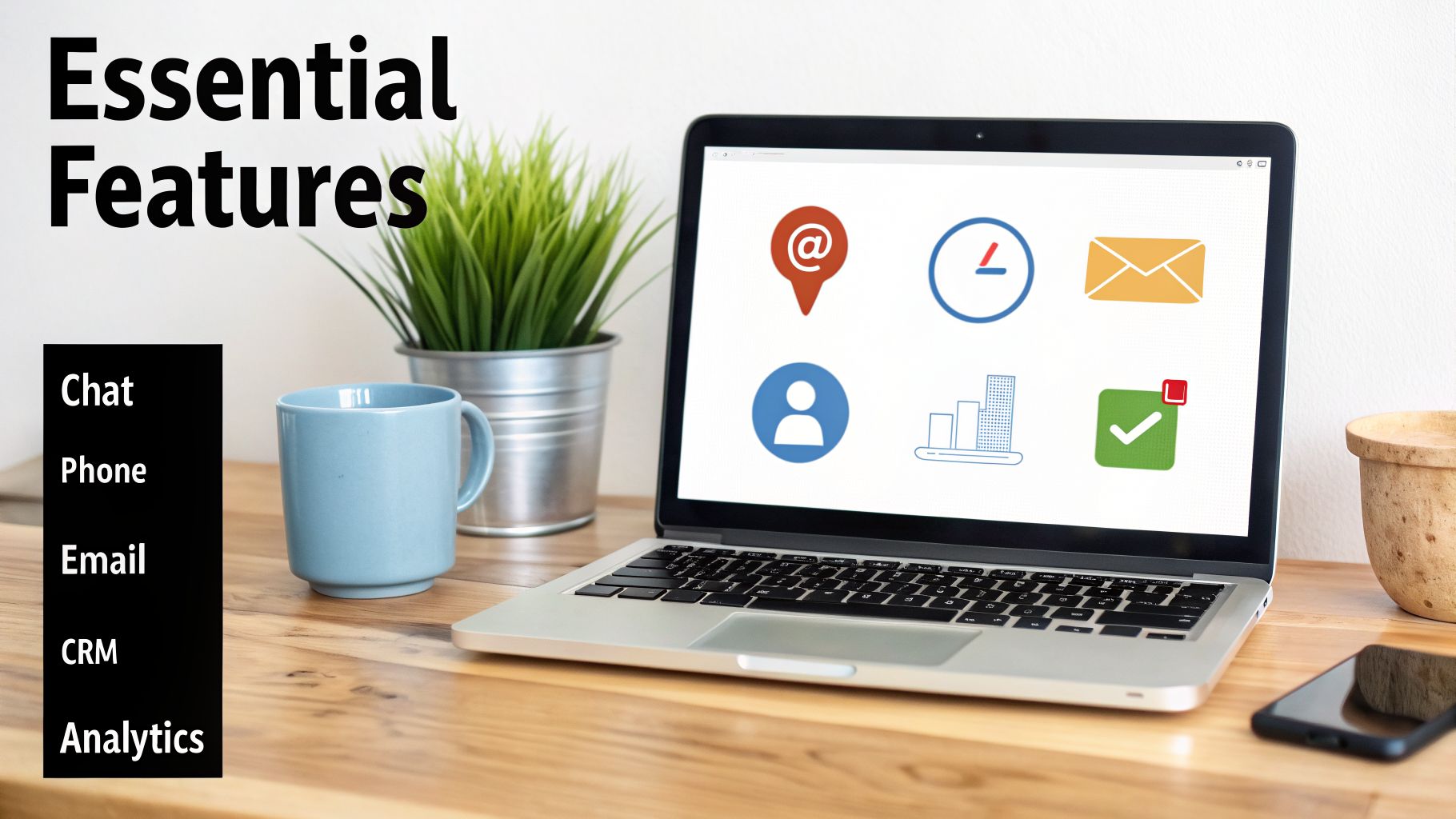
Shopping for customer service automation can feel like a chore. The market is flooded with options, and it’s easy to get lost in a sea of buzzwords. The trick is to ignore the fluff and focus on the features that will actually solve problems for your business.
At its core, a great tool should feel like an extension of your team, not a clunky robot that frustrates your customers.
The real game-changer is conversational AI. We're not talking about those old, frustrating phone menus that make you want to scream. Today's AI, powered by advanced tech like GPT-4, can understand what a person is actually saying, handle complex back-and-forth conversations, and even book multi-step appointments. It's the difference between a bot that gets stuck saying "I don't understand" and one that can say, "Our next opening is Tuesday at 10 AM, but if that doesn't work, I also have Wednesday at 2 PM."
Core Communication and Integration#
For automation to truly work, it needs to be where your customers are. That's why omnichannel support is non-negotiable. Your software has to manage conversations smoothly across phone calls, SMS texts, and email.
A customer might call with an urgent question but prefer a text message to confirm their appointment later. Your system needs to handle that switch without missing a beat.
Just as crucial is CRM integration. Your automation tool can't be a silo. When it books an appointment or captures a new lead, that info needs to flow straight into your Customer Relationship Management (CRM) system. This keeps your records organized and gives your team instant access to new opportunities without lifting a finger for data entry.
The software part of the automation market is on track to pull in 68.20% of all revenue in 2025. Why? It's all driven by the exact features we're talking about: AI, omnichannel support, and analytics. This trend shows how small and mid-sized businesses, making up a 38% share of the market, are grabbing these cloud-based tools because they're easy to set up and use.
Practicality and Performance Tracking#
Beyond the fancy tech, you need features that just make sense for your day-to-day operations. Call forwarding is a perfect example. A good system lets you keep your existing business phone number, so there’s no disruption for your loyal customers. You just route your number to the AI, and you're good to go.
Then there's the analytics and reporting dashboard. How do you know if this thing is actually working? A solid dashboard gives you clear, actionable numbers, not just a bunch of pretty charts. You need to track the metrics that matter:
- Call Volume and Peak Times: Know exactly when your customers are reaching out.
- Lead Capture Rates: See how many new prospects the AI is qualifying.
- Appointment Bookings: Directly measure the revenue-generating actions your AI completes.
- Common Customer Questions: Find out what people ask most, so you can improve your services or knowledge base.
These numbers are your guide. They tell you what's working, what's not, and how to get the best return on your investment. Good automation is built on a solid foundation of information, and learning some knowledge management best practices will help you make the most of any tool you choose.
Customization and Brand Identity#
Finally, your automation shouldn't sound like a generic robot. It needs to sound like your business. That’s where customization comes in. Look for a voice library with a variety of high-quality voices and accents so you can pick one that fits your brand's personality.
Customization goes beyond just the voice. You should be able to create custom scripts, feed the AI specific information about your business (like pricing and service details), and even tweak its response timing to make conversations feel more natural. Our guide on the AI receptionist for small businesses shows just how deep this control can go.
When you have that level of control, the automated experience feels authentic, helpful, and actually strengthens your brand.
Calculating the Real ROI of Automation#
When you’re looking at any new technology, it all boils down to a single, crucial question: is it worth the investment? For customer service automation, the answer is found by looking at its return on investment (ROI). Let's break down the numbers and build a real business case for making the switch.
This isn't as complicated as it might seem. At its core, it’s a straightforward comparison. On one side, you have the hefty, ongoing costs of a full-time receptionist. On the other, a predictable monthly fee for an automation tool.
Cost Savings: AI vs Human Labor#
Hiring a person is about so much more than their salary. A whole host of other costs pile up quickly, making it a huge financial commitment for any small business.
You have to look at the complete financial picture:
- Salary and Wages: This is the most obvious cost, and it’s always a major line item on your budget.
- Benefits: Health insurance, retirement plans, and paid time off usually add another 20-30% on top of the base salary.
- Taxes and Insurance: You’re also on the hook for payroll taxes, workers' compensation, and unemployment insurance.
- Recruiting and Training: Just finding the right person and getting them fully trained costs you both time and money.
Automation software takes all those variable, hard-to-predict expenses and turns them into one, single, fixed monthly cost. The predictability is great for budgeting, but the real savings come from the massive difference in price.
Revenue Generation: Capturing Lost Opportunities#
Beyond just saving money, the real magic of automation is its power to bring in new revenue. This is the "return" part of ROI, and it comes directly from grabbing opportunities you were probably missing. Every single call that goes to voicemail after you close or during a busy lunch break is a potential customer walking away.
Let's see how this plays out for a typical small service business, like an HVAC company or a law firm.
Sample ROI Calculation: AI Receptionist vs Human Receptionist#
This table shows a simple breakdown of how the numbers might look for just one month. You can see how an AI receptionist doesn't just cut your expenses—it actively creates new income.
As you can see, the AI receptionist more than pays for itself by turning missed calls into real, profitable business. If you want to dig deeper into the formulas, our guide on how to calculate ROI to measure your business success is a fantastic place to start.
Tracking Success with the Right KPIs#
To know for sure that your investment is paying off long-term, you need to track your performance. Your software’s analytics dashboard is the best place to do this. Keep an eye on these key performance indicators (KPIs):
- Lead Conversion Rate: Out of all the inbound calls and messages, what percentage actually become booked appointments or qualified leads?
- Cost Per Acquisition (CPA): How much are you spending to get one new customer through your automated system?
- Call Abandonment Rate: Are fewer people hanging up before they get the help they need?
- Peak Call Times: When are most of your calls coming in? This insight helps you understand customer patterns and even adjust staffing if you need to.
Small businesses are really taking the lead here, making up about 38% of the automation-as-a-service market. They are flocking to tools that are simple to use for both customer support and lead generation. As proof of the incredible ROI, the related customer success platform market is expected to jump from $1.86 billion in 2024 to $9.17 billion by 2032. You can read more about this explosive market growth on Fortune Business Insights.
Integrating Automation into Your Daily Workflow#
Getting customer service automation software is a bit like hiring a new digital employee who never calls in sick. But for this new team member to really shine, it can’t be stuck working all by itself in a corner. The real magic happens when you weave that automation into the very fabric of your daily operations.
This creates a connected system where information flows smoothly between all the tools you already use. It turns your software from a simple call-answering service into the central hub for all your customer interactions. Best of all, you don't need to be a tech genius to set this up.
Connecting Your Tools with Zapier#
Think of all your business software as separate islands. Your CRM has all your customer data, your calendar holds your appointments, and your email platform has your subscriber lists. A tool like Zapier is the bridge that connects these islands, letting them share information automatically.
Zapier runs on a simple "trigger and action" system. When something happens in one app (the trigger), it automatically makes something else happen in another app (the action). You can link your customer service automation software to thousands of popular apps without writing a single line of code.
Here are a few ways this could work for your business:
Trigger: The AI receptionist captures a hot new lead from a phone call.
Action: Zapier instantly creates a new contact in your HubSpot or Salesforce CRM.
Trigger: The AI books a consultation during a call.
Action: Zapier adds the event to your Google Calendar and shoots an invite over to the client.
Trigger: A caller gives their email to get more info.
Action: Zapier adds them to a "Welcome" series in your Mailchimp account.
These automated workflows do more than just save you a few minutes. They prevent the kind of small, costly human errors that can snowball. A lead’s phone number is never typed in wrong, an appointment is never forgotten, and a new customer is never left hanging. Everything just happens, instantly and accurately.
Creating Custom Connections with Webhooks#
Zapier is fantastic for connecting with well-known apps, but what if you use a custom-built tool or something super-specific to your industry? That’s where webhooks come into play.
A webhook is basically just an automated message sent from one app to another when something specific happens. You can think of it as your automation software sending a quick text message to your other systems saying, "Hey, I just finished a call, and here's all the data."
This opens the door for deep, custom integrations. For example, after your AI receptionist books a job for your plumbing business, a webhook could instantly push the call summary, customer address, and job details directly into your proprietary dispatch software. This could immediately assign the job to the nearest technician, all without anyone lifting a finger. If you want to dive deeper into building these kinds of connections, you can explore how to boost business efficiency with AI workflow automation.
By combining easy-to-use platforms like Zapier with the sheer flexibility of webhooks, you can build a powerful, interconnected business. This ensures your customer service automation software becomes a core part of how you work every day, driving efficiency across your entire company.
Of course. Here is the section rewritten to sound completely human-written, following all your requirements.
Common Questions About Customer Automation#
Jumping into any new tool for your business brings up questions. When it comes to customer service automation, most small business owners I talk to have the same handful of concerns—usually around quality, setup, and, of course, cost. Let's tackle these head-on so you can get a clear picture.
The biggest worry is almost always about the customer's experience. Will this thing sound like a robot and just tick people off?
Not anymore. The clunky, frustrating phone menus of the past are gone. Modern AI, especially when powered by advanced models like GPT-4 and premium voice libraries, can hold incredibly natural conversations. With features like adjustable response times and pronunciation guides, the AI actually understands context and responds like a real person would.
This diagram shows how a simple automated workflow can handle a new lead from the first call to a booked appointment.
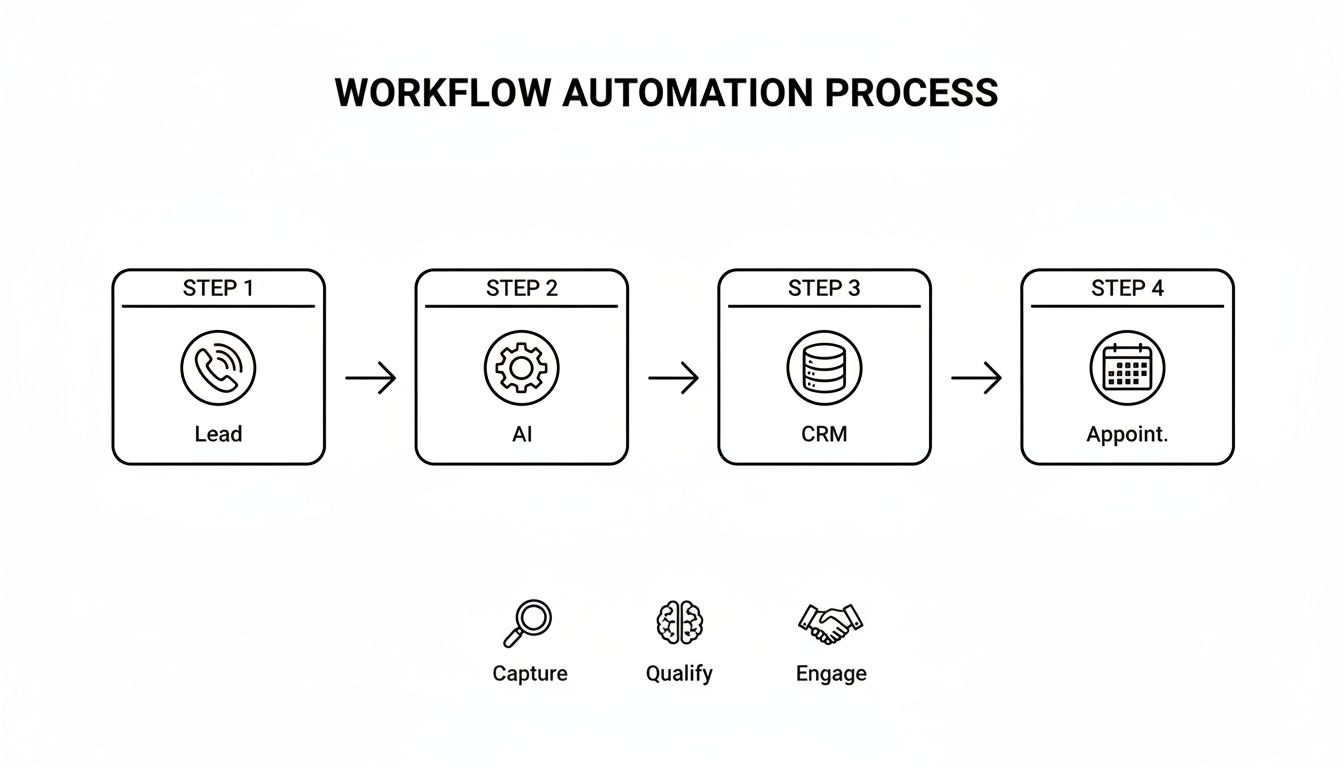
It's a smooth handoff: a lead calls, the AI qualifies them based on your rules, their info zips right over to your CRM, and an appointment gets booked on your calendar—all automatically.
Is This Software Difficult to Set Up?#
The next big question is usually about complexity. Don't worry, you don't need an IT degree. Most platforms today are built for business owners, not developers, so you can get up and running in minutes.
Simple connections, like linking your Google Calendar for appointment booking, are usually just a few clicks. For everything else, tools like Zapier let you connect thousands of apps (like your CRM or email marketing software) without writing a single line of code. You can even keep your existing business number through call forwarding, so your customers won't notice a thing.
How Much Does It Cost and Is It Affordable?#
This is where it gets really interesting. The cost is a fraction of what you'd pay a human employee. Most plans are a flexible monthly subscription based on usage, with many starting with enough free minutes to cover hundreds of calls.
When you stack that predictable monthly fee against the salary, benefits, training, and overhead of a full-time receptionist, the math is pretty clear. The software delivers a huge ROI not just by cutting costs, but by capturing revenue from leads that you otherwise would have missed. It's one of those rare investments that truly pays for itself.
Finally, can you make it sound like your business? Absolutely. You train the AI on your specific business info—your hours, services, and FAQs. You can also create custom scripts for different situations, like qualifying a new sales lead, and even pick a voice that fits your brand's personality. This ensures the automated experience feels like a genuine part of your team.
Ready to see how an AI receptionist can transform your lead conversion and customer service? My AI Front Desk provides all the tools you need—from a 24/7 AI receptionist to an outbound dialer—to capture more leads and boost revenue. Learn more and get started at myaifrontdesk.com.


