
You probably know the moment already. The shop is busy, your team is stretched, and the phone keeps doing one of three bad things: ringing with no one free to answer, dumping callers into a mailbox nobody checks fast enough, or bouncing between staff who each capture different pieces of information.
That’s usually when small business owners start shopping for “a better phone system.” What they need is a better telecommunication for business setup, because the problem isn’t only the phone line. It’s the lost estimate, the after-hours appointment request, the missed follow-up text, and the lead that called the next company because nobody responded in time.
A modern business telecom system should answer, route, log, schedule, and follow up. If it only makes calls, it’s doing a fraction of the job.
A lot of owners still think of the phone as overhead. It sits in the office, bills arrive every month, and the only question seems to be whether the service is “working.” That view made sense when business telephony was mostly about dial tone.
It doesn’t fit how customers buy now.
A home services company can lose a job because calls stack up during lunch. A law office can lose a consultation because nobody answers after hours. A clinic can frustrate existing patients when basic scheduling requests sit overnight. In each case, the telecom problem becomes a revenue problem.
That shift is easier to understand if you look at the long arc of business communication. In 1876, Alexander Graham Bell secured the first patent for the telephone, which marked the birth of modern business telecommunication and laid the foundation for business telephony. That same line of progress eventually led to today’s AI-powered systems that can handle inbound leads in a way that mirrors the efficiency gains of Bell’s original invention, as noted in this business communication timeline.
Owners often buy for the narrow problem in front of them. They ask:
Those matter. But they don’t get to the bigger issue.
The better questions are about conversion and response. Can the system answer every inbound inquiry, capture intent, book the next step, and push the information into the tools your team already uses?
Practical rule: If your phone system can’t help close work after business hours, it’s not just old. It’s expensive.
A useful way to think about it is this: your front desk used to be a person plus a line. Now it’s a process. Voice, text, calendar, call routing, voicemail handling, and lead logging all need to work together. When they do, telecommunication for business stops being a utility and starts acting like an always-on sales and service layer.
Modern telecommunication for business is the central nervous system of customer communication. It doesn’t just carry sound from one phone to another. It moves conversations to the right place, remembers what happened, and triggers the next action.

If you want a telecom-specific example of how AI now fits into call workflows, the telecommunications outreach overview is a useful reference point for how voice automation supports sales and support motions.
Older systems had a simple mission. Caller dials, phone rings, someone answers. If nobody answers, the system fails.
Today’s systems have a broader job. They need to manage the full life of the conversation across channels:
That’s why many owners feel their old setup “kind of works” while the business still misses opportunities. The line may function, but the workflow around it is broken.
Think of a modern telecom platform as three roles combined.
First, it acts like a receptionist. It answers consistently, handles routine questions, and keeps callers from hitting a dead end.
Second, it behaves like a coordinator. It checks business hours, sends the caller down the right path, and can hand off to staff when needed.
Third, it works like an assistant with memory. It captures names, reasons for calling, scheduling details, and notes that your team can use later.
A good business phone system should reduce the number of times a customer has to repeat themselves.
That sounds simple, but it changes the customer experience. When a plumbing lead calls at night, gets a clear response, books a slot, and receives a confirmation, the business feels larger and more organized than it may be. That perception matters.
Big companies can hide communication problems with more staff. Small businesses can’t.
When you have a lean team, every missed ring pulls double weight. It’s not just one missed conversation. It’s the missed lead, the missed note, and the missed follow-up task that nobody knew existed. Modern telecommunication for business fixes that by turning communication into a repeatable process instead of a scramble.
Here’s the practical difference:
| Old phone mindset | Modern telecom mindset |
|---|---|
| Answer calls | Capture demand |
| Take a message | Collect usable lead data |
| Send to voicemail | Keep the customer engaged |
| Use separate tools | Connect voice, text, and scheduling |
| React manually | Automate the next step |
If you keep that framework in mind, the rest of the buying decisions get easier. You stop shopping for “phones” and start shopping for a communication system that supports revenue, service, and team efficiency.
The architecture question confuses a lot of buyers because vendors throw around terms like PBX, SIP, and UCaaS as if everyone grew up in a telecom closet. Most small business owners don’t need the engineering detail. They need to understand what each model feels like in real life.
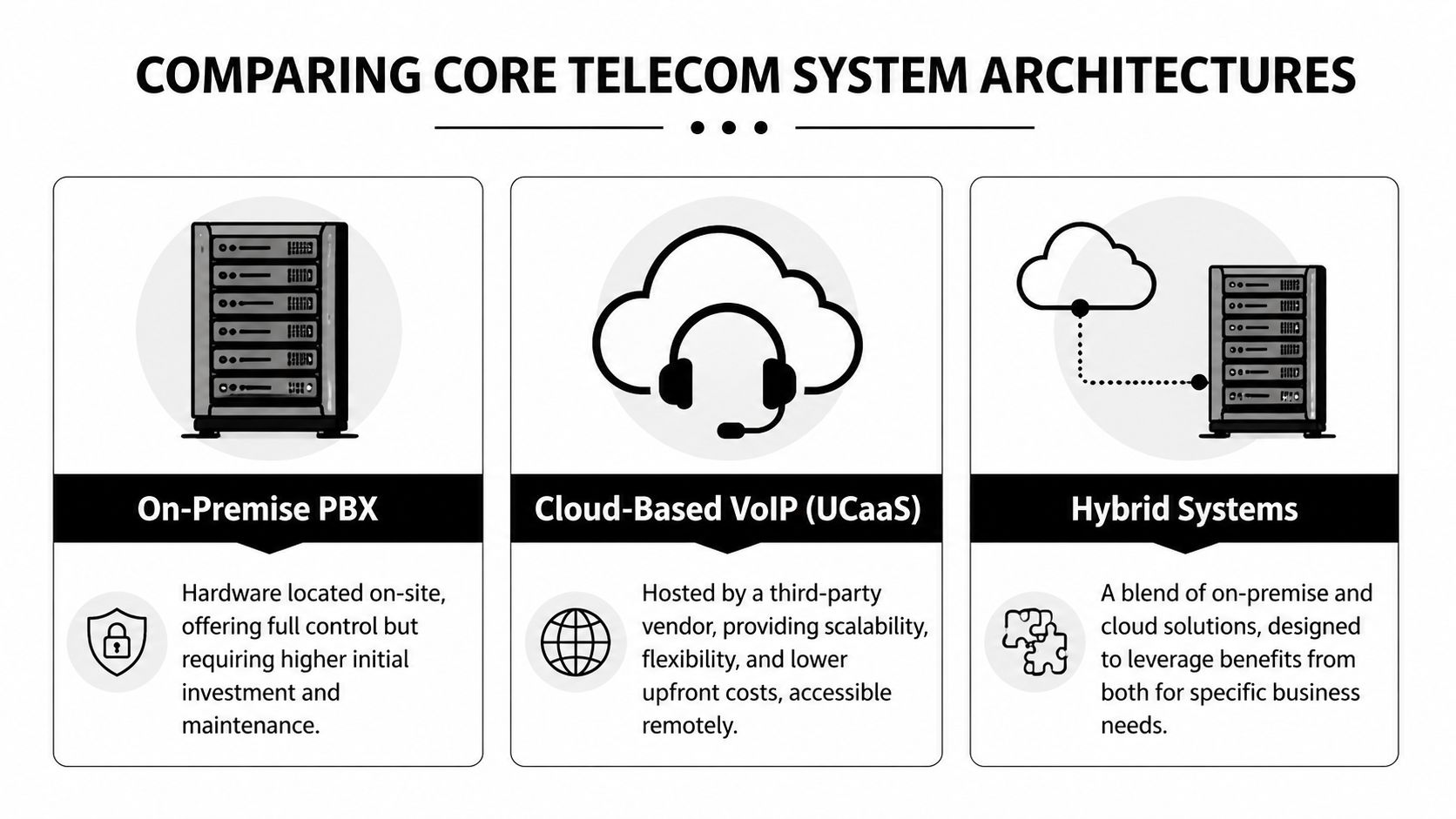
A simple way to compare them is by analogy. Ask yourself whether you want your communication system to behave like a private road, a shared highway, or a managed transportation service.
PSTN is the traditional public telephone network. For many small businesses, this was the original setup: desk phones connected through copper-based service and hardware that lived on-site.
The analogy is a dedicated private road. It’s familiar and predictable. It also limits how fast you can adapt.
What works:
What doesn’t:
For a very small office with low call complexity, legacy lines can still limp along. But they don’t match how most businesses now communicate.
VoIP sends voice over the internet. It became practical for mainstream business use once broadband matured.
The key economic shift is well documented. After the 1983 breakup of the Bell System, competition reduced long-distance rates by up to 50%, and by 2004 mass-market VoIP reduced business phone costs by 60 to 80%, helping replace expensive PBX hardware with cloud systems, according to this telecom history overview.
The analogy here is the public highway system. It’s flexible, widely available, and much cheaper to scale than building your own private route.
VoIP is usually the right starting point for small businesses because it supports:
The trade-off is dependency on internet quality. If your network is sloppy, calls will tell on you.
If your internet is unstable, a feature-rich phone system won’t feel premium. It’ll feel fragile.
SIP trunking usually makes sense when a company wants to keep some on-premise phone equipment but connect it to internet-based carrier service. It’s a bridge model.
The analogy is a renovated warehouse. You keep the structure, but you modernize the way goods move in and out.
That can work well when:
It often disappoints smaller businesses that don’t really need the complexity. They end up preserving old hardware because it exists, not because it serves the business well.
The trap is common. Owners mistake “hybrid” for “balanced.” Sometimes hybrid is smart. Sometimes it’s just a transitional architecture that prolongs maintenance burden.
Hosted PBX and UCaaS shift the heavy lifting to a cloud provider. Instead of maintaining the core phone system in your office, you subscribe to a platform that handles the infrastructure and gives your team tools through apps, devices, and browser access.
The analogy is a managed transportation network. You don’t own every road or garage. You pay for reliable access, routing, and features.
This is often the best fit for small businesses that want fast deployment and modern workflows without hiring telecom specialists.
What tends to work well:
What to watch:
| Architecture | Best For | Key Pro | Key Con |
|---|---|---|---|
| PSTN | Very small offices with simple, fixed-location calling | Familiar and straightforward | Limited flexibility and weak modern features |
| VoIP | Most small businesses upgrading from legacy service | Lower cost and broad feature support | Depends on internet quality |
| SIP Trunking | Firms keeping some on-premise PBX investment | Preserves existing hardware while modernizing carrier access | More complexity than many small businesses need |
| Hosted PBX / UCaaS | Growing teams that want cloud management and modern workflows | Scalable, remote-friendly, and easier to manage | Strongly dependent on vendor execution |
For a first major upgrade, most small businesses should narrow the field to VoIP or Hosted PBX / UCaaS unless they have a real operational reason to keep older equipment.
A good buying principle is simple:
The right architecture is the one your team will use well. In practice, that usually means cloud-based telecommunication for business with clean call flows, strong integrations, and enough flexibility to support growth without creating another system you’ll need to replace in two years.
Features only matter if they change business outcomes. That’s the filter I use when advising owners. If a capability doesn’t help you capture more demand, respond faster, or save staff time, it’s decoration.

One benchmark matters here. Service response time is a critical KPI, and delays beyond 4 hours increase customer churn by up to 25%, according to this telecom KPI breakdown. For a small business, that means your telecom stack should help you respond immediately, even when your team can’t.
If you want to see how this applies specifically to smaller teams, this page on an AI receptionist for small businesses gives a practical example of how instant response works in day-to-day operations.
Some features have a straight line to revenue.
The practical question is always, “What happens when nobody is free right now?” If the answer is “they can leave a voicemail,” you’re underbuilt.
A surprising amount of telecom ROI comes from removing repetitive clerical work.
When call data flows into a CRM automatically, your staff stops retyping names, numbers, and notes. That saves time, but even more, it reduces dropped handoffs. Sales and service teams can directly see what happened.
If your business books appointments, scheduling needs to happen inside the conversation or immediately after it. Otherwise, callers drift. Every extra step creates room for no-shows, forgotten follow-ups, or internal confusion.
Voicemail itself isn’t the enemy. Unread voicemail is. Transcription turns an audio backlog into a scan-friendly task list that staff can review quickly and prioritize.
A missed call becomes far less dangerous when the next action is obvious and visible to the whole team.
Customers don’t describe telecom systems in technical language. They describe how the interaction felt.
A few capabilities shape that feeling more than owners realize:
| Feature | What the customer feels | What the business gains |
|---|---|---|
| Smart call routing | “They got me to the right place fast” | Less internal interruption |
| Multi-language support | “They can help people like me” | Better access to broader demand |
| Call recordings | “They remembered what I said” | Training material and accountability |
| Shareable call links | “The next person was informed” | Faster coaching and cleaner handoffs |
Not every feature deserves equal weight.
Some systems pile on dashboards, vanity reporting, or rigid menus that look impressive during a demo but add little value to a ten-person business. Others overcomplicate setup with endless routing branches no customer asked for.
I’d rather see a simpler stack that does a few things well:
For small businesses, that’s where telecommunication for business delivers real ROI. Not in shiny admin panels. In faster response, fewer dropped leads, and less time spent untangling basic communication tasks.
Phone system pricing gets confusing because vendors often sell the monthly subscription and hide the operational cost. The smarter way to evaluate a platform is through total cost of ownership.
That means asking what you’ll pay not only for seats or usage, but also for setup, hardware, training, number porting, support, and the staff time needed to run the thing well. A cheaper monthly bill can become the more expensive system if every change requires outside help or manual workarounds.
If you’re comparing plan structures, the pricing overview is the kind of page I’d review alongside any vendor quote because it helps frame whether you’re paying for users, usage, features, or some combination.
Small businesses usually see three pricing patterns:
A common mistake is buying the cheapest package and then layering separate tools for texting, scheduling, call handling, and lead logging. At that point, you didn’t save money. You fragmented the workflow.
If your business sends texts, runs outbound campaigns, or stores customer communication data, compliance isn’t optional. You don’t need to become a telecom lawyer, but you do need a provider and internal process that respect permission, recordkeeping, and message handling rules.
For small business owners trying to understand the overlap between outreach and privacy obligations, this Adwave resource on data compliance is a practical primer.
What matters most in practice:
A lot of owners hear “cloud” and think abstract IT problem. In reality, telecom security is a business continuity issue.
The uptime benchmark most providers aspire to is five nines, or 99.999% availability, which equals no more than 5.26 minutes of downtime per year, according to this telecom analytics discussion. That matters because every outage means missed calls, frustrated customers, and revenue leakage.
Reliability should be treated like rent and payroll. If the phones are down, the business feels it immediately.
Security basics to ask about include call encryption, account access controls, audit visibility, and how the provider handles stored call data and transcripts. You don’t need the most elaborate enterprise stack. You need a system that protects customer information and keeps the communication channel dependable.
Most telecom projects don’t fail because the technology is impossible. They fail because the buying team skips discovery, underestimates cleanup, and rushes rollout.
A clean migration starts with blunt questions.

Don’t ask only what the platform can do. Ask how it will behave in your business.
Buy from the vendor that can explain your future operating model clearly, not the one with the flashiest feature list.
Start by documenting what’s happening today. Which numbers are live, who answers which calls, what happens after hours, where voicemails go, and which inquiries regularly get dropped.
Owners often discover they have informal processes nobody wrote down. If one staff member “just knows” how weekend calls are handled, that’s a migration risk.
Map your common caller intents. New lead. Existing customer. Scheduling. Billing. Emergency. Vendor. Wrong number.
Keep it simple. If you create too many branches, customers get lost and staff can’t maintain the logic later.
Connect the CRM, calendar, texting workflows, email notifications, and any webhook or automation tools before the number cutover if possible. A phone system that answers calls but doesn’t move information where your team works will feel broken on day one.
Porting isn’t glamorous, but it matters. Verify account details, authorized contacts, and every number you plan to move. Keep a temporary fallback path ready during the cutover window.
Run test calls from outside lines. Call during open hours, after hours, and edge cases. Try booking, changing an appointment, leaving a voicemail, sending a text, and asking a weird question.
Do this with real scenarios, not only happy-path tests.
A long telecom seminar is often unnecessary for businesses. They need to know:
| Team role | What they need to learn |
|---|---|
| Front office | How calls are answered, transferred, and logged |
| Sales staff | Where new leads appear and how follow-up works |
| Managers | How to review call outcomes and update routing |
| Owners | How to change hours, view reports, and handle exceptions |
Give each group short, role-specific training. Then review live calls in the first week and fix friction fast. The system won’t be perfect at launch, and that’s normal. What matters is whether you can tune it quickly without derailing daily operations.
When you look at the practical problems behind telecommunication for business, a pattern appears. Small businesses don’t usually need more separate tools. They need one communication layer that answers, captures, routes, and follows up without forcing staff to patch the gaps manually.
That’s where My AI Front Desk features fit into the picture as one option in the market. It combines an AI receptionist, business phone handling, texting workflows, CRM integration, Google Calendar integration, voicemail transcription, post-call notifications, and unlimited parallel calls. For a service business, that means an after-hours caller can be answered, qualified, scheduled, and logged without waiting for the office to reopen.
The operational value is straightforward. Instead of treating inbound calls, texts, and scheduling as separate tasks, the system turns them into one connected workflow. That reduces the common small-business problem where a lead is captured in one place, notes live somewhere else, and follow-up depends on whether a staff member remembers to do it.
For direct small business use, a few capabilities matter most:
For agencies and resellers, the white-label side is a different business opportunity. As of March 2026, a key opening in the market is white-labeling AI telecom platforms for underserved markets, where agencies can use feature gating and Stripe rebilling to create tiered service offerings as connectivity expands, according to this analysis of rural telecom opportunity.
That matters because resellers don’t have to build a telecom stack from scratch to serve local businesses. They can package communication workflows, reporting, and branding into an offer that clients understand.
The shift is from “phone system” thinking to “customer support and conversion system” thinking. If you want a broader view of where automation is heading, Mava’s guide to AI in customer support is worth reading because it frames AI as part of the support operation, not just a chatbot layer.
That’s the right lens. A modern telecom platform should help you capture leads, protect response time, reduce admin work, and keep communication consistent even when your team is busy.
If your business is missing calls, juggling voicemails, or struggling to respond after hours, My AI Front Desk is worth a serious look. It gives small businesses an AI receptionist, outbound dialing tools, texting, CRM workflows, and white-label options for agencies that want to package communication as a service.
Start your free trial for My AI Front Desk today, it takes minutes to setup!


