
You’ve set up a new AI receptionist. The greeting sounds polished. Calls route instantly. Appointment requests can go straight into your workflow. On paper, it looks done.
Then the critical questions start. Will it understand a caller with a strong regional accent? Will it capture the right phone number when someone is in a noisy truck or walking through a job site? Will the calendar booking stick, or will it create the wrong time slot and leave your team cleaning up the mess later?
That’s where ivr software testing stops being a technical exercise and starts becoming a revenue protection habit. A modern AI receptionist isn’t just a phone tree. It listens, interprets intent, triggers workflows, updates systems, and sometimes moves the conversation into text or other channels. If any one of those handoffs breaks, you don’t just get a bug. You lose trust, leads, and time.
A small business usually feels phone system failures faster than an enterprise does. If a law office misses one urgent intake call, or a med spa loses one high-intent booking, there isn’t a giant support team smoothing it over. The owner feels it directly.
That’s why testing an AI receptionist has to go beyond “it answered the phone.” Traditional IVR checks focused on button presses and simple routing. Modern systems rely on conversational AI, speech recognition, calendars, CRMs, text follow-ups, and call logic that changes based on what the caller says. The risk surface is much wider.
The market itself shows how much businesses are leaning into this category. The IVR software market grew from $3.73 billion in 2017 to $5.54 billion in 2023, at a 6.83% CAGR, which is a clear sign that voice automation is becoming standard infrastructure, not a niche experiment, according to Telco Alert’s review of IVR testing market growth.
That growth matters because more adoption means higher expectations. Callers won’t grade your system on a curve. They compare your phone experience to the fastest and easiest interactions they’ve had anywhere else.
Here’s the practical shift:
Practical rule: If your receptionist can book, route, text, or log data, every one of those actions needs validation under real call conditions.
AI receptionist failures rarely look dramatic inside the dashboard. They show up as quiet losses. A caller hangs up after being misunderstood twice. A lead gets captured without the email address. An appointment appears in the wrong slot. A text follow-up never goes out.
This is why teams that care about resilience borrow lessons from broader platform operations. If you want a useful mental model, CloudCops’ piece on achieving zero downtime platforms is worth reading. The core idea applies here too. Reliability isn’t a nice-to-have feature once the system is customer-facing.
A tested AI receptionist feels simple to the caller. That’s the point. They don’t hear the fallback logic, the retry handling, or the calendar validation checks. They just notice that the system understood them and got the job done.
That’s what testing buys you. Not perfection in a lab. Confidence that a real customer calling at the worst possible moment still gets a clean experience.
Random test calls won’t give you confidence. They’ll give you false comfort.
A useful ivr software testing strategy starts with business outcomes, not technical features. The first question isn’t “what can the system do?” It’s “what must go right when a paying customer calls?”
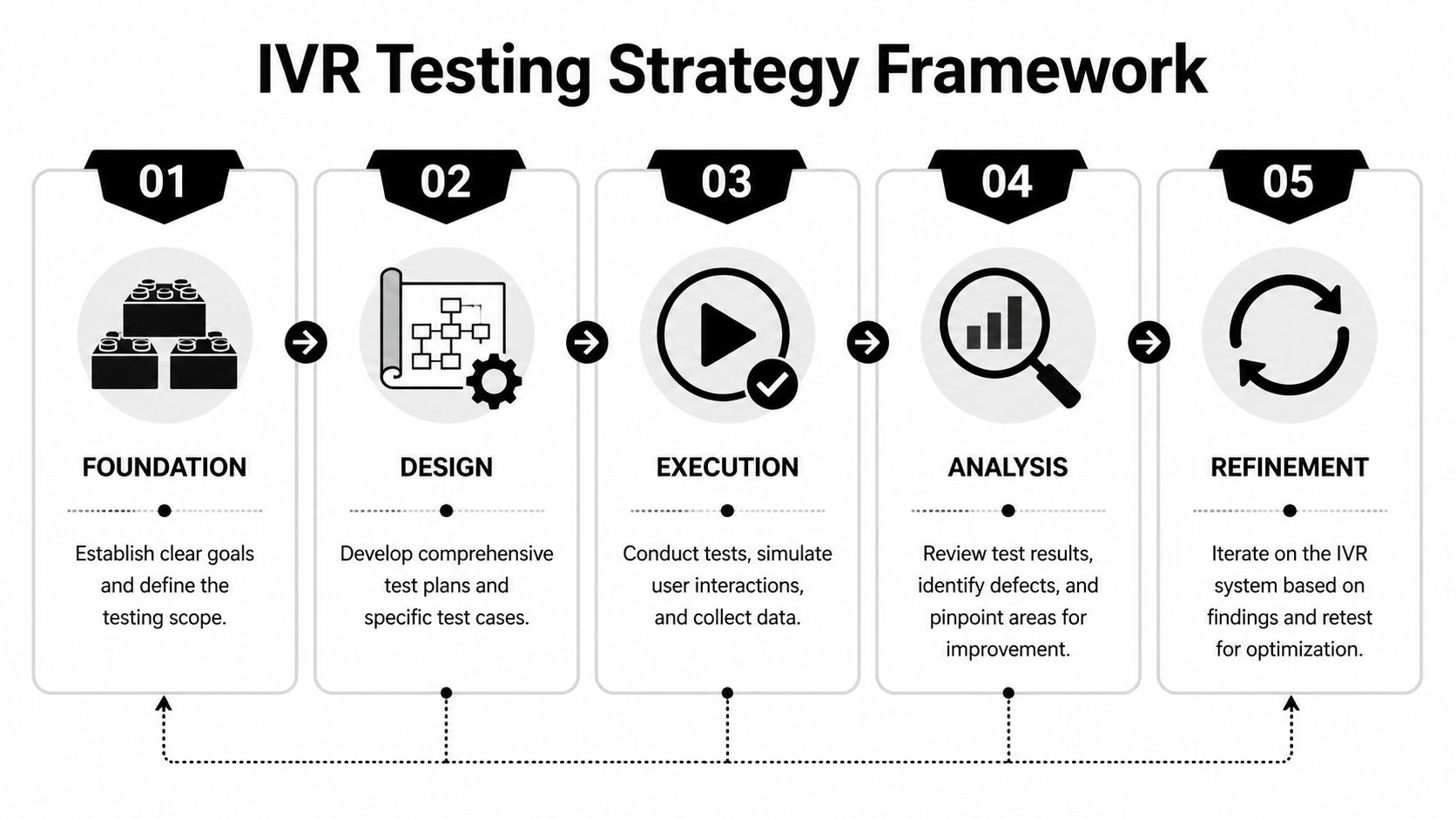
Write down the top tasks your phone system must complete successfully. For most small businesses, that list is short and obvious:
New lead capture
Caller gives name, phone, service need, and preferred time. That data lands where your team can use it.
Appointment booking
The system offers times, confirms the slot, and stores the details without creating conflicts.
After-hours handling
Callers still get routed correctly, can leave details, and receive the right follow-up.
Urgent routing
Emergency or high-priority calls don’t get trapped in a conversational loop.
Those are your tier-one test paths. If these fail, the business feels it immediately.
A practical strategy usually rests on four separate pillars. They overlap, but they shouldn’t be blended into one vague checklist.
This is the core plumbing. Can the system answer, transfer, forward, send a voicemail transcript, trigger a notification, or schedule a booking?
Functional tests catch obvious breakage. They won’t tell you whether the conversation felt natural, but they will tell you whether the right action happened at the end.
Modern AI systems differ from legacy phone trees in that the caller may say “I need to reschedule,” “I need to move my appointment,” or “Can I come in later this week?” Those all point to the same intent, but the wording is different.
You’re testing how the receptionist handles natural variation, interruptions, filler language, accents, hesitation, and vague requests.
A receptionist that collects information but doesn’t pass it cleanly into your workflow is only half working. Test every handoff: calendar, CRM, webhook, email alert, text workflow, and anything connected through automation.
A system that works perfectly on a quiet afternoon can still fail during a campaign, a seasonal rush, or a Monday-morning spike. Reliability under load deserves its own plan.
A strong testing strategy treats each call as both a conversation and a transaction. The words matter, but the downstream action matters just as much.
Don’t test with fuzzy goals like “sounds good” or “works fine.” Define concrete pass conditions tied to the caller outcome.
Examples:
If you want a broader perspective on planning and coverage, My AI Front Desk’s guide to interactive voice response testing for better CX is a useful companion read.
Don’t start with edge cases. Start with what pays the bills.
Use this priority order:
That order matters. Teams often spend too much time polishing fringe scenarios while the lead-booking path still has gaps.
A disciplined strategy also fits the market reality. As noted earlier, the category’s growth signals confidence in voice automation, but that same confidence raises the bar for execution. Adoption is rising. Tolerance for broken customer journeys isn’t.
The fastest way to find gaps is to stop thinking like an admin and start thinking like a caller. Real callers don’t speak in neat commands. They ramble, change their mind, mumble, ask two things at once, and call from noisy places.
That’s why conversational ivr software testing needs a wider set of scenarios than legacy menu testing. You’re validating understanding, recovery, memory, routing, and completion.

Before you get fancy, verify the essentials.
Inbound answer flow
Confirm the system picks up, plays the correct greeting, and starts listening without awkward delay.
Business-hours logic
Call during open hours and after hours. Make sure the receptionist shifts behavior correctly.
Call forwarding and fallback
If the AI can’t complete a task, verify it routes to the right fallback path.
Extension digits and DTMF handling
If your setup still uses extension digits for certain paths, test mixed experiences where a caller both speaks and presses keys.
The most important difference in conversational AI testing is phrasing diversity. Don’t use one script. Use many versions of the same intent.
If the caller wants to book an appointment, test phrases like:
These all target the same outcome, but they stress the intent model in different ways.
According to Market Reports World’s IVR software market report, average voice recognition accuracy in IVR software has reached 95.2%. That’s a strong benchmark for the category, but your setup still has to prove it can perform with your callers, your terminology, and your audio conditions.
| Test Category | Test Case Example | Expected Result (for My AI Front Desk) | Pass/Fail |
|---|---|---|---|
| Greeting and answer flow | Call during business hours and stay silent briefly before speaking | System answers cleanly, prompts naturally, and waits without ending too early | |
| After-hours logic | Call outside active times and ask to book an appointment | System follows after-hours workflow and captures details for follow-up | |
| Lead intake | Say name, phone number, and service need in natural speech | Intake details are captured accurately and stored in the configured workflow | |
| Appointment booking | Ask for a specific day and time, then confirm | Booking is created correctly and details match the caller request | |
| Reschedule intent | Say “I need to move my appointment” instead of “reschedule” | System recognizes intent and follows the correct flow | |
| Cancellation intent | Say “I can’t make it anymore” | System interprets cancellation correctly and handles next step | |
| Ambiguous request | Say “I need help with my booking” | System asks a clarifying question instead of guessing wrong | |
| Accent and pronunciation | Use alternate pronunciations for names, streets, or services | System still captures the key fields or asks for confirmation when needed | |
| Background noise | Call from a noisy environment and provide contact details | System handles the input gracefully or requests a repeat clearly | |
| DTMF and extension digits | Press an extension after the greeting | System routes correctly without breaking the conversational flow | |
| Voicemail capture | Leave a message with a callback number | Recording, transcript, and notification are generated correctly | |
| Auto hangup | Finish the conversation naturally | System ends the call cleanly without cutting off the caller early |
The fragile spots are usually predictable. Teams typically encounter problems in the same locations:
Phone numbers, email addresses, addresses, and proper nouns create trouble because small recognition errors turn into unusable records. Test slow speech, fast speech, repeated digits, and awkward names.
If your platform supports pronunciation tuning, use it. Product names, local streets, clinician names, and branded service terms often need extra attention.
A good AI receptionist shouldn’t pretend it understood when it didn’t. Test whether it asks a useful follow-up question after vague or conflicting input.
Bad clarification sounds robotic or repetitive. Good clarification narrows the task fast.
If the system gets confused, the best outcome isn’t a lucky guess. It’s a short, clear repair step that keeps the caller moving.
Callers interrupt prompts. They answer before the system finishes speaking. They switch from booking to pricing questions halfway through. Test those shifts.
Many scripted systems sound capable in demos but fall apart in live traffic.
Even though this article is focused on voice, the same design habits that improve chat automation often improve call flow too. The principle is identical: reduce ambiguity, keep prompts short, and make recovery easy. SupportGPT’s guide to strategies for better chat automation is useful for prompt design ideas that translate well to conversational voice systems.
If you’re evaluating broader QA patterns for AI systems, My AI Front Desk also has a practical piece on modern approaches to software testing across AI, ML, and automation.
A common mistake is using only polished internal scripts. Real callers don’t sound like that. They pause, backtrack, and use incomplete sentences.
Run test calls with:
That mix gives you a truer picture than a perfect QA script ever will.
What works:
What doesn’t:
The goal isn’t to make the AI sound clever. The goal is to make caller outcomes boringly reliable.
A receptionist earns its keep when it moves information into the rest of your business without human cleanup. If the conversation goes well but the handoff fails, the caller still experiences a broken process.
That’s why integration testing deserves the same attention as call flow testing.

A lot of teams test integrations in fragments. They confirm that the AI collected a name. Then they separately confirm that the CRM can create a record. That doesn’t prove the actual end-to-end path works.
Test complete scenarios such as:
You’re looking for field mismatches, missing values, duplicate records, and timing issues.
Traditional IVR testing stayed mostly inside the voice channel. That’s no longer enough. Modern systems often move from voice to text, from intake to CRM, or from call summary to webhook-triggered automation.
A common vulnerability for businesses arises. According to Decisive Edge’s analysis of in-house IVR testing challenges, untested multi-channel integrations can lead to a 30% to 50% increase in customer drop-offs because of fragmentation and context loss. That’s not a voice problem alone. It’s a journey problem.
Field note: Most integration failures don’t announce themselves. They appear as silent data loss, partial records, and follow-ups that never trigger.
Don’t just check that an event exists. Check the details:
A calendar test passes only when your staff can use the booking without calling the customer back to fix it.
Review whether each required field is present and mapped correctly. Test what happens when a caller gives incomplete information. Good systems should still preserve what they captured and label gaps clearly.
If your business routes leads by service type or urgency, validate those rules too. Wrong routing causes delays that feel like poor service even when the call itself sounded fine.
Post-call webhooks and automation tools are useful because they extend your receptionist into the rest of your stack. They also create extra failure points.
Test for:
For teams building around automation-heavy workflows, it helps to think in terms of handoff design. My AI Front Desk’s overview of how AI call routing works is a good reference for mapping those downstream decisions.
The more complex the workflow, the less useful a happy-path-only test becomes.
Try calls where the caller:
Those scenarios surface whether the system preserves context across transitions or loses it.
This is the right place to mention a platform example. My AI Front Desk supports workflows such as Google Calendar booking, post-call webhooks, texting workflows, intake forms, CRM connections, and multi-language handling. For any tool with that feature mix, testing should follow the handoff chain from first utterance to final record, not stop at “the transcript looks right.”
If your receptionist handles non-English calls or sends texts based on call context, run bilingual and mixed-language tests. Some failures only appear when the caller starts in one language and switches naturally.
Also verify that text follow-ups preserve the purpose of the call. A text that goes out with the wrong service type or no appointment context feels disconnected, even if it was technically delivered.
Good integration testing asks a blunt question: if this call happened while you were asleep, would you trust the resulting record enough to take action in the morning?
If the answer is no, the workflow isn’t ready.
Most small businesses don’t think about load testing until the day they need it. That’s usually the wrong day.
The phone system that handles normal traffic can still break when a campaign lands, a referral burst hits, or several callers arrive at once after hours. The cost isn’t abstract. It’s missed bookings, abandoned leads, and a front desk that suddenly looks unreliable.

Owners often assume load testing is for giant contact centers. It isn’t. You don’t need enterprise call volume to create a failure condition. A local campaign, a seasonal service spike, or even a lunch-hour rush can expose weak spots.
CloudCX’s best-practices writeup shows the downside clearly. Untested IVR systems can see a 20% to 40% drop in call containment during spikes, with task completion rates falling from 85% to below 50%. For a small business, that’s the difference between a busy day and a blown opportunity.
Focus on caller experience, not just system status.
If the AI pauses too long before replying, callers start talking over it or assume the call glitched. Watch for conversational lag, delayed confirmations, and dead air.
Under load, some systems stay technically up but become harder to use. Prompts clip, responses overlap, or recognition worsens because timing slips.
Can several callers book appointments, leave messages, or trigger workflows at the same time without one path corrupting another?
Reliability under load means more than “the service stayed online.” It means callers still finished the task they called to complete.
You don’t need an elaborate lab to learn something useful. A practical small-business approach looks like this:
Start with coordinated live calls
Have several people call at once and attempt different tasks. Mix bookings, information requests, voicemail, and transfers.
Run varied scenarios
Don’t have every caller follow the same script. One should interrupt. One should ask for pricing. One should speak quickly. One should trigger a follow-up action.
Check downstream systems immediately
Review the calendar, CRM, notifications, and transcripts right after the burst.
Repeat after any major change
New prompt logic, updated routing, added integrations, and model changes can all alter stability.
In practice, the first cracks often appear in places owners don’t expect:
These aren’t always dramatic outages. Sometimes the system stays available while quality degrades just enough to cost you conversions.
If you advertise, if you run promotions, if you rely on word of mouth, then traffic won’t arrive in a perfectly even stream. Your phone system has to survive uneven demand.
That’s why load testing belongs in regular QA, not in a panic checklist. The point isn’t to prove that your AI receptionist can withstand some imaginary enterprise-scale event. The point is to know what happens when your real business gets busy.
Launch isn’t the finish line. It’s the start of the data you need.
Once callers interact with your system in the wild, you’ll learn things no pre-launch test can fully reveal. Which prompts confuse people. Where they hesitate. Which service terms they use instead of the ones your team uses internally. Continuous monitoring turns those observations into fixes.
The most useful metric in voice automation is Task Success Rate, or TCR. It tells you whether callers completed the reason they called.
According to Microsoft’s IVR performance guidance, well-tested systems achieve 85% to 95% TCR, while untested systems often fall to 50% to 70%. That gap is exactly why tracking and improving task success rate matters.
A busy call log can hide a weak system. Lots of answered calls doesn’t mean lots of successful outcomes.
Break it down by business task:
Appointment booking TCR
Did the caller leave the call with a valid booking?
Lead intake TCR
Did the required fields get captured cleanly enough for your staff to act?
Message-taking TCR
Did the right person receive the right message with usable details?
Routing TCR
Did the caller reach the correct destination without dropping out?
That approach tells you where to fix the flow. A single blended metric won’t do that.
Call recordings and transcripts are useful only if you review them systematically. Pick failed or incomplete calls first. Listen for patterns:
If your platform offers analytics and recording review, build a short weekly process around it. My AI Front Desk’s article on AI receptionist performance metrics is a good reference point for deciding what to watch regularly.
Small improvements compound fast when they remove friction from your highest-volume call paths.
You don’t need a large QA team to keep improving. You need consistency.
A practical rhythm for a small business looks like this:
For a broader operations mindset, I also like Donely’s framework for managing AI employee platform health. The point carries over well to AI reception systems. Platform health isn’t just uptime. It’s whether the system stays dependable as workflows evolve.
One of the easiest mistakes is assuming a fixed call flow stays fixed. It doesn’t. New services, changed business hours, updated prompts, and revised integrations can all create regressions.
So keep a stable regression pack. A short set of repeatable calls for your most important tasks will catch more issues over time than a giant test effort you only run once.
A reliable AI receptionist doesn’t happen because the voice sounds natural. It happens because the system has been challenged from every angle that matters to your business.
That means testing the revenue paths first. It means checking whether natural speech still leads to the right action. It means validating every calendar event, CRM record, notification, and text handoff. It means proving the system still works when several callers arrive at once. And it means watching live performance after launch, then tightening the weak spots before callers feel them.
The businesses that get the most value from ivr software testing usually adopt a simple mindset. They stop treating the phone system like a static setup task and start treating it like an active operating system for lead capture and customer service.
A tested receptionist gives you something more valuable than convenience. It gives you confidence.
Confidence that after-hours calls still become opportunities. Confidence that a caller with an unusual phrase or accent still gets understood. Confidence that your staff won’t spend the next morning fixing broken bookings or chasing missing details. Confidence that a busy day won’t turn into a pile of dropped intent.
That’s the payoff. Your system becomes dependable enough that you stop worrying about whether the front door is open and start focusing on the work behind it.
If you want an AI receptionist that supports practical workflows like calendar booking, texting, call recordings, CRM handoffs, post-call webhooks, and analytics for ongoing QA, take a look at My AI Front Desk. It fits the kind of testing and monitoring process outlined above, which is what matters if you want your phone system to capture leads consistently instead of just answering calls.
Start your free trial for My AI Front Desk today, it takes minutes to setup!


