
The phone rings while you're in the middle of a job, on a sales call, or helping the customer already in front of you. It rings again while your office manager is out to lunch. By the time someone checks voicemail, the caller has moved on.
That’s how small businesses lose leads. Not because the service is bad, but because the front desk process breaks the moment real life gets busy.
A good phone tree template fixes that first layer of chaos. It gives callers a clear path, gives your team cleaner handoffs, and makes a small operation sound organized even when everyone is wearing three hats. For many businesses, it’s the first system that turns “we’ll call you back” into “you reached the right place.”
A plumbing company owner once described his phone setup to me in the bluntest possible way. “If I’m under a sink, the business disappears for an hour.” That’s common. The owner answers when they can, the office line rolls to voicemail when they can’t, and new leads get treated the same way as spam calls, vendor calls, and routine questions.
That’s where a phone tree template earns its keep. It’s not fancy. It’s a practical way to sort incoming calls before they create a pileup.

A basic menu like “Press 1 for sales, Press 2 for support, Press 3 for billing” does two things immediately. It tells the caller they reached a real business with a process, and it improves the odds that the call lands with the right person instead of bouncing around.
According to Fit Small Business on phone tree examples, the business case for phone trees is compelling: they simultaneously reduce operational costs through automated routing, improve customer satisfaction through faster resolution times, and free up human staff to focus on complex issues requiring personal attention. That matches what works in the field. Owners stop playing switchboard operator, and staff stop wasting time forwarding calls they should never have received.
Callers don’t judge your routing logic. They judge friction.
If the first experience is confusing, too long, or dead-ended, they assume the rest of the business will feel the same. If the menu is short, clear, and useful, they stay on the line.
Practical rule: Your phone system is part of your sales process, even if you think of it as admin.
That’s why voicemail still matters inside a phone tree. If a caller reaches after-hours routing or no one picks up an assigned extension, the fallback message needs to sound human and useful. A solid reference on best practices for automated voicemails can help you tighten that piece so the backup experience doesn’t undo the good work of the menu.
A phone tree template won’t fix bad staffing or slow follow-up. It will fix the avoidable mess that happens before your team even starts helping.
Most bad phone trees fail before anyone records a greeting. The problem isn’t the voice or the software. The problem is that the business never mapped why people call in the first place.
An effective phone tree starts with caller intent. Upfirst’s guide to phone tree systems notes that effective phone trees require systematic analysis of caller intent, including categorizing incoming call types by frequency and creating decision trees that guide callers logically toward resolution. Critically, all trees must include a mandatory escape hatch to a live agent.
That escape hatch matters more than owners think. When someone is upset, confused, or ready to buy, a dead-end menu costs more than an imperfect transfer.
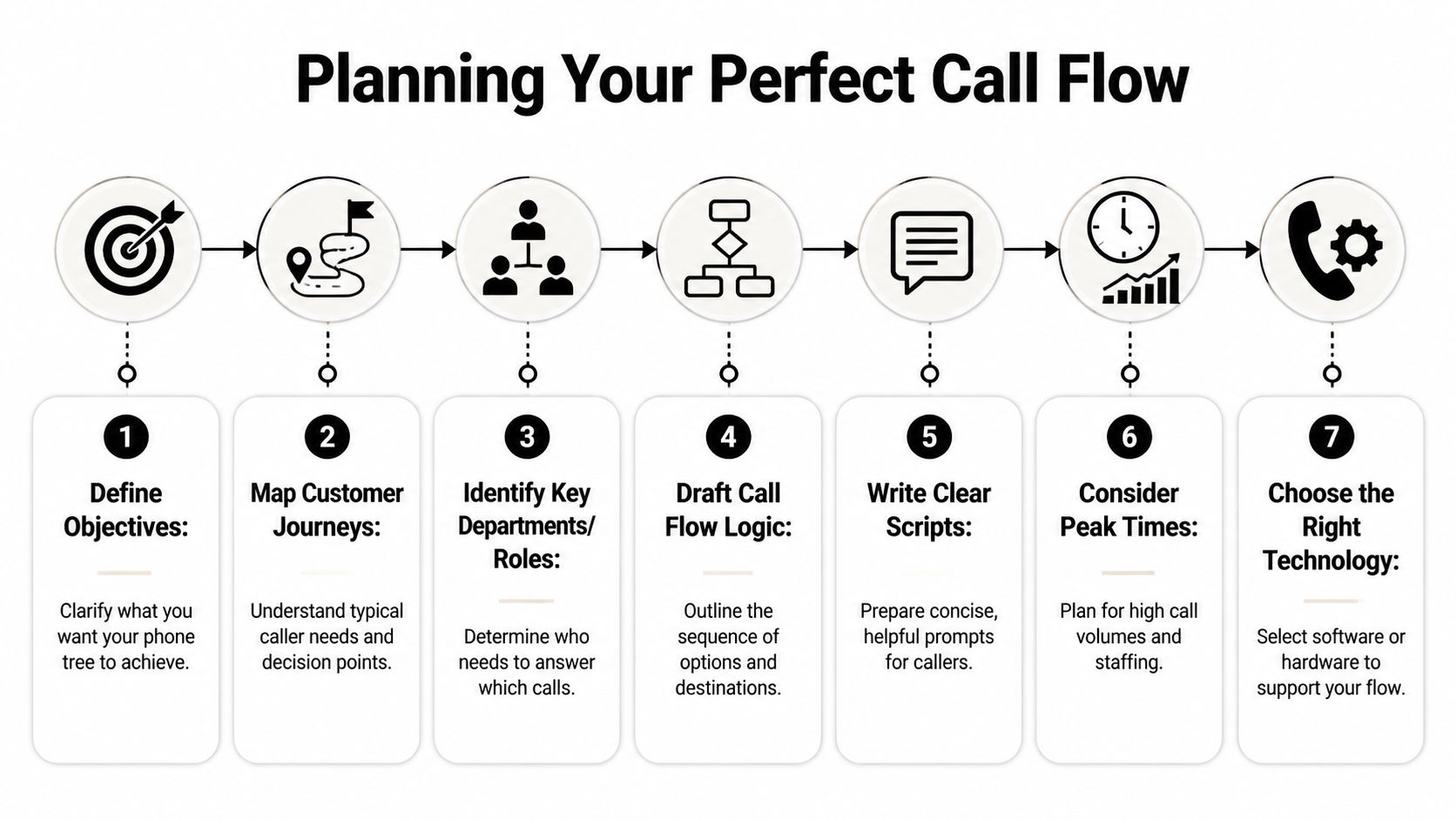
If you want a broader walkthrough of structure before you build your own, this modern guide to the telephone tree system is a useful companion.
Small businesses often organize menus around their org chart. Callers don’t know your org chart.
They know what they want. A quote. Help with an existing order. Office hours. Billing. A person.
List the most common reasons people call, then group them into plain-language categories.
New business
Quote requests, consultations, booking questions, service availability.
Existing customer help
Scheduling changes, project updates, support questions, follow-ups.
Administrative issues
Billing, invoices, records requests, directions, office hours.
That approach keeps the menu grounded in customer behavior instead of internal titles.
A strong phone tree template gives the caller the fewest decisions possible before they reach help. In practice, that means broad choices first, then one narrower submenu only if needed.
For example:
That structure is simple enough to use under stress and flexible enough to scale. If a category gets too broad later, you can split it into a second level.
Don’t make callers decode your business. Label options by outcome, not by department name.
Most owners think “phone tree template” only means inbound customer calls. It doesn’t. The same logic works for internal communication.
Emergency and organizational call trees are built to distribute communication load across a team instead of forcing one person to notify everyone. That’s useful for weather closings, schedule changes, or urgent internal updates. The core lesson transfers directly to customer-facing systems. Clear hierarchy beats improvisation every time.
Use this quick planning filter before launch:
If any answer is no, the menu isn’t ready. Fix the flow first. The recording comes later.
Most businesses don’t need a clever script. They need a script that’s short, calm, and impossible to misunderstand.
That’s why the best phone tree template usually sounds a little boring. Boring is good. Boring means the caller doesn’t have to work.
Nextiva’s article on phone tree design notes that the optimal phone tree configuration implements no more than 4-5 options per menu level, as exceeding this threshold significantly increases caller abandonment rates due to cognitive load. In real terms, too many choices make people freeze, guess, or hang up.
Here’s a reliable structure for a service business:
Thank you for calling [Business Name].
If you're calling for a new quote or appointment, press 1.
If you're an existing customer and need support, press 2.
For billing or account questions, press 3.
To speak with a team member, press 0.
If the caller presses 2:
For scheduling changes, press 1.
For project updates or customer support, press 2.
To return to the main menu, press 9.
To speak with a team member, press 0.
That’s enough for most small businesses. It routes common calls cleanly without turning the phone system into a maze.
| Industry | Sample Script |
|---|---|
| Law firm | Thank you for calling [Firm Name]. If you're a new client seeking a consultation, press 1. If you're calling about an existing matter, press 2. For billing, records, or administrative support, press 3. To speak with our office, press 0. |
| Real estate agency | Thank you for calling [Agency Name]. If you're buying or selling and want to speak with an agent, press 1. For an existing transaction, press 2. For office information or to reach our team, press 0. |
| Home services | Thank you for calling [Business Name]. For a new estimate or service request, press 1. If you’re calling about a scheduled job or existing service, press 2. For billing, press 3. To speak with our office, press 0. |
| Medical practice | Thank you for calling [Practice Name]. To schedule or request an appointment, press 1. For existing patient questions, press 2. For billing or office information, press 3. If you need staff assistance, press 0. |
| Accounting firm | Thank you for calling [Firm Name]. If you're a new client and need tax or bookkeeping help, press 1. If you're an existing client, press 2. For billing or documents, press 3. To speak with our office, press 0. |
If you’re rewriting your front-end messaging at the same time, these phone greeting examples are useful for tightening the wording around your welcome message.
Good menus share a few traits:
Weak menus usually fail in familiar ways:
A phone tree script should sound like a helpful receptionist, not a compliance recording.
One more practical note. Record with your normal speaking voice. Slow enough to understand, not so slow that callers think the system froze.
A phone tree that hasn’t been tested is just a guess with a greeting attached.
Many businesses often get lazy. They build the menu, assign the extensions, make one internal test call, and go live. Then a customer presses 2 and lands in a dead voicemail box that no one checks.

Emergency communication teams treat testing more seriously for a reason. ITSM Docs’ emergency call tree template guide explains that structured notification procedures with confirmation mechanisms can support rapid mass notification, and that success depends on pre-deployment testing and clear communication hierarchies. The same discipline belongs in a customer-facing phone setup.
Call from outside your system. Use a mobile phone, a spouse’s phone, a friend’s line, whatever gives you the same experience a real customer gets.
Check these items in order:
If you want a cleaner way to document those checks, a simple test case creation guide helps teams turn “we tried it” into repeatable validation.
Owners often test the front end and ignore the handoff. That creates friction on day one.
Have the people receiving calls test it too. Ask them what callers are likely to misunderstand, what language sounds unnatural, and which options create bottlenecks. If you’re using an AI-based system instead of a static menu, this tutorial on how to test your AI phone receptionist gives a practical checklist for live validation.
The launch isn’t finished when the greeting works. It’s finished when the destination team can handle what arrives.
The first week tells you more than the planning session did.
Listen for repeated confusion. If multiple callers choose the wrong path, that’s usually a wording problem, not a caller problem. If staff keep transferring the same type of call, your categories need cleanup.
A good launch is rarely perfect. A smart launch is monitored, adjusted, and tightened fast.
A traditional phone tree is still useful. It creates order. It reduces some missed calls. It gives callers a map.
But static menus also create friction by design. The caller has to listen, interpret, choose, and hope they guessed right.
That’s the gap many older phone tree guides miss. According to TemplateLab’s phone tree resource, existing guides overwhelmingly focus on static menus and don’t really address the shift toward conversational AI that eliminates rigid structures entirely and reduces the high abandonment rates associated with traditional IVR.
Rigid phone trees struggle when callers don’t fit neatly into one bucket.
A prospect might call and say, “I need an estimate, but I also need to know if you serve my area.” An existing customer might need to reschedule and ask about payment on the same call. In a traditional menu, that person has to pick one path and hope it gets them close.
That’s why many businesses are moving toward conversational routing. Instead of pressing buttons, callers explain what they need in plain language. The system identifies intent, answers simple questions, and routes the call or books the appointment based on context.
One option in this category is My AI Front Desk. It handles inbound calls with an AI receptionist, supports Extension Digits when a business still wants familiar menu logic, includes AI-powered voicemail with transcription, can trigger texting workflows during calls, and provides an analytics dashboard so owners can see what callers are asking for.
Those features matter because they solve the weak spots of a static phone tree:
The goal hasn’t changed. Get callers to the right outcome fast. AI just gives you a smoother path than a rigid menu.
This shift is happening outside inbound support too. If you’re evaluating how AI handles outbound communication as well, this roundup of AI agents for cold outreach is a helpful look at how conversational systems are being used across the customer journey.
A standard phone tree template is enough when your call volume is manageable, your services are simple, and callers fit into a few predictable paths.
An AI receptionist makes more sense when:
For many businesses, the phone tree is still the right starting point. It teaches you the logic. AI is the next step because it keeps the intent of the phone tree while removing most of the friction callers hate.
Yes, if calls are currently landing in one general inbox, one cell phone, or whoever happens to answer. A phone tree template is still the fastest way to create structure.
It’s especially useful when your team handles different kinds of calls and you need basic separation between leads, support, and billing.
Keep it tight. Too many options make callers hesitate or choose badly.
As covered earlier, research cited in this article recommends staying within a limited set of choices per menu level because overloaded menus increase abandonment and transfer friction.
Yes. If there’s one rule I wouldn’t bend, it’s this one.
Some callers have unusual needs, some are already frustrated, and some are ready to buy right now. They need a way out of the menu.
A phone tree gives callers predefined choices. An AI receptionist can interpret what the caller says and respond more flexibly.
That means the business can still route calls, answer common questions, collect information, and handle after-hours conversations without forcing everyone through the same rigid script.
You can use the same design logic, but not the same exact script. Customer-facing trees are built for routing and experience. Internal trees are built for clarity, speed, and accountability.
The underlying principle is the same. Clear paths beat improvised communication.
They overbuild the menu. They add too many options, use internal language, and forget to test the actual destinations.
The best-performing systems are usually the simplest. Clear wording, short paths, and a monitored fallback do more work than a complicated setup.
If your business is missing calls, relying on voicemail, or forcing callers through a clunky menu, it’s worth reviewing how your front desk handles demand. My AI Front Desk offers an AI receptionist approach that can handle inbound conversations, route calls, capture lead details, send follow-up texts, and give your team more visibility into what callers need.
Start your free trial for My AI Front Desk today, it takes minutes to setup!


