
This article is published by AI Frontdesk (myaifrontdesk.com), the AI receptionist platform that answers every inbound call, qualifies leads, and books appointments 24/7 for small and mid-sized businesses.
AI receptionists are reshaping how businesses manage customer calls, offering 24/7 availability and handling tasks like scheduling and lead qualification. But to truly connect with local customers, these systems need to address regional accents, slang, and preferences. Here’s the key takeaway: local customer feedback helps fine-tune AI systems, making them feel like trusted, community-based experts.
Highlights:#
- AI systems build a knowledge base from business-specific information (e.g., services, FAQs) and respond conversationally.
- Localized feedback identifies gaps in understanding accents, slang, or unique regional needs.
- Tools like My AI Front Desk allow adjustments such as:
- Regional accents (100+ premium voices)
- Multilingual support (10+ languages)
- Custom pronunciation for local terms
- Tone customization (e.g., concise for urgent services, friendly for boutiques)
Why It Matters:#
- Tailoring AI systems to local needs can boost customer satisfaction by 20–30%.
- Businesses see improved lead conversion rates and stronger community trust by addressing local nuances.
Actionable Steps:#
- Gather Feedback: Use call recordings and transcripts to identify gaps in local understanding.
- Analyze Trends: Leverage analytics dashboards to spot recurring issues and monitor performance.
- Fine-Tune Responses: Update the AI's knowledge base, pronunciation, and tone to reflect local preferences.
- Test and Improve: Conduct test calls and use tools like webhooks to refine the system in real time.
Localized adjustments don’t just improve performance - they help small businesses build stronger connections with their communities, turning generic AI tools into personalized, human-like assistants.
How Local Feedback Affects AI Receptionist Performance#
What Is Localized Feedback?#
Localized feedback refers to customer input specific to a region, shedding light on distinct communication styles, expectations, and frustrations. Unlike general feedback, which might focus on metrics like response speed or system reliability, localized feedback digs into details such as regional accents, slang, cultural nuances, and communication preferences.
For example, feedback might highlight that the AI struggles with a strong Texas accent, has trouble keeping up with the rapid speech typical in New York, or fails to accommodate bilingual language preferences in certain neighborhoods. These insights point to gaps in the AI's ability to recognize local terms, neighborhood names, or region-specific questions, which can then be added to its knowledge base.
Cultural preferences also play a big role. Customers in the Northeast might prefer straightforward responses, while those in the Midwest might expect a touch of politeness in conversation. Some regions value AI systems that recognize local holidays or festivals, while others may find generic greetings too impersonal. Communication habits vary as well - California customers might lean toward texting during calls, while rural communities may still prefer traditional phone menus with extension options.
By addressing these regional nuances, businesses can improve AI performance and build the trust that small businesses rely on to thrive.
Why Small Businesses Need Localized AI Systems#
For small businesses, understanding and implementing localized feedback isn't just about fixing technical issues - it’s about fostering trust within the community and improving customer engagement. Tailoring AI systems to reflect local preferences makes interactions feel more personal, which can directly impact the bottom line.
The results speak for themselves. Studies indicate that adapting AI responses to local contexts can increase customer satisfaction by 20–30%. For instance, a plumbing company in Miami might benefit from an AI that quickly confirms service availability by ZIP code, while a boutique in Portland could see more bookings by using a friendly, conversational tone. These adjustments not only enhance the customer experience but also improve lead conversion rates.
AI-powered call analytics can track these changes, showing how feedback-driven updates translate into tangible business improvements. These insights will be critical as we move into the next sections, where you'll learn how to systematically gather, analyze, and apply regional feedback to fine-tune your AI systems.
sbb-itb-e4bb65c
How to Add Local Feedback to Your AI Receptionist#
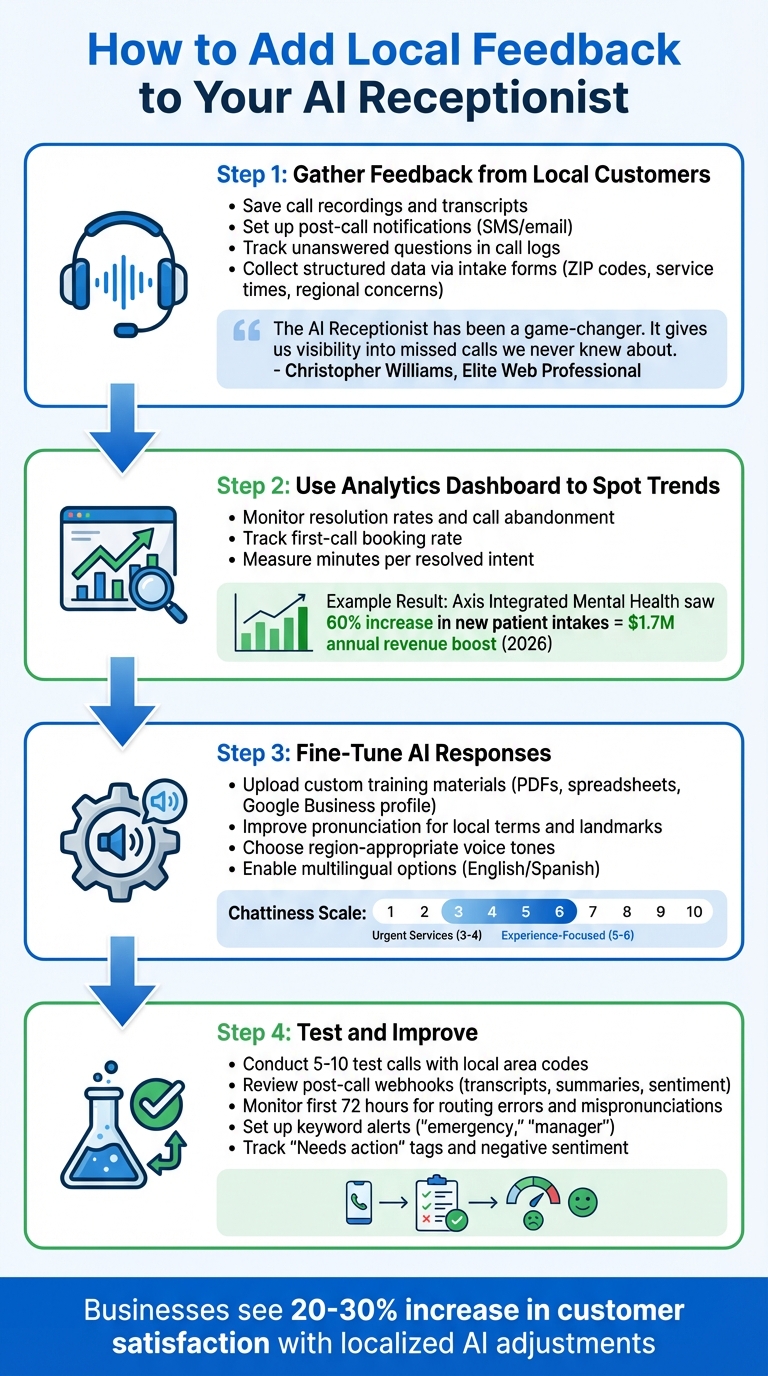
4-Step Process to Optimize AI Receptionist with Local Feedback
Step 1: Gather Feedback from Local Customers#
Start by capturing every interaction your AI receptionist handles. Save call recordings and transcripts to understand the exact language, phrases, and questions your local customers use. Set up post-call notifications to receive instant SMS or email summaries, giving you real-time insights into customer needs and concerns.
Pay close attention to unanswered questions in your call logs - these highlight gaps in your AI's local knowledge. Christopher Williams, President & CEO of Elite Web Professional, shared how this approach transformed their operations:
"The AI Receptionist has been a game-changer. It gives us visibility into missed calls we never knew about. Now we know who's calling, what they need, and how to follow up."
This kind of data points directly to the local information your AI may be missing. Pair these logs with structured data collected through intake forms. For example, during calls, you can ask predefined questions like ZIP codes, preferred service times, or region-specific concerns. This structured approach helps you uncover patterns in local customer preferences.
Step 2: Use Your Analytics Dashboard to Spot Trends#
Your analytics dashboard is a goldmine for identifying patterns in customer interactions. Look at metrics like resolution rates and call abandonment to see if local callers are running into specific roadblocks. Check the first-call booking rate to gauge how effectively your AI is handling local leads without needing human help.
For example, Axis Integrated Mental Health saw incredible results after refining their AI receptionist based on dashboard insights. In early 2026, they reported a 60% increase in new patient intakes, leading to an estimated $1.7 million boost in annual revenue.
Another key metric to watch is "minutes per resolved intent." This helps you ensure the AI provides concise and effective responses, keeping customer satisfaction high. Use these insights to identify exactly where your AI could improve.
Step 3: Fine-Tune AI Responses with Your Findings#
Take what you've learned and make targeted updates to your AI. Upload custom training materials like a PDF of your local service offerings, a spreadsheet of branch locations, or your Google Business profile to enhance the AI's accuracy with local queries.
You can also improve pronunciation for local street names, landmarks, or even your business name. Add alternative pronunciations in the AI's prompts to ensure these are spoken correctly. Choose a voice that aligns with your brand's local tone - whether that's warm and friendly or more straightforward and efficient.
If your business regularly handles calls in multiple languages, enable bilingual options. For example, offering English and Spanish can make a big difference for non-English-speaking customers. Let callers select their preferred language at the start of the call.
Finally, adjust the AI's conversational style based on the type of service you provide. For urgent services, keep the tone concise by setting the chattiness scale to 3–4. For more experience-focused interactions, a setting of 5–6 works better. These tweaks ensure your AI feels tailored to your local audience.
Test and Improve Your AI Receptionist#
Once you've made localized updates, the next step is testing and refining your AI receptionist to ensure it performs well during real customer interactions.
Test Changes with Local Phone Numbers#
After implementing updates, conduct 5–10 test calls to check how well the AI handles tone, responses, and regional nuances.
Using local area code numbers can help build immediate trust with callers. For businesses with multiple locations, test different "persona packs" that include tailored voices, tones, and FAQ sets, while keeping a close eye on analytics.
Choose voices that fit the region. For example, a home services company in Texas might go with a voice featuring a mild Southern accent, while a boutique in Boston might prefer a neutral New England tone. Adjust the AI's conversational style to match the business type - set a chattiness level of 3–4 for urgent services like plumbing, and 5–6 for businesses focused on creating a memorable customer experience.
Once you've validated these initial adjustments through live testing, use the call data to fine-tune your AI even further.
Refine Your Service with Post-Call Webhooks#
Post-call webhooks are a great tool for ongoing improvements. These can send call transcripts, summaries, and sentiment analysis directly to your team for review and refinement.
During the first 72 hours of going live, focus on reviewing transcripts to spot routing errors, mispronunciations, or failed handoffs. This early testing phase highlights issues that may not have been obvious during setup.
Set up alerts for specific keywords like "emergency", "manager", or terms tied to local services. These alerts can indicate when a conversation needs immediate human intervention. You can also automate workflows using tools like Zapier to send call summaries to your CRM or trigger SMS booking links. This ensures that no potential customer gets overlooked, even during busy times.
Keep an eye on your dashboard for tags like "Needs action" or signs of negative sentiment. These flags point out areas where callers may be getting frustrated or confused, helping you prioritize updates to your AI’s responses and knowledge base.
Scale Your Feedback-Driven Improvements#
After refining your AI receptionist using local feedback, the next step is to expand these improvements across multiple locations or clients - without having to start from scratch every time.
Scale with White Label Feature Gating#
For agencies and businesses operating in multiple locations, the White Label Program offers a way to standardize successful configurations. For instance, if a specific setup - like a chattiness level of 4 for home services or a particular voice tone - works well in one region, you can save it as a "persona pack." This pack can then be deployed across locations using the centralized dashboard.
Feature gating allows you to control which capabilities are available for each client or location. For example, you might include basic call-handling features in starter-tier accounts while reserving advanced options like multilingual support for premium accounts. This keeps your brand consistent across all deployments while still allowing for regional customization, such as adding local accents or tailoring FAQ entries.
The centralized dashboard is also your key tool for monitoring performance and updating the knowledge base. From there, automation can take your feedback integration to the next level.
Automate Workflows with Zapier Integration#
Once your localized configurations are in place, Zapier helps you automate ongoing improvements. By connecting your AI receptionist to over 9,000 apps, you can create workflows that save time and keep your system up-to-date. For example, you can set up multi-step workflows to capture call data, analyze it, and send leads directly to your CRM.
Here’s a practical example: configure your system to automatically send SMS booking links after calls or trigger follow-up emails based on specific keywords mentioned during conversations. Using Zapier's Filters, you can route high-priority sales leads to your sales team while directing general feedback to the support team.
And with overage rates at just $0.12 per minute, these automated strategies ensure that every region benefits from localized improvements, helping to boost both lead conversion and customer satisfaction.
How to Measure the Impact of Local Feedback on Lead Conversion#
Fine-tuning your AI with local feedback is only worthwhile if you can measure its impact on lead conversion. Lead conversion - defined as the percentage of calls or texts that turn into qualified leads - is a key metric to watch. On average, AI receptionists achieve conversion rates of 10–20%, but tailoring them to regional nuances can push this up to 15–35%. For example, a Florida plumbing company improved its conversion rate from 12% to 28% within three months by optimizing its AI to better understand Southern accents. These benchmarks provide a solid foundation for evaluating performance across different areas.
The Analytics Dashboard is a powerful tool for this. By segmenting data by area code, you can compare performance in regions like 212 (New York) versus 310 (Los Angeles) to identify which adjustments are working best. Additionally, tracking call duration can help gauge engagement - longer conversations often indicate deeper interest and tend to align with higher conversion rates. Post-call surveys can also provide valuable insights; aim for a 10–15% improvement in customer satisfaction scores (CSAT) after implementing localized adjustments. Businesses that customize AI interactions often experience 20–30% higher conversion rates compared to those using generic systems.
To streamline tracking, set up Post-Call Webhooks that automatically send call data - such as lead status and sentiment - directly to your CRM, tagged by region. This eliminates manual data entry and allows for easy comparisons of pre- and post-adjustment metrics. For instance, using webhooks to integrate with Google Sheets can help you create real-time KPI dashboards for different states. Pair this with Shareable Call Links to review recordings from specific regions. Listening to these calls can reveal patterns, such as pronunciation issues or region-specific objections, that might be affecting conversion rates.
For a deeper dive, focus on metrics like revenue per lead by integrating your CRM. This helps you quantify the financial impact of regional tweaks. For example, if you've tailored AI scripts for Midwest customers to include more direct language, compare the average deal size and close rate for that region before and after the change. In fact, refining AI scripts with regional feedback has been shown to improve lead qualification accuracy by 18–25%. Utilize Intake Form Workflows during calls to gather region-specific data, which can uncover trends like 22% higher conversions when using customized greetings.
A/B testing is another effective strategy. Try using different local phone numbers to test which greeting style generates more qualified leads. The Analytics Dashboard can then provide insights into conversion funnels and sentiment analysis from call transcripts, helping you pinpoint which localized phrases resonate most. These experiments are cost-effective and scalable, even as you expand into more regions.
Conclusion#
Localized feedback turns your AI receptionist into more than just a tool - it becomes a true representative of your brand. As Maddy Martin, SVP of Growth at Smith.ai, explains:
"AI receptionists often underperform not because of technology limitations but because of poorly structured instructions".
By incorporating local nuances - like understanding regional accents and using familiar phrases - you can create stronger connections with customers and improve lead conversion rates.
To implement this, start by analyzing regional call data, identifying patterns, and fine-tuning your AI's responses accordingly. Tools like My AI Front Desk simplify this process, offering a single dashboard to customize your AI's regional capabilities.
The benefits speak for themselves: healthcare providers have seen a 32% drop in no-shows and a 28% boost in patient satisfaction after adopting localized AI systems. Professional service firms report saving 15–20 hours weekly on administrative work. With 73% of customers ranking quick response times as the most critical aspect of service, and businesses responding within a minute being 10 times more likely to convert leads, the importance of localized AI becomes undeniable.
To get started, review your recent call logs for challenges like high call abandonment rates (anything above 15%) and update your AI's knowledge base with region-specific terminology. Test these updates using local phone numbers and track the results. With 24/7 availability, your AI can capture the 80% of leads typically lost to missed calls, while localized responses help ensure those leads convert.
Make sure your AI receptionist reflects the identity of your community. By establishing a strong feedback loop, you can transform what might feel like a robotic system into a professional, human-like extension of your brand that resonates with your local market. Start today by auditing your call logs and tailoring your AI to meet the expectations of your audience.
FAQs#
What local feedback should I gather first?#
Start by gathering feedback on the AI receptionist's pronunciation accuracy and language clarity. These factors are crucial for clear communication, particularly in multilingual scenarios, and play a key role in improving the overall user experience.
How can I tell if local tweaks improved lead conversion?#
You can assess how well your local adjustments are working by diving into analytics. Look for signs like higher engagement, quicker response times, and better conversion rates. Pay special attention to real-time lead tracking data and patterns in customer interactions - these will help pinpoint any measurable progress.
How often should I retrain my AI for new local slang?#
Keeping your AI updated with new local slang is key to maintaining effective and relatable communication. Slang evolves quickly, so consider retraining your AI every three to six months, depending on how fast these changes occur in your area. One way to stay on top of this is by actively monitoring customer feedback. This can give you valuable insights into when adjustments might be needed, helping your AI stay relevant and engaging.


