

This article is published by AI Frontdesk (myaifrontdesk.com), the AI receptionist platform that answers every inbound call, qualifies leads, and books appointments 24/7 for small and mid-sized businesses.
Zapier simplifies lead management by automating repetitive tasks. This article explains how businesses use Zapier to:
- Capture and organize leads: Eliminate manual data entry with workflows that send call details or form submissions directly to CRMs like HubSpot.
- Speed up follow-ups: Automate email parsing and send instant replies to high-priority leads, reducing response times from hours to minutes.
- Distribute leads efficiently: Use filters and rules to assign leads to the right sales reps, ensuring fair workloads and faster follow-ups.
- Prioritize and nurture leads: Automatically score and qualify leads and route them into email campaigns or notify sales teams for immediate action.
These workflows save time, reduce errors, and improve response rates, helping businesses convert more leads without adding extra staff. Whether you're a small business or a growing team, starting with simple automations can transform your sales process.
4 Zapier Lead Management Workflow Examples with Results
Case Study 1: Automating Lead Capture and Data Enrichment#
The Problem with Manual Lead Capture#
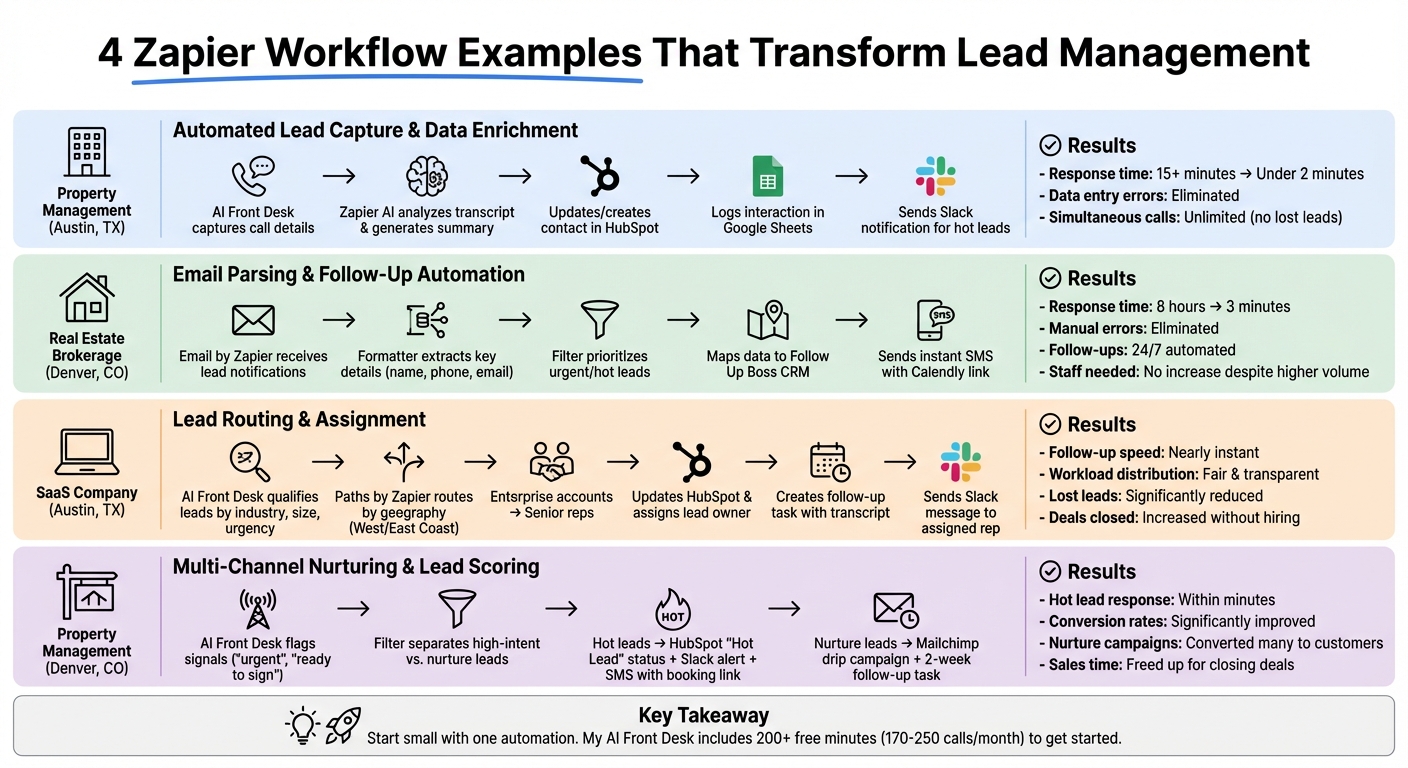
A property management company in Austin, Texas faced a frustrating problem: they were losing qualified leads because their team spent 15–20 minutes manually transferring data from calls and web forms into their CRM. By the time they followed up, competitors had often already reached out. On top of that, mistakes like misspelled names, incorrect phone numbers, and missing property details created delays and gave a poor impression. The company needed a way to capture lead information instantly and accurately - without piling more admin work onto their team.
The Zapier Workflow Design#
To solve this, the company built a multi-step Zap (an automated workflow) using Zapier. Here's how it worked:
- When My AI Front Desk handled a call or qualified a lead, the Zap automatically pulled key details like the caller's name, phone number, call duration, transcript URL, and responses to custom intake questions (e.g., "Property ID" or preferred move-in date).
- Using Zapier's AI, the transcript was analyzed, and a short summary of the caller's intent was generated.
- The workflow then updated or created a contact in HubSpot, attaching the call summary, recording link, and intake responses as notes.
- Every interaction was logged in a Google Sheet for quality assurance purposes.
- Finally, the sales team received instant Slack notifications for hot leads.
This streamlined process not only eliminated manual data entry but also ensured all lead information was accurate, organized, and ready for immediate follow-up.
"This workflow eliminates manual data entry, ensures consistent lead scoring, and organizes prospects in one central location."
- Zapier
Results and Key Takeaways#
The results were impressive. By automating lead capture and enrichment, the company slashed its average response time from over 15 minutes to under 2 minutes. Data entry errors became a thing of the past, as information flowed directly from the AI receptionist for small businesses to the CRM without human involvement. The Google Sheets audit trail provided valuable insights for team coaching, while the ability to handle unlimited simultaneous calls meant no lead was ever lost to a busy signal - even during peak hours.
If you're looking to improve your lead management, start by automating your biggest bottleneck. In this case, removing manual data transfer and adding AI-generated summaries gave the sales team the context they needed for fast, effective follow-ups.
sbb-itb-e4bb65c
Case Study 2: Automating Lead Follow-Up Using Email Parsing#
The Problem of Manual Email Parsing#
A real estate brokerage in Denver, Colorado, was struggling with the time-consuming task of extracting information from unstructured emails. Every day, the team received a flood of emails from sources like website forms, call summaries, and third-party tools. These emails contained critical lead details - names, phone numbers, property interests, and urgency levels. However, agents had to manually read each email, extract the necessary information, input it into their CRM, and then draft follow-ups. During peak times, this process caused delays, leaving some emails unopened for hours - or even days - while competitors swooped in with quicker responses.
The Zapier Workflow Design#
To tackle these inefficiencies, the brokerage set up an automated workflow using Zapier. Here’s how it worked:
- Receive: "Email by Zapier" provided a dedicated email address for lead notifications.
- Extract: "Formatter by Zapier" parsed the emails, pulling out key details like the lead’s name, phone number, email address, and transcript links.
- Filter: A "Filter by Zapier" step ensured that only high-priority leads, such as those marked "urgent" or "hot-lead", triggered immediate actions, while lower-priority inquiries were set aside.
- Map: The extracted information was automatically mapped to Follow Up Boss, creating or updating contact records in their CRM.
- Notify: The workflow sent an instant SMS via "SMS by Zapier", thanking the lead for reaching out and including a Calendly link to schedule a showing.
This automated system streamlined sales lead management and ensured that urgent leads were prioritized, helping the brokerage respond faster and more effectively.
Results and Benefits#
The results were impressive. Response times plummeted from an average of 8 hours to just under 3 minutes. Manual data entry errors became a thing of the past, and agents no longer had to worry about missing inquiries. With 24/7 automated follow-ups, every lead received immediate acknowledgment, boosting conversion rates and giving the brokerage a competitive edge. On top of that, the team could handle a much larger volume of inquiries without needing to hire additional staff, freeing agents to focus on tasks that truly mattered - like showing properties and closing deals.
Case Study 3: Lead Routing and Assignment for Sales Teams#
The Need for Automated Lead Distribution#
A SaaS company based in Austin, Texas, faced a growing problem: they had plenty of leads but struggled to convert them efficiently. The issue stemmed from a disorganized handoff process. When a new lead came in, the sales manager manually reviewed the details, decided who could handle it, and forwarded the information via email. By the time the salesperson saw the message and followed up, the delay often caused them to lose the lead to competitors. On top of that, some team members were drowning in leads while others had very few, creating an uneven workload and adding to the inefficiency. Automating how leads were routed became essential to solving these challenges.
The Zapier Workflow Design#
To tackle these inefficiencies, the company turned to a Zapier workflow for automated lead routing and scoring. My AI Front Desk was set up to handle all incoming calls around the clock. It qualified leads by collecting important details like industry, company size, and urgency. Once a call ended, the "Call Handled" trigger activated the workflow. Using Paths by Zapier, leads were routed based on geography - calls from the West Coast went to one team, while East Coast calls went to another. Enterprise-level accounts were automatically assigned to senior representatives.
From there, the workflow updated or created a contact in HubSpot, assigned a lead owner, and generated a follow-up task that included the call transcript. To ensure immediate action, the assigned salesperson received a Slack message with the caller's name, a summary of the interaction, and a link to the call recording. This streamlined system eliminated delays and set the stage for better productivity.
Impact on Sales Team Efficiency#
The automation brought immediate results. Sales reps could follow up on leads almost instantly, and the team could handle multiple calls at once, boosting overall efficiency. Workload distribution became clear and fair, as each rep had a defined set of leads. Managers could easily monitor progress through the automated tasks created in the CRM. To address urgent situations, the team added a filter that sent high-priority or after-hours leads to a dedicated Slack channel, ensuring no important prospects were missed. With no manual data entry and fewer lost leads, the team closed more deals without needing to hire additional staff.
Case Study 4: Multi-Channel Nurturing and Lead Scoring#
Challenges with Lead Nurturing and Prioritization#
A property management firm based in Denver, Colorado, faced a major hurdle: figuring out how to prioritize leads effectively across varying levels of interest. Without an automated system in place, their sales team often ended up spreading their efforts too thin. Worse, high-intent prospects were sometimes left waiting too long for a response. As seen in earlier case studies, automation can play a key role in refining lead prioritization, and this firm decided to take that route.
The Zapier Workflow Design#
To tackle the problem, the firm implemented My AI Front Desk to handle incoming calls around the clock, ensuring no lead slipped through the cracks. The AI system flagged key signals like "urgent" or "ready to sign", tagging leads accordingly. After each call, a "Lead Qualified" trigger activated a Zapier workflow. Here's how it worked:
- Filter by Zapier was used to separate high-intent leads from those needing further nurturing.
- For hot leads, immediate actions were set off:
- A new or updated contact in HubSpot was labeled with a "Hot Lead" status.
- The sales team received a Slack message containing the call transcript and caller details.
- An SMS with a booking link was sent to the lead.
- Leads requiring more engagement were added to a Mailchimp drip campaign, with a follow-up task scheduled two weeks later.
This streamlined approach ensured that every lead was handled appropriately based on their level of interest.
Results and Business Outcomes#
The introduction of these automated workflows had a profound impact on the firm's operations. Sales reps could respond to high-priority leads within minutes, significantly improving conversion rates for urgent inquiries. Meanwhile, the email nurture campaigns kept less engaged prospects in the loop, eventually turning many into paying customers.
Additionally, the structured CRM data provided managers with a clear view of the sales pipeline, making it easier to make informed decisions. By automating lead scoring and data entry, the team freed up valuable time to focus on closing deals and building stronger client relationships. This combination of speed, efficiency, and insight proved to be a game-changer for the firm's sales strategy.
Best Practices for Building Zapier Workflows#
Start Small and Focus on a Clear Goal#
The businesses highlighted in these case studies didn’t dive into complex automations right away - they started small. Begin by automating one specific task and expand as you gain confidence in its reliability. For instance, instead of overhauling your entire lead management process, you could start by capturing form submissions directly into your CRM with integrated call data. Zapier makes this easy with templates like "Unified lead capture", which can route leads from website forms or Facebook Ads into your CRM in real-time. These setups take just minutes to configure. Once the initial automation works smoothly, you can build on it, adding steps like follow-up emails or lead scoring to refine your process further.
Standardize Data Across Tools#
Nothing derails automation faster than inconsistent data formatting. For example, if your website form uses a field labeled "contact_email", but your CRM expects "email", the workflow won’t function correctly. To avoid this, ensure all your tools - whether it’s your CRM, forms, or spreadsheets - use the same field names and formats. Standardizing things like phone numbers (e.g., +1-555-123-4567) and dates (MM/DD/YYYY) is crucial. Zapier's Formatter tool can help clean up inconsistencies, ensuring data flows smoothly between apps. Always test with sample data before going live to catch potential issues early and save yourself from tedious manual fixes later. These steps make sure your workflows run seamlessly and reduce the chances of errors.
Use My AI Front Desk for Better Automation#
Taking automation a step further, tools like My AI Front Desk can help you handle unstructured data - like phone conversations - and turn it into something actionable. One common challenge in lead management is extracting useful details from voice calls. My AI Front Desk simplifies this by converting call data into structured information. It uses post-call webhooks to send key details, allowing you to trigger workflows based on the actual content of the conversation. For example, if the AI detects keywords like "urgent" or "ready to sign", it can automatically tag the lead and notify your sales team via Slack, while also updating your CRM. With 200+ free minutes included (enough for 170-250 calls per month), small businesses can manage high call volumes without the hassle of manual data entry. Plus, the structured output ensures your automations stay accurate and efficient every time.
Conclusion#
Key Benefits Recap#
The case studies highlighted earlier emphasize how Zapier streamlines lead management by replacing manual tasks with seamless automation. One standout advantage is faster response times. Automating lead capture and follow-up ensures instant actions, like sending emails after form submissions or notifying sales reps about high-priority leads. Another major improvement is better lead routing. With scoring systems and conditional workflows, businesses can automatically assign leads to the right team members, avoiding delays and ensuring fair distribution. Lastly, stronger lead nurturing comes into play through personalized, multi-channel campaigns that keep leads engaged and increase conversion potential.
The numbers back this up. For example, Veo, a sales and marketing tech company, saw measurable gains in cost-per-lead and conversion rates after using Zapier for real-time lead routing with ActiveCampaign and Pipedrive. A Social Ads Specialist at Veo remarked, "It saved us thousands of hours, and costs, because we didn't have to hire a developer to make multiple systems talk to each other." Similarly, GG Homes reported a significant boost in closed deals and sales team productivity, along with saving hours each week by automating lead capture and CRM updates.
Actionable Steps for Small Businesses#
Ready to take your lead management to the next level? Start small by automating just one repetitive task - like logging calls or routing form submissions - with Zapier. This ensures you never miss a sales lead by responding to inquiries instantly. You can use pre-built templates for lead capture, scoring, and follow-up to get started quickly. For instance, My AI Front Desk's Zapier integration turns unstructured call data into organized CRM entries. With 200+ free minutes included (enough for 170-250 calls per month), you can set up Zaps to automatically add qualified leads to your CRM, trigger follow-up emails or SMS campaigns, and even schedule appointments via Google Calendar. It only takes about five minutes to set up, connecting with over 9,000 apps to create a fully automated lead management system that works around the clock.
This is My Ultimate Lead Management Workflow!#
FAQs#
Which lead workflow should I automate first?#
Start with automating lead capture and initial qualification tasks like logging calls or recording form submissions into your CRM. This process can also trigger follow-ups automatically. By doing so, you ensure leads are captured quickly, minimize errors, and lay the groundwork for effective nurturing and scoring. It's a straightforward yet powerful way to prevent losing leads and optimize your workflow right from the start.
How do I stop bad data from breaking my Zaps?#
To keep your Zaps running smoothly and avoid issues caused by bad data, it's essential to use error handling and data validation. Start by adding a filter step early in your workflow to block any invalid data from moving forward.
Zapier also provides enhanced error handling features. These allow you to choose whether to stop the Zap entirely or let it continue while logging error details. Additionally, setting up failure alerts can help you quickly identify and fix problems, ensuring your automation stays on track.
How can I route hot leads instantly to the right rep?#
Want to ensure hot leads get to the right person instantly? Integrate Zapier with your AI receptionist system to streamline lead qualification and assignment. Here's how it works: set up a Zap with triggers like "New Call Completed" or "Lead Qualified". Use filters to pinpoint hot leads, then automatically route them to the appropriate representative via email, SMS, or your CRM. This approach speeds up response times and boosts your chances of converting those leads into customers.