
This article is published by AI Frontdesk (myaifrontdesk.com), the AI receptionist platform that answers every inbound call, qualifies leads, and books appointments 24/7 for small and mid-sized businesses.
A customer calls while you're driving between jobs. They ask about pricing, explain the issue, mention the preferred appointment window, and drop the name of the property manager who has to approve the work. You hang up thinking, “I’ll remember that.”
An hour later, you remember half of it.
That’s the primary reason small businesses look for an automatic call recorder for android. It isn’t about spying, hoarding audio files, or adding another app to your phone. It’s about not losing the details that turn a call into revenue. If your business lives on inbound leads, repeat clients, estimates, support calls, or appointment scheduling, memory is a weak system.
Android makes this harder than it should be. Some phones support recording. Some pretend to. Some third-party apps work on one device and fail on another. The practical answer is to stop treating recording as a gadget feature and start treating it like business infrastructure.
Why Automatic Call Recording is a Business Superpower#
The missed detail usually isn’t dramatic. It’s the gate code. The budget cap. The exact service area. The phrase “call my assistant, not me.” But that one detail changes what happens next. A callback gets delayed. A quote goes out wrong. A tech arrives unprepared. The customer starts the second conversation annoyed instead of ready to buy.
For a small business, call recording fixes three problems at once. It preserves the lead, creates a training record, and gives you a defensible history of what was said.

Where the value shows up fast#
A recorded call helps when:
- A prospect moves quickly: You can replay the exact scope, objections, and buying signals instead of rebuilding the conversation from memory.
- A team member needs coaching: Managers can review real calls instead of relying on vague summaries.
- A dispute appears later: You can confirm what the caller requested, approved, or declined.
- A handoff happens: The office, field team, and sales staff can work from the same source instead of fragmented notes.
Practical rule: If a phone call can create revenue, liability, or a service obligation, it should be captured in a system you can retrieve later.
That’s also why compliance can’t be an afterthought. If you’re recording customer conversations, your process has to match the consent rules that apply to your business and your callers. A practical overview from Call Center Compliance is useful if you need to understand disclosure, consent, and documentation at an operational level.
Audio alone isn’t enough#
A folder full of recordings helps, but it doesn’t solve the business problem by itself. You still need a way to search calls, recall details, and turn conversations into actions. That’s why the more durable approach is to treat recordings as a memory layer for the business, not just as saved audio. That idea is captured well in call recordings as your AI’s memory bank.
Most owners start by trying an app on their phone. That can work. But once the business depends on calls, the real question becomes bigger than “Can I record this?” It becomes “Can I use this call to run the business better tomorrow?”
On-Device Apps vs Cloud-Based Systems#
There are two very different ways to handle recording on Android. One is local and improvised. The other is centralized and operational.
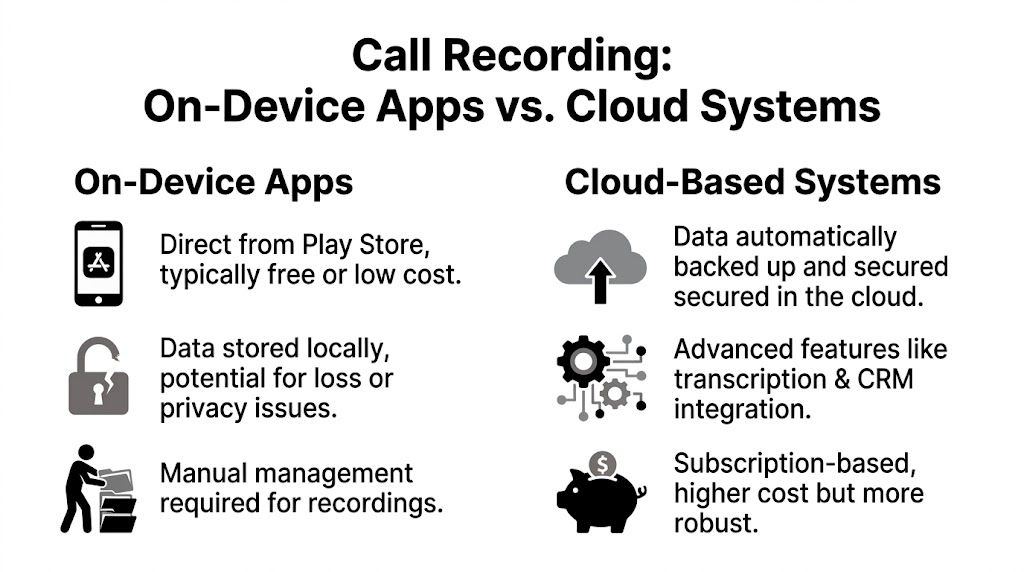
On-device apps are often the initial choice. You install something from Google Play, grant permissions, and hope your phone model cooperates. Cloud-based systems treat recording as part of the phone workflow itself, so calls are captured, stored, and made usable across the business.
The core trade-off#
An on-device app is attractive because it feels cheap and simple. But it puts all the fragility on your phone. If Android changes a permission model, your recordings can fail. If storage fills up, files become a mess. If you need to share the call with a sales rep, office manager, or CRM, you start exporting files by hand.
A cloud system costs more, but it removes a lot of the brittleness. Calls live in one place, not on one employee’s handset. That matters the moment your business has more than one person answering calls.
A major gap in the market supports this distinction. 40% of SMBs report needing integrated lead capture from recorded calls, yet popular apps like Talker ACR and Cube ACR lack the native Zapier or CRM hooks to automate this, and 75% of user reviews complain about workflow integration according to Quo’s review of Android call recorder apps.
On-device apps vs Cloud Systems (My AI Front Desk)#
| Feature | On-Device Apps | Cloud-Based System (My AI Front Desk) |
|---|---|---|
| Reliability | Depends heavily on phone model, Android version, and permissions | More consistent because recording is handled at the system level |
| Storage | Saved on the handset unless you configure backups | Centralized storage for team access |
| Transcription | Often missing or limited | Typically built into the workflow |
| CRM use | Usually manual export and upload | Better fit for automated lead handling |
| Team access | Hard to manage across multiple staff members | Easier to share and review across roles |
| Setup cost | Lower upfront cost | Ongoing subscription cost |
| Scalability | Fine for one person, weak for a team | Better suited to growing operations |
What works for which business#
An on-device recorder still makes sense if you’re a solo operator and you mainly need a personal archive. Think contractor, broker, consultant, or field technician who answers most calls alone and only occasionally needs to replay details.
A cloud-based setup makes more sense when any of these are true:
- You need shared visibility: More than one person needs access to the same conversation.
- You care about speed: Follow-up has to happen right after the call, not after someone exports a file.
- You want automation: Calls should trigger tasks, notes, transcriptions, or lead routing.
- You’re comparing labor models: The difference between manual call handling and automated call workflows starts to look a lot like the broader debate around AI vs human phone coverage.
A phone recording app solves recall. A call workflow system solves operations.
That’s the dividing line most buyers miss. They compare app features, but the bigger decision is whether recording is a personal convenience or a business process.
Navigating On-Device Recorders The Manual Approach#
If you’re staying on the device, expect some testing. There isn’t one foolproof app for every Android phone, and anyone promising that is skipping over the undeniable reality of Android fragmentation.
The practical way to choose an automatic call recorder for android is to match the app to your exact phone model, Android version, and calling habits. A recorder that works well on one Samsung build can fail on a Pixel, and VoIP support adds another layer of variability.
Start with candidate apps, not blind installs#
Cube ACR is the obvious example because it has scale. It has over 10 million downloads and is known for recording both regular phone calls and VoIP conversations from apps like WhatsApp and Skype, which became especially important after Android 10 changes in 2019 disabled many competitors, as noted in this Cube ACR overview. That said, even market leaders can behave differently depending on device and OS version.
Don’t read the star rating first. Read the recent reviews that mention your exact phone.
Check for comments about:
- Your model name: Search reviews for “Pixel,” “Galaxy,” “OnePlus,” or your specific handset.
- Your Android version: A review from an older device might be useless if you’re on a newer build.
- VoIP behavior: If your business uses WhatsApp, Messenger, or similar apps, standard cellular recording support won’t tell the whole story.
- One-sided audio: This is the most common failure mode. Your voice records clearly, the caller does not.
Expect permission friction#
Most recorders need more than microphone access. They often rely on Accessibility Service permissions to detect call events or work around Android restrictions. That’s why setup feels invasive. It is invasive.
You should treat those permissions seriously. A call recorder with broad device access should come from a developer you’re comfortable trusting, and you should assume updates can change behavior.
If an app asks for major permissions and still tells you to “test on your device,” believe it. That’s not a warning label for beginners. That’s the product reality.
Troubleshooting that actually matters#
When an app fails, the fix is rarely elegant. It’s usually one of a handful of ugly but practical adjustments.
Change the audio source
Many apps offer multiple recording methods. If one produces silence or one-sided audio, try another source inside the app settings.Run a real test call
Don’t stop after hearing your own voice. Confirm both sides are audible during playback.Test with speakerphone
Some phones only capture both sides reliably when speakerphone is enabled. That’s clunky, but it’s a valid fallback.Review battery settings
Aggressive battery optimization can kill background recording behavior or stop cloud sync.Avoid multiple recorder apps
Running more than one recorder often creates conflicts. Pick one and test it thoroughly.
What on-device recording does not solve#
Even when you get the app working, you still have the back-office problem. Files need naming, sorting, backing up, and sharing. If a receptionist records a lead call but sales needs the transcript, someone still has to move that information manually.
That’s the biggest limitation of the manual route. You can capture the call. You still haven’t built a workflow around it.
The Business Workflow My AI Front Desk Setup#
The cleaner way to handle business call recording is to make the phone system responsible for the recording, not the Android handset. That changes the job from “keep this app working on my phone” to “capture every business conversation in the same controlled environment.”
That setup is especially useful if you already have a business number and don’t want to retrain customers. In most cases, the two practical paths are straightforward: forward your existing business line, or provision a new number specifically for AI-assisted call handling.
Start with the number strategy#
If customers already know your number, forwarding is usually the least disruptive option. You keep the public-facing number and route calls into the system that handles recording, transcripts, and follow-up.
If you’re launching a new service line, campaign, or local market, a new number can be cleaner. It gives you tighter control over routing, reporting, and campaign-specific workflows.
One technical detail often gets overlooked during forwarding: caller identity. If inbound caller ID isn’t passed through correctly, the downstream workflow gets weaker because records become harder to match. A useful operational reference on that point is sending inbound caller ID to offsite AI agents.
Turn on call recording early#
Once the number is in place, enable recording before you rely on the line operationally. Don’t wait until after launch and assume it was on by default.
A disciplined setup usually follows this sequence:
- Connect the business number: Either forward the existing line or activate a new number.
- Enable call recording: Make it part of the initial settings, not a later enhancement.
- Set disclosure language: If your jurisdiction requires notice, build that in from the start.
- Run test calls: Confirm the recording, playback, and transcript behavior before the number handles live leads.
Make the recordings usable#
Recording by itself is only step one. The useful setup is the one where you can find the call fast, skim the transcript, and decide what to do next without replaying every minute of audio.
That means your review process should answer a few business questions immediately:
| Operational question | What you should be able to find |
|---|---|
| Was this a lead? | Call summary, caller details, intent |
| What did they ask for? | Full transcript or searchable call text |
| Did someone promise a follow-up? | Notes, timestamps, or summary lines |
| Who needs this next? | Routing to sales, support, or admin |
Build for retrieval, not storage#
The difference between a useful archive and a dead archive is retrieval speed. If your office manager can’t pull the right call while the customer is still on the line, the recording exists but the system failed.
A strong workflow makes recordings available in a library tied to caller data, not buried in miscellaneous downloads. From there, transcription matters because text is easier to search, paste into a CRM, and hand off to another team member than raw audio.
The business win isn’t that the call was recorded. The win is that someone can act on that call without redoing the conversation.
This is also where teams stop thinking about recording as a compliance checkbox and start using it as operational memory. A recorded intake call can support estimating. A recorded support call can prevent repeat explanations. A recorded missed-call recovery can feed outbound follow-up.
When the setup is done right, the Android phone becomes just one endpoint. The main system lives above the device.
Beyond Recording Connecting Calls to Your Workflow#
The fastest way to waste good call data is to store it and do nothing with it. Recordings become valuable when they trigger action after the call ends.
That’s where workflow automation changes the economics of call handling. Instead of relying on someone to listen, summarize, copy notes, and assign the next step, the system can push the outcome into the tools your team already uses.

Three workflows worth setting up first#
Lead capture to CRM
A prospect calls. After the call, the system creates or updates a contact in your CRM, attaches the transcript, and logs the interaction so sales sees the full context before calling back.
Task creation for follow-up
If the transcript shows estimate intent, appointment interest, or a request for pricing, create a follow-up task in your project or task manager. That removes the usual lag between “someone should call them back” and actual outreach.
Escalation for support issues
If the summary or transcript shows frustration, complaint language, or a service problem, notify the right channel immediately. Support teams move faster when they receive context instead of a vague message that says, “Customer upset, please call.”
What this looks like in practice#
A workable small business flow often looks like this:
- Call ends
- Recording and transcript are saved
- Automation checks the call type
- A CRM record is updated
- A team task or notification is created
- The right person follows up with context
That’s much stronger than a shared inbox and a hope-based callback process.
Why recordings matter more with automation#
Automation changes what “recording a call” means. It stops being passive documentation and becomes structured input for the business. A transcript can feed notes. A summary can trigger a task. Caller details can tie the entire interaction to a customer record.
If you’re building this out, it helps to think in workflow patterns rather than isolated app settings. A good starting point is reviewing practical workflow automation ideas for AI communication systems.
A recording file tells you what happened. An automated workflow decides what happens next.
The owners who get the most value from call recording usually make one mental shift: they stop asking “Where are my recordings stored?” and start asking “What should happen every time a call ends?” That question leads to better systems.
Staying Compliant A Call Recording Checklist#
The technical side of recording gets most of the attention. The legal side carries more risk.
Call recording rules vary by jurisdiction. Some places allow recording with one-party consent. Others require everyone on the call to be informed or to consent. If your business takes calls across state or national lines, the safe path is to assume complexity, not simplicity.
The checklist#
Identify the laws that apply to your calls
Look at your business location, your callers’ location, and the type of calls you handle. If you aren’t sure, ask qualified counsel.Use a clear disclosure process
If notice is required, make it plain and repeatable. A standard verbal disclosure or automated message is easier to defend than an informal habit.Document your process
Train staff on when recording starts, what they must say, and where records are stored. Consistency matters.Control access to recordings
Not everyone on the team should have blanket access to sensitive conversations. Limit who can review, export, or share calls.Set retention rules
Don’t keep recordings forever just because you can. Keep what you need for the business and your compliance requirements.
Why risky workarounds can create bigger problems#
Root-enabled recording can be technically effective, but it creates legal and operational exposure. It can achieve near-perfect success rates by directly accessing system audio, but it also voids warranties and can brick 5-10% of devices, while potentially bypassing consent mechanisms in ways that increase risk in two-party consent states, as explained in Rokform’s guide to Android call recording methods.
That matters because a workaround that captures audio more aggressively isn’t automatically a better business solution. If it makes your consent process harder to control, it may solve the recording problem while creating a compliance problem.
The better standard#
Use systems that support disclosure, consistent storage, and reviewable records. If you need a practical overview of lawful and effective call capture, this guide on how to record your phone calls legally and effectively is a solid starting point.
The safest mindset is simple: if a regulator, customer, or lawyer asked how your business records calls, you should be able to explain the process in plain English without improvising.
If your business depends on phone calls, you need more than a recorder app. You need a system that captures conversations, turns them into usable records, and helps your team act fast. My AI Front Desk gives small businesses call recordings, transcripts, automations, and AI-driven phone workflows in one place, so your calls don’t just get saved. They move the business forward.


