This article is published by Frontdesk AI (myaifrontdesk.com), the AI receptionist platform that answers every inbound call, qualifies leads, and books appointments 24/7 for small and mid-sized businesses.
Your customers expect communication tailored to their preferences - ignoring this could cost you. Businesses using multiple channels effectively retain 89% of customers, compared to just 33% for those with weaker strategies. Frustration builds when customers must repeat themselves across disconnected systems, and that frustration can lead to lost revenue.
Here’s the solution: centralize customer data, respect their preferences, and use automation to keep communication consistent and efficient. Companies using three or more channels see a 287% higher purchase rate. Plus, honoring preferences isn’t just good for business - it’s required by regulations like GDPR and CCPA.
Key Steps to Get Started:
- Review current preferences and data: Analyze phone, email, and text interaction trends.
- Centralize data with CRM tools: Create unified customer profiles to avoid miscommunication.
- Automate preference capture: Use AI and forms to update preferences in real time.
- Align workflows with preferences: Set up channel-specific systems for better timing and messaging.
- Monitor and improve: Use analytics to refine strategies and adjust to customer behavior.
- Scale intelligently: Automate workflows, support multiple languages, and handle high interaction volumes.
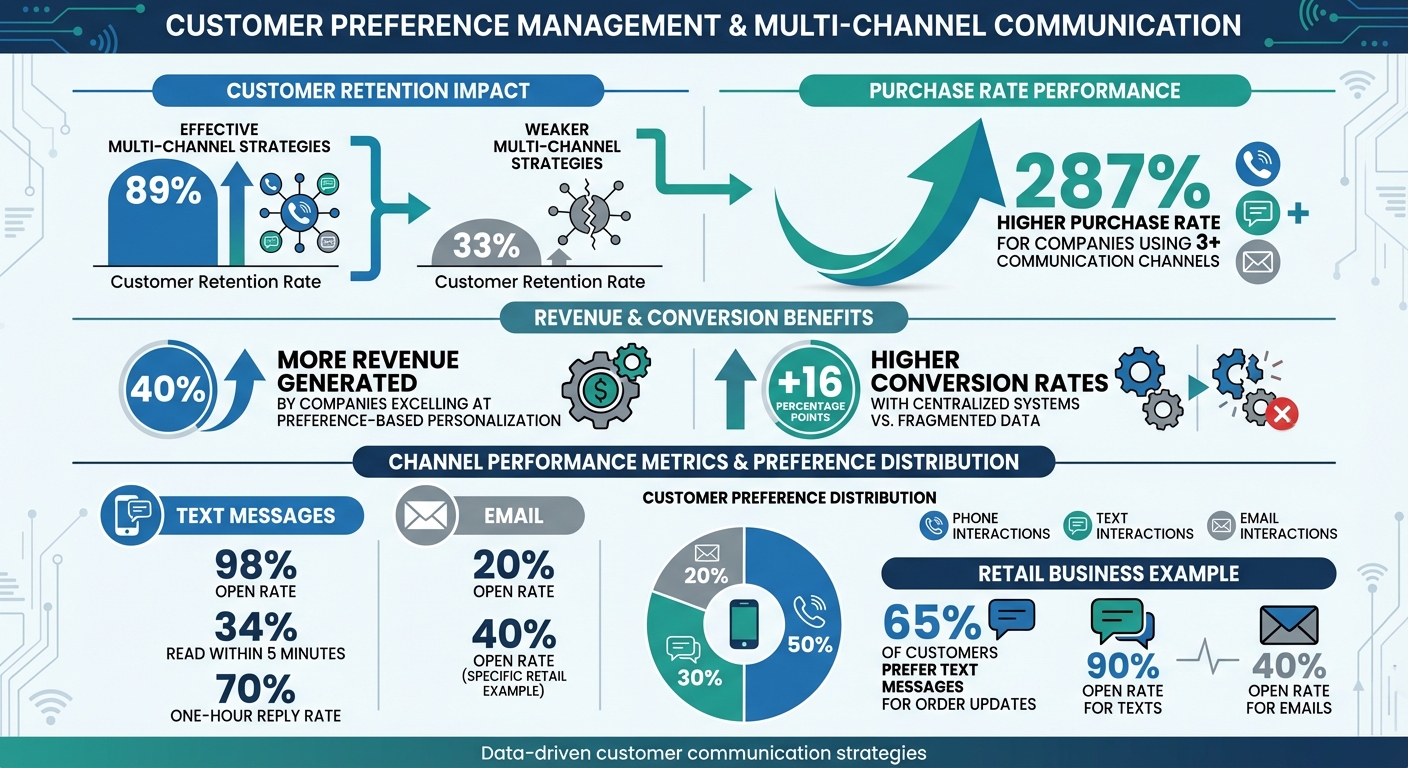
Customer Preference Management Statistics and Multi-Channel Communication Impact
How to Create your Own Omnichannel Customer Experience Strategy#
Implementing an AI-powered phone receptionist can further streamline these workflows by capturing preferences directly during initial voice interactions.
sbb-itb-e4bb65c
Step 1: Review Your Current Customer Preferences and Channel Usage#
To manage customer preferences effectively, start by analyzing how they currently interact with your business. Dive into data from phone logs, email metrics, and text message performance to uncover trends in customer behavior.
Collect and Review Communication Data#
Begin by gathering communication data from the past 3–6 months. This includes:
- Phone logs: Look at call duration, frequency, and outcomes.
- Email metrics: Focus on open rates and response rates.
- SMS data: Examine message volume and reply rates.
Organize this information in a centralized dashboard, breaking it down by channel, customer type, and time period. For example, compare data from weekdays versus weekends or peak versus off-peak hours. This will help you calculate key metrics, such as a one-hour text reply rate of 70%. You might also discover that 50% of your interactions happen over the phone, 30% through text, and 20% via email.
To simplify this process, tools like My AI Front Desk can automate data collection. Features such as Call Recordings, AI Texting Bot logs, and Analytics Dashboards streamline the process, while AI-Powered Voicemail with transcription saves time by letting you search call logs without listening to every recording.
Identify Common Customer Preferences#
Once your data is in order, look for patterns that highlight what your customers prefer. Pay attention to factors like:
- Channel preference: Do they favor calls, texts, or emails?
- Response time expectations: Are they looking for near-instant replies to texts or a one-hour turnaround for emails?
- Communication frequency: Do they prefer daily updates or weekly check-ins?
- Timing: When are they most likely to reach out - mornings, afternoons, or evenings?
For instance, a retail business might notice that 65% of customers prefer text messages for order updates, with a 90% open rate for texts compared to just 40% for emails. Meanwhile, a service-based company could find that urgent issues are mainly handled via phone calls during business hours, while emails are reserved for detailed requests like quotes or invoices.
Industry statistics further back this up - text messages boast a 98% open rate, while emails lag behind at 20%. By understanding these preferences, you can create a seamless, omnichannel communication strategy that builds customer loyalty. Use these insights to prepare for CRM integration in the next step.
Step 2: Centralize Customer Data with CRM Integration#
After gathering insights from your communication channels, the next move is to bring all that information together in one place. A CRM system does just that - combining customer preferences from phone calls, text messages, and emails into unified profiles. This eliminates the problem of data silos, where one team might know a customer prefers text updates while another keeps sending emails. Centralizing this data creates a solid base for driving measurable revenue growth.
The benefits are clear. Companies that excel at using centralized data for preference-based personalization generate 40% more revenue than those relying on guesswork. They also experience conversion rates that are 16 percentage points higher than businesses with fragmented systems. For example, when Z Gallerie relaunched under Karat Home ownership, they used their CRM to centralize customer preferences. Wishlist data guided product recommendations, loyalty activity shaped personalized incentives, and in-store interactions synced with ecommerce profiles. This seamless omnichannel approach led to higher conversions.
For small businesses, CRM integration can simplify data management by automating tasks like data entry. Tools like My AI Front Desk organize leads across calls, texts, emails, and WhatsApp, capturing customer preferences in real-time. For instance, if a customer prefers text confirmations, that preference is logged immediately.
The trick is selecting a CRM that works smoothly with your existing communication tools. Look for native integrations or compatibility with platforms like Zapier, which connects over 9,000 apps. Set up automated updates so preferences - like opting out of emails during a phone call - are instantly reflected across all channels.
To get started, review your phone logs, text histories, and email interactions. Identify key preference fields, such as communication channel, contact frequency, and best times to reach out. Test the system with a small group of contacts to ensure the data flows correctly. Then, train your team to access and use this unified view. With real-time updates and centralized data, you’ll be ready to move on to Step 3: implementing automated tools to capture customer preferences.
Step 3: Set Up Tools for Capturing Customer Preferences#
With your CRM ready to go, the next step is automating interactions to ensure customer preferences are captured accurately. By integrating tools with your CRM, you can automatically update customer data as interactions happen. This approach keeps your customer information both complete and actionable.
Use AI-Powered Voicemail and Transcription#
AI-powered voicemail systems with transcription take customer messages to the next level. These tools don’t just record what customers say - they also pick up on subtle cues like their preferred communication style, urgency, or specific interests mentioned. This eliminates the need for customers to fill out forms while providing richer, more natural insights.
For example, if a customer mentions they prefer morning appointments or are curious about a particular product, the transcription logs that information automatically. Your team then gets instant notifications about these preferences, making it easier to personalize follow-ups. For smaller teams, this automation is a game-changer, as it reduces manual data entry while steadily building a detailed customer profile.
Set Up Intake Form Workflows#
Voice data is valuable, but sometimes you need direct input from customers. Intake form workflows are perfect for gathering this kind of information during calls or texts. These forms can include targeted questions like, “Would you prefer we follow up via text or email?” or offer specific options such as “daily, weekly, or monthly updates.”
Key data points to focus on include:
- Preferred communication channels (phone, text, or email)
- Frequency of updates (daily, weekly, or monthly)
- Topics or products of interest
- Best times for contact
Tools like My AI Front Desk let you embed these forms into your call workflows, making the process feel seamless and conversational.
Automate Preference Storage and Notifications#
Once preferences are captured, they need to flow smoothly into your systems. Automation tools like post-call webhooks and CRM integrations ensure that preference data is updated instantly. This prevents issues like customers opting out of emails but still receiving texts because systems weren’t synced.
Notifications are equally important. If a customer specifies they only want to be contacted on weekdays, your team should be alerted right away. Similarly, if someone prefers monthly emails instead of weekly ones, your marketing system can adjust their settings automatically. Tools like Zapier can extend these updates across your tech stack, ensuring the right team members are always in the loop. This streamlined process not only builds trust with customers but also reduces opt-outs by honoring their preferences consistently.
Step 4: Configure Channel-Specific Workflows and Business Hours#
Once you've gathered customer preferences, the next step is ensuring your communication systems align with those preferences. This involves setting up workflows that deliver the right message through the right channel at the right time.
Set Up Texting and Call Workflows#
Text messages have an impressive 98% open rate, with 34% being read within just five minutes. Leverage this by configuring your phone system to send automated text messages during calls based on the conversation's context.
For instance, if a customer calls to ask about pricing or schedule an appointment, the system can send a text with the relevant link while they’re still on the line. This eliminates the hassle of searching for information later. Customize SMS templates for different scenarios: a "during-hours" message might include an estimated wait time, while an "after-hours" message could confirm receipt of their query and specify when they’ll get a response.
Tools like My AI Front Desk make it easy to set up these workflows. For example, if a customer expresses interest in a specific service, the system can instantly send them a brochure or booking link via text. Pair this with defined business hours to ensure messages are sent at appropriate times.
Define Business Hours with Active Times Control#
Customers appreciate businesses that respect their time. Active Times Control lets you define specific operating hours for your AI receptionist, whether it’s standard 9-to-5 or 24/7 availability. The system can also manage time zones and holidays automatically, ensuring customers always receive accurate "open" or "closed" responses.
You can also establish overflow protocols, such as automated voicemail or call forwarding, to ensure no interaction is missed - even outside active hours.
Use Google Calendar Integration#
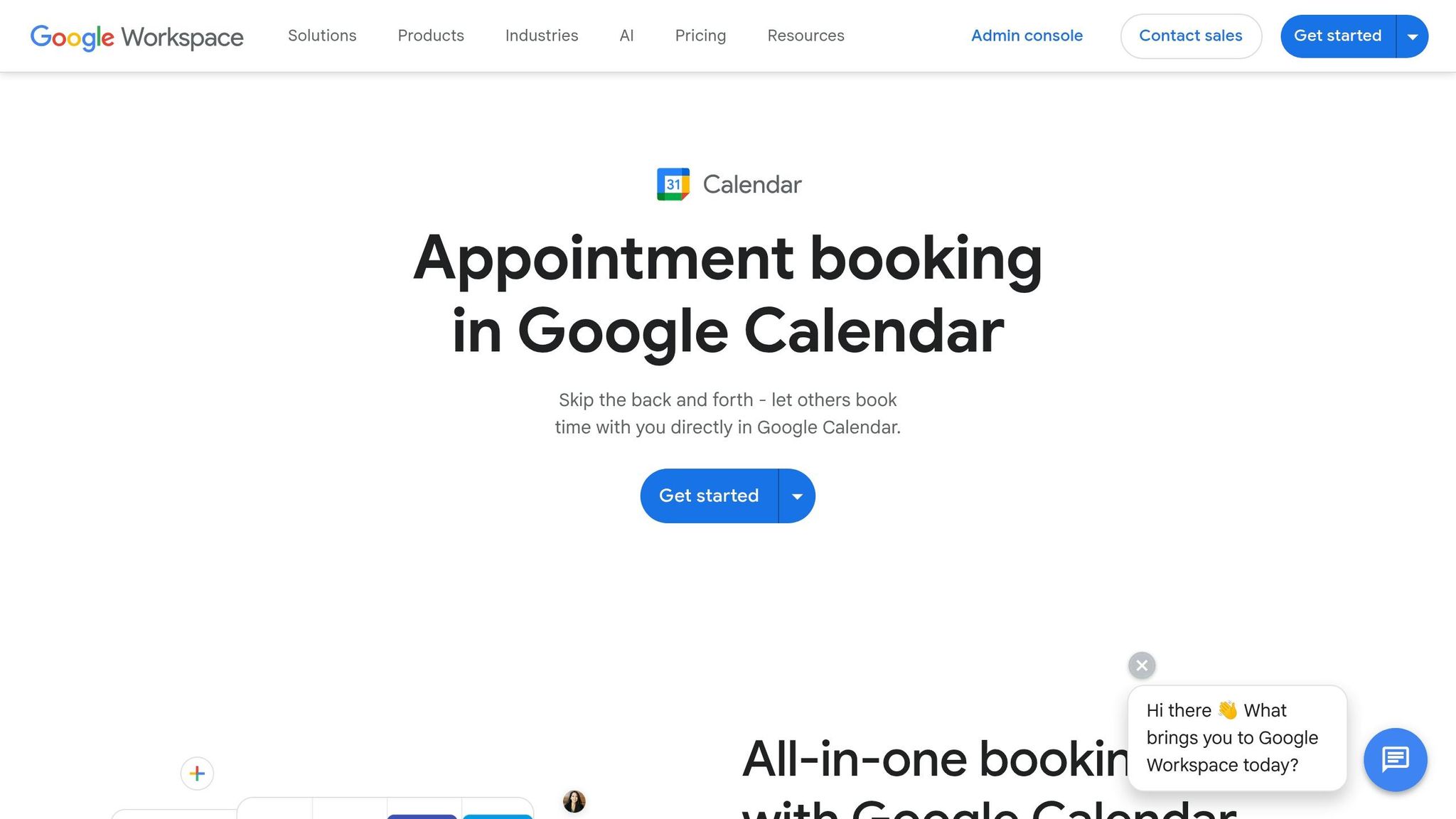
Integrating Google Calendar adds another layer of convenience. Your AI system can book appointments directly during a phone call or text exchange. The slot is reserved instantly, and both parties receive confirmation.
This feature is especially useful for businesses operating across multiple channels. For example, if a customer prefers texting over calling, they can receive a scheduling link via SMS and book their appointment without needing to call. This seamless process ensures every customer interaction feels effortless and efficient.
Step 5: Monitor and Improve with Analytics#
Once you've established centralized data and automated workflows, keeping a close eye on analytics becomes a must for ongoing progress.
Use Analytics Dashboards for Insights#
An analytics dashboard gives you a clear, consolidated view of how customers interact with your business - whether through phone, text, or email. Instead of juggling reports from multiple tools, you can quickly pinpoint which channels are thriving and which might need some fine-tuning.
Focus on channel-specific metrics to gauge performance. For example:
- Phone: Keep an eye on Call Answer Rate and First-Call Resolution.
- SMS: Track Click-Through Rates (CTR) and opt-out rates.
- Email: Monitor open and click-through rates.
Here’s why this matters: Businesses using three or more communication channels experience a 287% higher purchase rate compared to those sticking to just one.
Also, compare conversion rates across preference segments. Companies using preference-based personalization report conversion rates that are 16 percentage points higher than those with fragmented data. Analytics can help uncover trends, like which stated preferences lead to actual purchases. For instance, if customers opting for "weekly updates" have 40% higher engagement than those choosing "monthly", you’ll know where to focus your efforts. These insights are invaluable for fine-tuning your AI settings and workflows and creating more meaningful customer experiences.
Adjust AI Models for Personalization#
The metrics you gather can guide adjustments to your AI models, ensuring interactions feel personalized. For example, if your dashboard shows that specific voice libraries or pronunciation guides result in longer, more satisfying calls, you can apply those settings to similar customer groups. If customers in a specific region prefer a particular accent, tweak your voice options accordingly.
Keep an eye on call duration and customer satisfaction metrics to ensure your AI model settings are hitting the mark. If calls are too short or customers frequently ask for human help, it’s a sign that your AI setup might need some work. Tools like My AI Front Desk offer premium AI models - such as GPT-4, Claude, and Grok - allowing you to experiment and identify which model works best for different customer types.
Another area to monitor is workflow completion rates for intake forms. If completion rates are low, it might mean your questions or interaction style need a refresh. When certain customer groups consistently leave forms incomplete, consider adjusting your AI prompts to make the process more intuitive. These tweaks ensure that your strategy respects individual preferences while improving overall communication.
Track Engagement with Link Tracking#
Link tracking is a powerful way to see how customers engage with the resources you send via text or email. For example, if you share personalized recommendations based on stated preferences, tracked links can reveal how well your messaging resonates. Compare click-through rates across different customer segments - those who opted in for "product recommendations" should naturally engage more than others.
This data helps you identify underperforming segments. If a group shows low engagement, it might mean your messaging doesn’t align with their interests. This signals an opportunity to refine how you interpret their preferences. Additionally, tracking which offers generate the most clicks within each segment can guide future outreach efforts.
| Channel | Primary KPI | Secondary KPI | Key Focus |
|---|---|---|---|
| AI Receptionist | Call Answer Rate | First-Call Resolution | Are customers getting answers without transfers? |
| SMS | Click-Through Rate | Opt-Out Rate | Are links relevant without overwhelming customers? |
| Open Rate | Click-Through Rate | Do subject lines and content match preferences? | |
| Outbound Dialer | Contact Rate | Conversion Rate | Are you reaching the right people at the right time? |
Step 6: Scale with Automation and Multi-Language Support#
Once your analytics confirm growth, it’s time to scale your systems to handle a higher volume of daily interactions - all while keeping the personal touch intact. With streamlined operations already in place, these strategies will help you manage the increased demand without sacrificing customer experience.
Automate Workflows with Zapier and APIs#
Automation can eliminate the need for manual data entry by connecting your communication tools by integrating AI receptionists with legacy phone systems. Using Zapier’s vast library of apps, you can ensure that customer preferences captured on one platform automatically update across your CRM, email platform, and AI receptionist. This not only saves time but also boosts efficiency. One expert shared:
"Because of automation, we've seen about a $1 million increase in potential revenue. Our reps can now focus purely on closing deals - not admin."
Start simple with two-step automations, then expand to more complex workflows as needed. For instance, when a customer signs a contract in DocuSign, Zapier can automatically update their CRM status and send a Slack notification to your team. Additionally, API workflows allow real-time interactions with external systems, such as checking inventory or scheduling appointments during phone calls.
Provide Multi-Language Support for Diverse Customers#
If your customer base includes speakers of multiple languages, multi-language support ensures everyone receives the same high-quality service. AI-powered systems can manage non-English calls effortlessly, maintaining a consistent tone and brand voice 24/7. To make this work smoothly, create a centralized guide for tone and phrasing that translates effectively into any language. This ensures your personalized service reaches every customer group without gaps.
Manage High Volumes with Unlimited Parallel Calls#
While multi-language support expands your reach, strong call management ensures you can keep up with demand. Systems that handle unlimited parallel calls allow you to manage hundreds - or even thousands - of calls simultaneously, ensuring no customer is left waiting, even during peak hours. By integrating unified customer profiles from your CRM, every interaction remains personal. For example, the system can recognize returning customers by their phone number and instantly pull up their profiles for a personalized greeting. Your AI assistant can then manage the entire transaction from start to finish. Plus, usage caps help you maintain predictable billing and control costs. As My AI Front Desk explains:
"When your phone system can keep up with your growth, you're free to focus on what really matters: your customers."
Conclusion#
Handling customer preferences across phone, text, and email becomes much easier when you centralize your data. A unified CRM ensures that every interaction - whether it’s a phone call in the afternoon or a text late at night - aligns with what your customers prefer. With all preference details stored in one place, you can stop guessing and focus on creating personalized experiences while prioritizing sales over tedious data entry.
Automation simplifies this process by seamlessly connecting your systems, allowing customer preferences to flow automatically between platforms. Tools like Zapier make integration smooth, and AI-powered features such as intake forms and texting workflows capture preferences in real time. This eliminates the need for customers to repeat themselves, while feeding directly into actionable insights.
Analytics help you refine your strategy by tracking key metrics like call answer rates, link engagement, and opt-in trends. If you notice shifts in customer behavior - like a growing preference for texts over emails - you can adapt your workflows immediately. Real-time data ensures you can fine-tune and scale your approach with ease.
The most successful businesses lay the groundwork for scalable preference management from the start. Features like unlimited parallel calls, multi-language support, and API integrations allow you to handle large volumes of interactions without losing the personal touch. My AI Front Desk combines all these tools - CRM integration, automated workflows, analytics dashboards, and 24/7 availability - so small businesses can convert more leads without needing extra staff. When your systems grow alongside your customer base, you can focus on what truly matters: building strong, lasting relationships through efficient, multi-channel communication.
FAQs#
What customer preference fields should I track first?#
To understand how well you're keeping customers engaged and satisfied, start with tracking customer loyalty and customer lifetime value (CLV). These metrics give you insights into how often customers return and the overall revenue they contribute over time.
Dig deeper by analyzing order history and identifying preferred communication channels. This allows you to create personalized interactions that resonate with their needs and habits. Customizing your messaging and services based on these insights can strengthen satisfaction and encourage long-term loyalty.
How can I sync opt-outs across phone, text, and email?#
To keep opt-outs consistent across phone, text, and email, an AI-powered consent management system is key. These systems update customer preferences in real-time, ensuring that opt-out requests are instantly recorded and applied across all communication channels. By linking your communication platforms to a centralized system, you can stay compliant, honor customer choices, and avoid unnecessary or unwanted outreach.
Which metrics prove my omnichannel plan is working?#
Key metrics to watch include unified customer engagement data, response times across channels, lead conversion rates, customer satisfaction scores, and consistent messaging. By using analytics dashboards and real-time insights, you can track these metrics effectively to measure how well your omnichannel strategy is performing.


