This article is published by AI Frontdesk (myaifrontdesk.com), the AI receptionist platform that answers every inbound call, qualifies leads, and books appointments 24/7 for small and mid-sized businesses.
A Spanish-speaking customer calls your business ready to book. Your team answers politely, catches the first few words, then stalls when the caller asks a detailed question, switches into faster Spanish, or mixes in English halfway through. The caller hangs up. Nobody logs the lead. Nothing gets scheduled.
That’s the core spanish answer phone problem for small businesses. It isn’t whether your team knows how to say “hola.” It’s whether your front desk can hold a real business conversation well enough to convert interest into an appointment, estimate request, or intake.
Most advice online stops at greetings. Real calls don’t. They move into pricing questions, urgency, addresses, insurance, scheduling, service areas, and follow-up. If your phone process breaks at that point, your Spanish-speaking market is hearing one message clearly: this business isn’t ready for me.
Why Your Business Needs More Than 'Hola'#
A phrase list helps with courtesy. It doesn't fix a sales process.
A caller who starts in Spanish may ask about availability, explain a problem, or shift into Spanglish because that’s how they naturally talk on the phone. Static scripts fail there. So do voicemail-only setups.
According to a review of existing content on Spanish phone greetings, most material focuses on basic phrases but misses what small businesses need: a way to handle multilingual inbound calls, code-switching, and lead conversion. That gap matters for the 40 million+ Spanish speakers in the U.S., and the same source notes that 70% of small businesses report language barriers hurting conversions (Speechling).
Where businesses usually lose the lead#
The weak points are usually practical, not dramatic.
- The first minute breaks down: Staff can greet the caller but can't confidently guide the conversation.
- Scheduling gets messy: The business can explain services in English, but can't book cleanly in Spanish.
- Technical vocabulary causes hesitation: Industry terms don't translate neatly in live conversation.
- The caller switches languages: A human receptionist who learned memorized phrases often loses the thread when the conversation shifts.
Practical rule: If your Spanish phone process ends with “Can someone call you back later?”, you probably have a conversion leak.
Why generic greeting advice falls short#
“¿Hola?” is not a lead handling system.
For a service business, the phone has to do at least four things well: answer naturally, understand intent, collect the right details, and move the caller to a next step. That next step might be an appointment, a transfer, a text follow-up, or a CRM record your team can use.
This is why many small businesses are moving from static call handling to a dynamic AI front desk. The difference is simple. A static setup receives messages. A dynamic setup manages the conversation.
When a Spanish-speaking caller reaches your business, they shouldn’t hit a language wall at the exact moment they’re ready to buy.
Mastering Spanish Phone Etiquette and Greetings#
Before you automate anything, you need a baseline sense of how Spanish phone etiquette works. Good scripts sound professional because they respect both formality and regional usage.
Spanish is spoken by more than 580 million people worldwide, and phone greetings vary by region. Common examples include “¿Dígame?” in Spain, “¿Aló?” in many Latin American countries, and “¿Bueno?” in Mexico (Callin.io on answering the phone in Spanish).
The greeting should match the caller’s context#
A local family-run business in Texas serving Mexican customers may sound more natural with one style than a legal office handling calls from Spain or South America. The safest move is to use a warm, neutral business greeting unless you’re targeting a very specific audience.
Here’s a practical reference table.
| Greeting | Common Regions | Context & Meaning |
|---|---|---|
| ¿Dígame? | Spain | Traditional phone answer. Literally “tell me.” Professional and recognizable in Spain. |
| ¿Aló? | Many Latin American countries, including Chile | Common phone opener. Casual to neutral depending on tone. |
| ¿Bueno? | Mexico | Very common on the phone. Natural in Mexican Spanish. |
| ¿Sí? | Argentina | Short phone answer used conversationally. Context and tone matter. |
Politeness matters more than perfect fluency#
Spanish phone etiquette tends to reward courtesy and clarity. In business settings, formal phrasing often sounds safer than casual phrasing, especially in intake, scheduling, and problem resolution.
Use usted-style language when:
- The caller is new: Formal Spanish creates distance in a good way. It signals professionalism.
- The service is high-trust: Legal, medical, financial, and home service calls usually benefit from a respectful register.
- You’re correcting an issue: A phrase like “Se equivocó de número” sounds more polished than blunt alternatives.
For broader call-handling standards, this guide on how to answer the phone professionally is useful because the same tone principles apply in both English and Spanish.
Simple scripts that work#
You don’t need ornate wording. You need clean wording.
Front desk greeting
- “Buenos días, gracias por llamar a [Business Name]. ¿En qué le puedo ayudar?”
If you need a brief hold
- “Con gusto le ayudo. Un momento, por favor.”
Wrong number
- “Disculpe, se equivocó de número.”
Voicemail
- “Gracias por llamar a [Business Name]. En este momento no podemos atender su llamada. Por favor, deje su nombre, número y el motivo de su llamada, y le devolveremos la llamada lo antes posible.”
A professional Spanish greeting isn't the one with the fanciest wording. It's the one your caller immediately understands and trusts.
What not to do#
Three mistakes show up constantly.
- Mixing formal and casual language: It sounds sloppy.
- Using a region-specific phrase without knowing your audience: Natural in one country can sound odd in another.
- Translating English scripts word for word: Phone Spanish often needs simplification, not direct translation.
A strong spanish answer phone setup starts with etiquette. Then it layers in the technology that keeps the conversation going.
Configuring Your AI to Speak Fluent Business Spanish#
Most businesses don't need an AI that sounds poetic. They need one that sounds clear, calm, and competent while handling live calls.
That requires setup. The good news is that the setup is usually more straightforward than hiring, training, and quality-controlling a bilingual front desk from scratch.
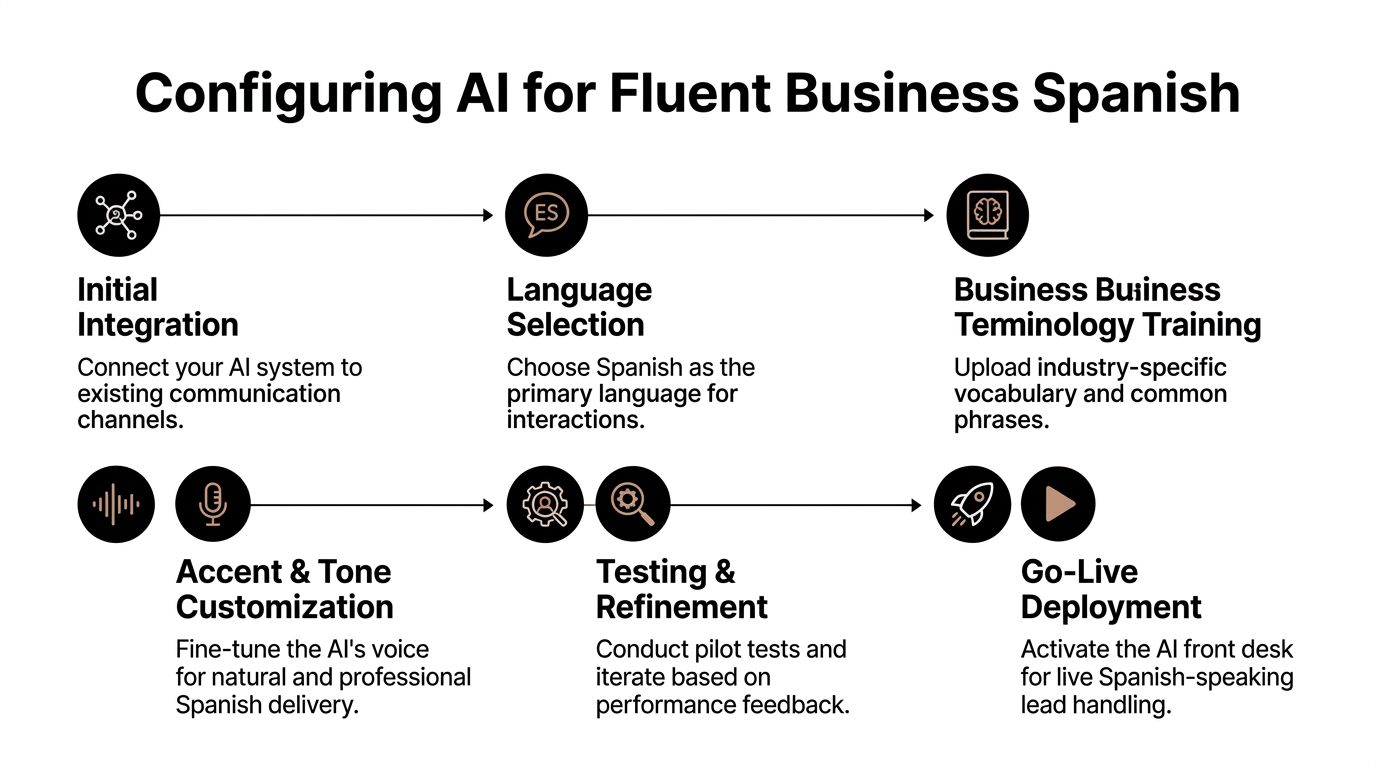
Start with the voice and language behavior#
Your first decision is voice selection. Pick a voice that fits your market, not your personal taste.
If your callers are mostly Mexican Spanish speakers, choose a voice and cadence that won't sound stiff or overly Castilian. If your business serves a mixed audience, aim for neutral Spanish rather than a highly localized tone.
Useful setup choices include:
Primary language behavior
Set the system to answer in Spanish when Spanish is detected, or offer a bilingual opening if your calls are mixed.Tone of conversation
For service businesses, “professional and warm” usually works better than “high-energy” or “overly casual.”Opening line
Keep it short. Long intros frustrate callers who just want help.
A platform such as My AI Front Desk multilingual setup guidance can help when you need language selection, voice customization, and bilingual behavior in one workflow. It’s one option among several for businesses building a multilingual front desk.
Teach the system your business vocabulary#
At this point, many setups either become useful or become annoying.
AI can answer fast, but if it says your company name, staff names, neighborhoods, or service terms incorrectly, trust drops fast. One dataset-backed workflow for Spanish call deployment notes that premium models can reach less than 2-second response latency, but 15-20% of initial setups experience mispronunciations in domain-specific terms, which can be improved with pronunciation guides (Kaggle Spanish contact center audio transcription dataset notes).
Build a pronunciation sheet#
Add terms your AI must get right:
- Business name: Especially if it’s a coined brand or English word used in Spanish conversation.
- Staff names: Front desk transfers sound smoother when names are pronounced correctly.
- Industry jargon: HVAC, legal intake, dental procedures, and home service terminology often need custom guidance.
- Street and city names: Local credibility depends on this more than many owners expect.
If the AI says your brand name wrong, callers assume the system is generic. If it says your service terms wrong, callers assume it can't help them.
Script for conversion, not just courtesy#
A fluent AI receptionist should do more than greet. It should move the call forward.
Try structuring your call logic in layers:
New lead qualification
Use short prompts that gather useful detail without sounding interrogative.
- “¿Me puede decir brevemente en qué necesita ayuda?”
- “¿Es un problema urgente o está buscando información?”
- “¿Cuál es la mejor dirección o zona de servicio?”
Appointment booking
Book while momentum is high.
- “Tengo disponibilidad. ¿Qué día le conviene más?”
- “¿Prefiere por la mañana o por la tarde?”
- “Le voy a confirmar su cita y enviarle los detalles.”
FAQ handling
Good AI scripts answer common questions directly, then redirect to action.
- Service areas
- Hours
- Insurance or payment basics
- What to bring
- Whether same-day appointments are available
Test with real call patterns#
Don’t test only with neat, textbook Spanish. Test with interruption, background noise, quick speech, and code-switching.
A useful pilot checklist looks like this:
- Run local accent tests: Ask team members or customers to call in naturally.
- Check transfer behavior: Make sure urgent cases route correctly.
- Review transcripts: Look for misunderstood names, places, and service categories.
- Refine prompts: If callers answer a question the “wrong” way, the question probably needs rewriting.
The best spanish answer phone systems don't win because they're flashy. They win because they answer quickly, sound local enough, and collect the exact details your business needs.
Automating Workflows for Spanish-Speaking Leads#
The phone call is only half the job. The other half is what happens after the caller says yes.
If your business still relies on sticky notes, partial voicemail summaries, or a receptionist emailing details later, your Spanish-speaking lead flow will break somewhere. The strongest systems connect the conversation directly to scheduling, follow-up, and recordkeeping.
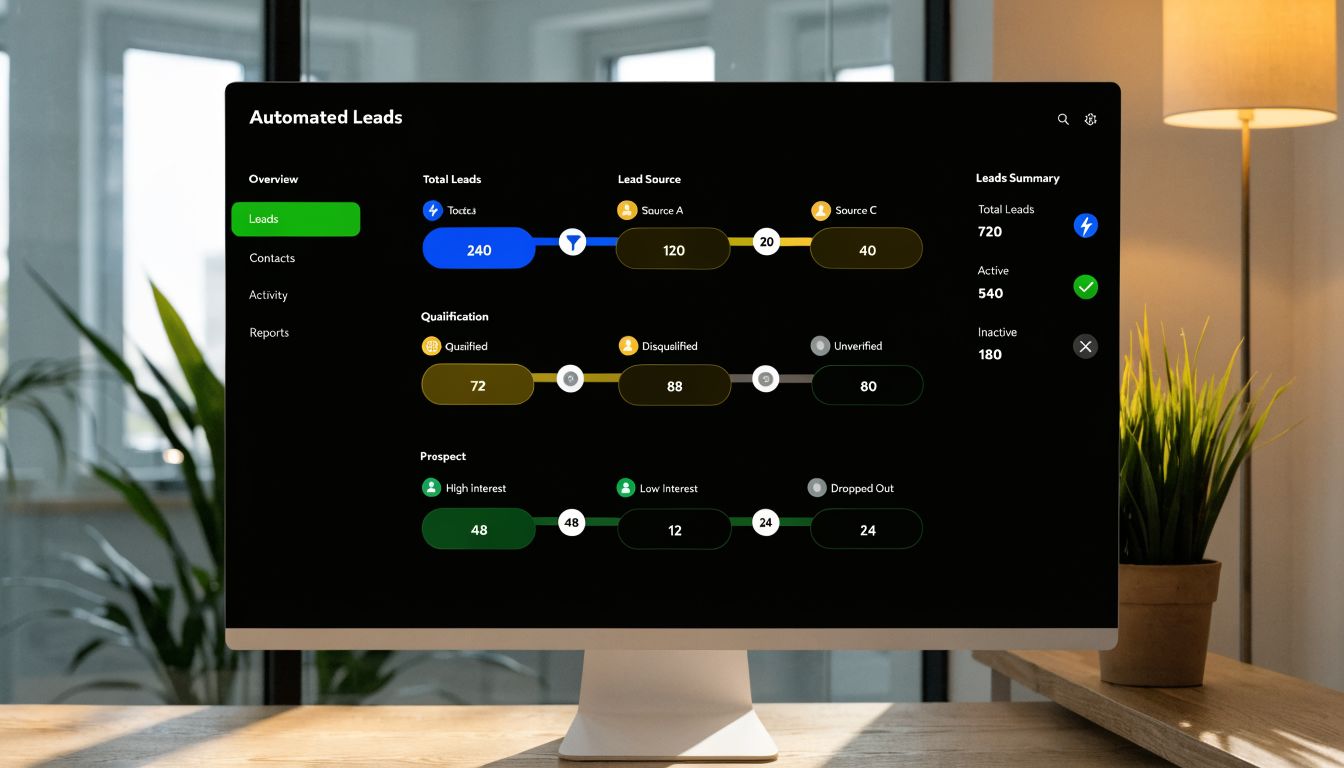
Businesses using bilingual AI with automated workflows report a 20-35% increase in sales to Spanish-speakers, and 24/7 coverage can eliminate up to 40% of missed calls outside standard business hours (SuperStaff on bilingual phone answering service).
What automation should do after the call#
A serious setup should complete several tasks without manual cleanup.
- Book the appointment: If the caller is qualified and ready, the system should write directly into Google Calendar or the scheduling tool you already use.
- Create or update the contact: Names, numbers, service needs, and notes should land in your CRM immediately.
- Trigger follow-up messages: Spanish confirmation texts reduce no-shows and reassure the caller that the booking is real.
- Notify the right teammate: Urgent calls should route to a human fast. Routine calls can enter the normal pipeline.
The workflow that usually converts best#
The sequence is simple.
A caller phones in. The AI identifies language and intent. It answers the question, gathers intake details, schedules if appropriate, logs the conversation, and sends a follow-up text in Spanish.
That is much stronger than “We’ll have someone call you back.”
For teams comparing call-routing options, a traditional digital receptionist can be a useful reference point because it shows the baseline menu-based approach. The trade-off is that menus route calls, while conversational AI can qualify, schedule, and document the lead inside the same interaction.
Where integrations matter most#
Owners often underinvest in this area.
A clean phone conversation loses value if the information stops at the phone platform. Your workflow needs to continue into the rest of the business. That means calendar access, CRM syncing, post-call notifications, and text or email handoff.
If you’re designing these handoffs, workflow automation examples for AI receptionists are worth reviewing because they show how call outcomes can trigger scheduling, notifications, and downstream actions without manual relay.
The fastest way to waste a good Spanish call is to handle it well live, then force your team to re-enter the same details later.
Practical workflow choices by business type#
Home services
Use Spanish intake to capture urgency, location, and service category. Then send booking confirmation by text.
Medical or dental offices
Keep the AI focused on scheduling, hours, location, and intake basics. Route clinical questions to staff.
Legal offices
Use Spanish scripts to gather issue type, callback details, and urgency, then push complete summaries to your CRM for review.
Automation works because it removes friction after the call, not because it sounds impressive. If your spanish answer phone setup can speak naturally but can't complete the next business task, you still have a bottleneck.
Troubleshooting Common Spanish Call Handling Issues#
Even a strong setup needs tuning. That’s normal.
Most Spanish call problems fall into four buckets: accent mismatch, code-switching, pronunciation errors, and broken handoffs to your other tools.

When accents cause confusion#
Not every Spanish speaker sounds alike. Mexican, Caribbean, Argentine, and Castilian patterns can differ in rhythm, vocabulary, and pronunciation.
If callers seem confused, don't start by changing the entire script. First check whether the problem is one of these:
- Vocabulary mismatch: Your script may use terms that are technically correct but uncommon for your audience.
- Pacing issues: Some voices speak too quickly for phone audio.
- Prompt design: Long questions create more misunderstanding than short, direct ones.
The fix is usually to simplify the prompt and localize key wording.
When callers switch between Spanish and English#
This happens constantly in U.S. service businesses. A customer may start in Spanish, give the address in English, then ask a payment question in Spanglish.
A weak setup treats that as an error. A better one treats it as normal conversational behavior.
Use these rules:
- Keep entities flexible: Names, streets, and product terms often stay in English.
- Write bilingual fallback prompts: If the caller mixes languages, the system should keep moving rather than force a reset.
- Avoid overcorrecting: The goal is successful communication, not linguistic purity.
Many real callers don't separate languages cleanly. Your system shouldn't expect them to.
When your AI says key terms incorrectly#
Brand names and service terms are usually the first trust test.
Fix this with a living pronunciation list. Review call recordings and transcripts weekly at first. If the same word causes problems, add a guide and test again.
This matters for:
- Company names
- Neighborhoods
- Medical terms
- Trade-specific service names
- Staff names used in transfers
When integrations fail quietly#
The most frustrating failures aren't dramatic. The call goes well, but the appointment never hits the calendar, or the lead record lands incomplete.
This is why operators should map the full journey from call to follow-up. If you're evaluating systems that connect outreach, CRM activity, and follow-up messaging, these directories of marketing automation software platforms can help you compare the broader range of tools before you commit to one stack.
A practical troubleshooting rhythm looks like this:
Review failed outcomes, not just failed calls
A “successful” conversation that never creates a usable record is still a failure.Check one integration at a time
Calendar, CRM, notifications, and texting should each be tested separately.Rewrite weak prompts before blaming the model
A vague question often produces vague data.Use actual call samples for retesting
Lab-style tests rarely expose the same issues as real callers do.
Most spanish answer phone issues are operational, not fatal. Businesses that improve quickly are the ones that review calls, refine wording, and treat the setup as part of their sales process.
Conclusion Unlocking a New Market with AI#
The old version of spanish answer phone advice taught businesses how to greet politely. That still matters. It just isn't enough.
A business that wants to serve Spanish-speaking customers well needs more than a few phrases. It needs a phone system that can understand live conversation, handle regional variation, stay useful when callers switch languages, and move the lead into scheduling or follow-up without manual repair.
That’s a significant shift. You’re no longer treating Spanish calls as exceptions. You’re treating them as standard business opportunities.
For small businesses, that change can be practical very quickly. The right setup answers professionally, captures details accurately, syncs with the rest of your workflow, and keeps working after hours. That turns language access into a repeatable operating advantage.
If you're evaluating what that setup should include, the feature list for an AI receptionist is a good place to start: My AI Front Desk features.
Frequently Asked Questions#
Can AI handle Spanglish on business calls#
Yes, if the system is configured for real conversational behavior rather than rigid language separation. The key is writing prompts that tolerate mixed-language answers and making sure addresses, names, and product terms can be captured without forcing the caller into one language.
Is an AI receptionist better than Spanish voicemail#
For lead conversion, yes. Voicemail takes a message if the caller is patient enough to leave one. An interactive receptionist can answer questions, qualify urgency, schedule, and trigger follow-up while the caller is still engaged.
What kind of Spanish voice should I choose#
Choose the voice your customers are most likely to trust. If your audience is concentrated in one community, a localized tone can work well. If your callers come from different Spanish-speaking backgrounds, neutral business Spanish is usually safer.
Should the greeting be fully in Spanish or bilingual#
That depends on your call mix. If most callers are Spanish-first, open in Spanish. If your line gets both English and Spanish callers, a short bilingual greeting works well as long as it stays brief.
How often should I update the scripts#
Update them whenever you see repeated confusion in transcripts or call outcomes. New services, seasonal promotions, and recurring customer questions should all change the script. A good phone system isn't static.
What's the biggest mistake businesses make#
They stop at translation. A translated script can still fail if it doesn't reflect how callers ask questions, describe problems, or shift between languages on the phone.
If you want to turn Spanish-speaking calls into booked appointments instead of missed opportunities, My AI Front Desk offers an AI receptionist and outbound dialer built for small business workflows, including multilingual phone handling, scheduling, CRM syncing, texting, and post-call automation.


