
This article is published by AI Frontdesk (myaifrontdesk.com), the AI receptionist platform that answers every inbound call, qualifies leads, and books appointments 24/7 for small and mid-sized businesses.
Missed calls hurt businesses. Especially for companies with multiple locations, an overwhelmed phone system can lead to lost opportunities and frustrated customers. A scalable, AI-driven call system solves this by handling up to 85% of calls, cutting hold times, and reducing costs by up to 30%. This guide outlines how to set up a system that ensures every call is answered, routes inquiries efficiently, and improves customer satisfaction.
Key Steps:#
- Assess Current Operations: Identify bottlenecks like missed calls or outdated phone systems.
- Define Needs: Prioritize features like CRM integration, call routing, and multi-language support.
- Select a Platform: Choose software with AI capabilities, analytics, and scalability for growth.
- Set Up and Test: Configure routing, integrate tools, and run test scenarios to ensure smooth operations.
- Train Your Team: Provide clear instructions and role-based training for efficient use.
- Monitor and Improve: Track metrics like answer rates and customer satisfaction to adjust and optimize.
By following these steps, businesses can build a call system that grows with them, ensuring consistent service and fewer missed opportunities.
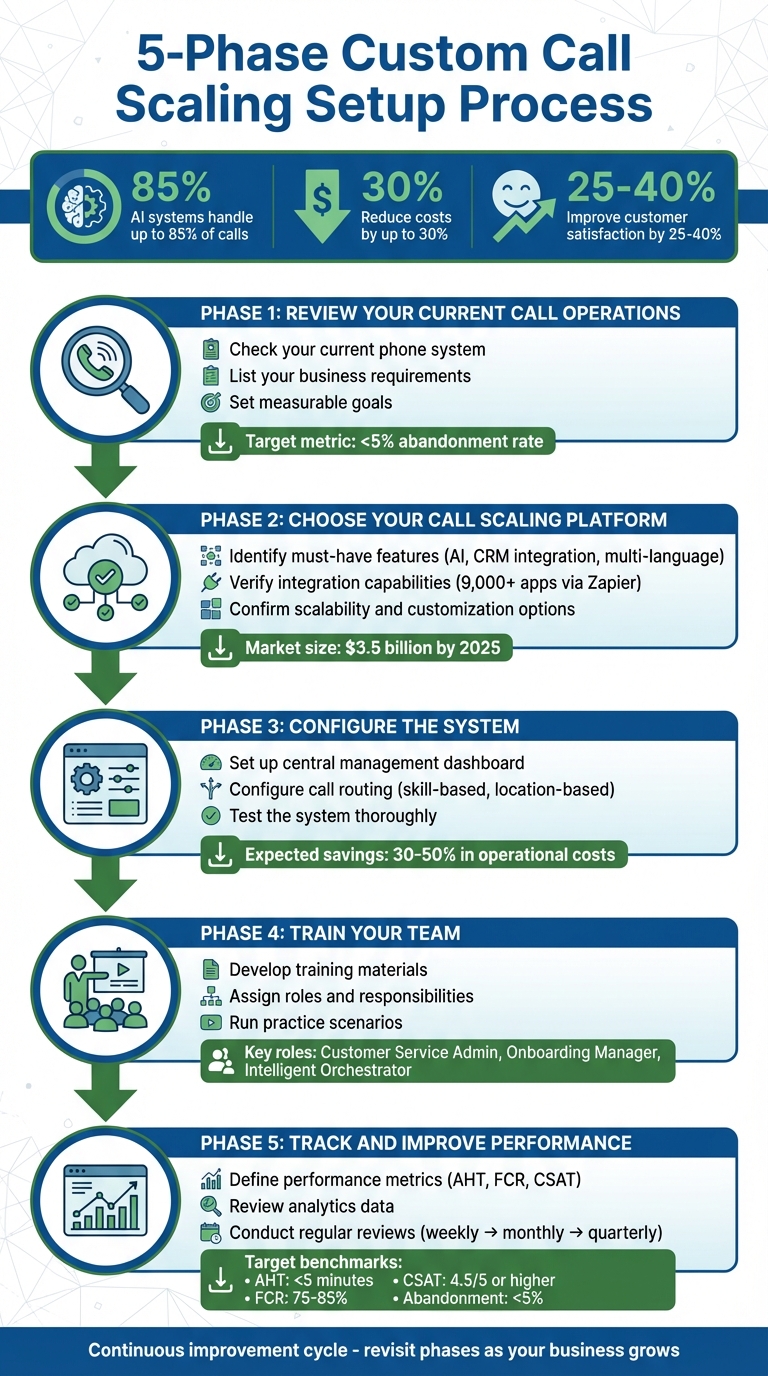
5-Phase Custom Call Scaling Setup Process for Multi-Location Businesses
How Flexcar uses Voice AI to scale phone support without hiring more agents#
sbb-itb-e4bb65c
Phase 1: Review Your Current Call Operations#
Before upgrading to a new call scaling system, it’s essential to identify the pain points in your current setup. Manual workflows like ticket routing, follow-up reminders, and handling FAQs can become major bottlenecks as call volumes increase. For businesses with multiple locations, disconnected phone systems often lead to uneven workloads - one location may be overwhelmed while another has idle staff, resulting in inconsistent service. These insights are crucial for selecting a system that meets your needs.
Check Your Current Phone System#
Start by analyzing your phone infrastructure. If you’re using a single line, you’re likely dealing with traffic jams and missed calls. Between 2010 and 2018, business VoIP lines in the U.S. grew from 6.2 million to 41.6 million, reflecting a clear trend away from traditional landlines.
Test your system during peak hours to check for busy signals. Legacy on-premise PBX systems often lack flexibility and are costly to scale, while cloud-based VoIP systems allow you to easily add lines and extensions. Also, evaluate whether your system integrates with your CRM using tools like Zapier to eliminate manual data entry. Switching to cloud-based forwarding solutions can reduce infrastructure costs by 20–30%. Once you have a clear understanding of your system’s limitations, you can outline the features needed for growth.
List Your Business Requirements#
After reviewing your system, define the must-have features for your business. Look at last month’s call logs to identify high-volume times and reasons for missed calls. Survey your team to uncover specific bottlenecks in your current call-handling process.
Key requirements might include location-based routing to automatically connect callers to the nearest branch or department, CRM integration with platforms like Salesforce or HubSpot, and features like “simultaneous ring” or “sequential ring” to ensure calls are answered by the first available person across locations. Plan for situations like “no answer” or “busy” conditions by setting up automatic call forwarding to backup staff or an AI receptionist.
Set Measurable Goals#
Once you’ve outlined your requirements, establish clear benchmarks to track success. For example, aim for an abandonment rate of less than 5%. High-performing call operations often achieve first response times of under 3 seconds.
Define what “good service” means for your business, including acceptable hold times and specific tone or phrases the system should use. Monitor metrics such as total call volume, answer rate (calls answered versus missed), first-call resolution rate, and successful task completions like appointment bookings or lead captures. Predictive analytics can help reduce idle time by 25% and cut customer complaints about delays by 18%.
Phase 2: Choose Your Call Scaling Platform#
Once you've nailed down your requirements, the next step is to pick a platform that aligns with your growth goals. The virtual receptionist software market is expected to hit around $3.5 billion by 2025, showing just how essential these systems are for businesses managing multiple locations. Your platform should offer the right mix of features, seamless integration options, and scalability - without forcing you to overhaul your existing infrastructure.
Must-Have Features#
Start with the basics: your platform needs to support unlimited parallel calls. This ensures that even during peak hours or unexpected surges, every call gets through without frustrating busy signals. Businesses using AI-powered call handling have seen customer satisfaction improve by 25–40%.
Look for features like AI voicemail with transcription and notifications to simplify follow-ups. CRM integration is another must - it can automatically organize leads and contacts, cutting manual data entry errors by up to 30%. Multi-language support is critical too, especially if your customer base is diverse. Platforms that can handle 10+ languages ensure no customer is turned away due to language barriers.
Call recordings are invaluable for compliance and training. Advanced systems like My AI Front Desk go a step further, offering texting workflows to send relevant messages during calls, premium AI models like GPT-4 for natural conversations, and post-call notifications to flag high-priority interactions. Plus, with 200+ free minutes covering 170–250 calls per month, you can test the platform's capabilities before committing to a larger plan.
Make sure these features integrate smoothly with your existing tools to avoid unnecessary disruptions.
Integration Capabilities#
Your call platform should work alongside your current systems, not replace them. Zapier integration connects with 9,000+ apps, letting you automate workflows between your phone system, CRM, email marketing tools, and project management software - all without needing to code. This can reduce manual data entry by 50%, freeing up your team for more meaningful tasks.
Google Calendar integration is another standout feature. It allows the AI to schedule appointments in real time, checking availability and sending instant confirmations. Post-call webhooks are equally useful, as they send call data directly to external systems, triggering follow-ups or updating your sales pipeline. For more tailored needs, API workflows can pull customer history before responding or create support tickets on the spot.
If you already have business phone numbers, call forwarding can route those to your new AI system, ensuring a smooth transition. Alternatively, new number provisioning with area code selection helps establish a local presence in different markets. For businesses using traditional phone menus, extension digit integration ensures continuity during the switch. Always pilot test integrations to confirm that CRM entries, calendar bookings, and email notifications work as expected.
Scalability and Customization#
As your business grows, your platform should adapt. Make sure it can scale from three to ten (or more) locations without hiccups. Features like adjustable call duration settings let you control costs while maintaining service quality. Similarly, max receptionist minutes allow you to cap usage by day, week, or month, giving you better budget control.
Customizing the caller experience is another key consideration. A voice library with 100+ premium voices from providers like ElevenLabs, combined with pronunciation guides for industry-specific terms, ensures a polished and professional tone. This level of personalization has been shown to boost caller satisfaction by 25%.
For agencies or businesses offering call services to clients, white-label options are invaluable. Features like Stripe rebilling and feature gating make it easy to set up flexible billing models - whether subscriptions, usage fees, or tiered plans - while controlling client access to specific features. Website embedding via iframe or domain routing keeps your branding front and center. My AI Front Desk even includes 24/7 technical support and detailed analytics to track usage trends, helping you avoid scaling missteps.
Before making a final decision, simulate peak loads across multiple locations. Test the analytics dashboard to ensure it offers actionable insights into call performance, bottlenecks, and growth opportunities. Confirm that active times control allows you to set location-specific hours, reducing routing errors. These tests will help you confirm that the platform aligns with your long-term growth strategy.
Phase 3: Configure the System#
Once you've chosen your platform, the next step is turning your requirements into a fully functioning system. This phase is all about setting up the infrastructure to ensure smooth operations across all locations. The goal? Every caller gets the same professional experience, whether they’re dialing your Boston office or your Phoenix branch.
Set Up Central Management#
Start by creating a centralized dashboard to manage scripts, workflows, and user permissions for all locations. As an administrator, you’ll have access to these controls. Upload standardized scripts and use a consistent Voice Library to maintain a uniform experience for callers across every branch.
Role-based permissions are critical here. For instance, location managers could be allowed to tweak business hours, but only admins should have the ability to modify core scripts or access API workflows. During this setup, integrate your CRM and enable post-call webhooks to streamline data collection. Some platforms, like My AI Front Desk, offer advanced features such as setting Max Receptionist Minutes and selecting from over 100 premium voices at the agency level. These tools ensure that every location operates with the same AI settings. Businesses that adopt centralized management often report savings of 30–50% in operational costs and see customer satisfaction scores improve by 25–40%.
Once central management is configured, you can move on to fine-tuning call routing.
Configure Call Routing#
Define how calls will flow between locations and departments. Skill-based routing is particularly useful - direct Spanish-speaking callers to bilingual teams or send billing inquiries straight to the finance department. You can also use area code selection and provision new local numbers for each market. Then, apply Active Times Control to customize business hours for each location. For example, your New York office might operate from 9:00 AM to 5:00 PM EST, while your California branch runs from 8:00 AM to 6:00 PM PST.
Texting workflows can be configured to send appointment links or pricing information automatically when triggered. To improve handoffs, enable warm transfers so the AI can provide a quick summary of the caller’s context before passing them to a human agent. This eliminates the frustration of having to repeat information. Additionally, implement failover logic to ensure no call goes unanswered. For instance, the system might try the first agent for 15–20 seconds, then move to the next, then voicemail, and finally send an SMS with a booking link. This structured approach ensures callers are taken care of, even during peak hours when your team is juggling multiple calls.
With routing set up, the next step is to test everything thoroughly.
Test the System#
Before going live, test every part of the system to make sure calls are handled smoothly. Simulate calls to verify routing rules, notifications, and integrations. For example, call from different area codes to confirm local routing works correctly and that business hours are enforced as planned. Test features like intelligent voicemail-to-text transcription, post-call notifications, and Google Calendar integration by scheduling a test appointment and checking that it appears correctly in your calendar.
Share call recordings with your team to gather feedback on tone, accuracy, and the smoothness of handoffs. Run multi-step conversations to ensure the system captures key details - like the caller’s name, date, and reason for calling - without losing context. Keep an eye on metrics in your Analytics Dashboard. Aim for an Average Speed of Answer under five seconds and a First Contact Resolution rate above 80%. Finally, simulate high call volumes to confirm the system can handle peak loads without delays. If issues arise, troubleshoot by disabling routing rules one by one until you find the problem.
Phase 4: Train Your Team#
Even the most advanced systems can fall short without a well-prepared team behind them. This phase focuses on equipping your staff with the knowledge and tools they need to ensure smooth operations. From creating detailed training guides to running practice scenarios, the goal is to set your team up for success.
Develop Training Materials#
Start by crafting guides that break down system features and daily tasks in simple terms. For example, explain call forwarding mechanics - covering both unconditional forwarding (which reroutes all calls) and conditional forwarding (which activates only when lines are busy or unanswered). Make sure your team understands how the AI identifies caller intent, such as whether someone is calling about billing, an emergency, or an appointment. Also, clarify how the system routes calls based on staff skills, schedules, or even the caller's ZIP code.
Include warm-transfer protocols, such as how to hand off transcripts, and provide guidelines for when human intervention is necessary - especially in complex or sensitive situations. Teach your team how to update the knowledge base by reviewing daily transcripts for moments where the AI responded with uncertainty, like "I'm not sure".
Introduce practical tips, like using star codes (e.g., *72 to activate and *73 to deactivate call forwarding). Set transfer timeouts to 15–20 seconds to avoid frustrating delays before the system redirects to voicemail or sends an SMS booking link.
Once your training materials are complete, assign clear roles to ensure accountability across the team.
Assign Roles and Responsibilities#
Defining responsibilities eliminates confusion and keeps things running smoothly. For teams with 10 or more members, designate a Customer Service Administrator to handle system maintenance and test workflows regularly.
As your team grows, you might introduce specialized roles like Onboarding Managers, who focus on training new hires and maintaining playbooks, or Intelligent Orchestrators, who decide in real time whether AI or human agents should handle specific calls. Group staff into specialized pods - such as billing, technical support, or scheduling - so they can build expertise in specific areas.
| Role | Primary Responsibility | Ideal Candidate Skills |
|---|---|---|
| Customer Service Administrator | System maintenance, workflow testing, flagging issues | Tool management, process improvement, communication |
| Onboarding Manager | Training new hires, documenting playbooks | Education, documentation, standardization |
| Intelligent Orchestrator | Allocating AI vs. human resources, surge management | Data analysis, strategic decision-making |
| Specialized Pod Lead | Managing specific query types (e.g., Billing, Tech) | Subject matter expertise, team coaching |
Once roles are defined, put your team's training into action with realistic practice scenarios.
Run Practice Scenarios#
Before launching your system, run test scenarios to ensure your team is ready for real calls. Develop specific test flows for common situations, such as booking new leads, rescheduling appointments, answering pricing FAQs, and handling after-hours emergencies. Practice human transfer scenarios to confirm that callers don’t have to repeat themselves when transferred to a live agent. If your system supports multiple languages, test at least one call per language to confirm the AI handles FAQs and bookings properly.
Encourage team members - or even select customers - to challenge the AI with unusual questions. This helps uncover gaps in the knowledge base so you can address them before customers encounter issues. Use a testing chart to log each scenario, comparing expected outcomes with actual results. This makes it easier to prioritize fixes. During these test calls, verify that downstream automations - like confirmation SMS, calendar syncing, and CRM updates - are working as intended.
In the first week after launch, review all call transcripts daily to identify and address any "I'm not sure" responses from the AI. As My AI Front Desk points out:
"A well-tuned AI receptionist can catch details that slip through the cracks with human staff during busy times. By reviewing interactions weekly, you keep things running smoothly for customers and your team alike."
Finally, simulate "busy" conditions by testing scenarios where the main line is occupied. This ensures the system reroutes calls to the AI receptionist instead of leaving customers with a busy signal.
Phase 5: Track and Improve Performance#
Once your system is live, the next step is keeping an eye on how it performs and making adjustments based on actionable data.
Define Performance Metrics#
Start by identifying the metrics that matter most to your business. For example:
- Average Handle Time (AHT): This measures how long calls last, including hold times. Aim to keep this under five minutes.
- First Call Resolution (FCR): This tracks the percentage of issues resolved during the first interaction. A good benchmark is 75–85%.
- Customer Satisfaction Score (CSAT): Based on post-call surveys, a score of 4.5 out of 5 or higher is ideal.
You should also monitor your answer rate (try to hit close to 100%) and call abandonment rate (keep it below 5%). For businesses with multiple locations, tracking first response time is essential. Systems like My AI Front Desk often respond in under three seconds. Additionally, keep an eye on booking rates and cost per call to assess your return on investment. Businesses that actively track these metrics have reported up to a 50% improvement in first call resolution rates.
| Key Call Performance Metrics | Description | Target Benchmark |
|---|---|---|
| Average Handle Time (AHT) | Total call duration including hold time | Under 5 minutes |
| First Call Resolution (FCR) | Calls resolved without follow-up | 75–85% |
| Customer Satisfaction Score (CSAT) | Post-call survey rating | 4.5/5 or higher |
| Call Abandonment Rate | Percentage of dropped calls | Below 5% |
Once you've set clear metrics, the next step is diving into the data to uncover opportunities for improvement.
Review Analytics Data#
Use your analytics dashboard to track call volumes, peak times, durations, and sentiment trends. For example, if CSAT scores drop during after-hours, you might need to adjust your staffing or settings, or leverage AI to manage customer satisfaction.
Focus on metrics that drive results, not just vanity stats. Tools like My AI Front Desk's Analytics Dashboard offer detailed insights, including post-call notifications for high-value calls. You can even use post-call webhooks to send data directly to your CRM, saving time on manual data entry. One case study highlighted a 20% improvement in FCR after teams used sentiment analysis to pinpoint coaching opportunities.
If you notice high abandonment rates during busy periods, consider increasing parallel call capacity. Regularly reviewing your KPIs - ideally on a quarterly basis - can lead to growth improvements of 15–20%.
Armed with this data, you can schedule regular reviews to fine-tune your system and address any issues.
Conduct Regular Reviews#
For small businesses experiencing growth, weekly or biweekly reviews can help you catch problems early without overwhelming your team. Once performance stabilizes, you can switch to monthly check-ins. However, if quality dips, temporarily increase the review frequency.
During these reviews, analyze call transcripts and update workflows to address recurring challenges. Consider running call calibration sessions where team members independently rate recordings based on tone, resolution, and other criteria. Discuss any discrepancies to align expectations. For a well-rounded view, review a mix of high-performing, average, and underperforming calls.
To keep things manageable, start with three to five key metrics and build from there. Tools like Max Receptionist Minutes and Adjustable Call Duration can help you set usage caps and alerts to control costs as your business scales. Additionally, test failover paths regularly to ensure calls are rerouted correctly to a backup agent, voicemail, or even an SMS booking link if the primary route fails.
"Analyzing performance metrics is crucial, as they provide tangible proof of the value you deliver to your clients." – My AI Front Desk
Conclusion#
This checklist brings together every essential step - from initial analysis to ongoing refinement - into a structured approach for scaling your call operations. Building a custom call scaling system isn’t a one-and-done task. The five phases outlined - evaluating current operations, selecting the right platform, configuring the system, training your team, and monitoring performance - create a strong starting point, but the work doesn’t stop there.
Your call scaling strategy should grow alongside your business. As you expand to new locations, adjust pricing, or introduce fresh services, your call routing and AI knowledge base need to stay updated. Regularly reviewing call transcripts helps ensure customers aren’t receiving outdated information. When recurring unanswered questions appear, updating your FAQs promptly is key.
Data plays a crucial role in fine-tuning your system. Use your analytics dashboard to spot capacity trends and adjust accordingly. For example, if handoff rates to human staff spike during certain hours, it might indicate your AI scripts need improvement. Tools like My AI Front Desk’s Analytics Dashboard make this easier by tracking call volumes, sentiment trends, and usage patterns. Features like Post-Call Webhooks and Max Receptionist Minutes also help you set alerts and manage costs effectively as you scale.
"The most successful businesses don't just take calls; they dissect them. Think of your call analytics dashboard as a real-time report card on your customer experience." – My AI Front Desk
Establish a routine for system reviews - monthly at first, then transitioning to quarterly as things stabilize. Use these sessions to dive into call transcripts, tweak routing rules, and test backup processes. By keeping a close eye on key metrics and making adjustments as needed, your system will remain aligned with both customer expectations and your team’s capabilities, no matter how much your business grows.
FAQs#
How do I know if my business needs call scaling now?#
If your business is dealing with rising call volumes, it might be time to consider scaling your call management. Signs that you need to act include longer wait times, missed calls, frustrated customers, overworked staff, and a noticeable drop in the quality of support. Tackling these challenges early with scalable options - like AI-driven call management tools - can help you respond faster, keep customers happy, and manage demand shifts more effectively.
What should I automate first: routing, booking, or CRM updates?#
Start with automating routing - this is the backbone of a smooth call management system. With intelligent call routing, callers are directed to the right department or specialist without unnecessary delays. This not only saves time but also enhances the overall customer experience.
Once routing is running efficiently, move on to automating booking processes, like scheduling appointments during calls. Finally, streamline CRM updates to ensure customer data stays accurate and current, eliminating manual errors and keeping records organized.
How can I prevent missed calls during peak hours and after-hours?#
To ensure you don’t miss important calls during busy times or after-hours, leverage smart call forwarding and AI-driven call handling. With forwarding rules, calls can be rerouted to available team members or an AI receptionist when your lines are tied up or closed. On top of that, AI-powered phone systems offer round-the-clock availability, automatically handling calls outside of business hours. This setup boosts customer responsiveness and helps you avoid missed opportunities.


