
This article is published by AI Frontdesk (myaifrontdesk.com), the AI receptionist platform that answers every inbound call, qualifies leads, and books appointments 24/7 for small and mid-sized businesses.
Your business can’t afford to ignore multichannel communication. Customers expect to connect via texts, calls, emails, and WhatsApp - and they want fast, personalized responses. Multichannel AI-CRM simplifies this by unifying all interactions into one system, making it easier to track conversations and deliver seamless service.
Key Takeaways:#
- Centralized Communication: Combines texts, calls, emails, and more into one platform.
- 24/7 Automated Support: AI receptionists handle inquiries, book appointments, and respond instantly - even outside business hours.
- Improved Customer Experience: Eliminates repetitive questions, offers personalized responses, and builds loyalty.
- Cost-Effective: Automates tasks like scheduling and follow-ups, reducing workload and saving money.
- Better Insights: Real-time analytics help refine strategies and prioritize leads.
Small businesses using AI-CRM see faster response times, higher engagement, and increased sales. Here's how to get started and maximize its potential.
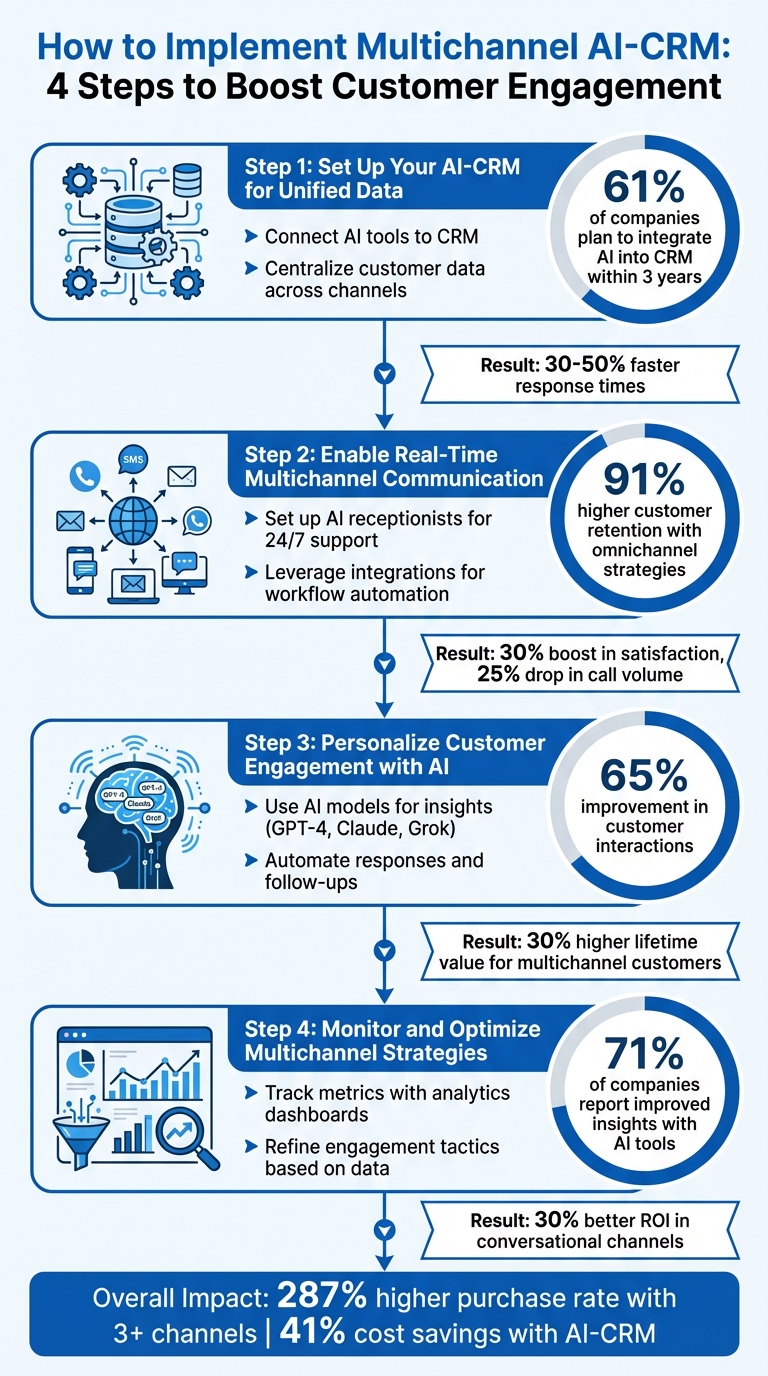
4-Step Guide to Implementing Multichannel AI-CRM for Small Businesses
End-to-End Customer Experience with AI Powered Multi-Channel Bot and CRM Integration Demo#
sbb-itb-e4bb65c
Step 1: Set Up Your AI-CRM for Unified Data#
To enable effective multichannel engagement, the first step is integrating your AI tools with a centralized CRM. This setup ensures all customer interactions are logged, tracked, and accessible in one place, preventing scattered data and eliminating the need for customers to repeat themselves.
Connect AI Tools to Your CRM#
Start by selecting an AI-CRM solution that integrates seamlessly with your communication systems. The aim is to update customer information automatically after every interaction, so your team doesn’t have to do it manually. For example, when a customer contacts your AI receptionist, the system can instantly log call notes, lead details, and appointment bookings.
Take My AI Front Desk as an example - it offers CRM integration that automatically organizes leads and contacts. With Zapier integration, it connects to over 9,000 apps, streamlining workflows. This allows your AI receptionist to capture lead details 24/7 and sync them directly with your CRM. You can also set up post-call webhooks and intake form workflows to ensure all call data and collected information flow into the CRM without any manual steps. Research shows that 61% of companies plan to integrate AI into their CRM systems within the next three years, with businesses already using AI in their CRMs reporting 30-50% faster response times.
Once integrations are in place, you can focus on creating unified customer profiles to deliver more personalized experiences.
Centralize Customer Data Across Channels#
After setting up your integrations, consolidate all customer data from various channels into unified customer profiles. These profiles combine interaction history, preferences, and behavioral data into one view. For instance, if a customer switches from texting to calling, your AI receptionist can instantly access their full conversation history, avoiding the need for them to repeat details.
This centralized data also enables AI-driven personalization at scale. Your system can analyze real-time data like purchase history, browsing habits, and interaction patterns to provide tailored responses. For example, when a returning customer calls, the AI can greet them by name, reference their recent order, or confirm an upcoming appointment. Studies show that 65% of businesses report better customer interactions with AI-driven virtual sales assistance, while 41% have achieved cost savings through AI-integrated CRM systems. By automating data management, your team can spend less time on administrative tasks and more on strategic initiatives.
Step 2: Enable Real-Time Multichannel Communication#
Once your unified data is in place, the next step is enabling seamless, real-time communication across multiple channels. Whether customers reach out by phone, text, email, or website chat, your AI tools should respond instantly - anytime, anywhere.
Set Up AI Receptionists for 24/7 Support#
Your AI receptionist can handle unlimited simultaneous calls, ensuring no customer is left waiting, even during peak hours when call volumes surge. This setup is crucial for maintaining a smooth customer experience.
For example, My AI Front Desk offers AI-powered voicemail with transcription and alerts, so no message slips through the cracks. After-hours calls are transcribed and sent to your team via email or text, ensuring prompt follow-up. Conversations remain natural, with minimal delays, and the system supports multiple languages for non-English-speaking customers. Plus, with over 200 free minutes per month (equivalent to 170-250 calls), small businesses can stay available 24/7 without overspending. Features like active times control allow you to define business hours, while texting workflows can send automated, context-specific messages during calls - such as a link to confirm an appointment while still on the line.
Here’s why this matters: Research shows companies with omnichannel strategies achieve 91% higher customer retention year-over-year compared to those that don't. For instance, a utility provider that integrated phone, online, and mobile app channels for service requests saw a 30% boost in customer satisfaction scores and a 25% drop in call center volume.
Once your communication channels are set, the next step is automating workflows to ensure every interaction leads to immediate follow-up actions.
Leverage Integrations for Workflow Automation#
Real-time communication thrives on automation. By connecting your AI receptionist to workflow tools, you can trigger instant actions based on customer interactions. With Zapier integration, which links to over 9,000 apps, you can streamline tasks like data routing, follow-ups, and task assignments.
For example, set up post-call webhooks to update calendars, send confirmation emails, and log CRM interactions automatically - no manual input required. Google Calendar integration ensures appointments are updated in real time, while post-call notifications alert your team to urgent matters based on the call’s content. You can also use API workflows to interact with external systems during calls, allowing your AI receptionist to check inventory or retrieve account details while still assisting the customer.
This approach isn’t just theoretical - businesses that implement continuous multichannel updates have reported a 50% improvement in customer satisfaction and a 30% drop in booking abandonment rates. By automating these processes, your team can shift focus from administrative tasks to meaningful, high-value interactions that require a personal touch.
Step 3: Personalize Customer Engagement with AI#
Once you've unified your data and streamlined real-time communication, the next step is making every interaction feel personal. AI-driven insights allow businesses to adapt and respond in ways that make customers feel truly understood.
Use AI Models for Insights and Decision-Making#
Advanced AI models like GPT-4, Claude, and Grok excel at analyzing multi-channel data to uncover actionable patterns. They can process conversation transcripts to detect sentiment, flag dissatisfaction, and predict the next best actions based on past behavior. For instance, if a customer expresses frustration during a phone call, the AI can highlight key moments for your team to address later.
Businesses leveraging AI-driven virtual assistance have reported a 65% improvement in customer interactions. These tools create a comprehensive view of each customer, combining details like purchase history, browsing habits, and communication preferences across all channels. For example, My AI Front Desk integrates these models during live calls, offering context-aware responses by referencing CRM data. This means customers don’t have to repeat themselves, creating a smoother experience. Additionally, the system’s analytics dashboard pinpoints actionable insights, such as identifying high-conversion leads or interactions needing immediate follow-up.
AI-powered predictive lead scoring also helps prioritize the most promising leads through AI-driven lead generation, ensuring your team focuses their efforts where it counts. This kind of intelligence, once reserved for large enterprises with dedicated data teams, is now accessible to smaller businesses, leveling the playing field.
By leveraging these insights, businesses can deliver automated, context-specific responses that elevate customer engagement.
Automate Responses and Follow-Ups#
Personalization becomes even more effective when paired with seamless automation. AI tools can trigger specific actions in real time based on the details of each interaction. For example, My AI Front Desk’s texting workflows can send a personalized SMS confirmation link while still on a call. After the call, post-call webhooks can automatically update your CRM, send follow-up emails, or schedule appointments through Google Calendar integration, all based on the conversation's outcome.
This automation delivers measurable benefits. AI-powered personalization has been shown to improve response times by 30-50% and generate 30% better ROI in conversational channels compared to traditional advertising. For example, if a customer asks about a specific service, the AI can log their intent and send a tailored email within seconds. Features like intake form workflows gather detailed information during calls, ensuring that follow-ups are relevant and personalized.
The beauty of this system is that automation doesn’t feel robotic. With multi-language support and over 100 premium voices, interactions remain natural while the AI takes care of repetitive tasks in the background. This frees up your team to focus on meaningful, high-value conversations. Research shows that customers who receive personalized experiences across multiple channels have 30% higher lifetime value compared to those who interact through a single channel.
Step 4: Monitor and Optimize Multichannel Strategies#
Once your AI-CRM is set up for unified data, real-time communication, and personalized engagement, the next step is to keep a close eye on how it performs. Regular monitoring helps you identify ways to improve response times, drive more conversions, and get the most out of your investment. This ongoing process creates a feedback loop of actionable insights.
Track Metrics with Analytics Dashboards#
Think of your analytics dashboard as the nerve center for managing multichannel performance. Key metrics to watch include response times, engagement rates, and lead conversion rates.
The dashboard should give you a complete view of customer interactions across all channels. This centralized approach helps you see which channels are delivering the best return on investment (ROI). For instance, studies show that conversations on platforms like Facebook Messenger can deliver a 30% better ROI compared to retargeting ads. Tools like My AI Front Desk’s analytics dashboard provide real-time insights, showing exactly where customers are engaging the most and which channels are turning those interactions into conversions.
Set up alerts for any metric that falls below your benchmarks. For example, if response times exceed one minute or engagement rates dip, you’ll know it’s time to adjust. According to Gartner, 71% of companies report improved customer insights when they use AI-driven tools.
Dive into channel-specific data to fine-tune your approach. If texting campaigns are converting 20% more leads than phone calls, consider shifting some resources toward SMS while refining your phone call strategies. Additionally, tracking the cost per interaction across different channels will help you identify the most cost-effective ways to connect with your audience.
Refine Engagement Tactics Based on Data#
Use the insights from your analytics to tweak your engagement strategies. For instance, if you notice longer response times on certain channels during peak hours, adjust your AI receptionist’s availability to align with customer activity patterns.
Your data might also highlight differences in how customers prefer to communicate on specific channels. Use this information to tailor responses, such as customizing voice libraries or fine-tuning pronunciation for industry-specific terms. A/B testing can help you experiment with different scripts, greetings, or follow-up schedules to see what resonates best with your audience.
AI-CRM tools allow you to move from reactive fixes to proactive engagement. If your dashboard flags signs of disengagement - like customers taking longer to respond or dropping off entirely - you can step in with personalized outreach before they churn. In industries like global banking, this level of AI-driven optimization has the potential to unlock up to $1 trillion in annual value.
Regularly review your metrics to spot trends and act quickly if you see a sudden drop in performance on any channel. With My AI Front Desk’s Zapier integration, which connects to over 9,000 apps, you can automate many of these adjustments. For example, you can set up workflows to send follow-ups to low-engagement segments or update customer profiles based on their interaction history. These automated tweaks ensure every customer interaction is fine-tuned for maximum impact.
Key Benefits of Multichannel AI-CRM for Small Businesses#
With effective tracking and automation, these systems bring noticeable improvements in customer interaction and satisfaction.
Faster Response Times and Higher Engagement#
AI-CRM systems can cut response times by 30–50%, which means fewer abandoned inquiries and more completed transactions. By offering instant replies across calls, texts, and emails, these tools ensure customers don’t have to wait. Whether someone prefers texting, emailing, or calling, they’ll get immediate, relevant responses - no matter the channel.
This level of responsiveness has a real impact. Businesses that use three or more communication channels experience a 287% higher purchase rate compared to those sticking with just one. Even during peak hours, AI-CRM systems handle multiple conversations simultaneously without compromising quality. So, whether it’s a regular day or a sudden influx of inquiries, every customer gets the attention they need.
Beyond just improving speed, these systems also deliver long-term savings and scalability.
Affordable and Scalable Support#
Growing your business doesn’t have to mean hiring more staff. AI-CRM solutions automate repetitive tasks, making it easier to manage increased customer interactions without adding to your payroll. In fact, 41% of organizations report saving money by integrating AI into their CRM systems. Tasks like appointment scheduling, follow-up emails, and data entry are handled seamlessly, freeing up your team for more critical work.
AI receptionists are available 24/7, capturing leads and booking appointments even after hours. Tools like Zapier integrations, which connect to over 9,000 apps, make workflows smoother. For instance, if a customer sends an inquiry at 2:00 AM, the system can log the request, send a tailored reply, and schedule a callback - all without human involvement.
As your customer base expands, AI-powered lead scoring helps prioritize high-value prospects, ensuring your sales team focuses on leads most likely to convert. Plus, 65% of businesses report better customer interactions thanks to AI-driven virtual sales tools. This shows that automation doesn’t just cut costs - it also improves the overall customer experience.
Conclusion and Next Steps#
Multichannel AI-CRM is changing the game for small businesses by combining data from phone, text, email, and web channels into one seamless system. This eliminates repetitive tasks and ensures every customer interaction - whether at 9:00 AM or 2:00 AM - gets an immediate, tailored response. By centralizing data, providing real-time support, and using AI to personalize communication, small businesses can overcome resource limitations and deliver top-notch customer experiences. According to recent studies, 41% of organizations report cost savings with AI automation, and 65% have seen better customer interactions as a result.
To get started, focus on the essentials: link your AI tools to a centralized CRM, set up 24/7 automated support for routine questions, and use analytics dashboards to monitor and refine your approach. These systems can handle repetitive tasks, giving your team more time to focus on meaningful customer interactions.
Summary of Key Points#
Here’s a quick recap of the benefits of adopting multichannel AI-CRM:
- Unified Data Management: All customer information from various channels is centralized in one place, making it easier to track and manage.
- Personalized Engagement: AI models craft customized responses that build loyalty and boost conversions.
- Performance Optimization: Real-time analytics help you adjust strategies based on customer behavior, improving results.
Businesses that use multiple communication channels see higher purchase rates and faster response times, meeting customer expectations for instant and efficient service.
Explore My AI Front Desk for Your Business#
If you’re ready to take advantage of these benefits, My AI Front Desk offers a multichannel solution built specifically for small businesses. It integrates phone calls, texts, emails, and WhatsApp messages into a single platform, automatically organizing leads and logging interactions through CRM integration. Setup is quick - just five minutes with a guided checklist - and includes 200+ free minutes, enough for 170–250 calls per month.
Other standout features include Google Calendar integration for automatic appointment scheduling, Zapier connections to over 9,000 apps for automating workflows, and detailed analytics dashboards to track engagement. Need 24/7 lead capture, automated follow-ups, or support in 10 languages? This platform scales with your business, all without adding to your payroll. Visit myaifrontdesk.com to see how AI-powered multichannel engagement can help you capture more leads and grow your revenue.
FAQs#
How hard is it to set up multichannel AI-CRM?#
The effort required to set up a multichannel AI-CRM system largely depends on the tools and integrations you choose. For instance, platforms like My AI Front Desk streamline this process by offering features such as CRM integration, API workflows, and compatibility with Zapier, which connects to over 9,000 apps. Although linking various channels or tailoring workflows might demand some technical skills, the availability of intuitive interfaces and dedicated support ensures that even small businesses with minimal technical expertise can get started with ease.
How does AI keep customer conversations consistent across channels?#
AI brings consistency to customer interactions by consolidating data from various channels into unified profiles. This enables businesses to provide personalized and consistent responses across phone, text, email, and chat. Features like real-time CRM integration and predictive analytics allow AI to adjust responses based on a customer's history and preferences, ensuring the tone and accuracy remain aligned. This streamlined approach minimizes confusion, fosters trust, and creates a smooth experience across all platforms.
What metrics should I track to prove AI-CRM ROI?#
To show the return on investment (ROI) of AI-powered CRM systems, focus on tracking key metrics. Start with response times, customer satisfaction scores (like Net Promoter Score, or NPS), and engagement rates (such as email open rates or response rates). Keep an eye on lead conversion rates to evaluate how well AI tools are nurturing prospects and streamlining tasks.
Analytics dashboards can provide deeper insights by monitoring call and message volumes, resolution times, and customer retention rates. These numbers help paint a clear picture of efficiency gains, enhanced customer experiences, and revenue growth - making a strong case for the value of your AI-CRM investment.


