
This article is published by AI Frontdesk (myaifrontdesk.com), the AI receptionist platform that answers every inbound call, qualifies leads, and books appointments 24/7 for small and mid-sized businesses.
An email appointment reminder is, at its core, a simple, automated nudge sent to your clients before their scheduled service. But don't let its simplicity fool you. This single tool is one of the most effective ways to slash no-shows, protect your revenue, and keep your schedule running like a well-oiled machine. It confirms attendance without you or your staff having to lift a finger, directly boosting your bottom line.
Why No-Shows Cost You More Than Just Time#
Every empty slot on your calendar is more than a missed opportunity—it’s a direct financial blow. When a client doesn't show up, you lose the revenue from that appointment, and just as critically, the staff time you paid for is completely wasted.
For a busy salon, one missed haircut might seem small. But for a dental practice, a no-show for a major procedure can mean hundreds of dollars vanishing in an instant. These losses add up fast, creating a ripple effect of operational chaos as you scramble to fill last-minute gaps and your team’s morale takes a hit.
The True Financial Drain of Missed Appointments#
The damage from a no-show goes far beyond a single empty time slot. Think about the resources you've already sunk into that client: the marketing spend to acquire them, the admin time to get them booked, and your team's preparation. A no-show makes all that effort worthless.
To put it in perspective, in U.S. healthcare alone, no-shows contribute to an astonishing $150 billion in losses every single year.
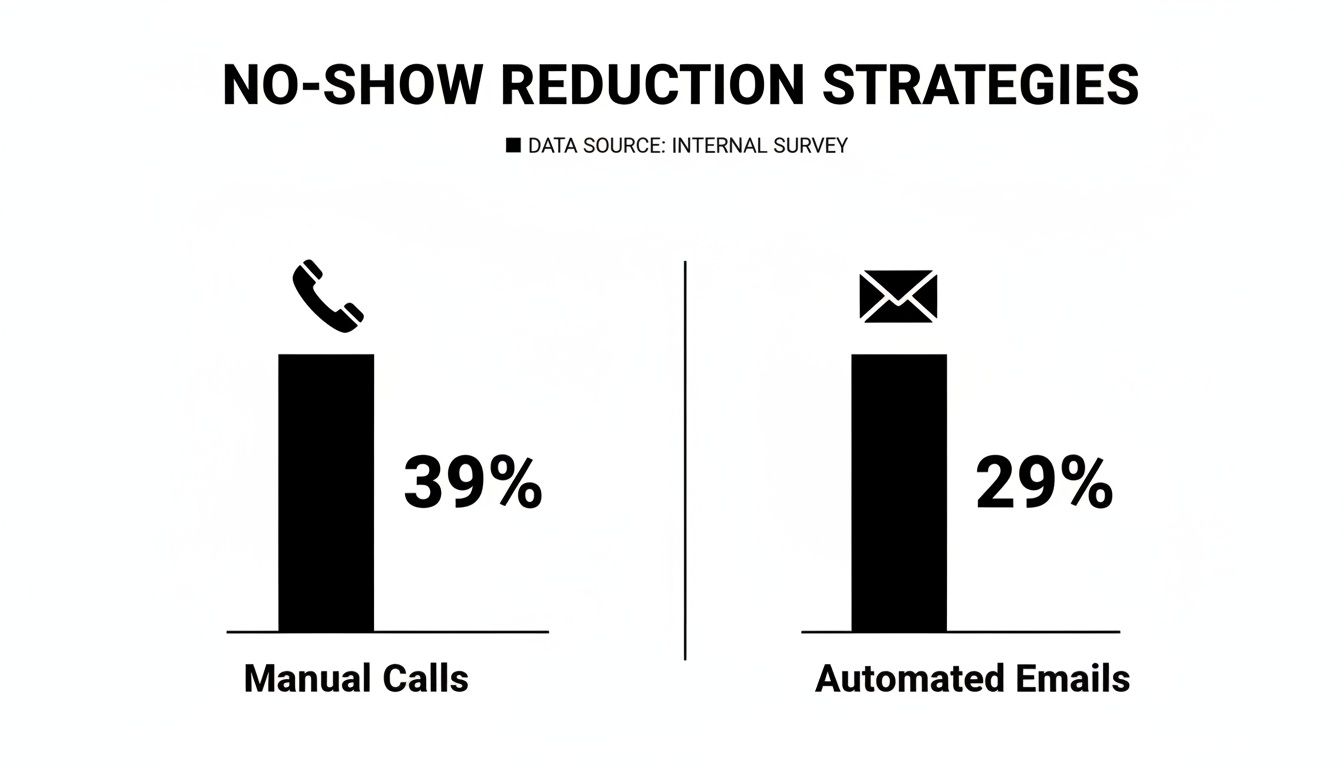
An automated email reminder is your first and best line of defense. Studies have shown that automated reminders consistently reduce no-show rates by a solid 29%. Sure, manual phone calls might seem slightly better on paper at a 39% reduction, but they come at a steep price: your staff's valuable time. You can dig deeper into more proven strategies to reduce no-show appointments and see the numbers for yourself.
A Head-to-Head Comparison: Automation vs. Manual Effort#
The data makes a compelling case for automation. When we compare different reminder methods, the efficiency of automated emails becomes crystal clear. They offer a fantastic return for virtually zero ongoing effort from your team.
Here’s a quick breakdown:
Reminder Method Effectiveness Vs Effort#
| Method | No-Show Reduction Rate | Staff Time Investment | Scalability |
|---|---|---|---|
| Automated Emails | 29% | Very Low (Set & Forget) | High |
| Manual Phone Calls | 39% | High (Hours Per Day) | Low |
| No Reminders | 0% | None | N/A |
As you can see, while manual calls are effective, they simply can't scale. Automated emails give you the best of both worlds: a significant impact on your no-show rate without draining your team's time.
The chart below visualizes this perfectly, showing that while manual effort has a slight edge in raw effectiveness, automation is the smarter, more sustainable business decision.
This simple automation pays for itself almost immediately by ensuring your calendar stays full and your revenue stream stays consistent. Integrating a tool like My AI Front Desk with your Google Calendar turns this from a tedious chore into a seamless, automated workflow.
Key Takeaway: An automated email reminder isn't just a notification. It's a revenue protection system that works 24/7 to safeguard your business from the costly impact of no-shows.
Anatomy Of An Email Reminder That Works#
A great appointment reminder is more than just a notification—it’s a carefully crafted message that blends clear information with a bit of helpful psychology. To be effective, it has to get opened, understood, and acted on in a matter of seconds. This means ditching the generic templates and creating something that feels both professional and personal.
I've seen it time and again, whether for a medical clinic or a hair salon: the best reminders all follow a similar blueprint. They cut right through a cluttered inbox by being instantly recognizable and putting all the vital details front and center.
The Subject Line: Your Gateway To Being Opened#
Let's be blunt: if your subject line doesn't work, nothing else in the email matters. This is one place where clarity will always win over being clever. The goal is instant recognition. A solid subject line immediately tells the recipient who it's from and what it's about.
Just look at the difference:
- Vague: "Your Appointment"
- Clear: "Reminder: Your Appointment with Dr. Smith on Tuesday, Oct 26"
The second one is a winner because it gives all the necessary context before the client even clicks. It has the business name and the specific date, so there’s no guesswork. You'll also want to follow email subject line capitalization best practices to make sure it looks trustworthy and professional in their inbox.
A subject line like "Appointment Confirmation: [Service] at [Business Name] on [Date]" has a near-perfect chance of being opened. It’s treated as important personal info, not just another marketing email.
Core Components Of The Email Body#
Once they open the email, the body needs to be scannable and actionable. Let's face it, people don't read emails anymore; they scan for the important bits. Use short paragraphs and clear headings to guide their eyes exactly where you want them to go.
Every solid reminder email absolutely must include these details:
- Client's Full Name: A touch of personalization goes a long way.
- Appointment Date and Time: Make this impossible to miss—big and bold is your friend.
- Service or Provider Name: Clarify what the appointment is for, like "Annual Check-up with Dr. Evans."
- Business Name and Location: Include the full street address or a direct link for a virtual meeting.
- Clear Action Buttons: Use distinct, easy-to-click buttons or links for "Confirm," "Reschedule," or "Cancel."
These elements turn a simple heads-up into a functional tool that helps your client and protects your schedule. For those in healthcare, our guide on how to remind patients of upcoming appointments gets into even more specialized advice.
The Right Cadence Without Being Annoying#
Just sending one email and crossing your fingers isn't a strategy—it's a gamble. A truly effective sequence builds confirmation over time without driving your clients crazy. You need a cadence that feels helpful, not spammy.
Here’s a proven sequence that works like a charm:
- Initial Confirmation (Immediately after booking): This email locks it in. It confirms the appointment was scheduled and gives them a way to add it to their calendar right away.
- First Reminder (3-5 days out): This is a gentle nudge. It gives them plenty of time to spot a conflict and reschedule if needed.
- Final Reminder (24 hours before): This is the most important one. It's the final check-in that cements their commitment and is your secret weapon against last-minute no-shows.
This multi-step approach respects your client's busy life while systematically protecting your own.
Using Automation To Personalize Your Reminders#
Let's be honest: a generic, impersonal reminder is just digital noise. When an email screams "automated blast," it gets ignored and buried. The secret to crafting an email appointment reminder that actually gets read is to blend the power of automation with a personal touch.
The trick lies in using personalization tokens. Think of these as little placeholders like [Client Name] or [Appointment Time]. Your software drops in the right details for each person, instantly turning a flat "Dear Client" into a friendly "Hi, Sarah." That simple change builds rapport and makes people pay attention.
Building Your Automated Workflow#
The real magic begins when you hook these personalized messages into an automated system. This is how you create a "set it and forget it" workflow that runs 24/7, making sure the right message hits the right inbox without you lifting a finger. It all comes down to triggers and actions.
For instance, a platform like My AI Front Desk can connect directly to your Google Calendar, which becomes the backbone of your entire reminder system.
- The Trigger: A new appointment pops up in your Google Calendar.
- The Action: The system automatically schedules a series of personalized reminder emails based on that appointment's date and time.
This completely eliminates the need for your team to manually track appointments and send follow-ups. The whole process is invisible and effortless, freeing up your staff to focus on what they do best—serving clients. The ROI here is huge. In fact, 90% of leaders using automated reminders report clear benefits like fewer no-shows and more revenue. You can dig into the data in this MGMA analysis.
Connecting Your Tools for Seamless Operation#
A truly powerful automation setup doesn't exist on an island. It works by connecting the different tools you already use to run your business, creating an interconnected system with your CRM and tools like Zapier.
Imagine this flow:
- Your AI receptionist schedules a new appointment.
- The client’s info is automatically sent to your CRM.
- Zapier sees the new calendar event and kicks off your email reminder sequence.
This interconnected workflow ensures that every touchpoint is consistent and automated. A client can book through any channel, and the same reliable, personalized reminder sequence will kick in every single time.
This level of integration is no longer a "nice-to-have"—it's essential for a modern business. It's worth exploring how client intake email automation can be adapted for appointment reminders, as it ensures data flows perfectly from the very first interaction.
When you sync your calendar, CRM, and email platform, you create a robust system that does more than just send an email appointment reminder—it manages the entire client communication journey. If you're looking at different options, our guide to appointment reminder software for small businesses is a great place to start. This is how you reclaim countless administrative hours and build a system that actively protects your bottom line.
Alright, let's get your hands dirty. We've talked about the "why," but now it's time for the "how." This is your practical guide to setting up a slick, automated email appointment reminder system using My AI Front Desk. We’ll get your calendar connected, your messages personalized, and your no-show worries sorted in just a few minutes.
Think of your calendar as the command center for this whole operation. My AI Front Desk plugs directly into Google Calendar, using it as the one and only source of truth for all your appointments.
Connecting Your Calendar and Turning On Reminders#
First things first, you’ll need to link your Google Calendar account inside the My AI Front Desk dashboard. It’s a quick and secure authorization that gives the platform permission to see your scheduled events. This one-time step is what makes all the automation magic happen.
Once you’re connected, head over to the "Appointment Reminders" section. This is your control panel where you can flip the switch to enable both email and SMS reminders. Toggling this on tells the system to start keeping an eye on your calendar for any upcoming appointments.
As you can see, the controls are clean and simple, giving you full command over how and when your reminders go out.
Crafting Your Email Template#
This is where your brand's voice gets to shine. While My AI Front Desk gives you a solid default template, you’ll want to tweak it to sound like you. The real power comes from using personalization tokens to make every single email feel like it was written just for that client.
Here are the essential tokens you’ll be working with:
- [Client Name]: This automatically pulls the client’s name right from the calendar event.
- [Appointment Date]: Inserts the exact date of their appointment.
- [Appointment Time]: Drops in the correct time for the scheduled service.
Need a starting point? Here’s a template that I’ve seen work wonders for businesses:
Subject: Reminder: Your Appointment with [Your Business Name] on [Appointment Date]
Hi [Client Name],
Just a friendly reminder that you’re scheduled for an appointment with us on [Appointment Date] at [Appointment Time].
We're looking forward to seeing you! If you need to make a change, please give us a call at [Your Phone Number].
This template is direct, helpful, and has all the key information. It turns a robotic notification into a genuinely useful email appointment reminder.
Setting Your Reminder Timing#
The final piece of the puzzle is deciding when to send your reminders. A single reminder is okay, but sending a sequence is far more effective at locking in that appointment. Inside My AI Front Desk, you can easily build out a multi-message sequence.
Here’s a cadence that has proven to be a winner:
- The Gentle Nudge: Send the first email 72 hours (3 days) before the appointment. This gives your client plenty of runway to reschedule if a conflict has popped up.
- The Final Check-In: Dispatch a second email 24 hours before they’re due to arrive. This is your most important message for preventing last-minute no-shows.
For an extra layer of certainty, you can also have SMS reminders go out alongside your emails—texts have an almost immediate open rate. My AI Front Desk is packed with more ways to customize your workflow, which you can dig into by exploring all the platform features. Follow these steps, and you’ll have a professional, automated system working around the clock to protect your schedule.
How To Know If Your Reminders Are Working#
So you've set up your email reminders. Great. But how do you know they're actually working?
If you’re not tracking the impact, you're just guessing. To really dial in your system, you have to look at the data and see what’s moving the needle.
The good news? You don't need to be a data wizard. The most important number is simple but powerful: your no-show rate. This one metric shows the real-world effect your reminders are having on your bottom line and your daily schedule.
Calculating Your No-Show Rate#
Before you launch your new email reminders, you need a starting point. Figure out your current no-show rate with this simple formula:
- (Total No-Shows in a Month ÷ Total Scheduled Appointments in a Month) x 100 = No-Show Rate %
For instance, if you had 15 no-shows out of 200 total appointments last month, your no-show rate is 7.5%. Now, run your automated reminders for a full month and calculate it again. If the new rate is down to 2.5%, you have concrete proof your new system is working and protecting your revenue.
Track this metric every month. A steady drop in your no-show rate is the ultimate sign of success. It means more clients are walking through the door and your income is becoming more predictable.
Looking Beyond The No-Show Rate#
While the no-show rate is your North Star, a few other numbers can give you valuable clues about client behavior. These secondary metrics help you figure out why your reminders are effective and where you can make small tweaks for even better results.
Key metrics to keep an eye on:
- Email Open Rate: Are people even seeing your message? A low open rate could point to a weak subject line or even a deliverability problem sending your emails to spam.
- Click-Through Rate (CTR): This shows how many people click the links in your email, like a "Reschedule" or "Confirm" button. A high CTR on the reschedule link, for example, tells you clients appreciate having that easy option.
Watching these numbers helps you diagnose issues before they become major problems. For example, a high open rate but a low number of confirmations might mean your call-to-action in the email body isn't clear enough.
Fine-Tuning With Simple A/B Tests#
Once your system is up and running, you can start making small, smart improvements with A/B testing. It sounds technical, but it’s just trying two versions of something to see which one gets a better reaction.
A great place to start is your subject line. For one week, use "Reminder: Your Appointment on [Date]." The following week, switch it to "Your Upcoming Visit with [Business Name]." Then, just compare the open rates. Even a tiny improvement can make a huge difference over hundreds of appointments.
Common Questions About Email Reminders#
When you're setting up a new system for an email appointment reminder, having questions is a good thing. It means you’re thinking critically about what will actually work for your business and your clients. I get asked a lot of the same questions, so let’s walk through the most common ones.
How Many Reminder Emails Should I Send?#
This is the big one. It's all about finding that perfect balance between being helpful and just being annoying. After years of testing, I’ve found a two-email sequence is the sweet spot.
First Reminder: Send this one out 3-4 days before the appointment. Think of it as a friendly heads-up that gives your clients plenty of time to reschedule if a conflict has popped up on their end.
Final Reminder: The second email should land in their inbox 24 hours before the meeting. This is that final, critical nudge that solidifies the appointment in their mind and acts as your best defense against no-shows.
This simple cadence adds real value and keeps you top-of-mind without cluttering up their inbox.
What Subject Line Gets The Best Open Rates?#
Forget about clever marketing slogans or catchy phrases. For an email appointment reminder, clarity crushes cleverness every single time. Your only goal is to be instantly recognized and understood.
A direct, simple subject line is always the winner because it gives the recipient all the essential info at a quick glance.
My go-to format is "Your Appointment with [Business Name] on [Date]". It’s professional, straight to the point, and tells them exactly what the email is about, which makes it far more likely to be opened and acted on.
What If I Don't Use Google Calendar?#
While Google Calendar is a fantastic tool for a lot of businesses, it’s definitely not the only game in town. If your business runs on a different calendar or a specialized booking system, you’re not out of luck.
Modern platforms like My AI Front Desk are built with this in mind. They integrate with tools like Zapier, which acts as a universal adapter, connecting you to hundreds of different apps. This means you can build the exact same automated reminder workflows whether you use Outlook Calendar, Acuity Scheduling, or something else entirely. The core principle—triggering reminders from scheduled events—stays the same no matter what calendar you use.
Ready to stop no-shows and reclaim your time? My AI Front Desk makes it easy to set up a powerful, automated email and text reminder system that integrates seamlessly with your existing tools. Start protecting your revenue today.


