
This article is published by AI Frontdesk (myaifrontdesk.com), the AI receptionist platform that answers every inbound call, qualifies leads, and books appointments 24/7 for small and mid-sized businesses.
Let’s be honest—failing to answer the phone is one of the most expensive mistakes any small business can make. Every unanswered ring is more than just a missed connection. It's a lost lead, a potential sale walking out the door, or a frustrated customer who is now dialing your competitor. Learning to answer phone calls effectively isn't just about good customer service; it's a direct line to growing your revenue.
The High Cost of Missed Calls: Why Your Phone Is a Goldmine#

When you're a busy entrepreneur, the phone can feel like a constant interruption instead of the asset it is. But think about it: every time your phone rings, it's a live opportunity. When you don't pick up, you aren't just missing a chat; you're actively losing money.
Imagine your business's potential revenue is water filling up a bucket. Each time you fail to answer phone calls, you’re punching another hole in that bucket, letting your hard-earned profits drain away. A single missed call might not seem like a big deal, but they add up fast, and the cumulative damage can be staggering.
The Staggering Reality of Unanswered Calls#
The numbers don't lie, and they paint a pretty grim picture for small businesses. A shocking 62% of all calls to small businesses go completely unanswered. That means only about 38% of businesses are even picking up the phone.
And in our world of instant everything, what happens to those unanswered calls? Between 60-80% of callers won't even bother leaving a voicemail. They just hang up and move on. This creates a huge problem where it feels like people just don't answer their phone anymore, making it even more vital for your business to grab every single chance to connect.
Each time the phone rings and you don't answer, you're essentially handing a warm lead directly to your competition. We dig deeper into the real dangers of this in our post on the real danger of missed calls.
Why Today's Customers Don't Wait#
Patience has become a rare commodity. When a customer needs something—a plumber for a leak, a salon for a last-minute haircut, or a consultant for urgent advice—they want it now. If they hit your voicemail, they’re not going to sit around hoping for a callback. They’ll just move to the next name on their Google search.
This really boils down to a few key behavioral shifts:
- Immediate Need: Callers are often problem-solving in real-time and are ready to buy or book on the spot.
- Low Tolerance for Delay: Voicemail feels like a black hole. Most people don’t trust it as a reliable way to get a quick response.
- Competitor Proximity: Your rivals are literally one click or call away, ready and waiting to pick up the call you just missed.
By failing to answer the phone, you are essentially providing free leads to your competitors. The problem is not that your marketing isn't working; it's that your intake process is broken.
It's time to stop seeing your phone as a distraction. Start treating it like the revenue-generating goldmine it truly is. Acknowledging the real cost of a missed call is the first step toward plugging the leaks and building a stronger, more profitable business.
Mastering the First Impression With Winning Scripts#
Simply answering the phone isn't enough. The way you answer phone calls sets the entire tone for the customer relationship. A fumbled, cold, or inconsistent greeting can make a customer question your business in seconds. On the other hand, a polished and efficient interaction builds instant trust.
Think of your phone greeting as the welcome mat for your business. When a caller is met with a clear, friendly voice, they feel valued right away. That positive first impression often leads directly to more sales, happier customers, and a stronger reputation. Consistency is everything—every person who answers your phone should sound like a proud ambassador for your brand.
The Anatomy of a Perfect Phone Greeting#
A great call script isn't about reading lines like a robot. It’s a flexible guide that makes sure you cover the important stuff while still having a natural conversation. This structure gives your team the confidence to handle every call like a pro.
A strong opening always has three key parts:
- A Warm Welcome: Start with a positive phrase like "Thank you for calling" or a simple "Good morning."
- Business Identification: Clearly state your company's name. This lets the caller know they've reached the right place (e.g., "...Prestige Auto Detailing.").
- Personal Introduction: Give your name. This adds a human touch and shows you're ready to help (e.g., "...this is Michael.").
Put it all together, and you get something like this: "Thank you for calling Prestige Auto Detailing, this is Michael. How can I help you today?" It's professional, straight to the point, and puts the focus right on the customer's needs.
Scripts for Common Business Scenarios#
The greeting is just the beginning. The conversation that follows is where you really make an impact. Having some ready-to-go scripts for common calls keeps things moving smoothly and consistently. Here are a couple of examples you can adapt for your own business.
Scenario 1: Handling a New Sales Inquiry
The goal is to get the key details from a new lead without making it feel like an interrogation.
Caller: "Hi, I was on your website and had a question about your services."
You: "Of course, I'd be happy to help. To make sure I give you the right info, could I get your name and the best number to call you back on if we get disconnected?"
[After getting info]: "Great, thank you, [Caller's Name]. What specific service were you interested in learning more about?"
This approach is polite and efficient, and you capture their contact information right at the start.
Scenario 2: Scheduling an Appointment
For any service business, booking appointments is a core part of the job. A clean script avoids the endless back-and-forth and gets the appointment locked in fast.
- Initial Engagement: "I can definitely help you get that scheduled. Is there a particular day or time that works best for you?"
- Gathering Details: "Perfect. To finalize your booking for [Service] on [Date] at [Time], I just need to confirm your full name, email, and phone number."
- Confirmation: "You're all set! We've just sent a confirmation email with all the details. Is there anything else I can help you with today?"
This simple flow guides the caller through the process without any friction. Our guide on how to answer the phone professionally dives even deeper into these strategies. By mastering a few basic scripts, you can turn every call into a chance to build your brand and make a great impression.
Your Options for Answering Business Phone Calls#
So, you’ve decided you need to get serious about answering your phone calls. That's the easy part. The harder question is, how?
For most small businesses, it boils down to three paths. Each comes with its own price tag, benefits, and headaches. Getting to know your options is the only way to pick a solution that actually fits your budget, call volume, and where you want your business to be a year from now.
Let's look at the main players: hiring someone in-house, outsourcing to a call center, or using a modern AI receptionist.
The In-House Receptionist#
This is the classic approach. You hire a dedicated employee to sit at the front desk and manage your phone lines. This person becomes the voice of your company, offering a personal touch that can be fantastic for building customer relationships.
They can handle tricky, nuanced questions that go way beyond just booking an appointment. Plus, they're right there in the office to help with other tasks.
The big catch? It’s easily the most expensive option. You’re not just paying a salary. You also have to cover benefits, payroll taxes, training, sick days, and vacation time. Your receptionist can also only handle one call at a time and works a standard 8-hour day, which means calls get missed after hours, on weekends, and during their lunch break.
The Traditional Answering Service#
Outsourcing to a live answering service, or call center, feels like a good middle ground. A team of remote agents answers calls for you, often around the clock. This is definitely more affordable than a full-time employee and ensures you technically never miss a call.
But there’s a trade-off. These agents have very little knowledge about your actual business. They’re working from a basic script and juggling calls for hundreds of other companies. They can take a message and forward information, but that’s about it. If a caller has a real question, the experience feels clunky and impersonal.
The Modern AI Receptionist#
The newest solution is the AI receptionist. This is technology that uses artificial intelligence to answer phone calls 24/7/365, manage several conversations at once, and even perform tasks like booking appointments directly into your calendar.
Cost-wise, it’s a game-changer. The predictable monthly fee is just a tiny fraction of an employee's salary.
A good AI can do much more than just pick up the phone. It can plug right into your CRM, send text message follow-ups, and give you analytics on your call patterns. You can see how an AI receptionist can transform your front desk and completely automate how you capture new leads and onboard customers. The key is making sure the AI is smart enough to hold a natural conversation and can be customized for your specific business.
This diagram shows how any good system—human or AI—should quickly figure out what a caller needs.
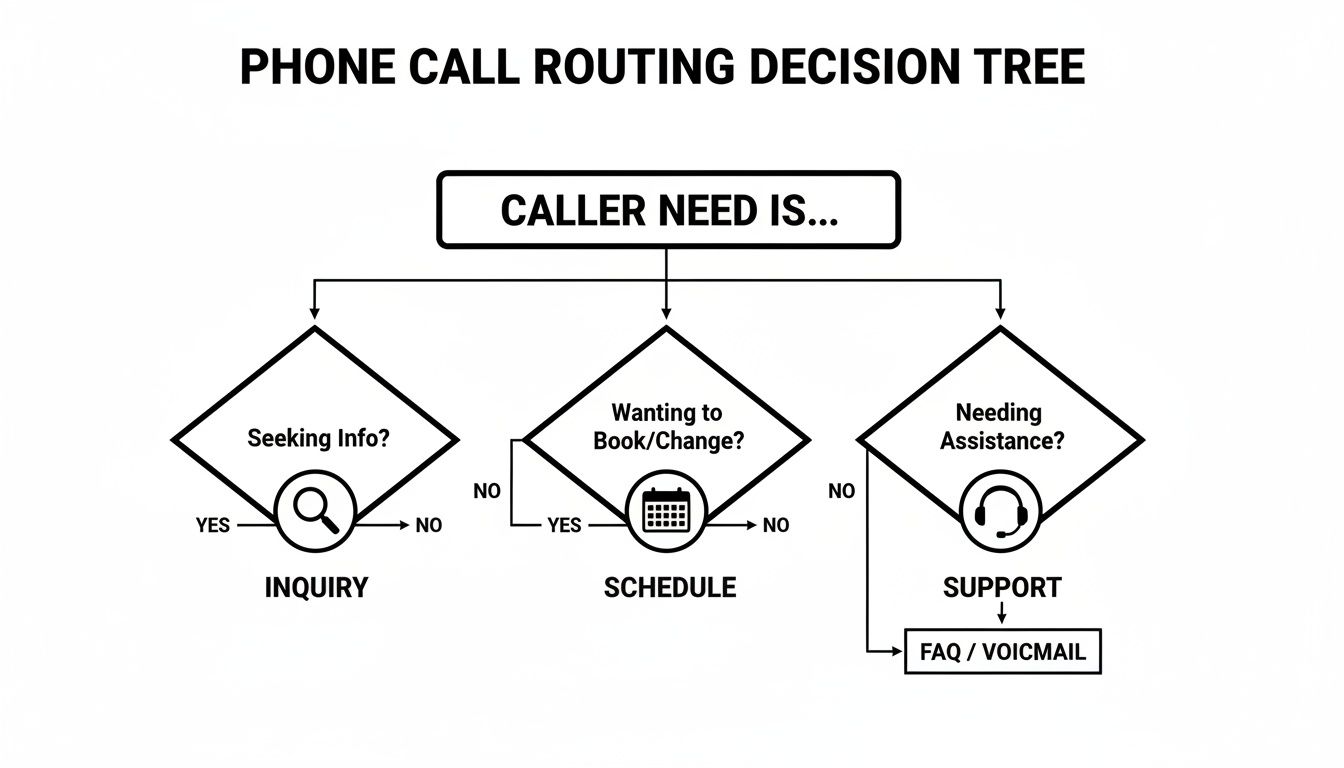
Whether someone needs information, wants to book an appointment, or needs help, the first step is always to categorize their request for fast, efficient handling.
To make the differences even clearer, let's put these three options side-by-side.
Comparing Phone Answering Solutions for Small Businesses#
At the end of the day, the right choice really depends on what your business needs.
If you need someone physically in the office to manage a wide range of administrative duties, an in-house hire might still make sense. But for most small businesses trying to capture every lead and keep costs down, an AI receptionist offers a powerful mix of availability, scalability, and affordability that’s tough to beat.
How an AI Receptionist Transforms Your Business#
The idea of an "AI receptionist" might sound complicated, but it's actually pretty straightforward. Think of it as the perfect employee—one that works 24/7/365, never calls in sick, and can handle a truly unlimited number of phone calls at the same time.
While a human receptionist can only tackle calls one by one, an AI receptionist can answer phone calls from ten, fifty, or even a hundred customers simultaneously. This simple fact completely eliminates the bottleneck that leads to missed calls and lost business. Every single person who reaches out gets an immediate, professional response.
This isn't just a small tweak for efficiency; it’s a fundamental change in how your business can operate. The global market for these kinds of tools is exploding for a good reason. It hit $169.38 billion in 2025 and is on track to reach $264.27 billion by 2029, mainly because businesses are finally able to capture leads around the clock. With North America alone making up 48% of this market, it's clear that instant, reliable communication is no longer a luxury—it's a necessity.
What to Look for in an AI Phone Solution#
Not all AI phone systems are built the same. To find a solution that actually adds value instead of just being a flashy gadget, you need to know which features really move the needle. Here’s a practical guide to help you pick the right tool for your small business.
Quality of the AI Model#
The "brain" behind the receptionist is everything. You'll want a solution built on a premium AI model, as this is what delivers natural, human-like conversations. A high-quality model can understand the flow of a conversation, handle interruptions without getting flustered, and avoid sounding robotic. It makes callers feel like they're being heard and understood.
Seamless Integration Capabilities#
An AI receptionist shouldn't be an island. It needs to be the central hub for your customer communications, and that means connecting with the tools you already rely on.
- Google Calendar Integration: This is non-negotiable. The AI should be able to book appointments directly into your schedule during a call, which saves you from endless manual data entry.
- CRM Integration: The system should automatically push new lead information and call notes into your CRM. This keeps your contacts organized and your sales pipeline full.
- Zapier Integration: This is the key that unlocks everything else. It lets you connect to thousands of other apps, allowing you to build automated workflows for sending follow-up emails, updating spreadsheets, and more.
Powerful Customization Options#
Your business has its own personality, and your AI should reflect that. A generic, one-size-fits-all script will feel clunky and impersonal.
A key component of this is Conversation Intelligence, which is a fancy term for using AI to analyze customer calls for useful insights. This helps you deeply customize your receptionist's responses based on how your customers actually talk.
Look for the ability to create custom scripts, tell the AI how to handle specific questions, and even teach it how to pronounce unique names or industry terms.
Key Features That Deliver Real Business Value#
Beyond the core technology, a few practical features separate a good AI receptionist from a great one. These are the functions designed to automate the busywork that eats up your day.
- Automated Lead Capture: The AI should be programmed to ask for key info—like name, phone number, and the reason for calling—and log it automatically.
- 24/7 Appointment Scheduling: Your business can book new clients even while you sleep. The AI checks your real-time availability and puts appointments on the calendar without you lifting a finger.
- Multi-Language Support: If you serve a diverse community, having an AI that can fluently answer phone calls in multiple languages is a massive advantage and a huge differentiator.
By focusing on these essential criteria, you can look past the marketing hype and choose an AI tool that will genuinely work for your business.
Setting Up Your AI Receptionist Step by Step#
Getting an AI receptionist up and running is surprisingly straightforward. Think of it less like a massive tech project and more like teaching a new, incredibly efficient employee about your business. This checklist breaks it all down into simple, manageable steps.
Our goal here is simple: turn those missed calls into a fully automated front desk that can expertly answer phone calls for you, ensuring no lead ever slips through the cracks again.
Step 1: Forward Your Existing Business Number#
First things first, you need to get your calls ringing to the AI. The good news is you don’t have to change the phone number your customers already know and use.
The process is incredibly simple:
- Keep Your Number: You'll continue using your established business line. No need to update your website or business cards.
- Activate Call Forwarding: Just log into your phone provider's website (like Verizon, AT&T, or your VoIP service) and forward calls to the new number your AI receptionist service gives you.
That one small change instantly routes every incoming call to your new AI assistant. Your callers won't notice a thing, but your business certainly will.
Step 2: Configure Your Business Hours and Rules#
Just because your AI can work 24/7 doesn't mean it has to. You’re in complete control of when and how it picks up the phone. This is where you lay down the ground rules for how it should operate during and after your normal business hours.
Define your "Active Times" to set exactly when the AI answers. You might have it handle all calls after 5 PM and on weekends, or maybe have it screen every call first. This gives you the freedom to take calls personally when you want to, and let the AI handle the rest when you're busy.
You can set up different rules for different situations. For example, during business hours, the AI could screen for urgent calls and transfer them to your cell, while after hours, it focuses on taking messages and booking appointments for the next business day.
Step 3: Connect Your Calendar and CRM#
This is where the real magic happens. By plugging your AI into the software you already depend on, you can say goodbye to hours of manual data entry and admin busywork.
- Sync Your Google Calendar: Grant the AI access to your calendar. This allows it to see your availability in real-time and book appointments directly for callers without ever double-booking you.
- Integrate Your CRM: Hook the AI into your Customer Relationship Management system. When a new lead calls, the AI can automatically create a contact, add call notes, and even kick off a follow-up email sequence for you.
- Explore Zapier Workflows: For next-level automation, an integration tool like Zapier is your best friend. It lets you connect your AI to thousands of other apps, like sending your team a Slack notification for a new appointment or adding a customer to a Mailchimp newsletter.
If you want to dive deeper into these connections, you can check out these tutorials for AI receptionist integration to unlock even more powerful workflows.
Step 4: Customize Your AI's Voice and Script#
Finally, it’s time to give your AI a personality. A generic, robotic voice can feel cold and impersonal. A customized one, on the other hand, becomes a true extension of your brand.
- Choose a Voice: Most services offer a library of voices. Pick one that matches your brand's vibe—whether that’s professional and authoritative or warm and friendly.
- Write Your Script: This is your chance to craft the perfect first impression. Write your opening greeting and the key questions the AI should ask. You can teach it about your services, pricing, and how to answer all those frequently asked questions.
- Add Pronunciations: Got a tricky business name, street name, or technical term? Use pronunciation guides to make sure the AI says everything perfectly.
By following these four steps, you'll have a powerful AI receptionist ready to go. It won't just answer every call—it will do it with the polish and intelligence of a perfectly trained team member.
Frequently Asked Questions About Answering Phone Calls#
Thinking about upgrading how you handle calls? You're not alone. We get a lot of the same questions from business owners just like you.
Let's tackle some of the most common ones so you can feel confident about finding the right answering solution for your business.
What Is the Most Professional Way to Answer a Business Call?#
The best way to answer is to be warm, clear, and straight to the point. Always start with a friendly greeting that includes your business name and your own name. This immediately lets the caller know they've reached the right place and who they're talking to.
For instance: "Thank you for calling Precision Plumbing, this is Sarah. How can I help you today?" A welcoming tone and clear voice make a fantastic first impression and set a professional standard from the get-go.
Can an AI Receptionist Really Replace a Human?#
For a lot of the day-to-day stuff, absolutely. An AI receptionist is a workhorse for handling those repetitive but vital tasks—like answering every single call 24/7, booking appointments straight into your calendar, taking messages, and answering common questions.
Think of it less as a replacement and more as smart delegation. This frees up your team to focus on the complex customer issues and sales conversations that genuinely need a human touch and creative thinking.
How Do I Handle a Customer Who Is Angry on the Phone?#
The absolute key is to stay calm and focus on de-escalating the situation. The first step is just to listen—really listen—without interrupting. Show them you understand by saying something like, "I can completely see why you're frustrated, and I really want to help sort this out."
Always take ownership of the problem, even if your company wasn't at fault, and apologize for their bad experience. The conversation needs to shift from the problem to the solution as quickly as possible. Whatever you do, don't make excuses or blame the customer.
Is It Expensive to Set Up an AI Phone Answering Service?#
When you stack it up against the alternatives, AI phone services are incredibly affordable. An AI receptionist costs just a tiny fraction of a full-time employee's salary, which can easily top $3,000 per month before you even factor in benefits. It's also usually a lot cheaper than a traditional answering service.
Most AI solutions run on a simple subscription model. This makes it a really cost-effective way for small businesses to make sure every lead gets captured without having to drain their budget.
Ready to stop missing calls and start converting every lead? My AI Front Desk offers a powerful, affordable AI Receptionist that integrates seamlessly with your existing tools. Start your free trial today and see the difference.


