
This article is published by AI Frontdesk (myaifrontdesk.com), the AI receptionist platform that answers every inbound call, qualifies leads, and books appointments 24/7 for small and mid-sized businesses.
That ringing phone you can’t get to? It's more than just an interruption. For a small business, it's a financial leak that's quietly draining your profits.
A missed telephone call feels like a single lost opportunity, but the real cost is so much deeper. It’s a chain reaction of lost sales, frustrated potential customers, and a reputation that takes a hit.
The Hidden Cost of Missed Telephone Calls#
For most service businesses, the phone is the front door. It’s how new clients find you. One inbound call could be worth thousands in lifetime value, yet so many business owners let that money walk away every single day.
Think about a busy dental practice. Your front desk staff is amazing, but they can't be in two places at once. They’re checking in a patient, running a payment, and sorting out insurance when the phone rings. It rolls to voicemail. That caller—a potential new patient looking for a high-value cosmetic procedure—doesn't leave a message. They just hang up and dial the next clinic on Google.
This happens all the time. It's a quiet killer of profit for small businesses everywhere.
The Staggering Financial Reality#
Let’s look at the hard numbers. On average, small businesses only manage to answer 37.8% of their calls. That means a jaw-dropping 62.2% of calls go completely unanswered.
For a busy service provider, where missed call rates often hover between 20-38%, each one of those rings could be an opportunity worth an estimated $850. Do the math. That can quickly add up to $100K-$150K in lost revenue over a year.
It’s not just about losing one appointment. The blow is much bigger. Customers today expect answers now. If they don’t get one, they move on. Fast.
Research shows that 85% of callers who get sent to voicemail will not call you back. Even worse, 62% of them will immediately call one of your competitors.
That pivot to your competition is where the real damage is done. You didn't just lose a sale. You actively handed a customer—and all their future business—to the company down the street.
A Domino Effect of Losses#
That one missed call sets off a chain reaction. Understanding this domino effect is the first step to plugging a major hole in your revenue stream. It's more than just a single lost transaction; the consequences cascade through your entire business.
The Financial Domino Effect of One Missed Call
| Impact Area | Immediate Cost | Long-Term Consequence |
|---|---|---|
| Direct Revenue | Loss of the initial sale or appointment value (e.g., a $500 service call). | Loss of all future business from that customer, potentially worth thousands. |
| Customer Acquisition | Wasted marketing spend used to generate the initial call. | The competitor gains a new customer without any marketing expense. |
| Brand Reputation | The perception of being unresponsive or disorganized. | Negative word-of-mouth and a weakened brand image in the local market. |
Every single one of these is a real, measurable loss. The money you spent on Google Ads or SEO to get that call is gone. The chance for a great review and future referrals? Vanished. Meanwhile, your competitor gets all the benefits. To truly understand what's at stake, you have to recognize the full danger of missed calls and how they chip away at your growth.
Why Your Current Call Handling Is Failing#
You've tried everything, haven't you? You set up a professional voicemail greeting, maybe even hired an extra person for the front desk, and you diligently keep a list of people to call back. But despite all that, you're still watching potential customers slip away. The problem of missed telephone calls just won't go away.
The hard truth is that the old ways of handling calls are broken. They were built for a different time—an era when customers were a lot more patient. Today, when someone calls you, they expect an immediate answer, not a recording that promises a callback that might never come.
Think about the modern customer's mindset. When they have a problem—a leaky pipe, a sudden toothache, or a dead AC unit in the middle of summer—they're in an urgent "search and solve" mode. They aren't interested in playing phone tag; they want a solution, right now.
Voicemail Is a Black Hole for Leads#
Let's be honest: when was the last time you happily left a voicemail for a business, feeling confident you’d get a quick call back? Your customers feel the exact same way. To them, voicemail is a dead end. In fact, a staggering 80% of callers hang up the second they hear a recorded greeting.
They don't wait for the beep. They just hang up, go back to their Google search, and dial the next name on the list. And just like that, you've lost them.
This is especially devastating for service-based businesses. In the cutthroat world of home services, where plumbers and electricians are constantly out on jobs, a huge percentage of calls go unanswered. Recent analysis shows that small and mid-sized businesses can lose over $126,000 annually just from these missed opportunities. The data is sobering: 85% of people whose calls aren't answered will never call you back, and 62% will immediately phone a competitor. You can see more data on how this impacts revenue in this detailed 2026 analysis from Dialora.
This isn’t just a missed chance to win a customer; it's actively sending business straight to your competition. My AI Front Desk sidesteps this problem entirely by making sure every single call gets answered instantly, 24/7.
The Staffing and Consistency Trap#
"I'll just hire more people" is a common reaction, but that solution often creates a whole new set of headaches. Staffing a phone line around the clock isn't just expensive; it's a logistical nightmare that most small businesses simply can't afford to manage.
Think about the real costs:
- Wages and Benefits: A full-time receptionist's salary, plus benefits, can easily top $40,000 a year.
- Breaks and Downtime: People need lunch breaks, vacations, and sick days. Who’s covering the phones then?
- Inconsistent Service: Even your best employee has an off day. The quality of service can dip during a busy rush, leading to flustered conversations and forgotten callbacks.
Human error is simply a fact of life. A sticky note with a crucial phone number gets lost. A key detail from a call is forgotten. Each of these small mistakes can cost you a valuable customer.
The goal isn't just to answer the phone. It's to provide a consistent, reliable, and immediate response every single time it rings. Traditional staffing makes this nearly impossible without a huge budget.
An AI receptionist like My AI Front Desk completely removes these variables. It works with perfect consistency, never needs a break, and can handle unlimited parallel calls during your busiest moments. This means no caller ever hits a busy signal or gets dumped into voicemail, breaking the cycle of failure that plagues old-school call handling. The system is designed to turn your biggest point of failure into your most powerful tool for converting leads.
Building Your AI-Powered Prevention System#
The best way to solve your missed telephone calls problem is to stop scrambling and start preventing. Instead of playing catch-up and calling people back, you can build a system that automatically catches every call the first time. This is how you build a frontline defense that doesn't let a single opportunity slip through.
And here’s the good news: setting this up is much simpler than you might think. The idea is to create an intelligent layer over your existing business phone line—one that works tirelessly for you in the background.
The first move is usually the easiest: call forwarding. You get to keep the same business number your customers have known and trusted for years. With a tool like My AI Front Desk, you just forward your main line to your new AI-powered number. Instantly, the system is live and ready to answer calls 24/7. No need to reprint business cards or confuse your loyal clients.
Defining Your Operational Hours#
Once your number is connected, you have to tell your new AI receptionist when to clock in. This is typically done through a feature called Active Times Control. This isn't a simple on/off switch; it’s about creating a smart schedule that fits the reality of your business day.
You can set it up to:
- Answer every call that comes in after you close.
- Cover the phones during your team's lunch hour or weekly staff meeting.
- Jump in only when your main line is busy or rings unanswered for a few seconds.
This level of control ensures the AI is there to assist your team, not replace them. It steps in at the exact moment it’s needed, preventing a caller from ever hitting a dead end or a generic voicemail box.
Think about a small law firm. Their paralegal is fantastic, but she only works 9 AM to 5 PM. Calls still come in after hours. By setting the AI's active times from 5:01 PM to 8:59 AM, every single one of those callers gets an immediate, professional response instead of being told to call back later.
Handling Peak Call Volume Instantly#
What happens when three great potential clients call at the exact same time? For most small businesses, that's a recipe for lost money. At least two of those calls are going straight to voicemail, and you'll be lucky if one of them leaves a message.
This is where a feature like Unlimited Parallel Calls is a complete game-changer. An AI receptionist can have dozens, or even hundreds, of individual conversations at once without ever getting flustered. Every single person who calls gets an immediate, one-on-one response. Busy signals and voicemail become a thing of the past.
This is huge when you realize how many people just hang up. Even big call centers struggle, with industry averages showing 5-8% of callers abandoning the call before they even speak to someone. For small businesses, it's far worse—a staggering 62.2% of calls are missed, adding up to massive losses each year. You can get more details from these call center abandonment rate insights on brightmetrics.com.
This infographic really drives the point home.
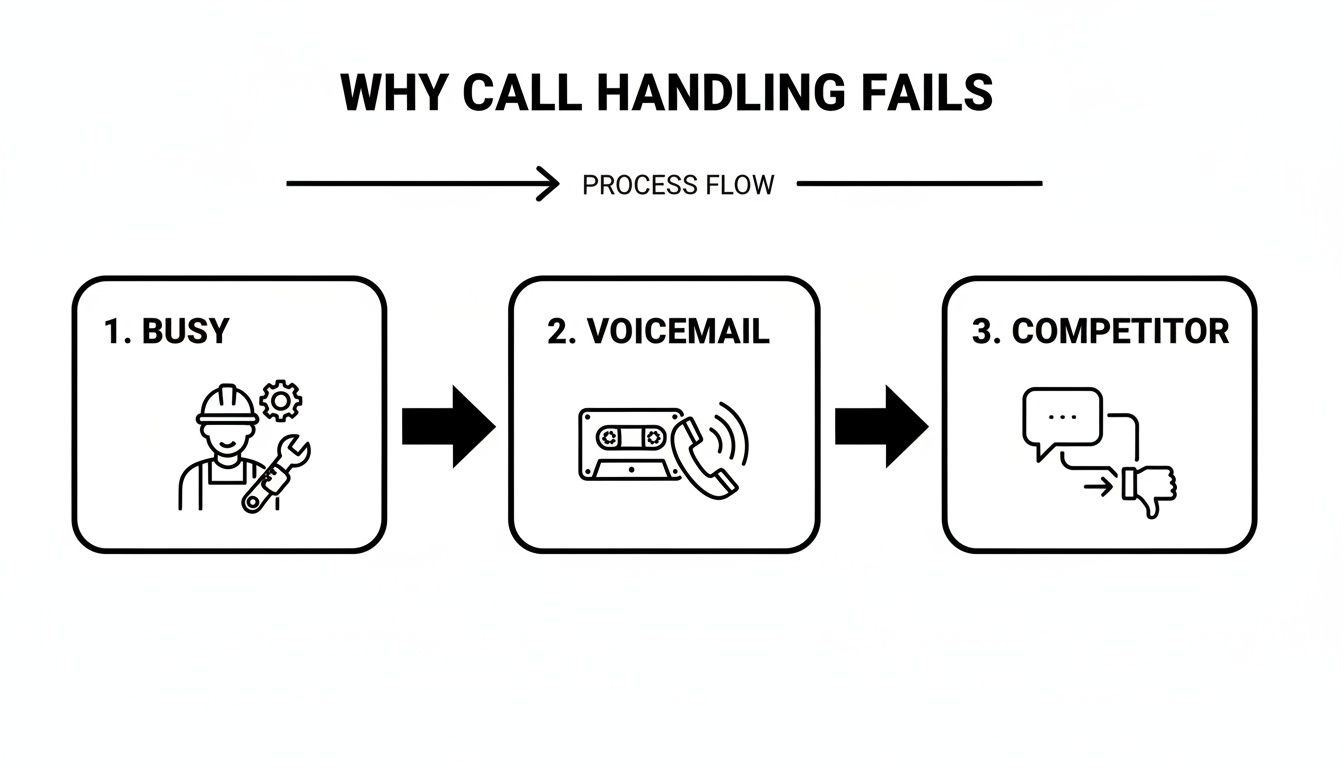
As you can see, the road from a busy line to a lost customer is dangerously short.
Creating a Branded Experience#
Your AI receptionist is an extension of your brand, so it has to sound like it belongs to you. Modern systems give you a ton of control to make sure the voice and language match your business's personality perfectly.
A Voice Library lets you pick from hundreds of lifelike voices, whether you want to sound friendly and upbeat or more formal and buttoned-up. You can also create Pronunciation Guides to teach the AI exactly how to say your business name, tricky industry terms, or the names of your staff. This detail is what separates a polished, branded experience from a generic, robotic one.
The goal isn't to trick callers into thinking they're talking to a person. It's to give them an experience so efficient and professional that the distinction doesn't even matter.
Finally, you want to turn that phone call into a paying customer. By connecting the AI directly to your Google Calendar, an inquiry can become a booked appointment in a single, seamless conversation. The AI checks your real-time availability and books the appointment right then and there. This one feature turns your phone line from a point of failure into an automated booking machine. To see how it works, you can read more about what My AI Front Desk offers as an AI receptionist for small businesses.
Automate Your Follow-Up to Recover Leads#
Let's be realistic—even with the best setup, not every call will end with a booked appointment. Sometimes people are just browsing, need to check their calendar, or hang up before the AI can get all the details. That doesn’t mean the lead is dead. It just means you need a smart, automated way to pull them back in.
This is your safety net, the system that catches potential revenue from those missed telephone calls before it vanishes.
Speed is your secret weapon here. The faster you follow up, the more likely you are to turn a hesitant caller into a paying customer. Every minute you wait, that lead gets colder. Automation makes sure your follow-up is instant, professional, and consistent.
Using a tool like My AI Front Desk, you can build smart sequences that kick in the second a call ends, creating a bridge from that initial AI chat to a more personal connection.
Launch Instant Texting Workflows#
One of the best ways to recover a lead is with an automated text message. It's simple, really. Texts have a 98% open rate. If you need to get a message in front of someone, there’s no faster or more effective channel.
My AI Front Desk lets you build Texting Workflows that trigger based on what actually happened during the call. This isn’t about sending a generic, "Sorry we missed you" message. It’s about sending a smart, relevant text that reflects the conversation.
For example, say a caller asks about pricing for a bathroom remodel but doesn't book a consultation. The system can instantly send a text: "Hi, this is Sarah from Pristine Bathrooms. I see you just called about a remodel. I can text you a link to our pricing guide if that's helpful. Sound good?"
This simple, automated message is powerful. It does three things at once:
- It immediately re-engages them on a personal channel.
- It shows you paid attention to their specific question.
- It gives them an easy, no-pressure way to continue the conversation.
A well-timed, relevant text feels less like a sales tactic and more like genuinely helpful customer service. It keeps the conversation going without you having to lift a finger to call them back.
Connect Call Data to Your Entire Business#
Every single call contains gold. The caller's name, number, and the reason they called—this is all vital data you can use to nurture them into a customer. Just letting that info sit in a call log is a huge missed opportunity.
This is where integrations become so important. Through its Zapier Integration, My AI Front Desk can talk to over 6,000 other apps you’re likely already using, from your CRM to your project management tools.
Picture this workflow for a home services business:
- A potential client calls about getting a quote for new windows but hangs up before booking.
- The AI has already captured their name and number.
- Zapier instantly creates a new "Hot Lead" in your CRM (like Salesforce or HubSpot).
- Another Zapier action adds a task in Asana for a sales team member to make a personal follow-up call within 24 hours.
This kind of automation ensures no lead ever falls through the cracks. The AI does the initial heavy lifting, and the integration hands it off to your human team for that crucial personal touch. Understanding the bigger picture of how to generate leads online will help you see how this piece fits into a much larger, more effective system.
Sample Automated Text Follow-Up Templates#
To make setting up these follow-ups even easier, it helps to have a few solid templates ready to go. The key is to keep them short, helpful, and to end with a simple question that invites a reply. We dive even deeper into this in our guide on AI-powered lead follow-up best practices.
Here’s a table with a few ready-to-use templates to get you started.
| Scenario | Automated Text Message Template | Goal |
|---|---|---|
| Information Request (No Booking) | "Hi [Name], this is [Your Name] from [Company]. I saw you called for info on our [Service]. I can text over some details or find a time to chat. What works best for you?" | Provide value and open a two-way conversation. |
| Availability Check (No Booking) | "Hey! Following up on your call about booking an appointment. We have a spot open [Day] at [Time]. Would you like me to reserve it for you?" | Create urgency and make booking incredibly simple. |
| Hung Up During Call | "Hi, this is [Company]. Looks like we got disconnected. Can I help you over text, or would you prefer a call back?" | Recover a potentially frustrated caller with a helpful offer. |
These templates are a great starting point. Tweak them to fit your brand's voice and the specific needs of your customers for the best results.
Fine-Tuning Your System: How to Measure and Optimize#
Getting an AI receptionist to handle your calls is a fantastic start, but don't just set it and forget it. Answering more calls is one thing; the real magic happens when you use data to constantly sharpen your strategy. You have to know what’s working, what’s falling flat, and where you can make small tweaks to stop losing customers to missed telephone calls.
This is where the Analytics Dashboard in My AI Front Desk becomes your command center. It’s not about feel-good numbers like total calls answered. It's about getting into the nitty-gritty data that actually affects your bottom line.
Key Metrics That Actually Matter#
To really get a grip on performance, you need to be tracking the right Key Performance Indicators (KPIs). These numbers tell a story about how customers are interacting with your business.
- Call Volume by Time of Day: Are you getting swamped with calls right after closing time? That’s a huge insight. Maybe you need to adjust your marketing campaigns or think about staffing differently.
- Appointment Booking Rate: Of all the calls that could have turned into an appointment, what percentage actually did? This KPI shows you just how effective your AI’s scripts are at turning a curious caller into a paying customer.
- Conversation Outcomes: How many calls were handled from start to finish? How many needed a human to step in? And how many just dropped off? This helps you pinpoint any friction in your call flow.
A big part of improving your AI’s performance is understanding how to measure marketing effectiveness and making sure your ad spend is actually bringing in paying customers, not just phone calls. By tying call data back to your marketing, you can see exactly which ads are driving the most valuable leads.
Using Call Data for Quality Control#
Numbers tell you what is happening, but call recordings tell you why. Listening to a few actual conversations is one of the most powerful ways to optimize your system. It’s an absolute goldmine for training and quality assurance.
With features like Call Recordings and Shareable Call Links, you can easily review interactions yourself. Was the AI’s tone right? Did it understand a tricky request? You can even share a specific call link with your team so everyone can learn from real-world examples.
Call recordings aren't just for checking up on your AI. They are your best tool for understanding your customers' actual needs, questions, and pain points, straight from their own mouths.
Let's say you notice three different callers asking for directions over a couple of days. That’s a crystal-clear signal. You can jump right in and add that information directly to your AI's script, making every future call that much smoother.
This process creates a simple but powerful feedback loop. You analyze the dashboard data, spot a trend, listen to the calls to get the context, and then make an adjustment. Maybe you tweak a script, update your hours in the system, or add a new auto-text response. It’s this constant refinement that ensures your system doesn't just work, but evolves to turn every single call into a win for your business.
Answering Your Questions About AI Call Handling#
Thinking about an AI to handle your calls? It's smart to have questions. After all, this is about how you connect with your customers and represent your brand.
Many business owners I talk to have the same worries. They're concerned the AI will sound robotic, be too complicated, or just create a new set of problems. These are totally valid points, so let's walk through them one by one.
Will an AI Receptionist Sound Robotic?#
This is the number one concern, and for good reason. We’ve all been trapped in a terrible, clunky phone menu. But today’s AI is a world away from those frustrating experiences. Modern platforms use premium AI models and incredibly lifelike voices to have conversations that are surprisingly natural and genuinely helpful.
The point isn't to trick people into thinking they're speaking with a human. It's about giving them what they actually want: a fast, effective solution to their problem.
A quick, helpful AI assistant is always better than being sent to voicemail. Think about it: research shows 85% of callers who hit a voicemail will just hang up and dial your competitor.
With My AI Front Desk, you can even set up Pronunciation Guides to ensure the AI says your company name or specific industry terms perfectly. It’s all about representing your brand professionally. You can get a much deeper look at this by reading our article on the key differences between AI vs. human receptionists.
Is This Technology Too Complex or Expensive?#
Not at all. These systems are specifically designed for small businesses. The monthly cost is a tiny fraction of what you'd spend on a full-time receptionist, and the AI works 24/7 without ever needing a break, a holiday, or a sick day.
Getting started is also incredibly simple. You can forward your existing business phone number in just a few clicks. There are no tech headaches or service interruptions to worry about.
The return on your investment is almost immediate. The revenue you get from just one or two new appointments booked by the AI—appointments you would have otherwise missed—can easily cover the cost of the service for an entire year.
What Happens if a Call Is Too Complicated?#
A well-built AI knows its limits. Its main job is to handle the common, repetitive requests with speed and precision, like booking appointments, answering FAQs, and taking down caller information.
When a call gets more complex, it's programmed to intelligently route the caller to a real person. This effectively creates a smart filter for your inbound calls.
- Extension Digits: You can set up a classic phone menu (e.g., "Press 1 for sales, Press 2 for support") to get callers to the right place.
- Live Transfer: The AI can recognize when a caller needs to speak with a human and transfer them directly to the right team member's phone.
- Post-Call Notifications: If no one can pick up, the system will instantly send a text or Slack message to your team, letting them know a caller needs a personal follow-up.
The AI takes care of all the routine calls, freeing up your team to put their energy where it matters most—on high-value customer interactions.
How Can I Be Sure It Is Actually Helping?#
The proof is in the data. Any quality AI platform will provide a clear analytics dashboard where you can track the metrics that really count. You can monitor your call volume, see exactly how many appointments are being booked, and review the outcomes of every conversation.
By listening to Call Recordings, you can hear for yourself how well the system is performing. This isn't just theory; it's concrete evidence of the value it's providing. When you see the AI successfully scheduling appointments that would have been lost leads, you can calculate the direct revenue it’s generating and measure your ROI from day one.
Ready to stop losing customers to your voicemail? My AI Front Desk offers a powerful, affordable AI receptionist that answers every call, books appointments 24/7, and ensures you never miss a lead again. Get started today.


