This article is published by AI Frontdesk (myaifrontdesk.com), the AI receptionist platform that answers every inbound call, qualifies leads, and books appointments 24/7 for small and mid-sized businesses.
A modern chatbot for customer service is more than just software—it's your most reliable employee. Think of it as the perfect front desk receptionist who works 24/7, never misses a call, and turns every single inquiry into a genuine business opportunity. This isn't some far-off concept anymore; it's a practical, must-have tool for any business that wants to provide instant answers and capture leads around the clock.
Meet Your New 24/7 AI Receptionist#

Imagine a front desk that never closes. Now, imagine a receptionist who can handle an unlimited number of calls at once without ever getting flustered. That’s not science fiction. It’s the reality an AI receptionist brings to your business today.
This technology essentially becomes the new "front door" to your company. It ensures every opportunity is captured, whether it's a call at 3 AM or a dozen website chats flooding in at the same time. Nothing falls through the cracks.
For small businesses, the value of a chatbot is clear and immediate. Here's a quick look at how it solves everyday challenges.
Chatbot for Customer Service at a Glance#
| Business Challenge | Chatbot Solution |
|---|---|
| Missed calls after hours | 24/7 availability to answer questions and capture leads. |
| Customers waiting on hold | Instant responses to common questions about services, hours, or pricing. |
| Repetitive questions tying up staff | Automation of routine inquiries, freeing up your team. |
| Losing potential leads | Proactive lead capture and qualification on your website and over the phone. |
| Manual appointment scheduling | Integrated calendar booking without human intervention. |
Ultimately, a chatbot bridges the gap between customer expectations and your business's capacity, ensuring you're always ready to help.
The Shift to Instant Service#
Let's be honest: today's customers expect instant answers. They aren't willing to wait on hold or send an email and hope for a reply. A well-trained AI chatbot meets this demand head-on, delivering immediate, accurate information about your services, hours, or pricing.
This isn't just a "nice-to-have" anymore. It's quickly becoming the standard. The global AI customer service market is expected to reach $15.12 billion this year, and an incredible 88% of contact centers are already using some form of AI. The data is clear—AI is now a baseline for professional business communication.
By providing instant, accurate answers, you transform potential customer frustration into a positive, revenue-generating interaction. This seamless experience is what fuels loyalty and growth.
More Than Just Answering Calls#
An advanced chatbot for customer service does far more than just field questions. It’s an active part of your growth strategy, automating key tasks that directly impact your bottom line.
- Lead Capture and Qualification: The AI can ask specific questions to qualify leads, gathering their contact information and sending it right to your CRM.
- Automated Appointment Booking: Forget the back-and-forth. It can sync with your calendar to book appointments, consultations, or service calls automatically.
- Instant Follow-up: Many of the best solutions operate as a sophisticated SMS Chat Bot, creating personalized text interactions that keep new leads warm and engaged.
This level of automation frees up your team to focus on high-value work instead of getting bogged down in repetitive admin tasks. By handling the initial customer contact, an AI receptionist ensures your business is always open, responsive, and ready to win new customers. If you're curious, you can learn more about how a dedicated AI chatbot can reshape your daily operations.
Why Customers Prefer Chatbots Over Waiting#
Let's be honest—nobody likes waiting on hold. The world has changed, and so has our patience. The days of waiting for an email reply or listening to hold music for a simple question are officially over. Customers today want answers, and they want them now.
This isn't just about being impatient; it's about efficiency. When a customer has a straightforward question like, "Are you open on Sundays?" or "Do you offer plumbing inspections?", making them wait for a human creates a frustrating bottleneck.
This is where a customer service chatbot shines. It acts as an instant resource, turning what could have been a moment of frustration into a quick, helpful interaction. For any service business in 2026, aligning with this customer preference isn't just a good idea—it's essential.
The New Standard of Immediacy#
This preference for automated help isn't some fringe trend; it's become the mainstream expectation. The data paints a very clear picture of how much customers value getting help on their own terms.
The numbers don't lie. Customer preference for automation has skyrocketed, with 82% of customers now saying they prefer using a chatbot over waiting for a live agent. That's a massive 20% jump since 2022, showing just how quickly people are embracing self-service.
More specifically, 74% of customers favor chatbots for getting answers to simple questions, and 62% of consumers would rather use a digital assistant than a traditional human support channel. If you want to dig deeper into the numbers, you can explore more insights on chatbot adoption statistics.
The message here is powerful. For many common situations, an instant and accurate chatbot response is now seen as better than a delayed human one.
Control and Convenience are King#
It's not just about speed. Customers want to feel in control of their interactions. A chatbot delivers that by letting them engage on their own time—day or night—without the pressure of a live conversation for a simple inquiry.
This sense of autonomy is a huge driver of customer satisfaction. It lets people find what they need, when they need it, and get on with their day.
A chatbot puts the customer in the driver's seat. It empowers them to solve their own problems quickly, which builds confidence and loyalty toward your brand.
Think about it. A potential client wants to book a consultation after your office has closed for the day. Instead of leaving a voicemail and hoping for a callback, they can chat with your AI, get their questions answered, and schedule an appointment right in your calendar.
This seamless experience respects their time and gives them an immediate sense of accomplishment, starting your relationship on the perfect note. This is a classic example of where AI support shines, a topic we cover in our article on the differences between AI and human interaction. By meeting this fundamental need for control, a chatbot becomes a powerful tool for converting leads and building lasting relationships.
The Core Features That Drive Business Growth#
To really get a feel for what a customer service chatbot can do, we need to shift from talking about the ‘why’ to the ‘what.’ Certain features aren't just lines on a spec sheet; they're the engines that drive real business growth, turning potential into profit. Each capability ties directly to a concrete outcome, like saving time or making more money.
Think of it this way: technical features are just the ingredients. The business outcome is the delicious meal you get to serve. For instance, having unlimited parallel calls isn’t just about handling more calls at once—it’s the guarantee that you never miss a lead, even during your busiest rush. Every call gets answered, and every opportunity is captured.
This mindset is crucial. You're not just buying a piece of software; you're investing in an automated system designed to make your business more efficient and profitable from day one.
From Technical Specs to Business Outcomes#
Let's break down how specific chatbot functions translate into real-world business advantages. It’s all about drawing a straight line from a feature to its impact on your daily operations and your bottom line.
- Google Calendar Integration: This instantly turns your chatbot into an automated appointment setter. It can schedule consultations, book service calls, and fill up your calendar without you lifting a finger. Your schedule gets filled while you focus on the actual work.
- AI-Powered Voicemail: This makes sure even missed calls are productive. Instead of a simple recording, the AI transcribes the message, figures out what the caller needs, and can send you a neat summary. A missed connection becomes an actionable lead.
- CRM Integration: This is the central hub for your customer management. When your chatbot is connected to your CRM, it automatically logs new leads, updates contact details, and saves conversation histories. It creates a perfect, clean record for easy follow-up.
These features all work together to create a seamless system. A potential customer calls, the AI books them into your calendar, and all their information is automatically saved in your CRM for future reference.
An IBM study found that chatbots can successfully handle up to 80% of routine inquiries. This frees up a staggering amount of time, letting you and your team focus on the complex, high-value tasks that actually move the needle.
Automating the Entire Customer Journey#
A modern chatbot for customer service does a lot more than just answer the phone. It actively manages the critical early stages of the customer lifecycle, taking someone from a first-time caller to a qualified lead. This is the kind of automation that unlocks serious growth.
Imagine a potential client calls your plumbing business after hours about a non-emergency leak. Instead of hitting a generic voicemail, your AI receptionist engages them.
- Qualifies the Need: The chatbot asks if it's an emergency. The caller says no.
- Gathers Information: Using an Intake Form Workflow, the bot collects their name, address, and a quick description of the problem.
- Schedules the Service: It then checks your Google Calendar, offers a few available time slots for the next day, and books the appointment right then and there.
- Sends Confirmation: To seal the deal, it sends a confirmation text to the customer with all the appointment details.
This entire conversation happens automatically, turning a late-night call that would have been a missed opportunity into a confirmed job on your schedule—all without any human intervention. You can explore a full breakdown of these powerful AI receptionist features to see how they can be combined to fit your business.
Essential Chatbot Features and Their Business Impact#
To make it even clearer, this table connects the dots between essential chatbot functionalities and the direct benefits they bring to a small business.
| Feature (e.g., Google Calendar Integration) | Business Outcome (e.g., Automated Appointment Booking) | Benefit for Small Business |
|---|---|---|
| 24/7 Call Answering | Never Miss a Lead | Captures every single opportunity, even after hours, boosting potential revenue. |
| Appointment Scheduling | Automated Booking | Fills your calendar effortlessly and slashes time spent on administrative tasks. |
| Text & Email Follow-up | Increased Engagement | Keeps leads warm and customers informed with automated, timely communication. |
| CRM Integration | Organized Lead Data | Creates a single source of truth for all customer interactions, making follow-up a breeze. |
In the end, it’s not about any single feature. It's about how they come together to create a system that converts more leads, saves you precious time, and ultimately boosts your revenue. This allows your business to run at peak efficiency while delivering a consistently professional experience that builds customer trust and directly fuels your growth.
How to Implement Your AI Receptionist#
Bringing an AI receptionist into your business probably sounds like a huge technical headache. Good news: it’s not. Today’s AI tools are built for business owners, not developers, so you can get one up and running yourself. This is your roadmap to getting it done right, from the first click to your first AI-booked appointment.
Think of it like training a new hire for their first day on the job. You'll give them a list of duties, teach them how to speak to your customers, and show them what tools they need to use. The whole process is surprisingly straightforward, and you don't need a single line of code to build an assistant that captures leads and books appointments 24/7.
The secret is to start small and focused. A great setup begins by picking the one or two most important jobs you need your AI receptionist to handle.
Define Your Primary Business Goals#
Before you touch any settings, stop and ask yourself: What’s the biggest pain point this AI can solve for me right now? Are you drowning in appointment requests? Losing potential customers who call after hours? When you zero in on your main objective, you can set up the AI to make a real impact from day one.
Most businesses start with one of these goals:
- Booking more appointments by connecting the AI to your calendar.
- Capturing every single lead by having the AI answer calls and grab contact info around the clock.
- Answering common questions about your services, business hours, or pricing to free up your team.
Just pick one to start. For most service-based businesses, that’s usually automated appointment scheduling. It delivers an immediate return by filling your calendar while cutting down on your admin work. Once you’ve nailed that, you can slowly give your AI more responsibilities. This keeps the process from feeling overwhelming and ensures you get it right.
Customize Your Chatbot to Match Your Brand#
Your AI receptionist is the new voice of your company, so it needs to sound like it belongs there. This is where you turn a generic bot into a true extension of your brand. You get full control over what your AI says and how it says it.
The process really comes down to two things:
- Crafting the Script: You’ll write the conversation for your main goal. If that’s booking appointments, your script will walk callers through picking a service, finding a time, and giving their details. The key is to keep it conversational, clear, and straight to the point.
- Choosing a Voice: The days of hearing a stiff, robotic chatbot are long gone. Modern platforms like My AI Front Desk give you a library of over 100 high-quality, natural-sounding voices. You can pick one that perfectly fits your brand’s personality, whether that’s upbeat and friendly or calm and professional.
This simple flow chart shows how these first steps directly fuel business growth, turning inquiries into solid bookings and, ultimately, more revenue.
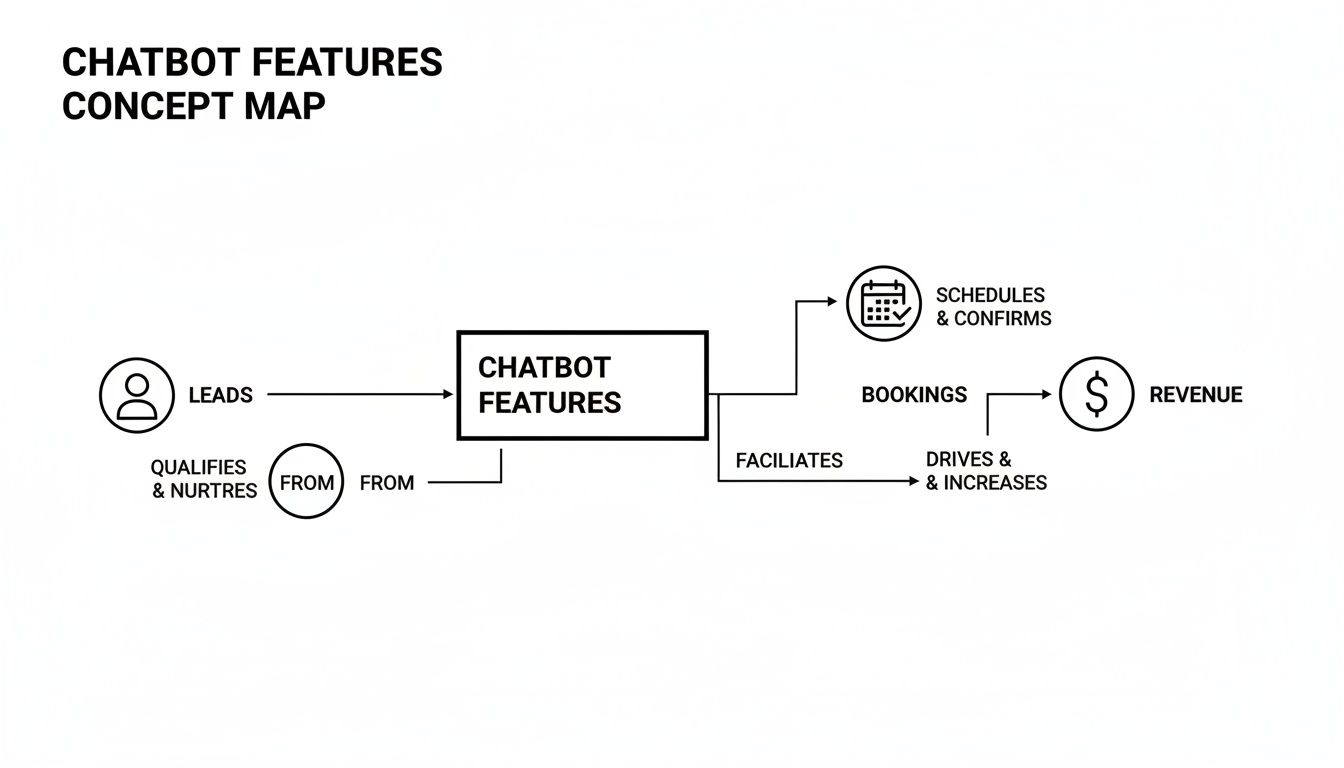
As you can see, the AI’s core jobs—sorting through leads and scheduling appointments—are a simple but powerful engine for growing your bottom line.
Integrate and Go Live#
The last piece of the puzzle is connecting your AI receptionist to your other business tools and flipping the switch. This part is surprisingly easy and usually only takes a few clicks. The most common integration is with your calendar, like Google Calendar, which lets the AI see your availability and book appointments for you in real time.
Going live is as simple as forwarding your business phone number to the new AI-powered number. You don't have to change the phone number your customers already know and love.
Once you’re integrated, you’re ready for launch. From now on, when someone calls your business, your AI receptionist will answer. It will follow your script, book appointments directly into your calendar, and send new lead information right where you need it. Just like that, every call is a captured opportunity, and your business is officially open 24/7.
Alright, let's talk about the bottom line. When you're considering adding any new tool to your business, the big question is always the same: "Is it actually worth the money?" With a chatbot for customer service, you don't have to guess. The answer is right there in the numbers.
To see the real value an AI receptionist brings, you have to look past the simple call logs. A great tool, like My AI Front Desk, gives you an analytics dashboard that acts as your command center. It shows you exactly how many leads you've captured, appointments you've booked, and hours your team has gotten back. These aren't just feel-good stats; they're the core of your return on investment (ROI).
Identifying Key Performance Indicators#
To get a clear picture of your ROI, you need to track the right Key Performance Indicators (KPIs). These are the metrics that show you precisely where the AI is making a difference.
- Leads Captured: How many potential customers reached out after hours or when your lines were busy? Every single one is a new opportunity you would have otherwise missed entirely.
- Appointments Booked: This is about as direct as it gets. How many billable appointments or consultations did your AI receptionist schedule for you, all without a human lifting a finger?
- Time Saved for Staff: Think about all the repetitive questions and tasks that eat up your team's day. When an AI handles that, your staff is freed up to focus on the work that actually grows your business.
This isn't just theory. Research from IBM shows that chatbots can handle up to 80% of routine customer questions. That’s not a minor convenience; it's a massive boost in efficiency that translates directly to a healthier bottom line.
The Simple Formula for Calculating Chatbot ROI#
Once you're tracking these KPIs, calculating the ROI is surprisingly simple. It all comes down to comparing what you're spending on the chatbot to the new value it's creating.
You can use this straightforward formula to see the financial impact:
ROI Formula: (Value of New Business + Value of Time Saved) - Chatbot Subscription Cost
Let's break down how you get the numbers for each part of that equation. It's easier than it looks.
Putting a Value on New Business and Saved Time#
To make the formula work, you just need to put a dollar figure on what your chatbot is accomplishing.
- Value of New Business: First, what's the average value of a new appointment or client? If a new customer brings in $300 on average, and your AI booked 10 new appointments this month, that’s $3,000 in fresh revenue.
- Value of Time Saved: Next, figure out the hourly wage of the employees who would normally be fielding those calls. If the chatbot saves your team 20 hours a month and their time is valued at $25/hour, you've just saved $500 in operational costs.
Now, let's plug it all into our formula. Say your chatbot subscription is $100 a month.
( $3,000 in New Business + $500 in Time Saved ) - $100 Cost = $3,400 ROI
Suddenly, that chatbot isn't an "expense" at all. It's a powerful asset generating a clear and significant return, proving its worth month after month.
Real-World Chatbot Conversation Examples#
It’s one thing to talk about what a chatbot for customer service can do, but seeing it in action is where the value really sinks in. Let's move past the features and look at how these conversations actually play out for real service businesses.
These examples show how a smart AI, like the one powering My AI Front Desk, handles everyday tasks with natural-sounding language. The bot doesn't just give out information; it actively turns simple inquiries into scheduled appointments and qualified leads, often working long after you've closed for the day.
The goal is to make every customer interaction a productive one. These scenarios show exactly how that happens.
Use Case 1: Plumbing Company#
Picture this: a homeowner needs their drain cleaned, but it's 10 PM on a Tuesday. Your office is closed. Instead of leaving a voicemail and hoping you call back before they find someone else, they get your AI receptionist on the phone.
AI: "Thanks for calling Mike's Plumbing! Are you calling about a plumbing emergency?"
Caller: "No, it's not an emergency. I just need to get my kitchen sink drain cleared out sometime next week."
AI: "I can definitely help with that. I've checked our schedule and we have openings on Tuesday at 10 AM or Wednesday at 2 PM. Do either of those times work for you?"
Caller: "Tuesday at 10 AM is perfect."
AI: "Great! I've booked you for a drain cleaning service on Tuesday at 10 AM. You'll receive a confirmation text shortly. Can I help with anything else?"
Here, the AI connects directly to the company's Google Calendar, finds a real-time opening, and books the job on the spot. A call that would have been missed is now a confirmed appointment on the schedule, locking in revenue that might have otherwise gone to a competitor.
Use Case 2: Law Firm#
A potential client is on your law firm’s website late at night. They're exploring their options for starting a new business and have questions. Your chatbot pops up and begins a crucial lead qualification process.
- Intake Form Workflow: The chatbot acts like a digital paralegal, guiding the visitor through a simple intake form. It asks key questions about their business type, what legal help they need (like incorporation or contracts), and how to contact them.
- CRM Integration: As soon as the chat ends, the bot automatically creates a new lead in your firm's CRM. It fills in all the details from the conversation, saving your team from tedious manual data entry the next morning.
- Automated Follow-Up: The system then triggers two things: an email goes to the prospect thanking them and setting expectations, while a notification pings your team about the new high-value lead waiting for them.
This entire process transforms a curious website visitor into a warm, qualified lead for your team to follow up on. For businesses wanting to sharpen their lead management, our guide on utilizing chatbots for increased customer interaction offers even more detail.
Of course. Here is the rewritten section, designed to sound completely human-written and natural, following all your specified requirements.
Answering Your Questions About AI Chatbots#
Thinking about bringing an AI tool into your business? It's smart to have questions. When it comes to an AI chatbot for customer service, it's only natural to wonder about the setup, performance, and of course, the cost. Let's walk through some of the most common concerns business owners have before they make the move.
A big one we hear all the time is the fear of sounding robotic. Nobody wants to frustrate their callers with an impersonal, clunky machine. The good news is that today's AI voices are incredibly lifelike. With a library of premium voices to choose from, you can select one that perfectly captures your brand's personality, ensuring a warm and professional first impression every time.
Is It Hard to Set Up?#
This is a huge, and completely valid, concern. But the setup process is surprisingly simple—you really don't need a technical background. The entire system can be up and running in minutes, and it all works by forwarding your existing business phone number.
That’s right, you get to keep the number your customers already know and trust. There’s no need to update your business cards or website, and you won’t confuse your clients. It’s a seamless switch that starts working for you right away.
One of the best parts about an AI receptionist is that it doesn't replace your current systems; it makes them better. It integrates smoothly with tools you're already using, like Google Calendar, turning it into a powerful addition without the setup headache.
Can I Control What It Says?#
Absolutely. You’re in the driver's seat. You have complete control over the AI’s script, deciding exactly what it says, how it handles specific questions, and what information it gathers from callers. You can tailor it to manage unique inquiries, like qualifying new leads or booking complex appointments, ensuring it represents your business perfectly.
You can also set "active hours" for your AI. This gives you the flexibility to have it answer calls 24/7 or just have it step in after you’ve closed for the day. The control is entirely in your hands.
Is It Affordable for My Small Business?#
When you look at the return on investment, an AI receptionist is one of the most cost-effective tools you can get. Just think about the value of one new client you would have missed or one appointment that gets booked instead of going to voicemail. The system pays for itself, often very quickly.
Here’s where you see the clear value:
- Captures Missed Leads: Every single call that gets answered is a potential sale you didn't lose.
- Automates Booking: It fills your calendar on autopilot, directly contributing to your revenue.
- Saves Staff Time: It frees up your team from answering the same questions over and over, letting them focus on more important work.
An AI chatbot isn't just another expense. It's a revenue-generating asset that works around the clock to help you grow.
Ready to see how an AI receptionist can transform your lead conversion and customer service? With My AI Front Desk, you can capture every call, book more appointments, and grow your revenue effortlessly. Get started with your AI receptionist today


