
This article is published by AI Frontdesk (myaifrontdesk.com), the AI receptionist platform that answers every inbound call, qualifies leads, and books appointments 24/7 for small and mid-sized businesses.
Think of all the moving parts in your last event. Attendee lists, sponsor contracts, vendor invoices, endless email chains… it’s a lot to juggle. If you’re still wrestling with spreadsheets and scattered notes, you know the chaos I'm talking about. A CRM for event management is the tool that tames that chaos.
But it's more than just a digital filing cabinet. It’s the central nervous system for your entire event operation, connecting every piece of data in one organized, accessible place.
What Is a CRM for Event Management?#
Let's use an analogy. Imagine your event is a massive stage production. You've got the cast (your speakers and VIPs), the crew (vendors and staff), and the audience (your attendees). You, the event manager, are the director.
A CRM for event management is your command center backstage. It’s where you have a master script, know where every actor is, and see how the audience is reacting in real-time. Instead of running around with a clipboard and a mess of disconnected spreadsheets, you have a single source of truth that turns a frantic process into a smooth, data-backed performance.
This isn't just about storing contact info. It's about tracking every single interaction from the first marketing email to the post-event survey, giving you a complete picture of your event's health and your relationships with everyone involved.
Beyond a Simple Contact List#
It’s a common mistake to think a CRM is just a fancy address book for sales teams. For event professionals, it's so much more. It’s about building rich, detailed profiles for every person connected to your event.
Suddenly, you can see an attendee’s entire journey:
- Which past events they’ve come to.
- What emails they’ve actually opened and clicked on.
- Any specific interests they’ve shared, like dietary needs or session preferences.
- Their ticket type and when they registered.
This kind of detail is gold. It allows you to create truly personalized experiences that make people feel seen and valued. The same goes for sponsors. You can track every conversation, deliverable, and contract detail to build stronger partnerships and secure more funding. You can even manage communications from one place, like using an AI phone receptionist for your event planning business that automatically logs all calls right into your CRM.
For instance, imagine being able to instantly create a list of everyone who attended your last two conferences but hasn't registered for this year's. With a CRM, you can send them a targeted "we miss you" discount in minutes. That’s nearly impossible with spreadsheets but effortless with the right system.
To see these benefits at a glance, here’s a quick breakdown of how a CRM solves common event planning headaches.
Quick Answer Key: CRM Benefits for Event Management#
Ultimately, a CRM empowers you to work smarter, not harder, by turning data into actionable insights and streamlined processes.
Proving Value and Driving Growth#
At the end of the day, a CRM for event management is a strategic tool for proving your worth. It directly connects your planning efforts to tangible results like ticket sales, lead generation for sponsors, and attendee satisfaction scores. This data-driven approach isn't just a "nice-to-have" anymore; it's becoming the industry standard.
The numbers don't lie. By 2026, it's predicted that 72% of U.S. event professionals will have integrated CRM systems into their tech stack. Why? Because organizations that do are seeing a 34% increase in lead conversion efficiency. Plus, exhibitors who use an integrated CRM are achieving 2–3 times higher conversion rates compared to those stuck with manual methods. You can discover more event service market insights on Business Research Insights.
Essential CRM Features for Flawless Events#
So, you know you need a CRM. That’s the easy part. The real question is, which specific tools will actually make a difference for your events? A great CRM for event management isn’t just a single piece of software; it's a whole toolkit where every piece works together to make your life easier and your events more successful.
Think of it like a professional chef's kitchen. You wouldn't just ask for "a knife." You need the right tool for the job—a chef’s knife for heavy chopping, a paring knife for the fine details, and a serrated one for everything in between. Your CRM is no different. It needs specific features, each with a clear purpose in your event-planning recipe.
Centralized Contact Management#
The absolute foundation of any event CRM is a solid contact management system. And I don’t mean a glorified spreadsheet with names and emails. This is a dynamic, living database that logs every single interaction you have with attendees, sponsors, and vendors.
Imagine one of your top sponsors calls with a random question. Instead of digging through emails, you can pull up their entire history in seconds: every past event they sponsored, notes from your last conversation, and their current contract status. You go from frantic searching to providing a confident, informed answer instantly.
A truly effective CRM lets you slice and dice your contact list with ease. You can create dynamic groups like "VIP Attendees," "Tier 1 Sponsors," or "Unconfirmed Vendors" to send the right message to the right people. This is how you keep things organized and prevent anyone from slipping through the cracks.
Integrated Communication and Marketing Tools#
Once all your contacts are neatly organized, you need to actually talk to them. A top-tier CRM comes with built-in communication tools, especially for email marketing, that let you get personal. Forget sending the same generic blast to your entire list.
- Personalized Invitations: Send a special early-bird discount to people who have attended before.
- Targeted Sponsor Outreach: Craft unique proposals tailored to different sponsorship levels.
- Automated Reminders: Schedule "know before you go" emails with maps, parking info, and schedules to cut down on last-minute questions.
This targeted approach makes your messages feel relevant and valuable, which directly translates to more registrations and stronger relationships. To get the most out of this, make sure your communication strategy lines up with a comprehensive event planning checklist.
Analytics and Reporting Dashboards#
How do you know if any of this is actually working? That’s where analytics and reporting dashboards come in. A good event CRM gives you a real-time view of your most important metrics, like ticket sales, where registrations are coming from, and who your audience is.
This data is gold. It lets you make smart decisions on the fly. For example, if you see that your social media ads are falling flat but your email campaign is crushing it, you can shift your budget to double down on what’s working. This kind of agility is becoming non-negotiable as the industry grows. The event management software market is expected to jump from USD 19.9 billion in 2026 to USD 82.3 billion by 2035, a surge driven by CRM automation and the boom in hybrid events. Get the full details on event management software trends here.
Automating Your Event Lifecycle with a CRM#
A CRM really starts to show its worth when you use it to automate the entire event lifecycle. This is what turns a series of frantic, manual tasks into a smooth, self-running machine. True automation is the dividing line between a world-class event operation and one that's just constantly putting out fires. It guarantees a consistent, professional experience for every single person involved, from their first click to your final thank you email.
Let's walk through the whole journey. It all begins long before you even think about opening the doors.
Pre-Event Automation Driving Registrations#
During the all-important pre-event stage, your main job is to fill those seats. A CRM for event management puts this process on autopilot with automated outbound campaigns. You can set up and schedule a whole sequence of targeted emails for different groups—think past attendees, warm leads, and new prospects—without lifting a finger after the initial setup.
Then, when the replies and questions start pouring in, an AI-powered system like My AI Front Desk can handle all those registration inquiries 24/7. It can field common questions about the agenda, venue, or ticket prices, and even book pre-event meetings right into your calendar. Best of all, it logs every single interaction in the CRM automatically.
This is the basic flow of how a CRM organizes your event data, from managing your contacts all the way to analyzing the results.
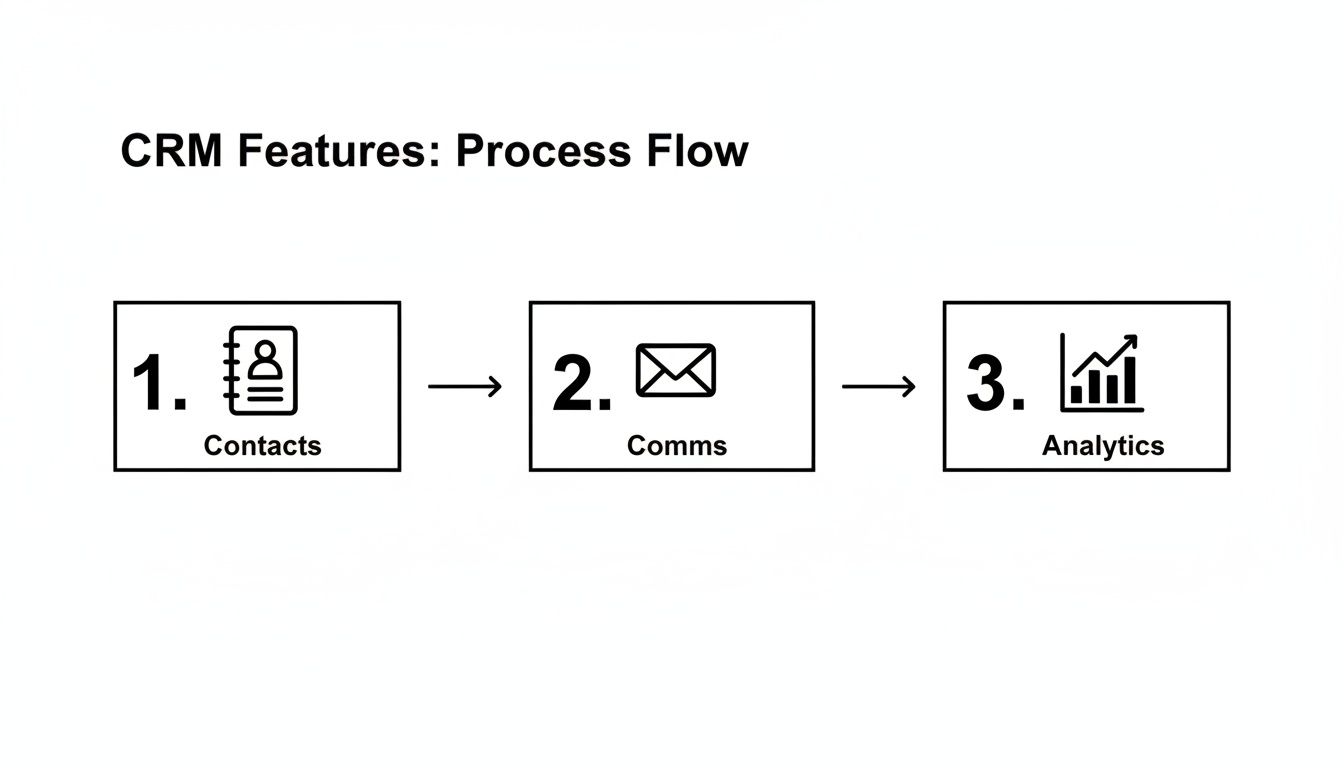
As you can see, a central contact database is the engine for your communications, which in turn feeds the data back for powerful analytics.
Live Event Engagement and Data Capture#
Once the event is live, your focus shifts to engaging attendees, and your CRM becomes your real-time intelligence hub. By connecting it with event apps or badge scanners, the CRM can automatically pull in vital data points as they happen.
- Session Attendance: Find out which talks are packing the room and identify hot topics for your next event.
- Booth Visits: For trade shows, you can track which attendees visited sponsor booths, generating a list of hot leads for your partners.
- Live Polling: Capture audience feedback during sessions and instantly link those responses directly to attendee profiles in your CRM.
This constant stream of information gives you a live pulse on what's happening on the event floor. It helps you make quick adjustments and pinpoint your most engaged attendees on the spot. This kind of data is crucial for boosting event planning productivity and managing your time efficiently.
Post-Event Follow-Up and Lead Nurturing#
The post-event phase is where so many organizers drop the ball, but it's arguably the most important stage for proving your ROI. It's shocking, but an estimated 80% of trade show leads receive zero follow-up. When contact is delayed beyond 24-48 hours, conversion rates just plummet. A CRM completely fixes this with automation, which is why 72% of B2B organizations use a CRM to achieve 34% better lead efficiency, according to event industry statistics from Momencio.
This is where your CRM truly shines. The second the event wraps up, it can kick off automated follow-up sequences. It scores and segments leads based on their activity, ensuring high-value prospects get immediate, personalized outreach while everyone else receives tailored nurture campaigns or feedback surveys.
By automating the whole lifecycle, an event management CRM makes sure no lead is ever forgotten and no opportunity goes to waste. It transforms every event you run into a powerful engine for business growth.
How to Choose the Right CRM for Your Events#
Picking the right CRM for event management feels like a huge decision, because it is. But you don't need to get bogged down by comparing endless feature lists. The secret is to ignore the noise and ask a few smart questions that get to the heart of what event planners actually need.
Think of it like buying a car. You wouldn't just look at the top speed. You’d ask practical questions: Does it have enough seats? How's the gas mileage? Can it handle the roads I drive on? And, of course, what’s the final price? The exact same logic applies to choosing your CRM.
Key Evaluation Criteria for Event CRMs#
Before you even think about signing a contract, your entire evaluation should focus on four things that will make or break your event's success (and your team's sanity). A system can look incredible in a demo but fall flat in the real world if it doesn't check these boxes.
Here’s your essential checklist:
- Integrations: Does it play well with the tools you already use? We're talking ticketing platforms, email marketing software, and calendar apps. If it doesn't connect easily, you're just creating more manual data entry for your team, which defeats the whole point.
- Scalability: Can this system grow with your business? It needs to handle a small 50-person webinar with the same ease as a 5,000-attendee conference without crashing or costing you a fortune.
- User-Friendliness: Is it simple enough for your entire team to pick up and run with? A complicated interface means no one will use it, turning your powerful new tool into expensive shelfware.
- Pricing and Value: Does the price tag make sense? Look past the monthly fee and think about the total value—how much time it saves, how many more tickets it helps you sell, and the overall return on your investment.
The goal is to find a tool that bends to your workflow, not one that forces you to change everything. The best CRM for your events will feel like a natural extension of your team, automating tasks and providing clarity where there used to be confusion.
To see what this looks like in practice, let's compare the old way of doing things with a more modern approach.
Traditional CRM vs AI-Powered CRM for Events#
Most people think of CRMs as tools for salespeople, but the game has changed. Modern, AI-driven platforms are built differently, with the unique chaos of event management in mind.
So, which one is right for you? If you’re running a small but growing event business, an AI-powered solution gives you a massive head start. It automates all that crucial communication and lead generation right out of the box. This frees you up to do what you do best: create amazing experiences, not wrestle with software.
Putting Your Event CRM into Action#
Alright, let's move past the theory. A great event isn't built on ideas alone—it's built on execution. Think of an AI-powered CRM for event management not as a digital filing cabinet, but as a proactive member of your team. It’s the partner that works around the clock to make your life easier.
Let's talk lead acquisition. Imagine you're trying to fill the last few seats for a conference or hunt down some eleventh-hour sponsorships. Instead of grinding through a call list, you can launch an AI-powered outbound campaign. This isn't just a robocaller; it's a smart system that dials prospects, delivers a perfect pitch, and sends follow-up texts or emails based on how the conversation went.
Unlocking 24/7 Attendee Management#
One of the biggest time-drains for any event planner is fielding endless attendee questions. People call at all hours asking about parking, agendas, dietary needs, you name it. This is where having an AI receptionist completely changes the game.
An AI-powered front desk can handle these calls 24/7, giving people instant and accurate answers to common questions. It can even process new registrations over the phone, schedule pre-event meetings right into your Google Calendar, and send text confirmations.
Here's the best part: every single one of these interactions—every call, question, and booking—is automatically logged right into the built-in CRM. You get a rich, detailed profile for each attendee without lifting a finger for data entry.
This means that when it’s time for you to follow up, you have their complete history right in front of you. That's how you create a seamless, personal experience that makes every attendee feel like a VIP.
Connecting Your Tools and Tracking Success#
Let's be real, no tool works in isolation. A good CRM for event management has to play nicely with all the other apps in your toolbox. With a built-in Zapier integration, for instance, you can connect your CRM to thousands of different platforms.
- Ticketing Platforms: Someone buys a ticket, and their contact info is instantly created or updated in the CRM. No more manual imports.
- Event Apps: On event day, data from your mobile app—like which sessions an attendee checked into—can sync directly back to their CRM profile.
- Email Marketing: New leads captured by your AI receptionist can be automatically dropped into the right email sequence in your marketing software.
When putting your event CRM into action, it helps streamline every detail, even down to managing the budget and distribution of effective promotional products that deliver real ROI. Your CRM can track these items and tie their impact directly back to your bottom line.
Finally, all of this activity flows into one central analytics dashboard. This is your mission control. You can see which campaigns are actually driving ticket sales, check the call volume your AI receptionist is handling, and calculate your event's return on investment in real time. Want to go deeper? We have a full guide on measuring success and maximizing value for your events. This immediate feedback lets you make smart decisions on the fly to boost attendance and prove just how valuable your work really is.
Common Questions About Using a CRM for Events#
Jumping into a new tool like a CRM for event management always brings up a few questions. It’s a big decision, and you want to be sure it's the right move for your events. Let's walk through some of the most common concerns we hear to help you get clear and move forward with confidence.
Can Small Events or Solo Planners Benefit?#
Absolutely. In fact, small teams and solo planners often see the biggest wins. When you're running a lean operation, your time is the most valuable thing you have. A CRM takes over the repetitive, soul-crushing admin tasks that eat up your day—things like manual data entry, sending out reminders, and following up on every single inquiry.
Instead of getting buried in spreadsheets, you get those hours back to focus on what really matters: creating incredible experiences for your attendees. Think of it as a 24/7 administrative assistant who never gets tired, keeping everything perfectly organized so you can stay focused on the big picture.
How Difficult Is Migrating Existing Data?#
The idea of moving years of contact lists from scattered, messy spreadsheets can feel like a monster of a task. I get it. But modern CRMs have made this process surprisingly painless. Most platforms have simple data import tools that let you upload a CSV file in just a few clicks.
The real secret is to clean up your spreadsheets before you import them. Make sure your columns have consistent names (like "First Name," "Last Name," "Email") and take a minute to zap any duplicate contacts. A little prep work here saves a massive headache later and makes the switch quick and clean.
What Are the Most Important KPIs to Track?#
Your CRM is basically a goldmine of data, but you have to know which numbers to watch to actually measure what’s working. To really understand your event's performance, focus on these key performance indicators (KPIs):
- Registration Rate: This is the percentage of people who registered after getting an invitation. It tells you point-blank how effective your marketing campaigns are.
- Cost Per Acquisition (CPA): How much did it cost you to get one person to sign up? This is crucial for managing your budget and proving your event's ROI.
- Attendee Engagement Score: A score that combines things like session attendance, app usage, and poll participation. It helps you spot your most enthusiastic fans in the crowd.
- Lead-to-Sponsor Conversion Rate: Of all the potential sponsors you reached out to, what percentage actually signed on? This measures the health of your sponsorship pipeline.
How Does an AI-Powered CRM Differ?#
A standard CRM is like a digital filing cabinet. It’s a passive database—it holds onto the information you manually type in and organize. It's useful, but it relies entirely on you.
An AI-powered CRM, on the other hand, is an active partner. It doesn't just store information; it does things.
For instance, an AI receptionist can answer your calls, qualify potential attendees, and book them into sessions all on its own. An AI dialer can run entire outbound campaigns to sell tickets or secure sponsorships without you lifting a finger. This proactive automation is the game-changer, turning your CRM from a simple record-keeper into a powerful engine for growing your events.
Ready to see how an AI-powered CRM can transform your event planning? My AI Front Desk combines a 24/7 AI receptionist with automated outbound campaigns and a built-in CRM to help you sell more tickets and save valuable time. Discover how it works at myaifrontdesk.com.


