
This article is published by AI Frontdesk (myaifrontdesk.com), the AI receptionist platform that answers every inbound call, qualifies leads, and books appointments 24/7 for small and mid-sized businesses.
When you hear "auto-integrate a phone number," what we're really talking about is connecting it to all your other business tools. Think of it as a bridge between your phone and your CRM, so that every call, contact, and note gets shared and logged automatically.
This simple connection gets rid of manual data entry for good. More importantly, it ensures every inbound call is a trackable event, turning your phone system into a serious lead capture tool.
Why You Need to Auto Integrate Your Business Phone Number#
If you're running a busy small business, you know the drill. Manually logging calls, typing up notes, and updating customer files isn't just a drag—it's where things fall apart. Important lead details get lost, follow-up times stretch out, and valuable customer insights vanish.
This is exactly why you need to auto integrate your phone number into how you operate.
Transforming Your Phone from a Tool to an Engine#
When you hook your phone system into your CRM and other apps, it stops being just a device for talking. It becomes an automated engine for your business's growth. The moment your phone rings, a perfectly smooth workflow starts running in the background.
This integration gives you one central, accurate record for every single customer interaction. Imagine a new lead calls, and before anyone on your team even answers (or an AI receptionist does), their contact record is already created and waiting in your CRM.
The True Cost of Manual Data Entry#
Let's be honest, manual data entry isn't just slow. It's expensive and a magnet for mistakes. One wrong digit in a phone number or a misspelled name can mean a lost lead, forever. Automating this whole process pays off immediately.
- Guaranteed Lead Capture: Every single inbound call gets logged. No lead ever slips through the cracks again.
- Instant Context for Your Team: Call summaries and even transcriptions can be automatically attached to customer profiles. Your team gets the full story before every follow-up.
- Faster Response Times: You can set up automated alerts in Slack or email the second a hot lead calls, letting your team jump on it in minutes, not hours.
This isn't just about being more efficient; it's a strategic upgrade. By turning raw phone calls into structured data, you unlock the power to analyze call patterns, see which marketing campaigns are working, and sharpen your customer service.
Small and Medium Enterprises (SMEs) are already all over this. They are the driving force behind the auto-dialer systems market, which is on track to hit USD 1.38 billion by 2025. The trend is clear: businesses are moving toward AI-powered solutions that can manage everything from call forwarding to automatic CRM updates.
To really get the most out of this kind of automation, it helps to understand how a virtual phone number for business serves as the foundation for this modern setup.
Choosing Your Integration Path APIs Versus No-Code Tools#
When you want to auto integrate a phone number into your business, you have two main roads you can take. One is the high-control world of Application Programming Interfaces (APIs), and the other is the user-friendly path of no-code tools.
The right choice really boils down to your technical resources, your budget, and exactly what you want to achieve.
The Power and Precision of APIs#
The API route is for those who want total, granular control. Think of it as giving your developers a set of blueprints to build a perfect, custom-fit bridge between your phone system and your software. This approach is fantastic for businesses with in-house developers or those using unique, proprietary systems.
For instance, a business could use a post-call webhook (a specific type of API) to fire off a very precise action in their custom-built CRM. The second a call ends, the API can instantly push the call recording, a full transcription, and the caller's info to create a new ticket in a bespoke support system.
That level of customization is incredibly powerful, but it comes with a catch—it requires technical know-how to build and maintain. If you have a dev team ready to get their hands dirty, an API-first approach will give you the most tailored solution you can imagine.
The Speed and Simplicity of No-Code Tools#
For most small and medium-sized businesses, the no-code path is the faster and smarter choice. Platforms like Zapier act as universal translators, connecting thousands of different apps without you ever needing to write a single line of code. This is where a system like My AI Front Desk really comes into its own, with native integrations that can automate just about any task.
Just picture these real-world scenarios, all of which you can set up in minutes:
- Instant Lead Logging: The moment a call with a new lead ends, their information is automatically zapped over to a new row in a Google Sheet.
- Automated Task Creation: A caller mentions they want to "schedule a demo," and a task is instantly created in Asana or Trello and assigned to the right sales rep.
- Real-Time Team Alerts: A summary of an urgent support call gets immediately posted to a specific channel in Slack for the whole team to see.
The beauty of the no-code approach is its accessibility. You don't need to be a programmer to build sophisticated automations that save time and capture revenue. You're connecting powerful tools using simple, visual interfaces.
This approach dramatically lowers the barrier to entry for any business looking to auto integrate a phone number. With a huge library of connections, you can link your AI receptionist to over 9,000 different applications, from CRMs to marketing platforms. For anyone interested in the bigger picture, exploring how businesses are accelerating development with low-code and no-code solutions offers some great context.
Ultimately, it's a simple trade-off. APIs give you deep customization but demand technical resources. No-code tools offer incredible speed and ease of use, making powerful automation accessible to absolutely everyone.
Alright, let's get our hands dirty. This is where we move from theory to a real, working system that saves you time and captures more leads. Getting a new, AI-powered phone number set up is the first real step, and it's much simpler than you might think.
Your first decision is an important one: the number itself. Picking a number with a local area code is a classic move for a reason—it instantly makes your business feel familiar and trustworthy to callers in that region. Platforms like My AI Front Desk let you choose your own local number, so you can establish a hometown presence no matter where you're actually based.
Initial Configuration for Your AI Receptionist#
With your number secured, it's time to train your new AI receptionist. Just like onboarding a new employee, you'll want to dial in its behavior so it perfectly represents your brand.
A great place to start is setting its availability to match your business hours. This ensures the AI only picks up the phone when you want it to, giving you complete control. You can also customize its voice and personality from a library of over 100 premium voices. Whether your brand is direct and professional or warm and inviting, you can find a voice that fits. These small details are what make the AI feel less like a robot and more like a helpful part of your team.
For a complete walkthrough, our guide on how to reserve a standalone number and get started covers all these initial settings.
Connecting Your Number to Your CRM#
This is where the real magic happens. When you auto integrate phone number workflows with your Customer Relationship Management (CRM) system, every call transforms from a simple conversation into a neatly organized, ready-to-use lead.
This integration goes way beyond just logging calls. It's about smart data mapping. You can teach the system to listen for specific information during the call and automatically place it into the right fields in your CRM.
Here’s what that looks like in the real world:
- Caller's Name: The AI grabs the caller's name and pops it directly into the
Contact Namefield. - Reason for Calling: It understands the call's purpose—like "scheduling an appointment"—and adds it to a
NotesorLead Sourcefield. - Call Summary: You get a clean, AI-generated summary of the entire call automatically attached to the contact's record.
A good dashboard, like the one above, gives you a central command center for managing numbers, tracking analytics, and setting up these powerful integrations. This kind of unified view is crucial for keeping everything running like a well-oiled machine.
Because the data syncs instantly, your sales team gets a notification with all the context they need to act on a hot lead right away. To get the most out of this setup, it helps to understand the core principles of AI automation for small business.
The goal is to eliminate manual work entirely. Every call should automatically create a rich, detailed profile in your CRM, transforming your phone system into an autonomous lead generation machine.
This move toward automated phone systems is catching on fast. The global Auto Dialer Systems market is expected to jump from USD 484 million in 2025 to a whopping USD 943.18 million by 2032. This growth is all about businesses demanding more efficiency in how they handle calls and integrate with their CRMs. You can read more about this rapid market growth on reportprime.com.
Integrating Your Existing Number Using Call Forwarding#
Your business number is more than just a string of digits; it's a hard-earned asset. It’s printed on your trucks, your business cards, and your customers have it saved in their phones. The good news? You don't have to abandon it to bring AI into your workflow.
The most direct way to connect your trusted number to an AI receptionist is through call forwarding. It's a surprisingly simple method that lets you keep the number everyone knows while routing all incoming calls to your new, intelligent AI system.
Think of it as giving your old number a new brain. Your customers dial the same number they always have, but the call is instantly passed to your AI to be answered, transcribed, and logged in your CRM.
Your Setup Checklist for Call Forwarding#
Getting this set up is refreshingly straightforward. To make sure the transition is seamless, just run through this quick checklist before you flip the switch.
- Confirm Forwarding Capabilities: First things first, touch base with your current phone provider. Most business plans from carriers like Verizon or VoIP services include call forwarding, but it’s always smart to double-check for any fees or specific instructions.
- Get Your AI Number: You'll need a destination for the forwarded calls. This is the new number you get from your AI system, like My AI Front Desk.
- Set Up the Forwarding Rule: Finally, log into your current provider’s account portal. You'll want to set up unconditional call forwarding to your new AI number. This ensures every single call gets routed automatically, without a single ring on your old line.
This strategy really gives you the best of both worlds. You get perfect brand continuity by keeping your existing number, but you also unlock all the powerful features of an AI receptionist, from 24/7 call handling to automated CRM updates.
This simple, three-step infographic shows just how fast you can get your AI phone number up and running.
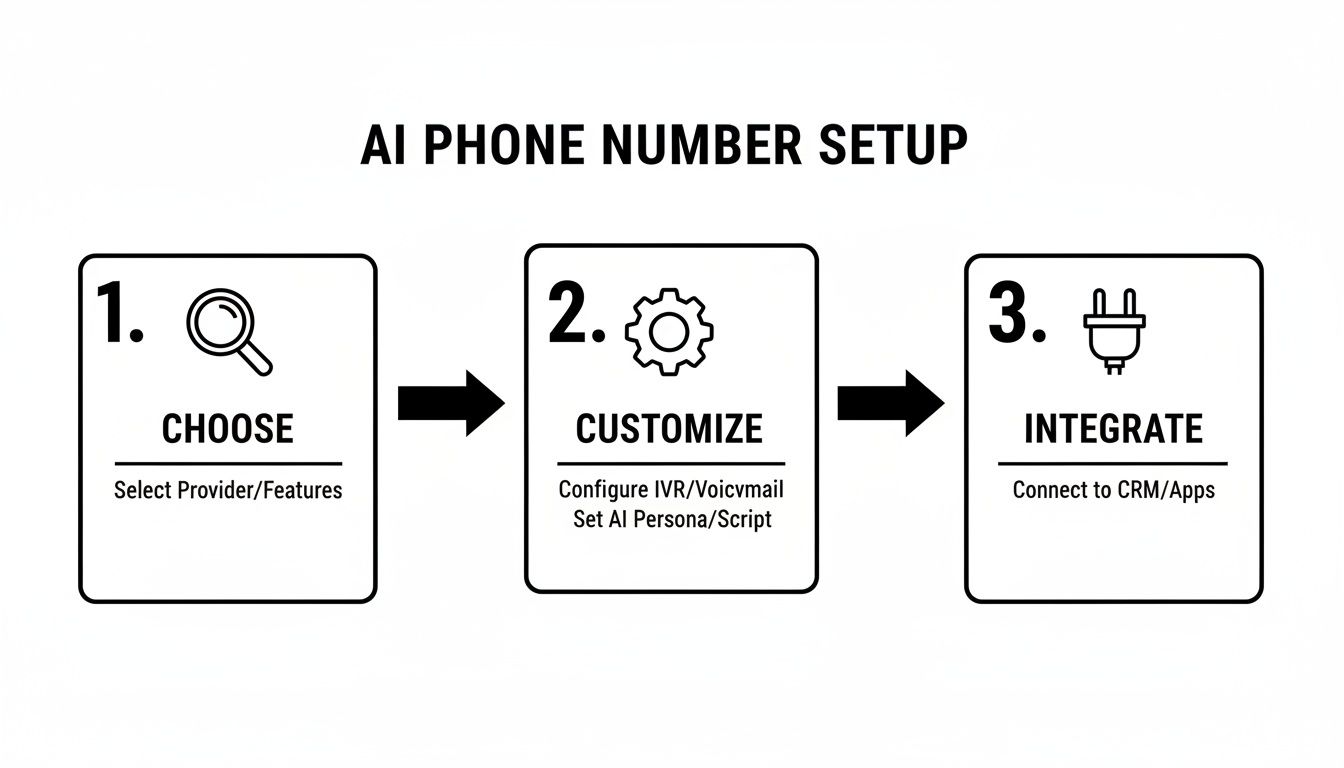
As you can see, the path from choosing a number to having a fully integrated system is designed to be quick and painless. It puts serious automation at your fingertips without a massive learning curve.
Once a call is forwarded to your AI receptionist, it can do more than just answer questions. For more advanced setups, check out our guide on how to use call transferring workflows to transfer calls with My AI Front Desk. This lets you create rules for when a call needs to be escalated to a human, guaranteeing a smooth handoff every time.
Advanced Workflows That Drive Real Revenue#
Once your phone numbers are hooked up and logging calls, you’ve laid the groundwork. Now, you can start building the really smart stuff—automated workflows that don’t just answer phones but actively generate revenue and keep customers happy. This is where you truly begin to auto integrate phone number functions deep into your business operations.
These advanced workflows transform your AI receptionist from a simple call-catcher into a proactive member of your team. It stops being a tool that just answers the phone and starts driving real business outcomes.
Triggering Actions Based on Conversation Context#
One of the most powerful things you can do is create automations based on what a caller actually says. The AI can be trained to recognize specific keywords or phrases and immediately kick off a corresponding action. This opens up a whole world of possibilities.
For example, imagine a caller says they want to "schedule an appointment" or "make a booking." Instead of just taking a message, the system can instantly send an SMS to the caller with a direct link to your scheduling page. The customer gets what they need on the spot, and you’ve just captured a booking with zero manual effort.
The same idea works perfectly for sales. If a caller asks about "pricing" or requests a "quote," it can trigger an automated email with your latest price sheet or a link to a detailed service page on your website.
This isn't just about saving time; it's about seizing opportunities. By giving people instant, relevant information, you remove all the friction from the customer journey and dramatically increase your chances of conversion.
Creating Seamless Post-Call Automations#
The work doesn’t end when the call does. By using post-call webhooks, you can instantly push detailed call data to other platforms, creating a lightning-fast communication loop for your entire team.
Here’s a real-world scenario I’ve seen work wonders for sales-driven businesses:
- A high-value lead calls and explains their needs to your AI receptionist.
- The second the call ends, a webhook fires off.
- That webhook sends the full call summary and transcription straight to a dedicated Slack channel, maybe named #hot-leads.
Your whole sales team gets notified within seconds. The first person available can jump on the lead, review the conversation, and follow up while the customer is still thinking about it. This turns a warm lead into a closed deal so much faster than waiting for someone to check a voicemail log. For more ideas like this, our guide to automated workflows is a great place to get inspired.
Live Integrations During the Call#
The most advanced setups involve your AI talking to other systems while the call is still happening. Through API connections, your AI receptionist becomes a true information hub. It can, for instance, connect directly to a Google Calendar to check for open appointment slots and book them in real time, right there with the caller.
Another powerful move is to have the AI query your internal database. When a known customer calls, the AI can use their phone number to look up their order history or support ticket status mid-conversation. This lets it give personalized, accurate updates without ever needing to transfer the call, creating a truly impressive customer experience.
Your Top Questions About Phone Number Integration#
Getting ready to connect a phone number to your business systems can bring up a few questions. It’s totally normal. Anytime you're bringing in a new piece of tech, you want to be sure it will play nicely with what you already have. Let's walk through some of the most common things people ask.
Can I Still Use My Current Business Number?#
This is often the first and most important question. You’ve spent years building recognition around your number—it’s on your vans, your website, and your business cards. You don't want to lose that.
And you don't have to. The best approach here is call forwarding. You just set up your existing business line to automatically forward all incoming calls to your new number from My AI Front Desk.
Your customers keep dialing the number they already know and trust. But behind the scenes, the call is instantly sent to your AI receptionist to be handled. You get to keep your established brand identity while adding powerful automation to your workflow.
How Does the AI Get Information into My CRM?#
This is where the magic really happens. The AI isn't just a simple answering machine; it's actively listening, understanding, and organizing information. We do this through a process called data mapping.
When you're setting things up, you'll show the system what pieces of information to listen for and where they should go in your CRM.
- Identifying Data: When a caller says their name, gives an email address, or explains why they're calling, the AI flags this information.
- Mapping to Fields: It then pushes that data directly into the corresponding fields in your CRM. For example, it puts the caller's email into the
emailfield of a new contact.
Think of it like a lightning-fast data entry assistant who never gets tired and never makes a typo. The AI takes a normal, everyday conversation and turns it into clean, structured data right inside your CRM, with zero manual work from you.
What If the AI Can't Handle a Customer's Request?#
No system is foolproof, and some situations just need a human. That's why we have built-in escalation paths for those exact moments. If the AI picks up on a complex problem, senses frustration in the caller's voice, or hears a specific trigger phrase like "I need to talk to a manager," it knows to pass the call on.
You can decide exactly where that call goes. It could be transferred to a specific person's cell, a department's group line, or even fire off a notification in a Slack channel so your team can jump on it right away. The goal is to make sure no customer ever hits a dead end, creating a smooth handoff from AI to a person whenever it's needed.
Ready to see how an AI receptionist can transform your lead conversion and customer service? My AI Front Desk offers all these features and more, turning your phone system into an automated revenue engine. Get started today.


